
RAI Loader 3DS: Difference between revisions
More actions
Created page with "{{Infobox 3DS Homebrews |title=RAI Loader |image=RAILoader3DS.png |description=The first AI Roleplay App for 3DS. |author=Extintor Incendiandose |lastupdated=2025/01/18 |type=Other Apps |version=2025 |license=Mixed |download=https://dlhb.gamebrew.org/3dshomebrews/RAILoader3DS.7z |website=https://jalm24.itch.io/rai-loader |source= |donation= }} {{#seo: |title= (Other Apps) - GameBrew |title_mode=append |image=RAILoader3DS.png |image_alt=RAI Loader }} RAI Loader is an expe..." |
No edit summary |
||
| Line 8: | Line 8: | ||
|version=2025 | |version=2025 | ||
|license=Mixed | |license=Mixed | ||
| | |downloadraw=[https://jalm24.itch.io/rai-loader Download on itch.io] | ||
|website=https://jalm24.itch.io/rai-loader | |website=https://jalm24.itch.io/rai-loader | ||
|source= | |source= | ||
| Line 18: | Line 18: | ||
|image=RAILoader3DS.png | |image=RAILoader3DS.png | ||
|image_alt=RAI Loader | |image_alt=RAI Loader | ||
}} | }}<!--https://dlhb.gamebrew.org/3dshomebrews/RAILoader3DS.7z--> | ||
RAI Loader is an experimental AI roleplay chat app developed for the Nintendo 3DS. It | RAI Loader is an experimental AI roleplay chat app developed for the Nintendo 3DS. It doesn't really outdo any similar Android apps and is more of a fun project built with C++ using devkitPro libraries and a special rest api. | ||
Unlike many AI chat apps, RAI Loader doesn't rely on big servers. It just communicates with an external rest api, and everything else happens locally on your console using specific JSON files. | |||
Unlike many AI chat apps, RAI Loader | |||
Each character file requires a .t3x file containing a 128x128 pixel sprite, said file represents the icon or profile picture of the chat you want to talk to. | |||
Chats are not saved 100% so every time you change chat or json file the AI will forget any conversation, resetting the memory at that moment. | |||
The app includes a single default personality in case you don't load any JSON file, a friendly robot that answers your questions and likes to talk to you. Currently two character packs are included (one in English and one in Spanish) containing 6 well-known characters: | |||
* Tony Stark (Iron Man) | |||
* Lucy (Cyberpunk Edgerunners) | |||
* Shanks (One Piece) | |||
* Megumin (Konosuba) | |||
* Sukuna (Jujutsu Kaisen) | |||
* Rias Gremory (High School DxD) | |||
'''Note:''' Internet access is required. | |||
== | ==Installation== | ||
Copy the folder ChaiCharaFolder to the 3ds folder on your SD card. | |||
JSON and .t3x files for the characters you want to use go insideChaiCharaFolder. | |||
==How to | ==User guide== | ||
How to load a character: | |||
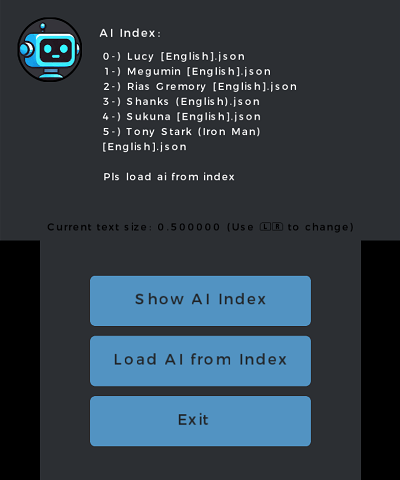
* Tap "Show Ai Index" to see a list of available characters in ChaiCharaFolder. | |||
* Then press "Load Ai from Index" and enter the index number for the character you want. | |||
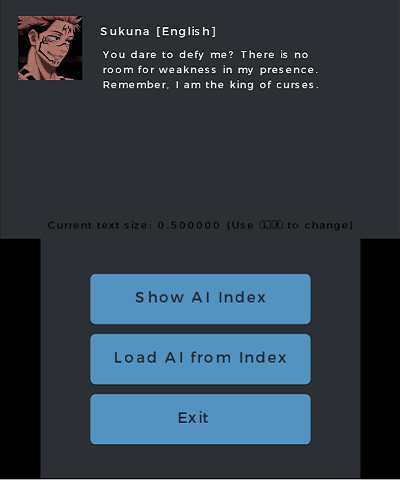
Once you have loaded the character you want to chat with you just have to press the A button and the text input will be displayed using the virtual keyboard of the Nintendo 3DS. | |||
==Screenshots== | ==Screenshots== | ||
https://dlhb.gamebrew.org/3dshomebrews/images/RAILoader3DS-01.png | https://dlhb.gamebrew.org/3dshomebrews/images/RAILoader3DS-01.png | ||
https://dlhb.gamebrew.org/3dshomebrews/images/RAILoader3DS-02.png | https://dlhb.gamebrew.org/3dshomebrews/images/RAILoader3DS-02.png | ||
==Changelog== | ==Changelog== | ||
| Line 68: | Line 58: | ||
== External links == | == External links == | ||
* | * itch.io - https://jalm24.itch.io/rai-loader | ||
Revision as of 07:14, 2 February 2025
| RAI Loader | |
|---|---|
 | |
| General | |
| Author | Extintor Incendiandose |
| Type | Other Apps |
| Version | 2025 |
| License | Mixed |
| Last Updated | 2025/01/18 |
| Links | |
| Download on itch.io | |
| Website | |
RAI Loader is an experimental AI roleplay chat app developed for the Nintendo 3DS. It doesn't really outdo any similar Android apps and is more of a fun project built with C++ using devkitPro libraries and a special rest api.
Unlike many AI chat apps, RAI Loader doesn't rely on big servers. It just communicates with an external rest api, and everything else happens locally on your console using specific JSON files.
Each character file requires a .t3x file containing a 128x128 pixel sprite, said file represents the icon or profile picture of the chat you want to talk to.
Chats are not saved 100% so every time you change chat or json file the AI will forget any conversation, resetting the memory at that moment.
The app includes a single default personality in case you don't load any JSON file, a friendly robot that answers your questions and likes to talk to you. Currently two character packs are included (one in English and one in Spanish) containing 6 well-known characters:
* Tony Stark (Iron Man)
*  Lucy (Cyberpunk Edgerunners)
*  Shanks (One Piece)
*  Megumin (Konosuba)
*  Sukuna (Jujutsu Kaisen)
*  Rias Gremory (High School DxD)
Note: Internet access is required.
Installation
Copy the folder ChaiCharaFolder to the 3ds folder on your SD card.
JSON and .t3x files for the characters you want to use go insideChaiCharaFolder.
User guide
How to load a character:
- Tap "Show Ai Index" to see a list of available characters in ChaiCharaFolder.
- Then press "Load Ai from Index" and enter the index number for the character you want.
Once you have loaded the character you want to chat with you just have to press the A button and the text input will be displayed using the virtual keyboard of the Nintendo 3DS.
Screenshots
Changelog
v2025
- First Release.
External links
- itch.io - https://jalm24.itch.io/rai-loader