
VWii NAND Restorer Wii U: Difference between revisions
More actions
No edit summary |
No edit summary |
||
| Line 29: | Line 29: | ||
Run CFW (mocha or haxchi). | Run CFW (mocha or haxchi). | ||
Recommended: Perform a slccmpt + otp backup with [[Wii U NAND | Recommended: Perform a slccmpt + otp backup with [[Wii U NAND Dumper]] before using this tool. Ensure keys.bin/otp.bin are from the console where the NAND Backup is from; otherwise, decryption will fail. | ||
== User guide == | == User guide == | ||
Revision as of 09:01, 20 May 2024
| vWii NAND Restorer | |
|---|---|
 | |
| General | |
| Author | GaryOderNichts |
| Type | System Tools |
| Version | 2.0 |
| License | GPL-3.0 |
| Last Updated | 2020/03/29 |
| Links | |
| Download | |
| Website | |
| Source | |
| Support Author | |
Restore your vWii NAND backups from your Wii U.
Note: It is recommended using vWii Decaffeinator to restore (partially) bricked vWii's instead.
Installation
Disclaimer: The author is not responsible for any damage while using this tool or any additional bricks done to your device.
Copy your NAND backup to sd:/vwiinandrestorer/slccmpt.bin and place keys.bin/otp.bin in the same folder.
Copy the .elf to sd:/wiiu/apps.
Run CFW (mocha or haxchi).
Recommended: Perform a slccmpt + otp backup with Wii U NAND Dumper before using this tool. Ensure keys.bin/otp.bin are from the console where the NAND Backup is from; otherwise, decryption will fail.
User guide
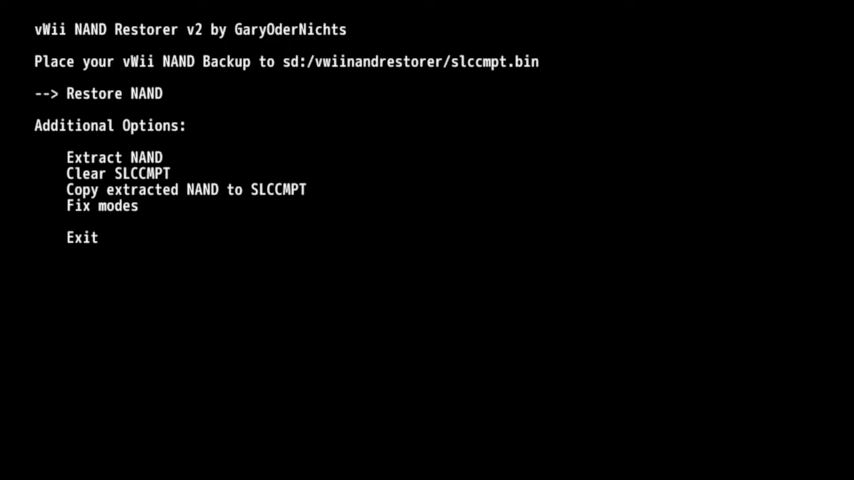
Menu Option
Restore NAND - Clears SLCCMPT, extracts the NAND backup to SLCCMPT, and fixes permissions.
Additional Options
Extract NAND - Extracts your NAND to sd:/vwiinandrestorer/extracted.
Clear SLCCMPT - Clears your SLCCMPT.
Copy Extracted NAND to SLCCMPT - Copies everything from sd:/vwiinandrestorer/extracted to your SLCCMPT. Useful for restoring an already extracted NAND Backup.
Fix Modes - Fixes the modes of your SLCCMPT. Needed after copying files to the SLCCMPT.
Screenshots
Changelog
v2
- Add support for 'Dump Mii Nand' Nand Dumps.
- Fix issue that may have resulted in incorrect file sizes for a few files.
v1
- Initial release.