
PSX-FPKG PS4: Difference between revisions
From GameBrew
More actions
No edit summary |
No edit summary |
||
| Line 8: | Line 8: | ||
|version=0.3 | |version=0.3 | ||
|license=Mixed | |license=Mixed | ||
|download=https://dlhb.gamebrew.org/ps4homebrews/ | |download=https://dlhb.gamebrew.org/ps4homebrews/PSX_FPKG_v0.3.7z | ||
|website=https://www.psx-place.com/resources/psx-fpkg.1287/ | |website=https://www.psx-place.com/resources/psx-fpkg.1287/ | ||
|source= | |source= | ||
| Line 19: | Line 19: | ||
|image_alt=PSX-FPKG | |image_alt=PSX-FPKG | ||
}} | }} | ||
PSX-FPKG is a ROM injection tool that can convert PS1 .bin's into PS4 fpkgs. | |||
PSX-FPKG is a tool | |||
It uses the new PS-Plus PS1 emulator, which has better game compatibility and more features like save-states and a gameplay rewind feature. | |||
== | Games using libccrypt should work too, if a game uses it a message will be displayed when converting the game. | ||
==Compatibility== | |||
Should work on FW 5.05 and up (only tested on 9.00). | |||
==User guide== | |||
===How to use=== | |||
* Select a PS1 disc image cue sheet (a .cue file). | |||
* Customize the settings (title, icon, splash, config, etc). | |||
* Press "Create fPKG". | |||
===Notes=== | |||
* Press the Options button in-game to display a menu, from there you can use savestates, change the display options or rewind your gameplay | * Press the Options button in-game to display a menu, from there you can use savestates, change the display options or rewind your gameplay | ||
* Games that use multiple .bin files are supported | * Games that use multiple .bin files are supported. | ||
* Games using CDDA music should work too | * Games using CDDA music should work too. | ||
* Libcrypt support has been added too, tested on the PAL version of Soul Raver | * Libcrypt support has been added too, tested on the PAL version of Soul Raver. | ||
* "Emulate Analog Stick" will map the dpad to the analog stick for games that support only the Digital Controller, don't check this option if the game supports Dualshock controllers. | * "Emulate Analog Stick" will map the dpad to the analog stick for games that support only the Digital Controller, don't check this option if the game supports Dualshock controllers. | ||
* Force 60hz will force games(mainly from the PAL region) to run in 60hz instead of 50hz | * Force 60hz will force games(mainly from the PAL region) to run in 60hz instead of 50hz. | ||
* When testing various pkgs of the same game with different txt configs make sure to delete the Application Data from the games Save File, if you don't do this the new config settings won't work because they're stored on first boot in the Application Data. | * When testing various pkgs of the same game with different txt configs make sure to delete the Application Data from the games Save File, if you don't do this the new config settings won't work because they're stored on first boot in the Application Data. | ||
* eg: You install a fpkg of EarthWorm Jim 2(or any other game) without any addional settings enabled, and then install the same game with "Skip Bootlogo" option enabled, the config changes won't take effect until you delete the Aplication Data from the Save File, because the old txt config is still in the games save data. | * eg: You install a fpkg of EarthWorm Jim 2(or any other game) without any addional settings enabled, and then install the same game with "Skip Bootlogo" option enabled, the config changes won't take effect until you delete the Aplication Data from the Save File, because the old txt config is still in the games save data. | ||
* If you want to edit the emu/game files before creating a pkg, check the "Pause before creating pkg" checkbox, a popup with the projects directory will pop-up, do your changes, and then click the OK button in the popup to resume the pkg creation process. | * If you want to edit the emu/game files before creating a pkg, check the "Pause before creating pkg" checkbox, a popup with the projects directory will pop-up, do your changes, and then click the OK button in the popup to resume the pkg creation process. | ||
==Screenshots== | |||
https://dlhb.gamebrew.org/ps4homebrews/images/psxfpkgps42.png | |||
https://dlhb.gamebrew.org/ps4homebrews/images/psxfpkgps43.png | |||
==Media== | ==Media== | ||
'''How to Play PS1 Games on a Jailbroken PS4 with PSX-FPKG''' ([https://www.youtube.com/watch?v=K1IRJUcBLGg MrMario2011]) <br> | '''How to Play PS1 Games on a Jailbroken PS4 with PSX-FPKG''' ([https://www.youtube.com/watch?v=K1IRJUcBLGg MrMario2011]) <br> | ||
<youtube width="640">K1IRJUcBLGg</youtube> | <youtube width="640">K1IRJUcBLGg</youtube> | ||
==Changelog== | ==Changelog== | ||
'''v0.3''' | '''v0.3''' | ||
* | *Now using the new psplus ps1 emulator. | ||
* | *Everything was rewritten from scratch. | ||
* | *Notable new features: | ||
* | *Added auto game id detection. | ||
* | *Added auto libcrypt detection and support. | ||
* | *Added .toc generation, so games that use cdda have now working music. | ||
* | *Added "Simulate Analog Sticks" checkbox, that adds support for analog stick to older games that didn't support them. | ||
* | *Added a "Skip Bootlogo" option that skips the Sony/Playstation logos. | ||
* | *Added a "Force 60hz" option. | ||
* | *The app will now automatically merge game images with multiple bin files. | ||
* | *Other stuff I forgot about. | ||
'''v0.2''' | '''v0.2''' | ||
* | *Added 5.05 support. | ||
* | *Fixed a typo. | ||
'''v0.1''' | '''v0.1''' | ||
* | *Initial release. | ||
== | ==Credits== | ||
* Super Thanks to CyB1K for the emulator release and backport | * Super Thanks to CyB1K for the emulator release and backport. | ||
* Thanks to goatman13 and Arczi for support. | * Thanks to goatman13 and Arczi for support. | ||
== External links == | == External links == | ||
* PSX-Place - https://www.psx-place.com/resources/psx-fpkg.1287/ | * PSX-Place - https://www.psx-place.com/resources/psx-fpkg.1287/ | ||
Revision as of 00:46, 12 May 2025
| PSX-FPKG | |
|---|---|
 | |
| General | |
| Author | Jabu |
| Type | Console |
| Version | 0.3 |
| License | Mixed |
| Last Updated | 2022/08/08 |
| Links | |
| Download | |
| Website | |
PSX-FPKG is a ROM injection tool that can convert PS1 .bin's into PS4 fpkgs.
It uses the new PS-Plus PS1 emulator, which has better game compatibility and more features like save-states and a gameplay rewind feature.
Games using libccrypt should work too, if a game uses it a message will be displayed when converting the game.
Compatibility
Should work on FW 5.05 and up (only tested on 9.00).
User guide
How to use
- Select a PS1 disc image cue sheet (a .cue file).
- Customize the settings (title, icon, splash, config, etc).
- Press "Create fPKG".
Notes
- Press the Options button in-game to display a menu, from there you can use savestates, change the display options or rewind your gameplay
- Games that use multiple .bin files are supported.
- Games using CDDA music should work too.
- Libcrypt support has been added too, tested on the PAL version of Soul Raver.
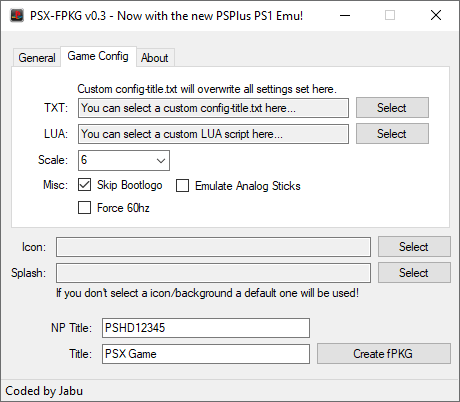
- "Emulate Analog Stick" will map the dpad to the analog stick for games that support only the Digital Controller, don't check this option if the game supports Dualshock controllers.
- Force 60hz will force games(mainly from the PAL region) to run in 60hz instead of 50hz.
- When testing various pkgs of the same game with different txt configs make sure to delete the Application Data from the games Save File, if you don't do this the new config settings won't work because they're stored on first boot in the Application Data.
- eg: You install a fpkg of EarthWorm Jim 2(or any other game) without any addional settings enabled, and then install the same game with "Skip Bootlogo" option enabled, the config changes won't take effect until you delete the Aplication Data from the Save File, because the old txt config is still in the games save data.
- If you want to edit the emu/game files before creating a pkg, check the "Pause before creating pkg" checkbox, a popup with the projects directory will pop-up, do your changes, and then click the OK button in the popup to resume the pkg creation process.
Screenshots
Media
How to Play PS1 Games on a Jailbroken PS4 with PSX-FPKG (MrMario2011)
Changelog
v0.3
- Now using the new psplus ps1 emulator.
- Everything was rewritten from scratch.
- Notable new features:
- Added auto game id detection.
- Added auto libcrypt detection and support.
- Added .toc generation, so games that use cdda have now working music.
- Added "Simulate Analog Sticks" checkbox, that adds support for analog stick to older games that didn't support them.
- Added a "Skip Bootlogo" option that skips the Sony/Playstation logos.
- Added a "Force 60hz" option.
- The app will now automatically merge game images with multiple bin files.
- Other stuff I forgot about.
v0.2
- Added 5.05 support.
- Fixed a typo.
v0.1
- Initial release.
Credits
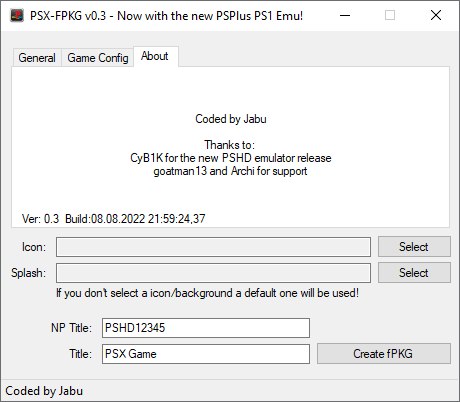
- Super Thanks to CyB1K for the emulator release and backport.
- Thanks to goatman13 and Arczi for support.