
PS4 Remote Gallery: Difference between revisions
From GameBrew
More actions
No edit summary |
No edit summary |
||
| Line 19: | Line 19: | ||
|image_alt=PS4 Remote Gallery | |image_alt=PS4 Remote Gallery | ||
}} | }} | ||
A software that lets you remotely view your PS4 capture gallery on the PC. | |||
== | ==User guide== | ||
"Jailbroken" PS4 with an FTP server. | |||
Enter PS4 IP and FTP port and click connect. | |||
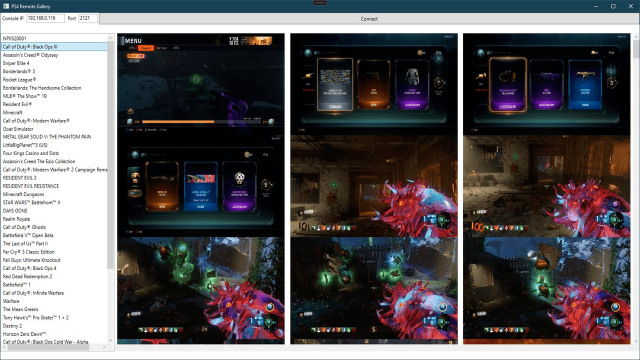
Your capture gallery games should populate in the list view on the left side (most games should have their proper name, but it will fallback to title id if not found). | |||
Select a game to view your gallery. | |||
==Screenshots== | |||
[[image:ps4remotegallery.png|640px|link=]] | |||
==Media== | ==Media== | ||
'''PS4 Remote Gallery - New Homebrew App''' ([https://www.youtube.com/watch?v=Z6ZUKe_kjQQ VicianaLab]) <br> | '''PS4 Remote Gallery - New Homebrew App''' ([https://www.youtube.com/watch?v=Z6ZUKe_kjQQ VicianaLab]) <br> | ||
<youtube width="640">Z6ZUKe_kjQQ</youtube> | <youtube width="640">Z6ZUKe_kjQQ</youtube> | ||
==Changelog== | ==Changelog== | ||
| Line 46: | Line 42: | ||
== External links == | == External links == | ||
* GitHub - https://github.com/Tustin/RemoteGallery | |||
* PSXhax - https://www.psxhax.com/threads/ps4-remote-gallery-remotely-view-your-ps4-capture-gallery-by-tustin.10520/ | * PSXhax - https://www.psxhax.com/threads/ps4-remote-gallery-remotely-view-your-ps4-capture-gallery-by-tustin.10520/ | ||
Revision as of 05:52, 22 May 2025
| PS4 Remote Gallery | |
|---|---|
 | |
| General | |
| Author | Tustin |
| Type | Other Apps |
| Version | 2021 |
| License | Mixed |
| Last Updated | 2021/12/15 |
| Links | |
| Download | |
| Website | |
| Source | |
A software that lets you remotely view your PS4 capture gallery on the PC.
User guide
"Jailbroken" PS4 with an FTP server.
Enter PS4 IP and FTP port and click connect.
Your capture gallery games should populate in the list view on the left side (most games should have their proper name, but it will fallback to title id if not found).
Select a game to view your gallery.
Screenshots
Media
PS4 Remote Gallery - New Homebrew App (VicianaLab)
Changelog
v2021
- First Release.