
Payload-Launcher-Apple Switch: Difference between revisions
From GameBrew
More actions
name? |
No edit summary |
||
| Line 6: | Line 6: | ||
|lastupdated=2019/06/03 | |lastupdated=2019/06/03 | ||
|type=Utilities | |type=Utilities | ||
|version=3 | |version=3.0 | ||
|license=GPL-2.0 | |license=GPL-2.0 | ||
|download=https://dlhb.gamebrew.org/switchhomebrews/payloadlauncherapplenx.7z | |download=https://dlhb.gamebrew.org/switchhomebrews/payloadlauncherapplenx.7z | ||
Revision as of 11:43, 28 April 2023
| Payload-Launcher-Apple | |
|---|---|
 | |
| General | |
| Author | oraj (Olav-André Johansen) |
| Type | Utilities |
| Version | 3.0 |
| License | GPL-2.0 |
| Last Updated | 2019/06/03 |
| Links | |
| Download | |
| Website | |
| Source | |
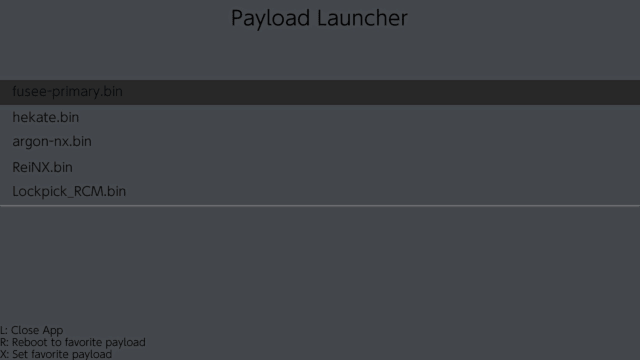
Allows users to reboot into payloads from SD.
Installation
Place the .nro to sdmc:/switch/PayloadLauncher/payload_launcher.nro.
To make payloads show up in the app, just add your payloads to sdmc:/payloads/ and the app should find them all.
Screenshots
Changelog
v3.0 2019/06/03
- You can now press X when hovering over a payload to set it as your favorite payload. And from then on you can press the R button to instantly reboot to your favorite payload.
v2.0 2019/05/27
- This release removed hard-coded paths, you can now slam any payload into "sdmc:/payloads/" and the app should find them all.
v1.0 2019/05/26
- First release.
Credits
Credits