XCI Explorer Mod Switch: Difference between revisions
From GameBrew
More actions
Created page with "{{Infobox Switch Homebrews |title=XCI-Explorer (Mod) |image=xciexplorermodswitch.png |description=XCI-Explorer (Mod). |author=mrdude2478 |lastupdated=2020/07/11 |type=PC Utilities |version=1.50d |license=Mixed |download=https://dlhb.gamebrew.org/switchhomebrews/xciexplorermodswitch.7z |website=https://gbatemp.net/threads/xci-explorer-1-50mod.566877/ |source=https://github.com/mrdude2478/XCI-Explorer |donation= }} {{#seo: |title=Switch Homebrew PC Tools (PC Utilities) - G..." |
No edit summary |
||
| Line 1: | Line 1: | ||
{{Infobox Switch Homebrews | {{Infobox Switch Homebrews | ||
|title=XCI | |title=XCI Explorer Mod | ||
|image= | |image=xciexplorermodnx.png | ||
|description=XCI-Explorer | |description=XCI-Explorer Mod. View contents of XCI files and more. | ||
|author=mrdude2478 | |author=mrdude2478 | ||
|lastupdated=2020/07/11 | |lastupdated=2020/07/11 | ||
| Line 8: | Line 8: | ||
|version=1.50d | |version=1.50d | ||
|license=Mixed | |license=Mixed | ||
|download=https://dlhb.gamebrew.org/switchhomebrews/ | |download=https://dlhb.gamebrew.org/switchhomebrews/xciexplorermodnx.7z | ||
|website=https://gbatemp.net/threads/xci-explorer-1-50mod.566877/ | |website=https://gbatemp.net/threads/xci-explorer-1-50mod.566877/ | ||
|source=https://github.com/mrdude2478/XCI-Explorer | |source=https://github.com/mrdude2478/XCI-Explorer | ||
|donation= | |donation= | ||
}} | }} | ||
A mod for [[XCI Explorer Switch|XCI Explorer]], a tool allows you to modify, dump, explore XCI files which are clones of Switch game cartridges. | |||
| | |||
'''Note:''' No longer maintained, use at your own risk. Also note that this app may be flagged by some antivirus programs (see [https://gbatemp.net/threads/xci-explorer-1-50mod.566877/post-9127969 author's note]). | |||
==Features== | |||
* View metadata for XCI and NSP files. | |||
* Explore partitions. | |||
* Check NCA hashes. | |||
* Extract NCA. | |||
* Modify cert. | |||
* Save game image. | |||
* XCI/NSP Splitter for splitting large games to fit on fat32 micro SD cards. | |||
* Show md5 of files. | |||
* Base 64 encoder & decoder. | |||
* Easily rename XCI and NSP files based on Title ID and the Orignal game Name. | |||
* Key editor (for hactool use). | |||
* 4nxci GUI (converts XCI to NSP). | |||
* RenXpack GUI (repacks NSP with lower firmware key). | |||
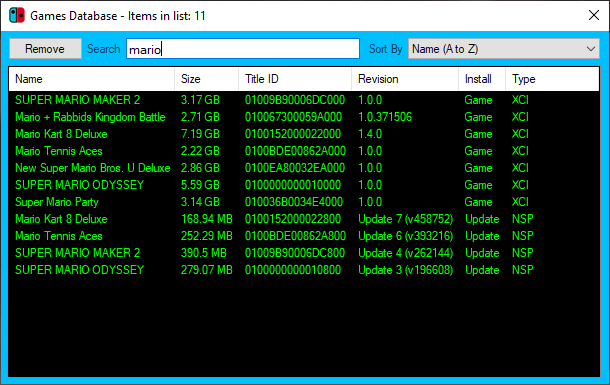
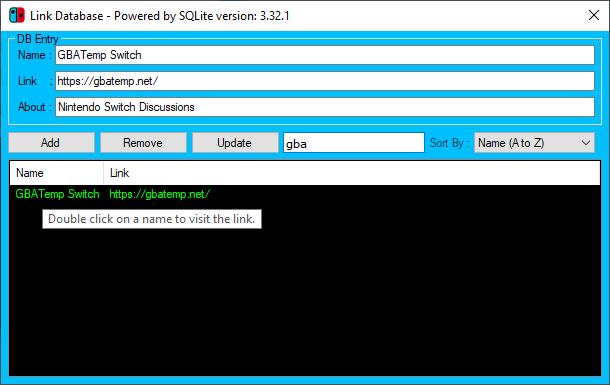
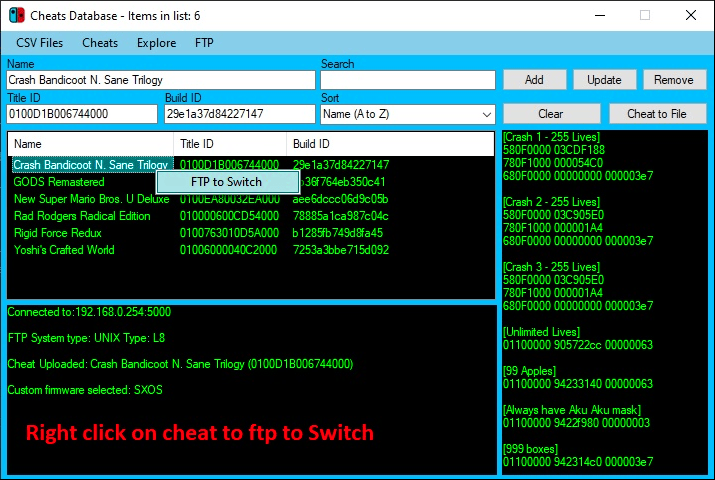
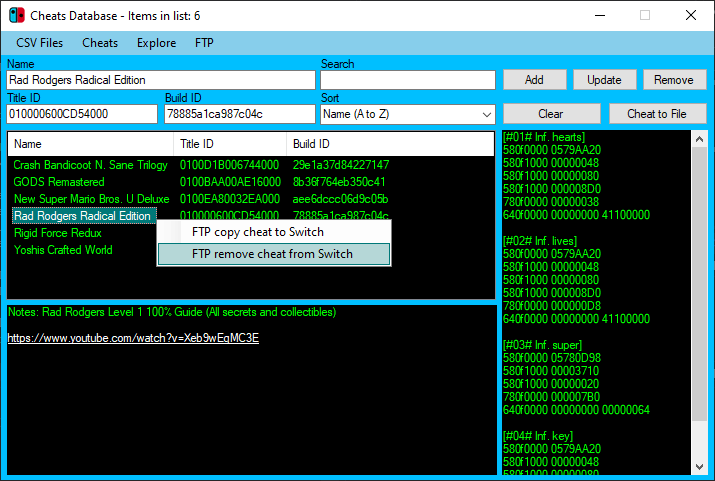
* Database tools for links & game tracking. | |||
* Tools - SAK (for changing game formats), fat32 format tool, Cobra Crypt (for link decoding/encoding). | |||
* Games can be dragged on to the address bar instead of the load button. | |||
==User guide== | |||
No keys are present in this - you will need to add your own to keys.dat. | |||
You can obtain prod.keys with [[Lockpick RCM Switch|Lockpick RCM]], rename it to keys.dat and place it in /tools/bin directory. | |||
Newest 64bit & 32bit versions of the following are included: | |||
*4nxci.exe | |||
*hactool.exe | |||
*renxpack.exe | |||
These can be replaced in the tools/bin folder depending on the System O/S you are using - by default 32bit files are in this folder. | |||
==Screenshots== | ==Screenshots== | ||
https://dlhb.gamebrew.org/switchhomebrews/ | https://dlhb.gamebrew.org/switchhomebrews/xciexplorermodnx2.png | ||
https://dlhb.gamebrew.org/switchhomebrews/ | https://dlhb.gamebrew.org/switchhomebrews/xciexplorermodnx3.png | ||
https://dlhb.gamebrew.org/switchhomebrews/xciexplorermodnx4.png | |||
https://dlhb.gamebrew.org/switchhomebrews/ | |||
https://dlhb.gamebrew.org/switchhomebrews/xciexplorermodnx5.png | |||
== External links == | == External links == | ||
* | * GitHub - https://github.com/mrdude2478/XCI-Explorer | ||
* | * GBAtemp - https://gbatemp.net/threads/xci-explorer-1-50mod.566877/ | ||
* GBAtemp - https://gbatemp.net/threads/xci-explorer.505528/ | |||
Revision as of 03:18, 3 May 2023
| XCI Explorer Mod | |
|---|---|
 | |
| General | |
| Author | mrdude2478 |
| Type | PC Utilities |
| Version | 1.50d |
| License | Mixed |
| Last Updated | 2020/07/11 |
| Links | |
| Download | |
| Website | |
| Source | |
A mod for XCI Explorer, a tool allows you to modify, dump, explore XCI files which are clones of Switch game cartridges.
Note: No longer maintained, use at your own risk. Also note that this app may be flagged by some antivirus programs (see author's note).
Features
- View metadata for XCI and NSP files.
- Explore partitions.
- Check NCA hashes.
- Extract NCA.
- Modify cert.
- Save game image.
- XCI/NSP Splitter for splitting large games to fit on fat32 micro SD cards.
- Show md5 of files.
- Base 64 encoder & decoder.
- Easily rename XCI and NSP files based on Title ID and the Orignal game Name.
- Key editor (for hactool use).
- 4nxci GUI (converts XCI to NSP).
- RenXpack GUI (repacks NSP with lower firmware key).
- Database tools for links & game tracking.
- Tools - SAK (for changing game formats), fat32 format tool, Cobra Crypt (for link decoding/encoding).
- Games can be dragged on to the address bar instead of the load button.
User guide
No keys are present in this - you will need to add your own to keys.dat.
You can obtain prod.keys with Lockpick RCM, rename it to keys.dat and place it in /tools/bin directory.
Newest 64bit & 32bit versions of the following are included:
- 4nxci.exe
- hactool.exe
- renxpack.exe
These can be replaced in the tools/bin folder depending on the System O/S you are using - by default 32bit files are in this folder.
Screenshots