
NxFileViewer Switch: Difference between revisions
From GameBrew
More actions
Created page with "{{Infobox Switch Homebrews |title=NxFileViewer |image=nxfileviewerswitch.png |description=Tool to view Nintendo Switch file. |author=Myster-Tee |lastupdated=2022/03/29 |type=PC Utilities |version=2.6.1 |license=GPL-3.0 |download=https://dlhb.gamebrew.org/switchhomebrews/nxfileviewerswitch.7z |website=https://github.com/Myster-Tee/NxFileViewer |source=https://github.com/Myster-Tee/NxFileViewer |donation= }} {{#seo: |title=Switch Homebrew PC Tools (PC Utilities) - GameBre..." |
No edit summary |
||
| Line 1: | Line 1: | ||
{{Infobox Switch Homebrews | {{Infobox Switch Homebrews | ||
|title=NxFileViewer | |title=NxFileViewer | ||
|image= | |image=nxfileviewer.png | ||
|description=Tool to view Nintendo Switch file. | |description=Tool to view Nintendo Switch file. | ||
|author=Myster-Tee | |author=Myster-Tee | ||
|lastupdated=2022/03/29 | |lastupdated=2022/03/29 | ||
| Line 9: | Line 8: | ||
|version=2.6.1 | |version=2.6.1 | ||
|license=GPL-3.0 | |license=GPL-3.0 | ||
|download=https://dlhb.gamebrew.org/switchhomebrews/ | |download=https://dlhb.gamebrew.org/switchhomebrews/nxfileviewer.7z | ||
|website=https:// | |website=https://gbatemp.net/threads/nxfileviewer.583936/ | ||
|source=https://github.com/Myster-Tee/NxFileViewer | |source=https://github.com/Myster-Tee/NxFileViewer | ||
|donation= | |donation= | ||
}} | }} | ||
NxFileViewer allows you explore the content of your Nintendo Switch files. | |||
==Features== | |||
*Based on [https://github.com/Thealexbarney/LibHac LibHac]. | |||
*Supported files: NSP, NSZ, XCI, XCZ. | |||
*Supports Super NSP/XCI. | |||
*Browse files content structure. | |||
*Export files. | |||
*Save or copy title images. | |||
*Specify your own keys location. | |||
*Searches keys in commonly used locations. | |||
*Automatically download keys from an URL defined in the settings. | |||
*Supports drag and drop. | |||
*Checks real files type (XCI or NSP). | |||
*Detailed log. | |||
*User-friendly and responsive interface. | |||
*Single executable file. | |||
*Do not write anything outside of the program directory. | |||
*Verify hash and signature. | |||
*Displays missing keys. | |||
*Opens title URL. | |||
*Multiple languages (English and French). | |||
*Advanced files renaming. | |||
== | ==Screenshots== | ||
https://dlhb.gamebrew.org/switchhomebrews/nxfileviewer.png | |||
https://dlhb.gamebrew.org/switchhomebrews/nxfileviewer2.png | |||
https://dlhb.gamebrew.org/switchhomebrews/nxfileviewer3.png | |||
https://dlhb.gamebrew.org/switchhomebrews/nxfileviewer4.png | |||
https://dlhb.gamebrew.org/switchhomebrews/ | |||
https://dlhb.gamebrew.org/switchhomebrews/ | |||
==Changelog== | ==Changelog== | ||
''' | '''v2.6.1 2022/03/30''' | ||
* | *Fix duplicated files display (in structure view) for file system sections (issue [https://github.com/Myster-Tee/NxFileViewer/issues/5 #5]). | ||
*Fix wrong error reporting for titles with Brazilian/Portuguese icons. | |||
'''v2.6.0 2022/03/29''' | |||
*Based on latest LibHac release (v0.16.0). | |||
*Possibility to rename files with custom options. | |||
*Fix «Offset must be a multiple of 16» when opening update files. | |||
*Settings can be reset to default. | |||
*Many small improvements. | |||
'''v2.5.0 2022/01/21''' | |||
*Based on latest LibHac release (v0.15.0). | |||
*Possibility to open a Web page for the loaded title (based on the Title ID). | |||
*Possibility to save decrypted NCAs. | |||
*NCA hash strategy changed, now based on CNMT metadata file. | |||
*Property «IsNCA0» added for NCA. | |||
*French language supported (language can be changed in the settings). | |||
*Some small issues fixed. | |||
*Based on .NET 6. | |||
'''v2.4.0 2021/03/02''' | |||
*Properties of ticket files (*.tik) are displayed. | |||
*Title ID keys from the ticket files are now loaded and used for opening NCA contents. | |||
'''v2.3.0 2021/03/1''' | |||
*Keys files being used are displayed in the settings. | |||
*New command added for reload keys on demand. | |||
*«title.keys» can also be downloaded from an URL defined in the settings. | |||
*Can edit keys from the settings. | |||
*New setting added for reloading keys each time a file is opened. | |||
*Keys download URL can be immediately tried. | |||
*Missing title keys are displayed via an icon in the status bar. | |||
*Can open location of opened file via context menu of «Overview» tab. | |||
*NCA (or NCZ) Sections are displayed even when content can't be opened. | |||
*FIX: NCA hash is not anymore considered valid when NCA content cannot be opened. | |||
*Hash status moved to «Section» items instead of «NCA» items. | |||
*Tooltip added for displaying NCA's hash or NCA's signature error. | |||
*Text of help tooltips can be copied. | |||
'''v2.2.0 2021/02/24''' | |||
*Hash of NCAs can now be verified. | |||
*Header signature of NCAs can now be verified. | |||
*Long time actions are now threaded (a status bar and a progress bar have been added). | |||
*Possibility to save a Directory (was not finished in previous version). | |||
*Possibility to save a NCA Section. | |||
*Possibility to save a PartitionFileEntry. | |||
*Program can now open supported files at startup when program is associated with supported files. | |||
*Errors are marked on the corresponding structure tree item when applicable. | |||
*Item's errors can be opened in a specific window. | |||
*Displayed item's properties order improved. | |||
*Size of PartitionFileEntry displayed. | |||
*Lazy loading option removed (as file opening is now threaded, it is better to always reveal possible errors). | |||
*Fix initial directory when browsing for a file to open. | |||
*Lots of small UI changes and improvements. | |||
'''v2.1.0 2021/01/30''' | |||
*New setting added to select the structure tree loading mode. | |||
*Fix a display bug in the settings when cancel button was clicked. | |||
*Enum settings are now saved as string instead of integer (better readbility). | |||
*Change version format in overview tab (displayed as 65536, 131072, etc instead of 0.1.0.0, 0.2.0.0). | |||
*Opened file logged. | |||
*Log level can be selected in the settings. | |||
*Keys download URL can be defined in the settings. | |||
*The ModuleID (also known as Build ID) is displayed in the properties when the «main» program file is selected (requested by BigOnYa). | |||
*Some extra properties added to display. | |||
*Missing NCAs of type «DeltaFragment» are logged as warning instead of error (maybe normal?). | |||
'''v2.0.0 2021/01/28''' | |||
*Now based on LibHac (hactool not anymore required). | |||
*In addition to NSP, now supports NSZ, XCI and XCZ. | |||
*Supports Super NSP/XCI. | |||
*Full file content structure browsing. | |||
*Export contained files. | |||
*Save or copy title images. | |||
*Specify your own keys location. | |||
*Searches keys in commonly used locations. | |||
*Automatically download keys from an URL defined in the settings. | |||
*Supports drag and drop. | |||
*Checks real files type (XCI or NSP). | |||
*Nearly totally redevelopped. | |||
*Now based on .NET 5. | |||
*Prepared for beeing translated in other languages. | |||
'''v1.0.0 2019/05/15''' | |||
*Initial release. | |||
== External links == | == External links == | ||
* | * GitHub - https://github.com/Myster-Tee/NxFileViewer | ||
* | * GBAtemp - https://gbatemp.net/threads/nxfileviewer.583936/ | ||
Revision as of 03:47, 15 June 2023
| NxFileViewer | |
|---|---|
 | |
| General | |
| Author | Myster-Tee |
| Type | PC Utilities |
| Version | 2.6.1 |
| License | GPL-3.0 |
| Last Updated | 2022/03/29 |
| Links | |
| Download | |
| Website | |
| Source | |
NxFileViewer allows you explore the content of your Nintendo Switch files.
Features
- Based on LibHac.
- Supported files: NSP, NSZ, XCI, XCZ.
- Supports Super NSP/XCI.
- Browse files content structure.
- Export files.
- Save or copy title images.
- Specify your own keys location.
- Searches keys in commonly used locations.
- Automatically download keys from an URL defined in the settings.
- Supports drag and drop.
- Checks real files type (XCI or NSP).
- Detailed log.
- User-friendly and responsive interface.
- Single executable file.
- Do not write anything outside of the program directory.
- Verify hash and signature.
- Displays missing keys.
- Opens title URL.
- Multiple languages (English and French).
- Advanced files renaming.
Screenshots
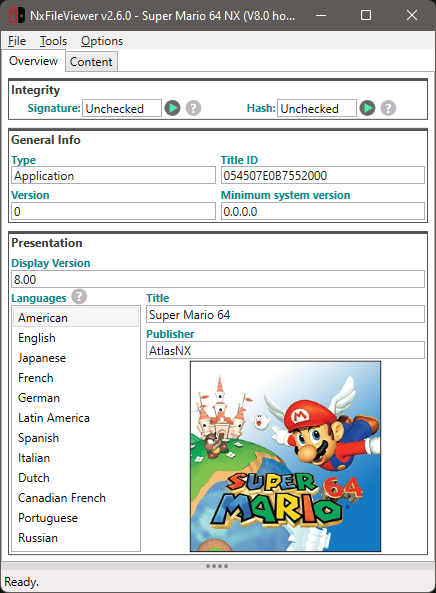
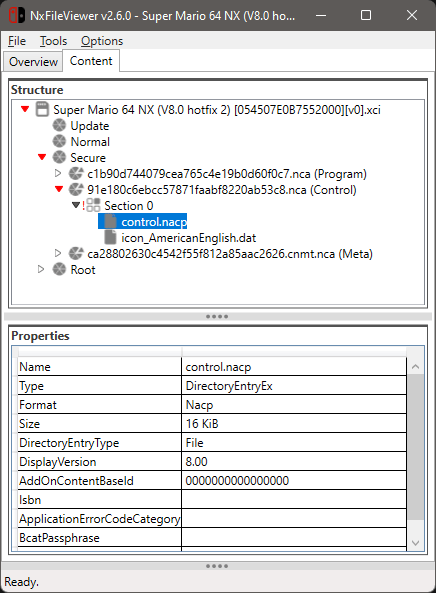
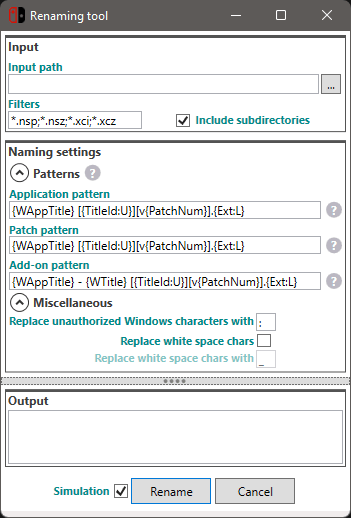
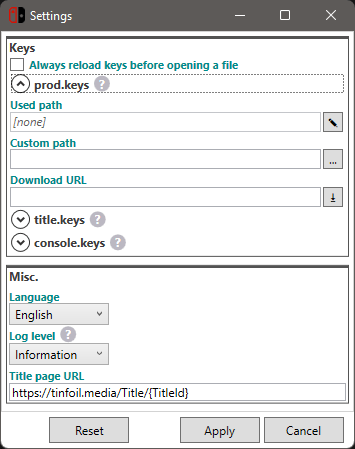
Changelog
v2.6.1 2022/03/30
- Fix duplicated files display (in structure view) for file system sections (issue #5).
- Fix wrong error reporting for titles with Brazilian/Portuguese icons.
v2.6.0 2022/03/29
- Based on latest LibHac release (v0.16.0).
- Possibility to rename files with custom options.
- Fix «Offset must be a multiple of 16» when opening update files.
- Settings can be reset to default.
- Many small improvements.
v2.5.0 2022/01/21
- Based on latest LibHac release (v0.15.0).
- Possibility to open a Web page for the loaded title (based on the Title ID).
- Possibility to save decrypted NCAs.
- NCA hash strategy changed, now based on CNMT metadata file.
- Property «IsNCA0» added for NCA.
- French language supported (language can be changed in the settings).
- Some small issues fixed.
- Based on .NET 6.
v2.4.0 2021/03/02
- Properties of ticket files (*.tik) are displayed.
- Title ID keys from the ticket files are now loaded and used for opening NCA contents.
v2.3.0 2021/03/1
- Keys files being used are displayed in the settings.
- New command added for reload keys on demand.
- «title.keys» can also be downloaded from an URL defined in the settings.
- Can edit keys from the settings.
- New setting added for reloading keys each time a file is opened.
- Keys download URL can be immediately tried.
- Missing title keys are displayed via an icon in the status bar.
- Can open location of opened file via context menu of «Overview» tab.
- NCA (or NCZ) Sections are displayed even when content can't be opened.
- FIX: NCA hash is not anymore considered valid when NCA content cannot be opened.
- Hash status moved to «Section» items instead of «NCA» items.
- Tooltip added for displaying NCA's hash or NCA's signature error.
- Text of help tooltips can be copied.
v2.2.0 2021/02/24
- Hash of NCAs can now be verified.
- Header signature of NCAs can now be verified.
- Long time actions are now threaded (a status bar and a progress bar have been added).
- Possibility to save a Directory (was not finished in previous version).
- Possibility to save a NCA Section.
- Possibility to save a PartitionFileEntry.
- Program can now open supported files at startup when program is associated with supported files.
- Errors are marked on the corresponding structure tree item when applicable.
- Item's errors can be opened in a specific window.
- Displayed item's properties order improved.
- Size of PartitionFileEntry displayed.
- Lazy loading option removed (as file opening is now threaded, it is better to always reveal possible errors).
- Fix initial directory when browsing for a file to open.
- Lots of small UI changes and improvements.
v2.1.0 2021/01/30
- New setting added to select the structure tree loading mode.
- Fix a display bug in the settings when cancel button was clicked.
- Enum settings are now saved as string instead of integer (better readbility).
- Change version format in overview tab (displayed as 65536, 131072, etc instead of 0.1.0.0, 0.2.0.0).
- Opened file logged.
- Log level can be selected in the settings.
- Keys download URL can be defined in the settings.
- The ModuleID (also known as Build ID) is displayed in the properties when the «main» program file is selected (requested by BigOnYa).
- Some extra properties added to display.
- Missing NCAs of type «DeltaFragment» are logged as warning instead of error (maybe normal?).
v2.0.0 2021/01/28
- Now based on LibHac (hactool not anymore required).
- In addition to NSP, now supports NSZ, XCI and XCZ.
- Supports Super NSP/XCI.
- Full file content structure browsing.
- Export contained files.
- Save or copy title images.
- Specify your own keys location.
- Searches keys in commonly used locations.
- Automatically download keys from an URL defined in the settings.
- Supports drag and drop.
- Checks real files type (XCI or NSP).
- Nearly totally redevelopped.
- Now based on .NET 5.
- Prepared for beeing translated in other languages.
v1.0.0 2019/05/15
- Initial release.