
ScreenTester-NX Switch: Difference between revisions
From GameBrew
More actions
Created page with "{{Infobox Switch Homebrews |title=ScreenTester-NX |image=screentesternxswitch.png |description=Nintendo Switch Screen Tester. |author=Marice |lastupdated=2018/05/20 |type=Utilities |version=0.2 |license=Mixed |download=https://dlhb.gamebrew.org/switchhomebrews/screentesternxswitch.7z |website=https://gbatemp.net/threads/screentester-nx.504662/ |source=https://github.com/Marice/ScreenTester-NX |donation= }} {{#seo: |title=Switch Homebrew Apps (Utilities) - GameBrew |title..." |
No edit summary |
||
| Line 1: | Line 1: | ||
{{ombox | |||
| text=Photosensitive warning: The application may trigger seizures in people sensitive to flashing lights. If you have a seizure disorder, have somebody else run the program for you. | |||
}} | |||
{{Infobox Switch Homebrews | {{Infobox Switch Homebrews | ||
|title=ScreenTester-NX | |title=ScreenTester-NX | ||
|image= | |image=screentesternx.png | ||
|description=Nintendo Switch Screen Tester. | |description=Nintendo Switch Screen Tester. | ||
|author=Marice | |author=Marice | ||
| Line 8: | Line 11: | ||
|version=0.2 | |version=0.2 | ||
|license=Mixed | |license=Mixed | ||
|download=https://dlhb.gamebrew.org/switchhomebrews/ | |download=https://dlhb.gamebrew.org/switchhomebrews/screentesternx.7z | ||
|website=https://gbatemp.net/threads/screentester-nx.504662/ | |website=https://gbatemp.net/threads/screentester-nx.504662/ | ||
|source=https://github.com/Marice/ScreenTester-NX | |source=https://github.com/Marice/ScreenTester-NX | ||
|donation= | |donation= | ||
}} | }} | ||
This program displays different colors to detect dead/stuck pixels on your Nintendo-Switch screen. | |||
It can cycle colors on your Switch screen very rapidly to try and repair stuck/dead pixels. | |||
==Installation== | |||
Just unpack the zip to the root of your SD-Card (make sure to keep folder structure intact). | |||
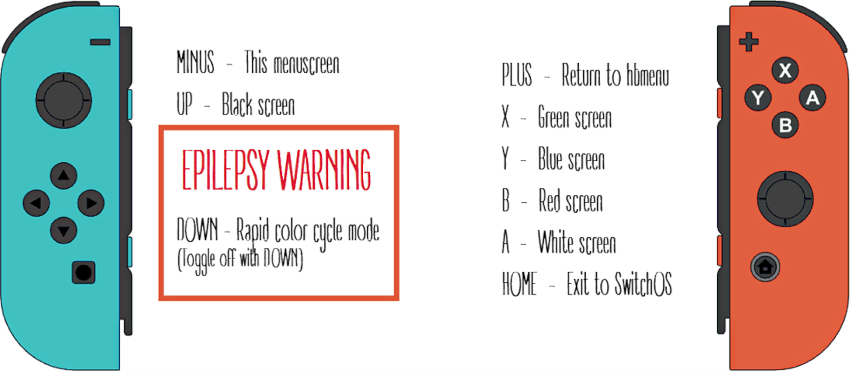
==Controls== | |||
A - White | |||
B - Red | |||
X - Green | |||
Y - Blue | |||
Up - Black | |||
Down - Rapid color cycle mode (Press DOWN again to toggle off) | |||
Minus - Menu screen | |||
Plus - Return to hbmenu | |||
==Screenshots== | ==Screenshots== | ||
https://dlhb.gamebrew.org/switchhomebrews/ | https://dlhb.gamebrew.org/switchhomebrews/screentesternx2.png | ||
==Changelog== | ==Changelog== | ||
''' | '''v0.2 2018/03/20''' | ||
* | *Added Menuscreen. | ||
*Added rapid color cycle mode (to repair stuck/dead pixels). | |||
*Few minor changes. | |||
'''v0.1 2018/05/19''' | |||
*This program displays different colors to detect dead/stuck pixels on your Nintendo-Switch screen. | |||
**Press A for White | |||
**Press B for Red | |||
**Press X for Green | |||
**Press Y for Blue | |||
**Press + to return to hb-menu. | |||
**Press HOME to return to Switch-OS | |||
== External links == | == External links == | ||
* | * GitHub - https://github.com/Marice/ScreenTester-NX | ||
* | * GBAtemp - https://gbatemp.net/threads/screentester-nx.504662/ | ||
Revision as of 01:12, 27 April 2023
 |
Photosensitive warning: The application may trigger seizures in people sensitive to flashing lights. If you have a seizure disorder, have somebody else run the program for you. |
| ScreenTester-NX | |
|---|---|
 | |
| General | |
| Author | Marice |
| Type | Utilities |
| Version | 0.2 |
| License | Mixed |
| Last Updated | 2018/05/20 |
| Links | |
| Download | |
| Website | |
| Source | |
This program displays different colors to detect dead/stuck pixels on your Nintendo-Switch screen.
It can cycle colors on your Switch screen very rapidly to try and repair stuck/dead pixels.
Installation
Just unpack the zip to the root of your SD-Card (make sure to keep folder structure intact).
Controls
A - White
B - Red
X - Green
Y - Blue
Up - Black
Down - Rapid color cycle mode (Press DOWN again to toggle off)
Minus - Menu screen
Plus - Return to hbmenu
Screenshots
Changelog
v0.2 2018/03/20
- Added Menuscreen.
- Added rapid color cycle mode (to repair stuck/dead pixels).
- Few minor changes.
v0.1 2018/05/19
- This program displays different colors to detect dead/stuck pixels on your Nintendo-Switch screen.
- Press A for White
- Press B for Red
- Press X for Green
- Press Y for Blue
- Press + to return to hb-menu.
- Press HOME to return to Switch-OS