
Ldn mitm Switch: Difference between revisions
More actions
No edit summary |
No edit summary |
||
| Line 1: | Line 1: | ||
{{Infobox Switch Homebrews | {{Infobox Switch Homebrews | ||
|title=ldn_mitm | |title=ldn_mitm | ||
|image= | |image=ldnmitmnx.png | ||
|description=Play local wireless supported games online. | |description=Play local wireless supported games online. | ||
|author=spacemeowx2 | |author=spacemeowx2 | ||
| Line 8: | Line 8: | ||
|version=1.15.0 | |version=1.15.0 | ||
|license=GPL-2.0 | |license=GPL-2.0 | ||
|download=https://dlhb.gamebrew.org/switchhomebrews/ | |download=https://dlhb.gamebrew.org/switchhomebrews/ldnmitmnx.7z | ||
|website=https://gbatemp.net/threads/ldn_mitm-play-local-wireless-supported-games-online.525512/ | |website=https://gbatemp.net/threads/ldn_mitm-play-local-wireless-supported-games-online.525512/ | ||
|source=https://github.com/spacemeowx2/ldn_mitm | |source=https://github.com/spacemeowx2/ldn_mitm | ||
|donation= | |donation= | ||
}} | }} | ||
For those who are using older firmware or have been banned from online activities, playing single-player games may seem like the only option. However, the release of [[switch-lan-play|switch-lan-play]] has opened doors by allowing players to enjoy a select list of games online regardless of their bans or subscriptions. | |||
For those | |||
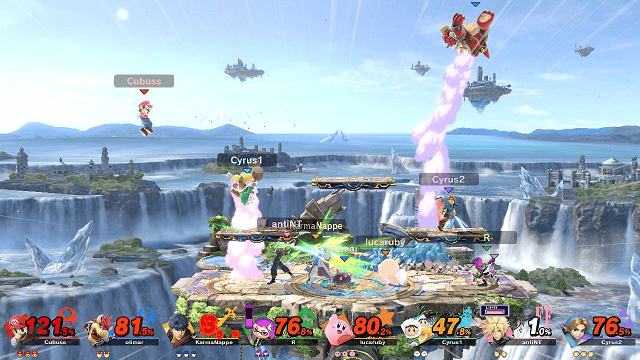
Now, with the introduction of ldn_mitm, a custom kip that breaks the final chains, almost every game that supports local wireless can be played online. | |||
== | ==Installation== | ||
* [[Atmosphere Switch]] or SXOS 2.5 Beta+ | Requirements: | ||
* switch-lan-play ([http://www.lan-play.com/install setup guide]) | * [[Atmosphere Switch|Atmosphere]] or SXOS 2.5 Beta+ | ||
* ldn_mitm | * [[switch-lan-play|switch-lan-play]] ([http://www.lan-play.com/install setup guide]) | ||
* ldn_mitm ([https://github.com/spacemeowx2/ldn_mitm#version-table version table]) | |||
How to Use (Atmosphere): | |||
* Download the zip from the release pages. | |||
* Extract the zip to your sd card. | |||
* Boot up Atmosphere with fusee primary.bin. | |||
* Start your game of choice, and select local wireless play. | |||
* (Optional) Use official Switch-lan-play discord to match make and find other players. | |||
How to Use (SXOS): | |||
* Download the latest SXOS. | * Download the latest SXOS. | ||
* Go to SX Menu then to options. | * Go to SX Menu then to options. | ||
* Enable ldn_mitm | * Enable ldn_mitm. | ||
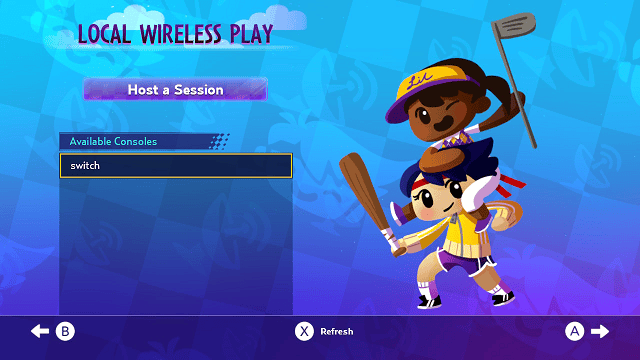
* Go in-game and select the Wireless Play Option (If you see an L in your WiFi bars that means that the kip did not load and that you need to reboot). | * Go in-game and select the Wireless Play Option (If you see an L in your WiFi bars that means that the kip did not load and that you need to reboot). | ||
==User guide== | |||
===What is ldn_mitm=== | |||
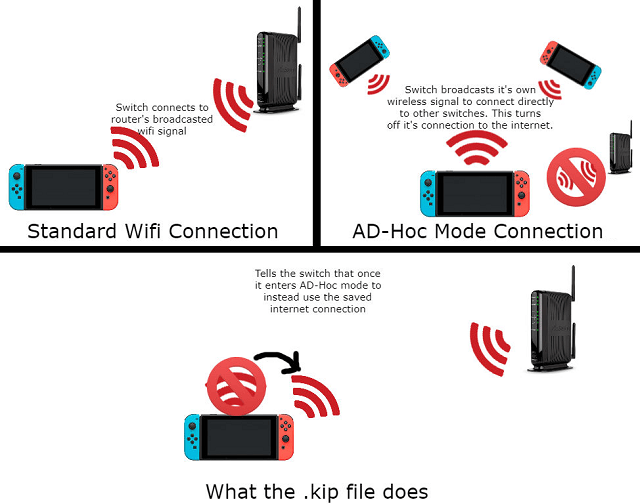
It's a custom kip modified from fs_mitm that implements LAN connectivity by replacing the system's ldn service. The original ldn service only calls the WiFi service to scan and connect to nearby Switch. However, ldn_mitm uses the LAN UDP to emulate this scanning process, making it compatible with switch-lan-play. For a configuration tutorial, click here. | |||
===Game compatibility=== | |||
You can find a list of currently tested games [https://docs.google.com/spreadsheets/d/1Eg_EE0xsBytSyWr7mtvD0MGUjCjyDJBXrHJ8ra8q8-8/edit#gid=0 here]. | You can find a list of currently tested games [https://docs.google.com/spreadsheets/d/1Eg_EE0xsBytSyWr7mtvD0MGUjCjyDJBXrHJ8ra8q8-8/edit#gid=0 here]. | ||
'''It is recommended to only use ldn_mitm and lan-play.exe from their official releases, third-party apps and homebrew are not supported. | '''Note:''' It is recommended to only use ldn_mitm and lan-play.exe from their official releases, third-party apps and homebrew are not supported. | ||
== | ==Screenshots== | ||
https://dlhb.gamebrew.org/switchhomebrews/ldnmitmnx3.png | |||
https://dlhb.gamebrew.org/switchhomebrews/ldnmitmnx2.png | |||
https://dlhb.gamebrew.org/switchhomebrews/ldnmitmnx5.png | |||
==Media== | ==Media== | ||
''' | '''MHGU Newest ldn''' ([https://www.youtube.com/watch?v=86yAGxtLwRI Sansa Motin]) <br> | ||
<youtube> | <youtube>86yAGxtLwRI</youtube> | ||
https:// | '''Rocket League Newest ldn''' ([https://www.youtube.com/watch?v=yYnms6baHII Sansa Motin]) <br> | ||
<youtube>yYnms6baHII</youtube> | |||
== External links == | == External links == | ||
* | * GitHub - https://github.com/spacemeowx2/ldn_mitm | ||
* | * GBAtemp - https://gbatemp.net/threads/ldn_mitm-play-local-wireless-supported-games-online.525512/ | ||
* Discord - https://discord.gg/K9WFGSH | |||
Revision as of 13:07, 20 April 2023
| ldn_mitm | |
|---|---|
 | |
| General | |
| Author | spacemeowx2 |
| Type | Other Apps |
| Version | 1.15.0 |
| License | GPL-2.0 |
| Last Updated | 2023/03/25 |
| Links | |
| Download | |
| Website | |
| Source | |
For those who are using older firmware or have been banned from online activities, playing single-player games may seem like the only option. However, the release of switch-lan-play has opened doors by allowing players to enjoy a select list of games online regardless of their bans or subscriptions.
Now, with the introduction of ldn_mitm, a custom kip that breaks the final chains, almost every game that supports local wireless can be played online.
Installation
Requirements:
- Atmosphere or SXOS 2.5 Beta+
- switch-lan-play (setup guide)
- ldn_mitm (version table)
How to Use (Atmosphere):
- Download the zip from the release pages.
- Extract the zip to your sd card.
- Boot up Atmosphere with fusee primary.bin.
- Start your game of choice, and select local wireless play.
- (Optional) Use official Switch-lan-play discord to match make and find other players.
How to Use (SXOS):
- Download the latest SXOS.
- Go to SX Menu then to options.
- Enable ldn_mitm.
- Go in-game and select the Wireless Play Option (If you see an L in your WiFi bars that means that the kip did not load and that you need to reboot).
User guide
What is ldn_mitm
It's a custom kip modified from fs_mitm that implements LAN connectivity by replacing the system's ldn service. The original ldn service only calls the WiFi service to scan and connect to nearby Switch. However, ldn_mitm uses the LAN UDP to emulate this scanning process, making it compatible with switch-lan-play. For a configuration tutorial, click here.
Game compatibility
You can find a list of currently tested games here.
Note: It is recommended to only use ldn_mitm and lan-play.exe from their official releases, third-party apps and homebrew are not supported.
Screenshots
Media
MHGU Newest ldn (Sansa Motin)
Rocket League Newest ldn (Sansa Motin)