
Nethack for PSP: Difference between revisions
More actions
No edit summary |
|||
| (9 intermediate revisions by the same user not shown) | |||
| Line 1: | Line 1: | ||
{{Infobox PSP Homebrews | {{Infobox PSP Homebrews | ||
|title= | |title=Nethack for PSP | ||
|image=nethackpspvir2.png | |image=nethackpspvir2.png | ||
|description=Port of Nethack to the PSP. | |description=Port of Nethack to the PSP. | ||
|author=VirtuaMUnstaz | |author=VirtuaMUnstaz, IveGotThePawa | ||
|lastupdated=2006/ | |lastupdated=2006/05/08 | ||
|type=Role Playing | |type=Role Playing | ||
|version=1. | |version=1.0d | ||
|license=Mixed | |license=Mixed | ||
|download=https://dlhb.gamebrew.org/psphomebrew/nethackpspvir.7z | |download=https://dlhb.gamebrew.org/psphomebrew/nethackpspvir.7z?k33p0fil35 | ||
|website=https://web.archive.org/web/ | |website=https://web.archive.org/web/20071218145304/http://www.feelthepawa.com/psp/nethack/screenshots.html | ||
|source=http://virtuamunstaz.de/svn/nethack/ | |source=http://virtuamunstaz.de/svn/nethack/ | ||
}} | }} | ||
| Line 138: | Line 138: | ||
==Known issues== | ==Known issues== | ||
Diagonal movements are difficult to | Diagonal movements are difficult to achieve easily. | ||
== Changelog == | |||
'''1.0d''' | |||
* Keyboard interface for text prompts (Wishing, naming items, etc.). | |||
* Fixed the bug of headers that would interfeer in the item selection dialog. | |||
* Added a way to go back up a menu when you've highlighted the last item (and vice versa). | |||
* Correctly fixed to always select first item in a menu if no default is found (was buggy in some cases). | |||
* Splitted the context menu in two columns and added many more commands. | |||
* Enabled #enhancing your skills. | |||
* Fixed Diagonal movements, added some buttons to facilitate things. | |||
* You can now apply something to yourself or in any direction you might want to. | |||
* You can now apply an Orb (crystal ball), it will now bring out the soft-keyboard to select a single character. | |||
* Enabled engraving with your fingers. | |||
* Enabled analog stick for scrolling pop-ups that are too big for display. | |||
==Credits== | ==Credits== | ||
| Line 146: | Line 160: | ||
==External links== | ==External links== | ||
* Official website - [https://web.archive.org/web/20071216180132/http://www.feelthepawa.com/psp/nethack/ http://www.feelthepawa.com/psp/nethack/] (archived) | |||
* Author's website - [https://web.archive.org/web/20070106124036if_/http://virtuamunstaz.de/nh/ http://virtuamunstaz.de/nh/] (archived) | * Author's website - [https://web.archive.org/web/20070106124036if_/http://virtuamunstaz.de/nh/ http://virtuamunstaz.de/nh/] (archived) | ||
Latest revision as of 04:15, 11 February 2025
| Nethack for PSP | |
|---|---|
 | |
| General | |
| Author | VirtuaMUnstaz, IveGotThePawa |
| Type | Role Playing |
| Version | 1.0d |
| License | Mixed |
| Last Updated | 2006/05/08 |
| Links | |
| Download | |
| Website | |
| Source | |
Port of Nethack 3.4.3 to the PSP. Based on glHack by Andrew Apted.
The game is playable up to a certain extend. You cannot enter text required for Wishing, Engraving or naming stuff.
Installation
Move the NetHackPSP folder to ms0:/PSP/GAME/.
You can change your name and other character settings by editing the .nethackrc file found in PSP/GAMES/NetHack/.
Be careful though because some settings may affect the gameplay.
User guide
You can assign actions via the Special Context Menu, the available actions are:
- a - Apply.
- b - Eat.
- c - Kick.
- d - Pickup.
- e - Wear.
- f - Wield.
- g - Put On.
- h - Drop.
- i - Drop All.
- j - Remove.
- k - Take off.
- l - Read.
- m - Pay Bill.
- n - Quafe (drink).
- A - (Extended Command) Chat.
- B - (Extended Command) Dip.
- C - (Extended Command) Enhance.
- D - (Extended Command) Force.
- E - (Extended Command) Invoke.
- F - (Extended Command) Loot.
- G - (Extended Command) Offer.
- H - (Extended Command) Pray.
- I - (Extended Command) Rub.
- J - (Extended Command) Sit.
- K - (Extended Command) Turn Undead.
- L - (Extended Command) Untrap.
- M - (Extended Command) Wipe.
Controls
Default:
Up/Down - North/South, Menu up/down
Left - West/East
Down+Left/Right - South-West/South-East
Up+Left/Right - North-West/North-East
Circle - Enter key (confirm Menu selection)
Square - List previous message
Cross - Space key (select Menu item)
Triangle - Escape (cancel Menu selection)
Select - See the Inventory
Start - Special Context Menu
Button set (L+):
L+D-Pad - Fast North/East/South/West
L+Down+Left/Right - Fast South-West/Fast South-East
L+Up+Left/Right - Fast North-West/Fast North-East
L+Cross - Open
L+Square - Search
L+Tringle - Close
L+Circle - Pick Up
L+Select - Display usefull information
L+Start - Save your game and Quit
Button set (R+):
R+Up/Down - Go up/down the stairs
R+Cross - Throw
R+Square - Zap wand
R+Triangle - Cast Spell from Spellbook
R+Circle - Fire ammo placed in the Quiver
R+Select - Select Quivered Item
R+Start - Echange weapon with alternate
Button set (L+R+):
L+R+Cross - Teleport
L+R+Square - List known spells
L+R+Triangle - Show what type of thing a visible symbol corresponds to.
L+R+Circle - Known discoveries
L+R+Select - Toggle ASCII/Graphic mode
L+R+Start - Switch to explorer mode
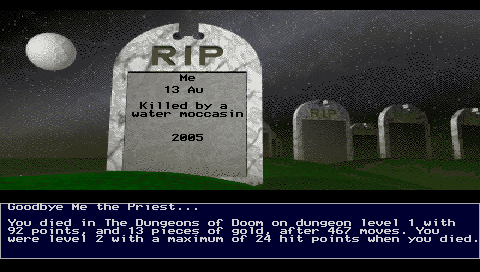
Screenshots
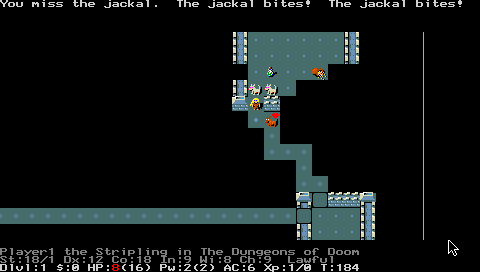
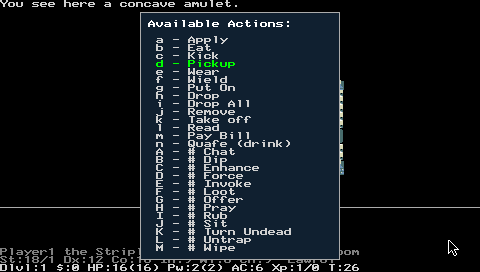
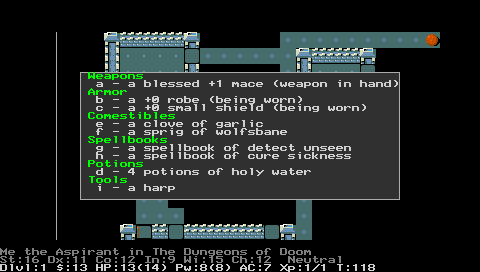
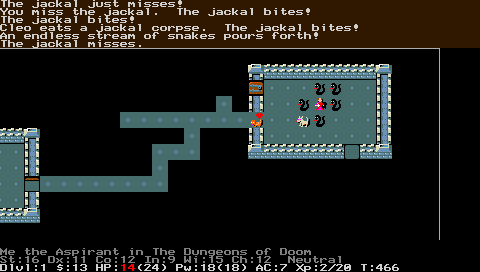
Known issues
Diagonal movements are difficult to achieve easily.
Changelog
1.0d
- Keyboard interface for text prompts (Wishing, naming items, etc.).
- Fixed the bug of headers that would interfeer in the item selection dialog.
- Added a way to go back up a menu when you've highlighted the last item (and vice versa).
- Correctly fixed to always select first item in a menu if no default is found (was buggy in some cases).
- Splitted the context menu in two columns and added many more commands.
- Enabled #enhancing your skills.
- Fixed Diagonal movements, added some buttons to facilitate things.
- You can now apply something to yourself or in any direction you might want to.
- You can now apply an Orb (crystal ball), it will now bring out the soft-keyboard to select a single character.
- Enabled engraving with your fingers.
- Enabled analog stick for scrolling pop-ups that are too big for display.
Credits
- Based on glHack by Andrew Apted.
- Ported to the PSP by VirtuaMUnstaz.
- Helped by IveGotThePawa.
External links
- Official website - http://www.feelthepawa.com/psp/nethack/ (archived)
- Author's website - http://virtuamunstaz.de/nh/ (archived)