
Fake 08 Builder Vita: Difference between revisions
From GameBrew
More actions
Created page with "{{cleanup|article|Needs cleanup}} {{#seo: |title=Vita Homebrew PC Tools (PC Utilities) - GameBrew! |title_mode=append |image=fake08buildervita.jpg |image_alt=Fake-08-Builder }..." |
m Text replacement - "https://vitadb.rinnegatamante.it/" to "https://www.rinnegatamante.eu/vitadb/" |
||
| (10 intermediate revisions by the same user not shown) | |||
| Line 1: | Line 1: | ||
{{#seo: | {{#seo: | ||
|title=Vita Homebrew PC Tools (PC Utilities) - GameBrew | |title=Vita Homebrew PC Tools (PC Utilities) - GameBrew | ||
|title_mode=append | |title_mode=append | ||
|image= | |image=fake08buildervita02.png | ||
|image_alt=Fake-08-Builder | |image_alt=Fake-08-Builder | ||
}} | }} | ||
{{Infobox Vita Homebrews | {{Infobox Vita Homebrews | ||
|title=Fake-08-Builder | |title=Fake-08-Builder | ||
|image= | |image=fake08buildervita02.png | ||
|description=Create custom bubbles for Fake-08. | |description=Create custom bubbles for Fake-08. | ||
|author=DRok17 | |author=DRok17 | ||
|lastupdated=2021/07/06 | |lastupdated=2021/07/06 | ||
|type= | |type=Bubble Makers | ||
|version=1.0 | |version=1.0 | ||
|license=Mixed | |license=Mixed | ||
|download=https://dlhb.gamebrew.org/vitahomebrews/fake08buildervita.7z | |download=https://dlhb.gamebrew.org/vitahomebrews/fake08buildervita.7z | ||
|website= | |website=https://www.reddit.com/r/vitahacks/comments/oex9t9/release_fake08builder_v10/ | ||
|source=https://github.com/DRok17/Fake-08-Builder | |source=https://github.com/DRok17/Fake-08-Builder | ||
}} | }} | ||
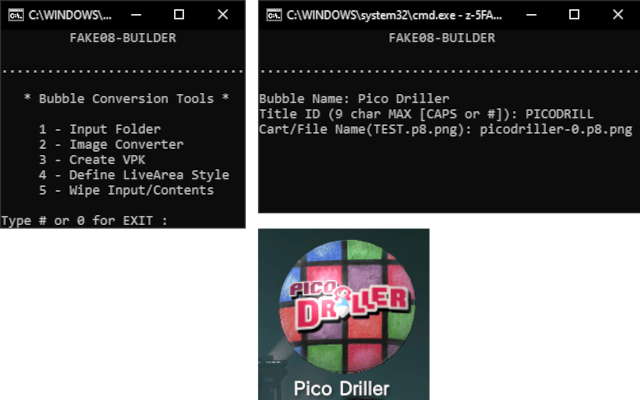
Fake-08-Builder is a tool for Windows 10 that creates LiveArea Bubbles for Pico-8 carts on the PS Vita. | |||
Works with [[FAKE-08 Vita|FAKE-08]] v0.0.2.11 and above. | |||
==User guide== | |||
Simply follow these steps: | |||
*Download the required images (Supported formats: jpg, jpeg, bmp, png, jfif, tiff). | |||
*Place them into the Input folder. | |||
*Name as: bg, icon0, startup. | |||
*Run zz-Fake08-Builder.bat. | |||
*Select Image Converter and wait until finished. | |||
*Select Create VPK. | |||
*Name, Title ID, and enter Cart/File Name. | |||
*VPK will then generate in VPK folder. | |||
*Transfer and install to the Vita. | |||
== | Optional: | ||
Define LiveArea Style available (see below): | |||
*Center = a1 | |||
*Left = psmobile | |||
*Center-Upper = a2 | |||
*Left-Upper = a5 | |||
*Left-Lower = vd | |||
For the best results, please use the Photos App (standard Windows app) to crop images BEFORE conversion. | |||
*bg, startup = Widescreen - 16:9 | |||
*icon0 = Square | |||
==Screenshots== | ==Screenshots== | ||
https://dlhb.gamebrew.org/vitahomebrews/ | https://dlhb.gamebrew.org/vitahomebrews/fake08buildervita3.png | ||
== | https://dlhb.gamebrew.org/vitahomebrews/fake08buildervita4.png | ||
==Credits== | |||
Big thanks to jtothebell creator of [[FAKE-08 Vita]] for making this possible. | |||
And to [https://www.lexaloffle.com/pico-8.php Lexaloffle Team] for providing the platform and software tools for Pico-8 game developers. | |||
== External links == | == External links == | ||
* | * GitHub - https://github.com/DRok17/Fake-08-Builder | ||
* VitaDB - https://www.rinnegatamante.eu/vitadb/#/info/703 | |||
* | * Reddit - https://www.reddit.com/r/vitahacks/comments/oex9t9/release_fake08builder_v10/ | ||
* | |||
Latest revision as of 04:37, 5 January 2025
| Fake-08-Builder | |
|---|---|
 | |
| General | |
| Author | DRok17 |
| Type | Bubble Makers |
| Version | 1.0 |
| License | Mixed |
| Last Updated | 2021/07/06 |
| Links | |
| Download | |
| Website | |
| Source | |
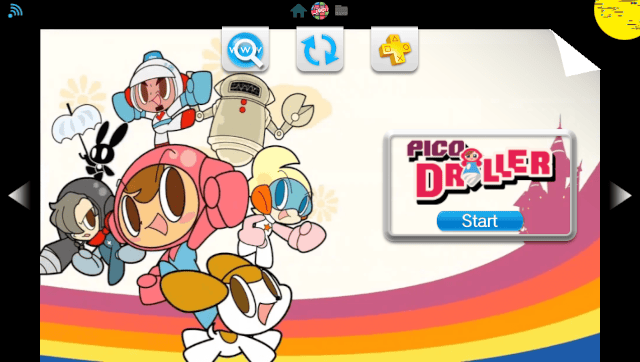
Fake-08-Builder is a tool for Windows 10 that creates LiveArea Bubbles for Pico-8 carts on the PS Vita.
Works with FAKE-08 v0.0.2.11 and above.
User guide
Simply follow these steps:
- Download the required images (Supported formats: jpg, jpeg, bmp, png, jfif, tiff).
- Place them into the Input folder.
- Name as: bg, icon0, startup.
- Run zz-Fake08-Builder.bat.
- Select Image Converter and wait until finished.
- Select Create VPK.
- Name, Title ID, and enter Cart/File Name.
- VPK will then generate in VPK folder.
- Transfer and install to the Vita.
Optional: Define LiveArea Style available (see below):
- Center = a1
- Left = psmobile
- Center-Upper = a2
- Left-Upper = a5
- Left-Lower = vd
For the best results, please use the Photos App (standard Windows app) to crop images BEFORE conversion.
- bg, startup = Widescreen - 16:9
- icon0 = Square
Screenshots
Credits
Big thanks to jtothebell creator of FAKE-08 Vita for making this possible.
And to Lexaloffle Team for providing the platform and software tools for Pico-8 game developers.