
Pnakys GBA: Difference between revisions
More actions
No edit summary |
No edit summary |
||
| (6 intermediate revisions by the same user not shown) | |||
| Line 8: | Line 8: | ||
|version=1.0 | |version=1.0 | ||
|license=Public Domain | |license=Public Domain | ||
|download=https://dlhb.gamebrew.org/gbahomebrews/ | |download=https://dlhb.gamebrew.org/gbahomebrews/pnakys_v1.0.zip | ||
|website=http://torlus.com/index.php?2004/01/05/24-pnakys-version-10-pdroms-release | |website=http://torlus.com/index.php?2004/01/05/24-pnakys-version-10-pdroms-release | ||
}} | }} | ||
| Line 17: | Line 17: | ||
|image_alt=Pnakys | |image_alt=Pnakys | ||
}} | }} | ||
Pnakys is a puzzle game inspired by an old arcade game called Pnickies, in which the gameplay is a mix between Tetris and Bust-a-Move. | Pnakys is a puzzle game inspired by an old arcade game called Pnickies, in which the gameplay is a mix between Tetris and Bust-a-Move. | ||
This was an entry for the PDRoms Coding Competition #1 ( | This was an entry for the PDRoms Coding Competition #1 (Game). | ||
==User guide== | ==User guide== | ||
| Line 51: | Line 50: | ||
https://dlhb.gamebrew.org/gbahomebrews/pnakys3.png | https://dlhb.gamebrew.org/gbahomebrews/pnakys3.png | ||
https://dlhb.gamebrew.org/gbahomebrews/pnakys4.png | https://dlhb.gamebrew.org/gbahomebrews/pnakys4.png | ||
<!--BEGIN Online Emulator Section--> | |||
==Online emulator== | |||
{{EmulatorJS Main | |||
|width=480px | |||
|height=400px | |||
|EJS_backgroundBlur=false | |||
|EJS_backgroundImage=https://www.gamebrew.org/images/0/02/Pnakys02.png | |||
|EJS_core=gba | |||
|EJS_gameName=Pnakys | |||
|EJS_gameUrl=https://dlhb.gamebrew.org/onlineemulators/gba/pnakys_v1.0.7z | |||
}} | |||
{{GBA Control Settings}} | |||
<!--END Online Emulator Section--> | |||
==Credits== | ==Credits== | ||
Thanks to: | Thanks to: | ||
| Line 58: | Line 69: | ||
* People at #gbadev and #gbadevfr. | * People at #gbadev and #gbadevfr. | ||
== | ==External links== | ||
* Author's website - http://heliscar.com/greg/ | * Author's website - http://heliscar.com/greg/ | ||
* Author's website - [https://web.archive.org/web/20050427144706/http://torlus.com/index.php?2004/01/05/24-pnakys-version-10-pdroms-release http://torlus.com/] | * Author's website - [https://web.archive.org/web/20050427144706/http://torlus.com/index.php?2004/01/05/24-pnakys-version-10-pdroms-release http://torlus.com/] | ||
| Line 64: | Line 75: | ||
* PDRoms - [https://web.archive.org/web/20031203212556/http://www.pdroms.de/pdrc1-submissions.php http://www.pdroms.de/pdrc1-submissions.php] (archived) | * PDRoms - [https://web.archive.org/web/20031203212556/http://www.pdroms.de/pdrc1-submissions.php http://www.pdroms.de/pdrc1-submissions.php] (archived) | ||
[[Category: | [[Category:PDRoms Coding Competition 1]] | ||
Latest revision as of 07:22, 18 August 2024
| Pnakys | |
|---|---|
 | |
| General | |
| Author | Torlus |
| Type | Puzzle |
| Version | 1.0 |
| License | Public Domain |
| Last Updated | 2003/10/28 |
| Links | |
| Download | |
| Website | |
Pnakys is a puzzle game inspired by an old arcade game called Pnickies, in which the gameplay is a mix between Tetris and Bust-a-Move.
This was an entry for the PDRoms Coding Competition #1 (Game).
User guide
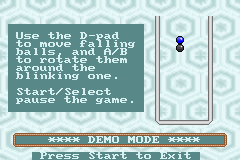
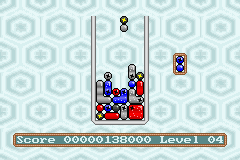
Make groups of balls of the same color, then make them explode by having two special balls (balls that contain a star) within a group.
Later in the game, some parasites will fall. You can explode them by making a group of balls explode near to them.
There's also a high-score table that is stored in SRAM.
In the Vertical Mode, you have to rotate your GBA 90° on the left to play. The graphics are larger which makes the game easier to play.
Controls
Normal mode:
Left/Right - Move left/right
Down - Go down faster
A/B - Rotate
Vertical mode:
Up/Down - Move left/right
Left - Go down faster
Start/Select - Rotate
Screenshots
Online emulator
| Game Boy Advance | Keyboard |
|---|---|

|

|

|

|

|

|

|

|

|

|

|

|

|

|
Credits
Thanks to:
- Sylvie for helping out with gfx, good ideas, support and intensive beta-testing.
- Lolo.
- People at #gbadev and #gbadevfr.
External links
- Author's website - http://heliscar.com/greg/
- Author's website - http://torlus.com/
- PDRoms - https://pdroms.de/files/nintendo-gameboyadvance-gba/pnakys-v1-0
- PDRoms - http://www.pdroms.de/pdrc1-submissions.php (archived)