
WiiXplorer: Difference between revisions
From GameBrew
More actions
No edit summary |
No edit summary |
||
| (8 intermediate revisions by the same user not shown) | |||
| Line 1: | Line 1: | ||
{{Infobox Wii Homebrews | {{Infobox Wii Homebrews | ||
|title=WiiXplorer | |title=WiiXplorer | ||
|image= | |image=wiixplorer02.png | ||
|description=SD/USB/SMB File Manager | |description=SD/USB/SMB File Manager. | ||
|author=Dimok | |author=Dimok | ||
|lastupdated=2013/04/28 | |lastupdated=2013/04/28 | ||
|type= | |type=File Browsers | ||
|version=r259 | |version=r259 | ||
|license=GPL | |license=GPL | ||
|download=https://dlhb.gamebrew.org/wiihomebrews/ | |download=https://dlhb.gamebrew.org/wiihomebrews/wiixplorer.7z | ||
|website=http://sourceforge.net/projects/wiixplorer/ | |website=http://sourceforge.net/projects/wiixplorer/ | ||
|source=http://sourceforge.net/p/wiixplorer/code/HEAD/tree/ | |source=http://sourceforge.net/p/wiixplorer/code/HEAD/tree/ | ||
}} | }} | ||
WiiXplorer is a | WiiXplorer is a file explorer for the Nintendo Wii developed by Dimok. The application features graphics created by NeoRame, and uses a customized libwiigui as the foundation for its GUI. | ||
It also includes several additional functionalities that allow it to execute various file types similar to a typical file explorer. | |||
==Features== | ==Features== | ||
*USB2 support with IOS58 or IOS202 installed | *USB2 support with IOS58 or IOS202 installed. | ||
*SMB/USB/SD/DVD recursive copy/move/delete of files/directories with all files in it | *SMB/USB/SD/DVD recursive copy/move/delete of files/directories with all files in it. | ||
*FAT/NTFS/EXT2/EXT3/EXT4 files systems support | *FAT/NTFS/EXT2/EXT3/EXT4 files systems support. | ||
*GUID Partition Table (GPT) support | *GUID Partition Table (GPT) support. | ||
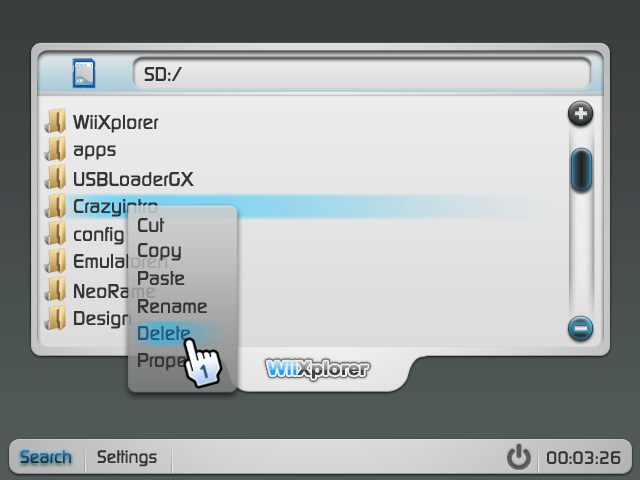
*Rename files/directories | *Rename files/directories. | ||
*Properties of files/directories | *Properties of files/directories. | ||
*Browse through SD/USB/SMB/DVD/WiiDisk | *Browse through SD/USB/SMB/DVD/WiiDisk. | ||
*Addressbar with path | *Addressbar with path. | ||
*Multilanguage with custom font support | *Multilanguage with custom font support. | ||
*Boot .dol/.elf files | *Boot .dol/.elf files. | ||
*Playback Wii/GC Game Videos | *Playback Wii/GC Game Videos. | ||
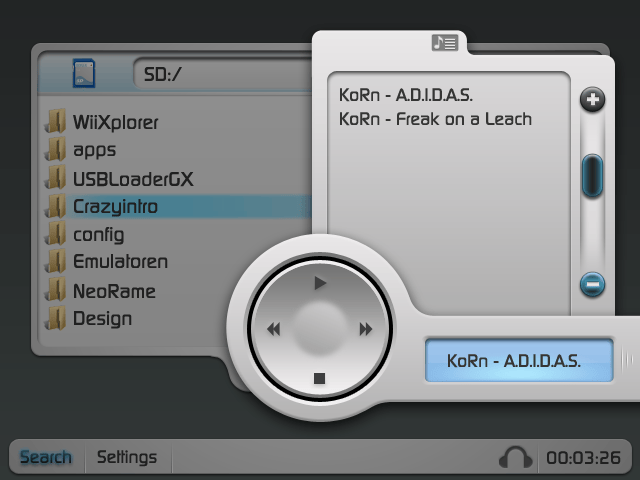
*Stylish Music Player | *Stylish Music Player. | ||
*Open TXT/XML/MP3/OGG/WAV/BNS/AIFF files | *Open TXT/XML/MP3/OGG/WAV/BNS/AIFF files. | ||
*Supported Image Formats: PNG/JPEG/GIF/BMP/TPL/TGA/TIFF/GD/GD2 | *Supported Image Formats: PNG/JPEG/GIF/BMP/TPL/TGA/TIFF/GD/GD2. | ||
*Imageoperations zoom/slideshow | *Imageoperations zoom/slideshow. | ||
*Image converter which converts the supported formats to: PNG/JPEG/GIF/BMP/TIFF/GD/GD2 | *Image converter which converts the supported formats to: PNG/JPEG/GIF/BMP/TIFF/GD/GD2. | ||
*Screenshot support at any point of the app in different formats | *Screenshot support at any point of the app in different formats. | ||
*ZIP/7zip/RAR/BNR/U8Archive/RARC browsing and decompressing | *ZIP/7zip/RAR/BNR/U8Archive/RARC browsing and decompressing. | ||
*Properties of archive files | *Properties of archive files. | ||
*Add files/directories to a ZIP or create new ZIP files | *Add files/directories to a ZIP or create new ZIP files. | ||
*Text Editor | *Text Editor. | ||
*USB Keyboard support | *USB Keyboard support. | ||
*PDF Viewing support | *PDF Viewing support. | ||
*Format SD/USB primary/logical partitions to FAT32 | *Format SD/USB primary/logical partitions to FAT32. | ||
*Integrated FTP Server and FTP Client | *Integrated FTP Server and FTP Client. | ||
*MD5 Calculator and Logger | *MD5 Calculator and Logger. | ||
*Start BootMii | *Start BootMii. | ||
*Auto-Update feature | *Auto-Update feature. | ||
==Controls== | |||
Aim - Move Pointer | |||
A - Click button | |||
B - Close Context menu/Picture | |||
D-Pad - Navigate | |||
Plus - Open Context menu | |||
Minus - DeMark browser item | |||
1 - Mark browser item | |||
==Screenshots== | ==Screenshots== | ||
https://dlhb.gamebrew.org/wiihomebrews/ | https://dlhb.gamebrew.org/wiihomebrews/wiixplorer3.png | ||
https://dlhb.gamebrew.org/wiihomebrews/ | https://dlhb.gamebrew.org/wiihomebrews/wiixplorer4.png | ||
==Media== | ==Media== | ||
'''Playing thp files on Wii discs using Wiixplorer ([https://www.youtube.com/watch?v=gEn07p5WxGo GeneralGir2])'''<br> | |||
<youtube>gEn07p5WxGo</youtube> | <youtube>gEn07p5WxGo</youtube> | ||
== Credits == | == Credits == | ||
*Main Coder | *Main Coder: Dimok. | ||
*Contributors: | *Contributors: R-win, dude. | ||
*Artworks: | *Artworks: NeoRame. | ||
*Iconset: Oxygen | *Iconset: Oxygen. | ||
*Languages: Dj Skual, kavid and all translators | *Languages: Dj Skual, kavid and all translators. | ||
==External links== | ==External links== | ||
* | * WiiBrew - https://wiibrew.org/wiki/WiiXplorer | ||
* | * SourceForge - http://sourceforge.net/projects/wiixplorer/ | ||
Latest revision as of 09:56, 25 February 2023
| WiiXplorer | |
|---|---|
 | |
| General | |
| Author | Dimok |
| Type | File Browsers |
| Version | r259 |
| License | GPL |
| Last Updated | 2013/04/28 |
| Links | |
| Download | |
| Website | |
| Source | |
WiiXplorer is a file explorer for the Nintendo Wii developed by Dimok. The application features graphics created by NeoRame, and uses a customized libwiigui as the foundation for its GUI.
It also includes several additional functionalities that allow it to execute various file types similar to a typical file explorer.
Features
- USB2 support with IOS58 or IOS202 installed.
- SMB/USB/SD/DVD recursive copy/move/delete of files/directories with all files in it.
- FAT/NTFS/EXT2/EXT3/EXT4 files systems support.
- GUID Partition Table (GPT) support.
- Rename files/directories.
- Properties of files/directories.
- Browse through SD/USB/SMB/DVD/WiiDisk.
- Addressbar with path.
- Multilanguage with custom font support.
- Boot .dol/.elf files.
- Playback Wii/GC Game Videos.
- Stylish Music Player.
- Open TXT/XML/MP3/OGG/WAV/BNS/AIFF files.
- Supported Image Formats: PNG/JPEG/GIF/BMP/TPL/TGA/TIFF/GD/GD2.
- Imageoperations zoom/slideshow.
- Image converter which converts the supported formats to: PNG/JPEG/GIF/BMP/TIFF/GD/GD2.
- Screenshot support at any point of the app in different formats.
- ZIP/7zip/RAR/BNR/U8Archive/RARC browsing and decompressing.
- Properties of archive files.
- Add files/directories to a ZIP or create new ZIP files.
- Text Editor.
- USB Keyboard support.
- PDF Viewing support.
- Format SD/USB primary/logical partitions to FAT32.
- Integrated FTP Server and FTP Client.
- MD5 Calculator and Logger.
- Start BootMii.
- Auto-Update feature.
Controls
Aim - Move Pointer
A - Click button
B - Close Context menu/Picture
D-Pad - Navigate
Plus - Open Context menu
Minus - DeMark browser item
1 - Mark browser item
Screenshots
Media
Playing thp files on Wii discs using Wiixplorer (GeneralGir2)
Credits
- Main Coder: Dimok.
- Contributors: R-win, dude.
- Artworks: NeoRame.
- Iconset: Oxygen.
- Languages: Dj Skual, kavid and all translators.
External links
- WiiBrew - https://wiibrew.org/wiki/WiiXplorer
- SourceForge - http://sourceforge.net/projects/wiixplorer/