
Fire By Dashxdr Wii: Difference between revisions
From GameBrew
More actions
Created page with "{{#seo: |title=Wii Homebrew demos (Demos) - GameBrew |title_mode=append |image=firedashxdrwii.jpg |image_alt=Fire by Dashxdr }} {{Infobox Wii Homebrews |title=Fire by Dashxdr..." |
No edit summary |
||
| (4 intermediate revisions by the same user not shown) | |||
| Line 1: | Line 1: | ||
{{Infobox Wii Homebrews | {{Infobox Wii Homebrews | ||
|title=Fire by Dashxdr | |title=Fire by Dashxdr | ||
|image= | |image=firedashxdrwii2.png | ||
|description=SDL plasma fire tutorial | |description=SDL plasma fire tutorial. | ||
|author=Dashxdr | |author=Dashxdr | ||
|lastupdated=2010/09/24 | |lastupdated=2010/09/24 | ||
| Line 15: | Line 9: | ||
|license=GPL | |license=GPL | ||
|download=https://dlhb.gamebrew.org/wiihomebrews/firedashxdrwii.7z | |download=https://dlhb.gamebrew.org/wiihomebrews/firedashxdrwii.7z | ||
|website= | |website=https://wiibrew.org/wiki/Fire | ||
|source=/ | |source=https://dlhb.gamebrew.org/wiihomebrews/firedashxdrwii.7z | ||
}} | }} | ||
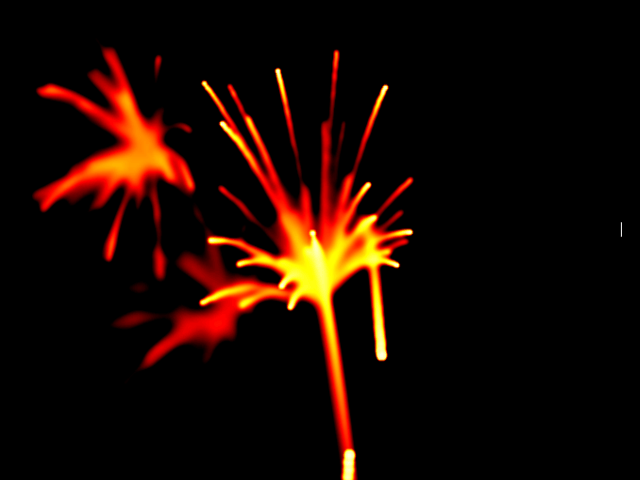
A small SDL demo program that brings the excitement of a fireworks display right to your TV screen. | |||
== Controls == | |||
Aim - Aim pointer | |||
A - Paint "fire" | |||
B - Ignite the atmosphere | |||
Minus/Plus - Cycle through color tables | |||
2 - Take screenshot sd:/fire_grab.ppm | |||
Home - Exit | |||
==Screenshots== | ==Screenshots== | ||
https://dlhb.gamebrew.org/wiihomebrews/firedashxdrwii3.png | |||
==Media== | ==Media== | ||
<youtube></youtube> | '''Fire v1.00 ([https://www.youtube.com/watch?v=7BwEZIFUJYA Cid2Mizard])'''<br> | ||
<youtube>7BwEZIFUJYA</youtube> | |||
==External links== | |||
* WiiBrew - https://wiibrew.org/wiki/Fire | |||
Latest revision as of 05:56, 26 February 2023
| Fire by Dashxdr | |
|---|---|
 | |
| General | |
| Author | Dashxdr |
| Type | Demos |
| Version | 1.01 |
| License | GPL |
| Last Updated | 2010/09/24 |
| Links | |
| Download | |
| Website | |
| Source | |
A small SDL demo program that brings the excitement of a fireworks display right to your TV screen.
Controls
Aim - Aim pointer
A - Paint "fire"
B - Ignite the atmosphere
Minus/Plus - Cycle through color tables
2 - Take screenshot sd:/fire_grab.ppm
Home - Exit
Screenshots
Media
Fire v1.00 (Cid2Mizard)
External links
- WiiBrew - https://wiibrew.org/wiki/Fire