
TWLSaveTool 3DS: Difference between revisions
From GameBrew
More actions
No edit summary |
No edit summary |
||
| (8 intermediate revisions by 2 users not shown) | |||
| Line 1: | Line 1: | ||
{{Infobox 3DS Homebrews | {{Infobox 3DS Homebrews | ||
|title=TWLSaveTool | |title=TWLSaveTool | ||
|image= | |image=Twlsavetool2.png | ||
|description=Manage saves from NDS cartridges. | |description=Manage saves from NDS cartridges. | ||
|author=TuxSH | |author=TuxSH | ||
|lastupdated= | |lastupdated=2024/09/23 | ||
|type= | |type=Save Managers and Editors | ||
|version=1.2 | |version=1.2.1 | ||
|license=GPL-2.0 | |license=GPL-2.0 | ||
|download=https://dlhb.gamebrew.org/3dshomebrews/twlsavetool.7z | |download=https://dlhb.gamebrew.org/3dshomebrews/twlsavetool.7z | ||
| Line 12: | Line 12: | ||
|source=https://github.com/TuxSH/TWLSaveTool | |source=https://github.com/TuxSH/TWLSaveTool | ||
}} | }} | ||
TWLSaveTool is a 3DS homebrew that allows you to read, write, and erase save files from NDS cartridges (just like savegame-manager). | |||
Even though a CIA build is provided for historical reasons, the 3DSX build is the recommended way to use this application. You are expected to run Luma3DS. | |||
==Installation== | ==Installation== | ||
Available in CIA and 3DSX/SMDH formats. | Available in CIA and 3DSX/SMDH formats. | ||
* CIA - Requires an access to CFWs | * CIA - Requires an access to CFWs. | ||
* 3DSX - | * 3DSX - Now the recommended way to run this program. | ||
==User guide== | ==User guide== | ||
===Game compatibility=== | |||
All NDS games should be supported except: | All NDS games should be supported except: | ||
* WarioWare D.I.Y. | * WarioWare D.I.Y. | ||
| Line 31: | Line 29: | ||
* Pokémon Typing Adventure. | * Pokémon Typing Adventure. | ||
===Notes=== | |||
* After creating a backup save file, it is always recommended to keep a backup of this file before importing or editing it with any save editors. | |||
* Make sure the newly created save is in the TWLSaveTool folder on the root of your SD card (not in /3ds/TWLSaveTool), and it has the exact name showed on screen. Otherwise it will not recognize your save file. | |||
==Controls== | ==Controls== | ||
| Line 57: | Line 57: | ||
==Changelog== | ==Changelog== | ||
'''v1.2.1 2024/09/23''' | |||
* Rebuild with latest tools:. | |||
** Fixes build issues with latest tools and greatly reduces binary size. | |||
** Fixes 3DSX compatibility with Luma3DS v8.0+ (from 2017!) and homebrew autoboot. | |||
* Rewrite README. 3DSX build is now the recommended way to run this program, and is now shipped as a single file. | |||
'''v1.2 2016/08/28''' | '''v1.2 2016/08/28''' | ||
* Fix Pokémon Mystery Dungeon: Explorers of Sky (thanks to @Steveice10). | * Fix Pokémon Mystery Dungeon: Explorers of Sky (thanks to @Steveice10). | ||
'''v1.1 2016/02/07''' | '''v1.1 2016/02/07''' | ||
* Doesn't work with PMD EoS. | * Doesn't work with PMD EoS. | ||
| Line 66: | Line 70: | ||
* Fixed glitched text issues, as well as other bugs. | * Fixed glitched text issues, as well as other bugs. | ||
* Simplified the build system. You just have to run make now (pull request [https://github.com/TuxSH/TWLSaveTool/pull/6 #6], thanks @WinterMute). | * Simplified the build system. You just have to run make now (pull request [https://github.com/TuxSH/TWLSaveTool/pull/6 #6], thanks @WinterMute). | ||
'''v1.0 2016/01/31''' | '''v1.0 2016/01/31''' | ||
* First release. | * First release. | ||
==Credits== | ==Credits== | ||
Special thanks to: | |||
* Current contributors. | * Current contributors. | ||
* Apache Thunder, for making the amazing banner and icon used by this homebrew. | * Apache Thunder, for making the amazing banner and icon used by this homebrew. | ||
| Line 82: | Line 84: | ||
* GitHub - https://github.com/TuxSH/TWLSaveTool | * GitHub - https://github.com/TuxSH/TWLSaveTool | ||
* GBAtemp - https://gbatemp.net/threads/release-twlsavetool-v1-0.412887 | * GBAtemp - https://gbatemp.net/threads/release-twlsavetool-v1-0.412887 | ||
Latest revision as of 15:47, 28 September 2024
| TWLSaveTool | |
|---|---|
 | |
| General | |
| Author | TuxSH |
| Type | Save Managers and Editors |
| Version | 1.2.1 |
| License | GPL-2.0 |
| Last Updated | 2024/09/23 |
| Links | |
| Download | |
| Website | |
| Source | |
TWLSaveTool is a 3DS homebrew that allows you to read, write, and erase save files from NDS cartridges (just like savegame-manager).
Even though a CIA build is provided for historical reasons, the 3DSX build is the recommended way to use this application. You are expected to run Luma3DS.
Installation
Available in CIA and 3DSX/SMDH formats.
- CIA - Requires an access to CFWs.
- 3DSX - Now the recommended way to run this program.
User guide
Game compatibility
All NDS games should be supported except:
- WarioWare D.I.Y.
- Band Brothers DX.
- Art Academy DS.
- Pokémon Typing Adventure.
Notes
- After creating a backup save file, it is always recommended to keep a backup of this file before importing or editing it with any save editors.
- Make sure the newly created save is in the TWLSaveTool folder on the root of your SD card (not in /3ds/TWLSaveTool), and it has the exact name showed on screen. Otherwise it will not recognize your save file.
Controls
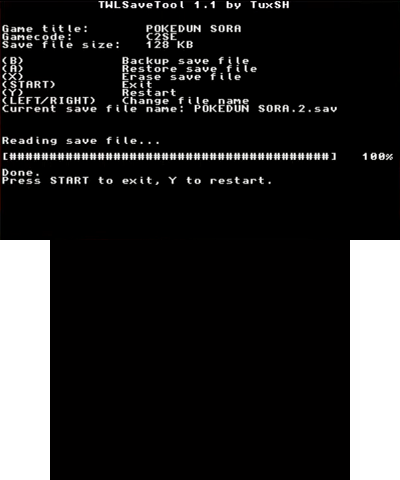
B - Backup save file
A - Restore save file
X - Erase save file
Start - Exit
Y - Restart
Left/Right - Change filename
Screenshots
Media
Backup your nintendo ds game saves on CFW 3ds (GTS 2018)
How To Backup 3DS/DS Saves and Cartridge Roms (The Boolean Gemini)
Changelog
v1.2.1 2024/09/23
- Rebuild with latest tools:.
- Fixes build issues with latest tools and greatly reduces binary size.
- Fixes 3DSX compatibility with Luma3DS v8.0+ (from 2017!) and homebrew autoboot.
- Rewrite README. 3DSX build is now the recommended way to run this program, and is now shipped as a single file.
v1.2 2016/08/28
- Fix Pokémon Mystery Dungeon: Explorers of Sky (thanks to @Steveice10).
v1.1 2016/02/07
- Doesn't work with PMD EoS.
- Added a (very simplistic) file selector.
- Changed the key layout (pull request #5, thanks @lavanoid).
- Fixed glitched text issues, as well as other bugs.
- Simplified the build system. You just have to run make now (pull request #6, thanks @WinterMute).
v1.0 2016/01/31
- First release.
Credits
Special thanks to:
- Current contributors.
- Apache Thunder, for making the amazing banner and icon used by this homebrew.
- Steveice10, for having RE'd PXIDEV:SPIMultiWriteRead.
- idgrepthat, for pointing out that PokéTransporter was indeed using that function.
- Everyone else who helped.