
Connect4DS - Stelek: Difference between revisions
From GameBrew
More actions
Created page with "{{Infobox homebrew | title = Connect4 DS | image = File:Connect4steds.JPG | type = Board | version = October 2008 | licence = Mixed | author ..." |
No edit summary |
||
| (21 intermediate revisions by the same user not shown) | |||
| Line 1: | Line 1: | ||
{{Infobox | {{Infobox DS Homebrews | ||
| title | |title=Connect4 DS | ||
| image | |image=connect4dsste2.png | ||
| type | |description=4 in a row game. | ||
| version | |author=Stelek | ||
| | |lastupdated=2008/10/09 | ||
| | |type=Board | ||
| website | |version=2008 | ||
| | |license=Mixed | ||
|download=https://dlhb.gamebrew.org/dshomebrew2/connect4ds_stelek.rar | |||
}} | |website=http://stelmach-online.net | ||
|discussion={{Tick}} | |||
}} | |||
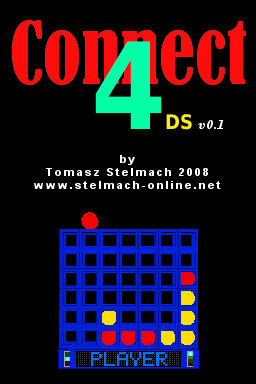
Connect4DS is a Connect 4 board game for the DS. The homebrew is in 3D and can play against the computer. | |||
==Features== | ==Features== | ||
*3 Difficulty Levels | * 3 Difficulty Levels. | ||
*3D Graphics | * 3D Graphics. | ||
*Menu Screen | * Menu Screen. | ||
==User guide== | ==User guide== | ||
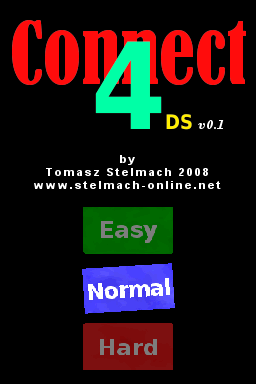
There are three levels of difficulty | There are three levels of difficulty: Easy, Normal and Hard. | ||
==Controls== | ==Controls== | ||
'''Menu:''' | |||
: | |||
D-Pad - Move | |||
[ | A - Select | ||
'''In game:''' | |||
D-Pad - Move the tab | |||
A - Leave the tab in the selected box | |||
L/R - Rotate game table | |||
X - Reset the position of the table | |||
Start - Exit game and return to the Main Menu | |||
A/B/Start - Exit when game is finished | |||
==Screenshots== | |||
https://dlhb.gamebrew.org/dshomebrew/connect4dsste.png | |||
https://dlhb.gamebrew.org/dshomebrew/connect4dsste3.png | |||
<!--BEGIN Online Emulator Section--> | |||
==Online emulator== | |||
{{EmulatorJS Main | |||
|width=515px | |||
|height=384px | |||
|EJS_backgroundImage=https://www.gamebrew.org/images/3/32/Connect4dsste2.png | |||
|EJS_core=desmume2015 | |||
|EJS_gameName=Connect4 DS | |||
|EJS_gameUrl=https://dlhb.gamebrew.org/onlineemulators/nds/connect4dsste.7z | |||
}} | |||
{{DS Control Settings}} | |||
<!--END Online Emulator Section--> | |||
==External links== | |||
* Author's website - [https://web.archive.org/web/20101230033532/http://stelmach-online.net http://stelmach-online.net] (archived) | |||

Latest revision as of 11:59, 20 August 2024
| Connect4 DS | |
|---|---|
| Error creating thumbnail: Unable to save thumbnail to destination | |
| General | |
| Author | Stelek |
| Type | Board |
| Version | 2008 |
| License | Mixed |
| Last Updated | 2008/10/09 |
| Links | |
| Download | |
| Website | |

Connect4DS is a Connect 4 board game for the DS. The homebrew is in 3D and can play against the computer.
Features
- 3 Difficulty Levels.
- 3D Graphics.
- Menu Screen.
User guide
There are three levels of difficulty: Easy, Normal and Hard.
Controls
Menu:
D-Pad - Move
A - Select
In game:
D-Pad - Move the tab
A - Leave the tab in the selected box
L/R - Rotate game table
X - Reset the position of the table
Start - Exit game and return to the Main Menu
A/B/Start - Exit when game is finished
Screenshots
Online emulator
| Nintendo DS | Keyboard |
|---|---|

|

|

|

|

|

|

|

|

|

|

|

|

|

|

|

|

|

|
External links
- Author's website - http://stelmach-online.net (archived)