
3DSident: Difference between revisions
From GameBrew
More actions
No edit summary |
0.9.4 |
||
| (17 intermediate revisions by 2 users not shown) | |||
| Line 1: | Line 1: | ||
{{Infobox 3DS Homebrews | {{Infobox 3DS Homebrews | ||
|title=3DSident | |title=3DSident | ||
|image= | |image=3dsident.png | ||
|description=Check device info similar to PSPident, hence the name 3DSident. | |description=Check device info similar to PSPident, hence the name 3DSident. | ||
|author=joel16 | |author=joel16 | ||
|lastupdated= | |lastupdated=2026/03/25 | ||
|type=System Tools | |type=System Tools | ||
|version=0. | |version=0.9.4 | ||
|license= | |license=Zlib | ||
|download=https://dlhb.gamebrew.org/ | |download=https://dlhb.gamebrew.org/3dshomebrews/3dsident.7z | ||
|website=https://github.com/joel16/3DSident | |website=https://github.com/joel16/3DSident | ||
|source=https://github.com/joel16/3DSident | |source=https://github.com/joel16/3DSident | ||
|donation=https://www.paypal.me/Joel16IA | |||
}} | }} | ||
3DSident is a tool inspired by [[PSPident]], which was originally developed by Jas0nuk and later updated by Yoti. The tool was used to obtain more information about your PSP's motherboard, firmware etc. | |||
Similarly the 3DS version 3DSident aims to display more information about your 3DS. 3DSident is a fork of ctr_vercheck which was originally developed by Wolfvak, and was initially intended to be a small application only used to display FIRM info. | |||
==Features== | |||
== Features | |||
* Current kernel, FIRM and system version detection. | * Current kernel, FIRM and system version detection. | ||
* Display initial system version. | * Display initial system version. | ||
| Line 39: | Line 33: | ||
* AC Adapter connection status. | * AC Adapter connection status. | ||
* Battery percentage (actual battery percentage using mcu::HWC). | * Battery percentage (actual battery percentage using mcu::HWC). | ||
* Displays battery voltage (estimated) | * Displays battery voltage (estimated). | ||
* Displays battery temperature. | |||
* Displays MCU firmware. | * Displays MCU firmware. | ||
* SD detection. | * SD detection. | ||
| Line 60: | Line 55: | ||
* Card slot status and inserted card type (CTR/NAND). | * Card slot status and inserted card type (CTR/NAND). | ||
* Displays parental control pin, email address and secret answer. (GUI exclusive) | * Displays parental control pin, email address and secret answer. (GUI exclusive) | ||
* Displays Wifi slot info (SSID, password, security type). | |||
* Displays Wifi slot info (SSID, password | |||
* Displays original/NAND local friend code seed. | * Displays original/NAND local friend code seed. | ||
* Displays PMIC vendor code and battery vendor code. | |||
* Incorporates a button tester that checks for home button input, 3d and volume slider levels etc. | |||
* Displays manufacturing date. | |||
* Displays SD card cluster size. | |||
==Installation== | |||
3CSX - Copy the 3dsx file to the 3ds folder of the SD card and run it with the Homebrew Launcher. | |||
CIA - Install the cia file with a title manager (i.e. [[FBI 3DS|FBI]]). | |||
==Screenshots== | |||
https://dlhb.gamebrew.org/3dshomebrews/images/3dsident.png | |||
https://dlhb.gamebrew.org/3dshomebrews/images/3dsident2.png | |||
'''Old versions''' <br> | |||
https://dlhb.gamebrew.org/3dshomebrews/images/3dsident3.png | |||
https://dlhb.gamebrew.org/3dshomebrews/images/3dsident4.png | |||
==Changelog== | |||
'''v0.9.4''' | |||
* Updated to the latest version of libctru and devkitARM. | |||
** Now uses the ACT service implementation from libctru for NNID info. | |||
** Only initialize MCU on BatteryInfoPage and system state info. ([https://github.com/R-YaTian @R-YaTian]) | |||
* Changes to button tester by [https://github.com/CatotheCat11 @CatotheCat11] | |||
** Change circle pad and c stick representations using their analog values. | |||
** Highlight segment of D-Pad instead of whole D-Pad when a D-Pad button is pressed. | |||
* Display SD cluster size in storage info page. | |||
'''v0.9.3''' | |||
* Fixed NNID info displaying the following infomration incorrectly: | |||
** Persistent ID. | |||
** Transferable ID Base. | |||
** Principal ID. | |||
* NNID info now displays the following information: | |||
** Account ID. | |||
** Account status (whether the server account was deleted or is active). | |||
** Country tied to the NNID account. | |||
'''v0.9.2''' | |||
* Fixed a discrepancy with check digits when a serial number contains more than two letters. | |||
* Display manufacturing date under the miscellaneous category. | |||
'''v0.9.1''' | |||
* Fixed app metadata and reintroduced .cia builds. | |||
* Button tester can now check for home button inputs. | |||
* Fixed NAND local friend code seed in the system category. | |||
* Display PMIC and battery vendor code under the battery category. | |||
'''v0.9.0''' | |||
* Clean up services that are not constantly used by the UI. | |||
* GUI has been slightly refreshed with icons representing each category. (GUI also uses a dark mode UI) | |||
* Fix running hardware check in the system category. | |||
* Display "check digit" with the serial number in the system category. | |||
* Display battery temperature (both °C/°F) in the battery category. | |||
'''v0.8.0 Final''' | |||
Now displays NAND as well as the original local friend code seed | Both: | ||
* Now displays NAND as well as the original local friend code seed (Useful to know if you've switched your friend code seed before). | |||
* Removed a bunch of unused functions as well as the screenshot feature. (You should be able to use Rosalina now). | |||
* Based off the latest devkitARM toolchain. Both versions are also under one branch now and can be compiled together. | |||
* CIA versions include the new boot logos by FrozenFire. | |||
Original Version: | |||
* Added some features from the GUI version - Now displays mac address for all 3 WiFi slots, card slot status and initial firmware version. | |||
GUI Version: | |||
* Integrated 3DSident button tester. (Use start + select to activate/deactivate). | |||
* Now uses Citro2D and up-to-date tool chain functions as well as many under the hood improvements. | |||
* Slight improvements to UI to make it sort of similar to the Switch version. | |||
[https://github.com/joel16/3DSident/releases Release notes.] | |||
==Credits== | |||
* Preetisketch for the logo/banner. | |||
* devkitPro maintainers and contributors for libctru, citro2d, devkitARM, and other packages used by this project. | |||
* 3DBrew maintainers and contributors for documenting various 3DS hardware/software API information used by this project. | |||
==External links== | |||
* GitHub - https://github.com/joel16/3DSident | |||
* GBAtemp - https://gbatemp.net/threads/release-3dsident.435755 | |||
Latest revision as of 02:07, 27 March 2026
| 3DSident | |
|---|---|
 | |
| General | |
| Author | joel16 |
| Type | System Tools |
| Version | 0.9.4 |
| License | Zlib |
| Last Updated | 2026/03/25 |
| Links | |
| Download | |
| Website | |
| Source | |
| Support Author | |
3DSident is a tool inspired by PSPident, which was originally developed by Jas0nuk and later updated by Yoti. The tool was used to obtain more information about your PSP's motherboard, firmware etc.
Similarly the 3DS version 3DSident aims to display more information about your 3DS. 3DSident is a fork of ctr_vercheck which was originally developed by Wolfvak, and was initially intended to be a small application only used to display FIRM info.
Features
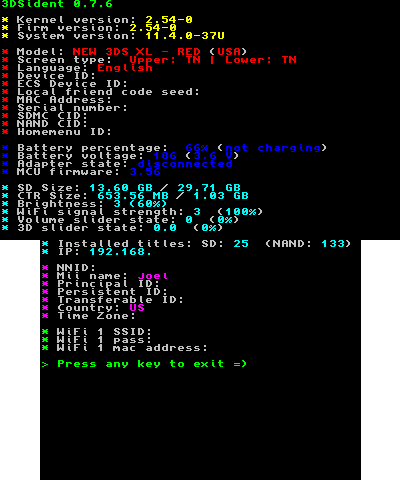
- Current kernel, FIRM and system version detection.
- Display initial system version.
- Model detection with code name and hardware info (Retail/Devboard/Debugger/Capture unit)
- Displays screen type (TN/IPS).
- Displays region.
- Displays language.
- Displays MAC address.
- Displays serial.
- Displays SDMC and NAND CID
- Displays NNID username, principal ID, persistent ID, transferable base ID, country and timezone.
- Displays device ID.
- Displays soap ID.
- Battery charging status.
- AC Adapter connection status.
- Battery percentage (actual battery percentage using mcu::HWC).
- Displays battery voltage (estimated).
- Displays battery temperature.
- Displays MCU firmware.
- SD detection.
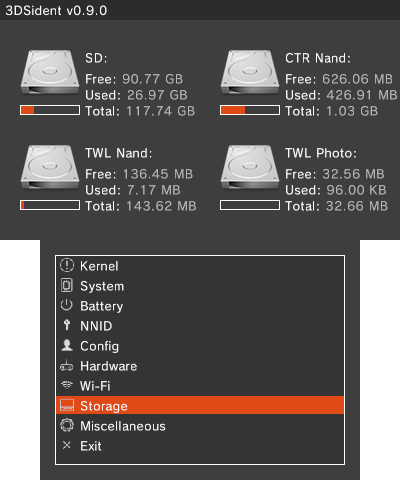
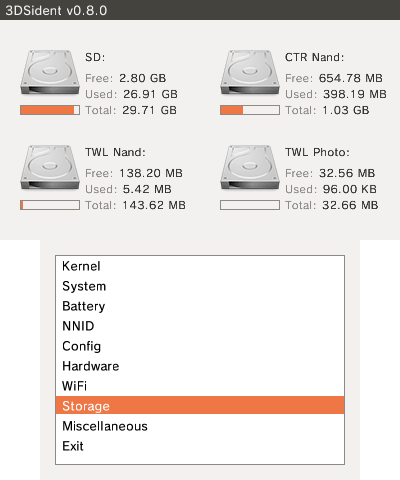
- Displays SD free and total storage capacity.
- Displays CTR free and total storage capacity.
- Displays TWL free and total storage capacity. (GUI exclusive)
- Displays TWL photo free and total storage capacity. (GUI exclusive)
- Displays number of titles installed on SD and NAND.
- Displays number of tickets installed. (GUI exclusive)
- Displays volume slider state and percentage.
- Displays 3D slider state and percentage.
- Displays Wifi signal strength.
- Displays IP address.
- Displays current brightness.
- Display auto-brightness status. (GUI exclusive)
- Display power saving mode. (GUI exclusive)
- Display sound output mode. (GUI exclusive)
- Displays if the console is a debug unit. (GUI exclusive)
- Displays headphone/audio jack status. (GUI exclusive)
- Card slot status and inserted card type (CTR/NAND).
- Displays parental control pin, email address and secret answer. (GUI exclusive)
- Displays Wifi slot info (SSID, password, security type).
- Displays original/NAND local friend code seed.
- Displays PMIC vendor code and battery vendor code.
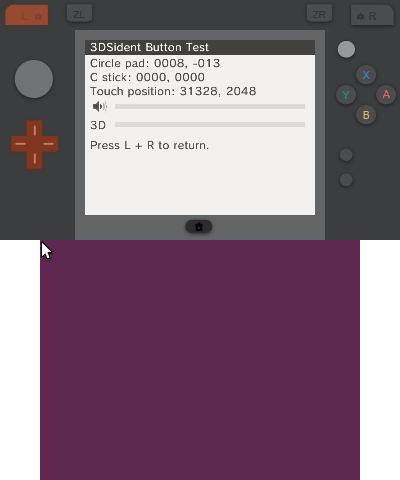
- Incorporates a button tester that checks for home button input, 3d and volume slider levels etc.
- Displays manufacturing date.
- Displays SD card cluster size.
Installation
3CSX - Copy the 3dsx file to the 3ds folder of the SD card and run it with the Homebrew Launcher.
CIA - Install the cia file with a title manager (i.e. FBI).
Screenshots
Old versions
Changelog
v0.9.4
- Updated to the latest version of libctru and devkitARM.
- Now uses the ACT service implementation from libctru for NNID info.
- Only initialize MCU on BatteryInfoPage and system state info. (@R-YaTian)
- Changes to button tester by @CatotheCat11
- Change circle pad and c stick representations using their analog values.
- Highlight segment of D-Pad instead of whole D-Pad when a D-Pad button is pressed.
- Display SD cluster size in storage info page.
v0.9.3
- Fixed NNID info displaying the following infomration incorrectly:
- Persistent ID.
- Transferable ID Base.
- Principal ID.
- NNID info now displays the following information:
- Account ID.
- Account status (whether the server account was deleted or is active).
- Country tied to the NNID account.
v0.9.2
- Fixed a discrepancy with check digits when a serial number contains more than two letters.
- Display manufacturing date under the miscellaneous category.
v0.9.1
- Fixed app metadata and reintroduced .cia builds.
- Button tester can now check for home button inputs.
- Fixed NAND local friend code seed in the system category.
- Display PMIC and battery vendor code under the battery category.
v0.9.0
- Clean up services that are not constantly used by the UI.
- GUI has been slightly refreshed with icons representing each category. (GUI also uses a dark mode UI)
- Fix running hardware check in the system category.
- Display "check digit" with the serial number in the system category.
- Display battery temperature (both °C/°F) in the battery category.
v0.8.0 Final
Both:
- Now displays NAND as well as the original local friend code seed (Useful to know if you've switched your friend code seed before).
- Removed a bunch of unused functions as well as the screenshot feature. (You should be able to use Rosalina now).
- Based off the latest devkitARM toolchain. Both versions are also under one branch now and can be compiled together.
- CIA versions include the new boot logos by FrozenFire.
Original Version:
- Added some features from the GUI version - Now displays mac address for all 3 WiFi slots, card slot status and initial firmware version.
GUI Version:
- Integrated 3DSident button tester. (Use start + select to activate/deactivate).
- Now uses Citro2D and up-to-date tool chain functions as well as many under the hood improvements.
- Slight improvements to UI to make it sort of similar to the Switch version.
Credits
- Preetisketch for the logo/banner.
- devkitPro maintainers and contributors for libctru, citro2d, devkitARM, and other packages used by this project.
- 3DBrew maintainers and contributors for documenting various 3DS hardware/software API information used by this project.