
Maelstrom DS: Difference between revisions
More actions
No edit summary |
No edit summary |
||
| (16 intermediate revisions by the same user not shown) | |||
| Line 1: | Line 1: | ||
{{Infobox | {{Infobox DS Homebrews | ||
| title | |title=Maelstrom DS | ||
| image | |image=maelstromds.png | ||
| type | |description=Based on Tempest. | ||
| version | |author=Philip Corner | ||
| | |lastupdated=2010/01/07 | ||
| | |type=Shooter | ||
| website | |version=2010 | ||
|license=Mixed | |||
| source | |download=https://dlhb.gamebrew.org/dshomebrew2/maelstromds.7z | ||
}} | |website=http://www.vertex.ukfsn.org/maelstromDS/index.html | ||
|source=https://dlhb.gamebrew.org/dshomebrew2/maelstromds.7z | |||
}} | |||
Maelstrom DS is a game demo based on Tempest from Dave Theurer. | Maelstrom DS is a game demo based on Tempest from Dave Theurer. | ||
==User guide== | ==User guide== | ||
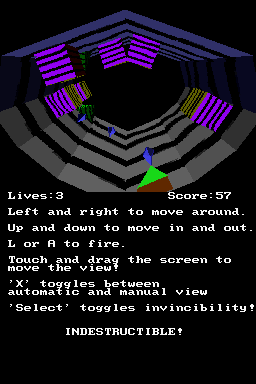
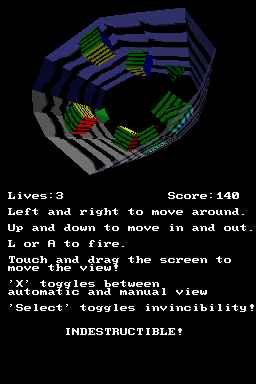
Shoot the enemies coming towards you, and avoid getting hit by them. | |||
The view can be moved by dragging the touch screen. When you do, you'll see that the outside of the tunnel becomes partially transparent to allow you to see all the action! | The view can be moved by dragging the touch screen. When you do, you'll see that the outside of the tunnel becomes partially transparent to allow you to see all the action! | ||
| Line 30: | Line 33: | ||
https://dlhb.gamebrew.org/dshomebrew/maelstromds2.png | https://dlhb.gamebrew.org/dshomebrew/maelstromds2.png | ||
https://dlhb.gamebrew.org/dshomebrew/maelstromds3.png | https://dlhb.gamebrew.org/dshomebrew/maelstromds3.png | ||
<!--BEGIN Online Emulator Section--> | |||
==Online emulator== | |||
{{EmulatorJS Main | |||
|width=515px | |||
|height=384px | |||
|EJS_backgroundImage=https://www.gamebrew.org/images/0/0f/Maelstromds.png | |||
|EJS_core=desmume2015 | |||
|EJS_gameName=Maelstrom DS | |||
|EJS_gameUrl=https://dlhb.gamebrew.org/onlineemulators/nds/maelstromds.7z | |||
}} | |||
{{DS Control Settings}} | |||
<!--END Online Emulator Section--> | |||
==Compatibility== | ==Compatibility== | ||
Can be played on real hardware. | Can be played on real hardware. | ||
| Line 43: | Line 57: | ||
==External links== | ==External links== | ||
* Author's website - [https://web.archive.org/web/20090129163614/http://www.vertex.ukfsn.org/maelstromDS/index.html http://www.vertex.ukfsn.org/maelstromDS/index.html] (archived) | * Author's website - [https://web.archive.org/web/20090129163614/http://www.vertex.ukfsn.org/maelstromDS/index.html http://www.vertex.ukfsn.org/maelstromDS/index.html] (archived) | ||
Latest revision as of 10:11, 6 July 2025
| Maelstrom DS | |
|---|---|
 | |
| General | |
| Author | Philip Corner |
| Type | Shooter |
| Version | 2010 |
| License | Mixed |
| Last Updated | 2010/01/07 |
| Links | |
| Download | |
| Website | |
| Source | |
Maelstrom DS is a game demo based on Tempest from Dave Theurer.
User guide
Shoot the enemies coming towards you, and avoid getting hit by them.
The view can be moved by dragging the touch screen. When you do, you'll see that the outside of the tunnel becomes partially transparent to allow you to see all the action!
Controls
D-Pad - Move around the tunnel, Zoom in/out
A/L - Fire
Stylus - Move view
X - Switch between manual and automatic view (touching the screen switches to manual)
Select - Toggles invincibility
Screenshots
Online emulator
| Nintendo DS | Keyboard |
|---|---|

|

|

|

|

|

|

|

|

|

|

|

|

|

|

|

|

|

|
Compatibility
Can be played on real hardware.
Tested with SuperCard MiniSD and M3 DS Simply.
Credits
Thanks must go to everyone who's contributed to DevKitPro and libnds, particularly the people who implemented the pseudo-OpenGL functions which made writing this demo so easy.
A particular thanks must go to Dovoto who converted the NeHe tutorial demos for use on the DS. Some of the initialisation and texture loading code was taken from these demos.
External links
- Author's website - http://www.vertex.ukfsn.org/maelstromDS/index.html (archived)