
Demo Reset 3DS: Difference between revisions
From GameBrew
More actions
Created page with "{{Infobox-3DS-Homebrews | title = Demo-Reset | image = https://dlhb.gamebrew.org/3dshomebrew/Demo-Reset-3DS.jpg|250px | type = Other Apps | version = 1.0.0 | lastupdated = 202..." |
type |
||
| (9 intermediate revisions by the same user not shown) | |||
| Line 1: | Line 1: | ||
{{Infobox | {{Infobox 3DS Homebrews | ||
| title = Demo-Reset | |title=Demo-Reset | ||
| image = | |image=Demoreset2.png | ||
| | |description=Reset the demo counter. | ||
| | |author=NPX-I7 (Tobi) | ||
| lastupdated = 2020/07/16 | |lastupdated=2020/07/16 | ||
| | |type=System Tools | ||
| | |version=1.0.0 | ||
| | |license=Mixed | ||
| | |download=https://dlhb.gamebrew.org/3dshomebrews/demoreset.7z | ||
| source = https://github.com/NPXTobi/Demo-Reset | |website=https://github.com/NPXTobi/Demo-Reset | ||
|source=https://github.com/NPXTobi/Demo-Reset | |||
}} | }} | ||
Demo-Reset is an application that resets the demo counter of the 3DS. [[Luma3DS]] Required. | |||
==Installation== | |||
Available in 3DSX and CIA formats. | |||
* CIA - Install the .cia with the CIA manager of your choice. | |||
* 3DSX - Use the .3dsx provided with the Homebrew Launcher. | |||
==User guide== | |||
The LED shows whether it was successfully completed or not. | |||
==Controls== | |||
A - Reset | |||
Start - Exit | |||
==Screenshots== | |||
https://dlhb.gamebrew.org/3dshomebrews/demoreset3.png | |||
==Credits== | |||
The App - Tobi. | |||
==External links== | |||
* GitHub - https://github.com/NPXTobi/Demo-Reset | |||
Latest revision as of 02:47, 22 March 2026
| Demo-Reset | |
|---|---|
 | |
| General | |
| Author | NPX-I7 (Tobi) |
| Type | System Tools |
| Version | 1.0.0 |
| License | Mixed |
| Last Updated | 2020/07/16 |
| Links | |
| Download | |
| Website | |
| Source | |
Demo-Reset is an application that resets the demo counter of the 3DS. Luma3DS Required.
Installation
Available in 3DSX and CIA formats.
- CIA - Install the .cia with the CIA manager of your choice.
- 3DSX - Use the .3dsx provided with the Homebrew Launcher.
User guide
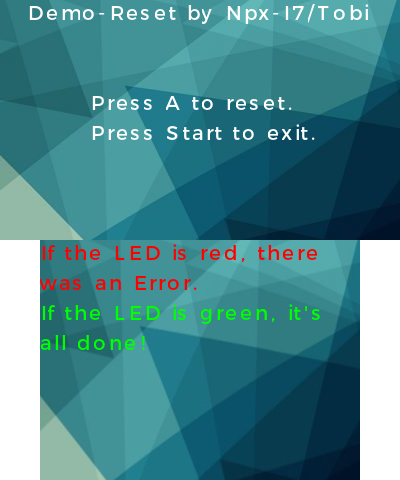
The LED shows whether it was successfully completed or not.
Controls
A - Reset
Start - Exit
Screenshots
Credits
The App - Tobi.