
Orkus: Difference between revisions
From GameBrew
More actions
No edit summary |
No edit summary |
||
| (15 intermediate revisions by the same user not shown) | |||
| Line 1: | Line 1: | ||
{{Infobox | {{Infobox DS Homebrews | ||
| title | |title=Orkus | ||
| image | |image=orkus.png | ||
| type | |description=Puzzle game. | ||
| version | |author=Orkus | ||
| | |lastupdated=2006/05/21 | ||
| | |type=Puzzle | ||
| website | |version=0.4 | ||
|license=Mixed | |||
|download=https://dlhb.gamebrew.org/dshomebrew2/orkus_0.4.zip | |||
|website=http://trollgard.de/orkus/orkus/nds/index.php | |||
}} | |||
Orkus is a DS homebrew puzzle game made with PAlib. A level editor is included. | |||
Orkus | ==Uder guide== | ||
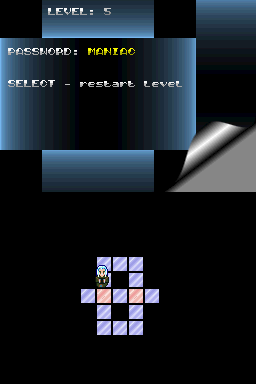
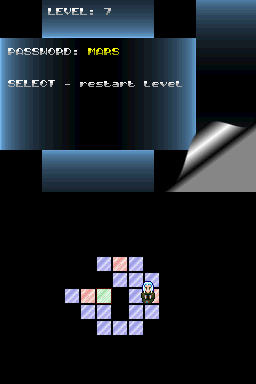
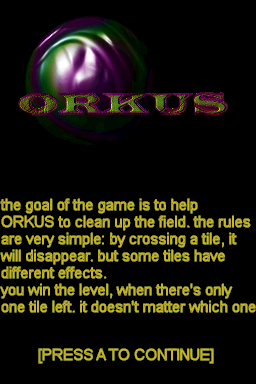
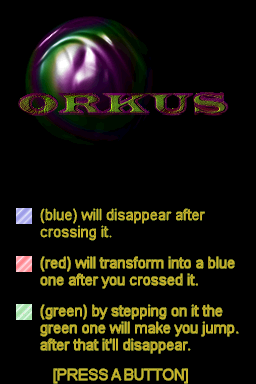
Giude Orkus to clear the field by crossing the tiles: | |||
* Blue tile - Disappears after crossing it. | |||
* Red tile - Will turn into a blue tile after crossing it. | |||
* Green - Makes Orkus jump, after that it will disappear. | |||
==Controls== | |||
D-Pad - Move Orkus | |||
Select - Restart level | |||
==Screenshots== | ==Screenshots== | ||
| Line 19: | Line 30: | ||
https://dlhb.gamebrew.org/dshomebrew/orkus4.png | https://dlhb.gamebrew.org/dshomebrew/orkus4.png | ||
https://dlhb.gamebrew.org/dshomebrew/orkus5.png | https://dlhb.gamebrew.org/dshomebrew/orkus5.png | ||
<!--BEGIN Online Emulator Section--> | |||
==Online emulator== | |||
{{EmulatorJS Main | |||
|width=515px | |||
|height=384px | |||
|EJS_backgroundImage=https://www.gamebrew.org/images/5/53/Orkus.png | |||
|EJS_core=desmume2015 | |||
|EJS_gameName=Orkus | |||
|EJS_gameUrl=https://dlhb.gamebrew.org/onlineemulators/nds/orkus.7z | |||
}} | |||
{{DS Control Settings}} | |||
<!--END Online Emulator Section--> | |||
==Changelog== | ==Changelog== | ||
'''0.4 2006/05/21''' | '''0.4 2006/05/21''' | ||
| Line 42: | Line 64: | ||
==External links== | ==External links== | ||
* Author's website - [https://web.archive.org/web/20090216140048/http://trollgard.de/orkus/orkus/nds/index.php http://trollgard.de/orkus/orkus/nds/index.php] (archived) | * Author's website - [https://web.archive.org/web/20090216140048/http://trollgard.de/orkus/orkus/nds/index.php http://trollgard.de/orkus/orkus/nds/index.php] (archived) | ||
Latest revision as of 02:32, 21 August 2024
| Orkus | |
|---|---|
| Error creating thumbnail: Unable to save thumbnail to destination | |
| General | |
| Author | Orkus |
| Type | Puzzle |
| Version | 0.4 |
| License | Mixed |
| Last Updated | 2006/05/21 |
| Links | |
| Download | |
| Website | |

Orkus is a DS homebrew puzzle game made with PAlib. A level editor is included.
Uder guide
Giude Orkus to clear the field by crossing the tiles:
- Blue tile - Disappears after crossing it.
- Red tile - Will turn into a blue tile after crossing it.
- Green - Makes Orkus jump, after that it will disappear.
Controls
D-Pad - Move Orkus
Select - Restart level
Screenshots
Online emulator
| Nintendo DS | Keyboard |
|---|---|

|

|

|

|

|

|

|

|

|

|

|

|

|

|

|

|

|

|
Changelog
0.4 2006/05/21
- Added menu screen.
- New levels.
- Fixed jump bug (jump too far after 3 green tiles).
0.3 2006/05/19
- Finally fixed the green tile effect (jump into empty room), and included a falling "animation".
- Added 2 new backgrounds.
- Fixed some editor bugs - should work perfectly.
0.2 2006/05/16
- Made a level editor (to enter it press SELECT on menu screen).
0.1 2006/05/15
- Released the first playable version of ORKUS with 15 levels.
0.0 2006/05/09
- Started coding.
External links
- Author's website - http://trollgard.de/orkus/orkus/nds/index.php (archived)