
Eclipse Driving: Difference between revisions
More actions
Created page with "{{Infobox homebrew | title = Eclipse Driving | image = [[]] | type = Rasing | version = 1.05 | licence = Mixed | author = Mastertop101 | website ..." |
No edit summary |
||
| (24 intermediate revisions by the same user not shown) | |||
| Line 1: | Line 1: | ||
{{Infobox | {{Infobox DS Homebrews | ||
| title | |title=Eclipse Driving | ||
| image | |image=eclipsedriving.png | ||
| type | |description=Driving game. | ||
| version | |author=Mastertop101 | ||
| | |lastupdated=2007/04/06 | ||
| | |type=Racing | ||
| website | |version=1.05 | ||
|license=Mixed | |||
|download=https://dlhb.gamebrew.org/dshomebrew2/eclipsedriving_1.05.rar | |||
|website=http://www.playeradvance.org/forum/showthread.php?t=6549 | |||
}} | }} | ||
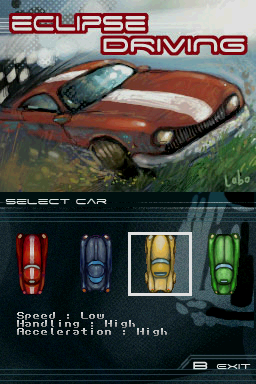
Eclipse Driving is a 2D car driving game for the NDS.The control of the vehicle is realistic which have to go up or down the gears of the car. The game includes the choice between 4 different cars each with different characteristics. There are controls for left-handed/right-handed and is compatible with NDS Motion. | |||
It was released for the NEO Spring Coding Compo 2007 (GBA/NDS Game). | |||
==Features== | |||
* Support NDS motion. | |||
* Select wheel sensitivity. | |||
* 4 selectable cars with different specs (speed, acceleration, handling). | |||
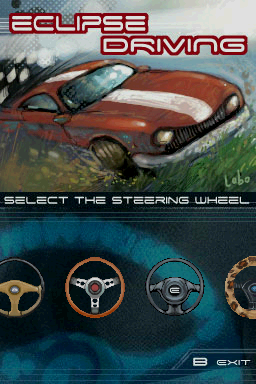
* 4 selectable steerwheel. | |||
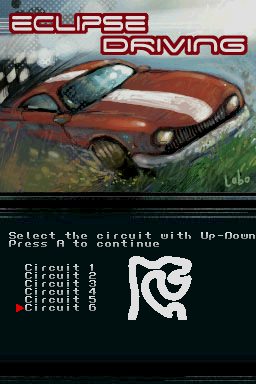
* 6 tracks. | |||
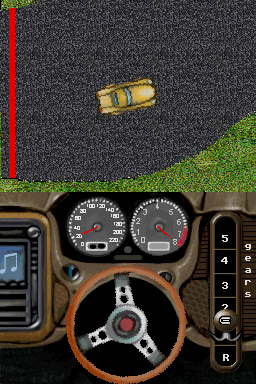
* 5 gears. | |||
== | ==User guide== | ||
The goal is to overcome the circuits in the shortest time possible and go beating the record. | |||
You must use gears correctly in order to be fast; 1st gear accelerates much faster then 6th. | |||
You must utilize brake if you want to play well; the faster you go, the less you turn easily. | |||
You must brake if you want to play well; the faster you go, the less you turn easily. | |||
The car slows down on the grass so make sure to stay on the track. | |||
==Controls== | ==Controls== | ||
'''Basic:''' | '''Basic:''' | ||
Stylus - Turn the wheel left | Stylus - Turn the wheel left/right | ||
Up/X - Accelerate | |||
Down/B - Brake | |||
Right/A - Top up | |||
Left/Y - Lower gear | |||
'''With DS Motion:''' | '''With DS Motion:''' | ||
DS Motion | DS Motion - Turn right and left | ||
R | R/L - Up/Down motion | ||
A - Accelerate | A - Accelerate | ||
| Line 55: | Line 55: | ||
B - Brake | B - Brake | ||
You can activate DS Motion in the Option menu. | |||
==Screenshots== | |||
https://dlhb.gamebrew.org/dshomebrew/eclipsedriving2.png | |||
https://dlhb.gamebrew.org/dshomebrew/eclipsedriving3.png | |||
https://dlhb.gamebrew.org/dshomebrew/eclipsedriving4.png | |||
https://dlhb.gamebrew.org/dshomebrew/eclipsedriving7.png | |||
<!--BEGIN Online Emulator Section--> | |||
==Online emulator== | |||
{{EmulatorJS Main | |||
|width=515px | |||
|height=384px | |||
|EJS_backgroundImage=https://www.gamebrew.org/images/b/b5/Eclipsedriving.png | |||
|EJS_core=desmume2015 | |||
|EJS_gameName=Eclipse Driving | |||
|EJS_gameUrl=https://dlhb.gamebrew.org/onlineemulators/nds/eclipsedriving.7z | |||
}} | |||
{{DS Control Settings}} | |||
<!--END Online Emulator Section--> | |||
==Compatibility== | ==Compatibility== | ||
Works on Original R4DS | Works on Original R4DS (firmware 1.19). | ||
==Changelog== | ==Changelog== | ||
'''1.05''' | '''1.05''' | ||
* | * New graphics, signed Lobo, and the corrrections of some bugs. | ||
[[Category: | |||
'''1.00''' | |||
* 1st version officially released, for the Neoflash contest, finished 11th. | |||
==Credits== | |||
Thanks to: Lobo the graphic designer, Mollusk for the help and Lib, ysilog and Costello who gave advise in C, smealum for the encouragment and all others. | |||
==External links== | |||
* PlayerAdvance.org - http://www.playeradvance.org/forum/showthread.php?t=6549 | |||
* NeoFlash - https://www.neoflash.com/forum/index.php?topic=3963.0 | |||
[[Category:NEO Spring Coding Compo 2007]] | |||
Latest revision as of 12:41, 20 August 2024
| Eclipse Driving | |
|---|---|
 | |
| General | |
| Author | Mastertop101 |
| Type | Racing |
| Version | 1.05 |
| License | Mixed |
| Last Updated | 2007/04/06 |
| Links | |
| Download | |
| Website | |
Eclipse Driving is a 2D car driving game for the NDS.The control of the vehicle is realistic which have to go up or down the gears of the car. The game includes the choice between 4 different cars each with different characteristics. There are controls for left-handed/right-handed and is compatible with NDS Motion.
It was released for the NEO Spring Coding Compo 2007 (GBA/NDS Game).
Features
- Support NDS motion.
- Select wheel sensitivity.
- 4 selectable cars with different specs (speed, acceleration, handling).
- 4 selectable steerwheel.
- 6 tracks.
- 5 gears.
User guide
The goal is to overcome the circuits in the shortest time possible and go beating the record.
You must use gears correctly in order to be fast; 1st gear accelerates much faster then 6th.
You must utilize brake if you want to play well; the faster you go, the less you turn easily.
The car slows down on the grass so make sure to stay on the track.
Controls
Basic:
Stylus - Turn the wheel left/right
Up/X - Accelerate
Down/B - Brake
Right/A - Top up
Left/Y - Lower gear
With DS Motion:
DS Motion - Turn right and left
R/L - Up/Down motion
A - Accelerate
B - Brake
You can activate DS Motion in the Option menu.
Screenshots
Online emulator
| Nintendo DS | Keyboard |
|---|---|

|

|

|

|

|

|

|

|

|

|

|

|

|

|

|

|

|

|
Compatibility
Works on Original R4DS (firmware 1.19).
Changelog
1.05
- New graphics, signed Lobo, and the corrrections of some bugs.
1.00
- 1st version officially released, for the Neoflash contest, finished 11th.
Credits
Thanks to: Lobo the graphic designer, Mollusk for the help and Lib, ysilog and Costello who gave advise in C, smealum for the encouragment and all others.
External links
- PlayerAdvance.org - http://www.playeradvance.org/forum/showthread.php?t=6549
- NeoFlash - https://www.neoflash.com/forum/index.php?topic=3963.0