
Switch-NewPipe: Difference between revisions
More actions
Created page with "{{Infobox Switch Homebrews |title=Switch-NewPipe |image=SwitchNewPipe.png |description=A libre lightweight video streaming frontend for the Nintendo Switch. |author=mirusu400 |lastupdated=2026/04/26 |type=Media Players |version=0.0.3 |license=GPL-3.0 |download=https://dlhb.gamebrew.org/switchhomebrews/SwitchNewPipe.7z |website=https://github.com/mirusu400/switch-newpipe |source=https://github.com/mirusu400/switch-newpipe |donation= }} {{#seo: |title=Switch Homebrew Apps..." |
No edit summary |
||
| (2 intermediate revisions by one other user not shown) | |||
| Line 19: | Line 19: | ||
|image_alt=Switch-NewPipe | |image_alt=Switch-NewPipe | ||
}} | }} | ||
Switch-NewPipe is a free, open-source YouTube client for Nintendo Switch homebrew. It is inspired by [ | Switch-NewPipe is a free, open-source YouTube client for Nintendo Switch homebrew. It is inspired by [https://github.com/TeamNewPipe/NewPipe NewPipe] and requires no Google account, with no ads and no tracking. | ||
== Features == | |||
* Browse Home, Search, Subscriptions, Library, and Settings. | |||
* Watch YouTube at 720p (HLS streaming, no throttle). | |||
* Search for any video and play it immediately. | |||
* Log in with cookies to see subscriptions and personalized recommendations. | |||
* Save watch history and favorites locally. | |||
* English and Korean UI. | |||
== Installation == | |||
Make sure your Switch has Atmosphere CFW with the Homebrew Menu. | |||
Download <code>switch_newpipe.nro</code> from the [https://github.com/mirusu400/switch-newpipe/releases/latest latest release]. | |||
Copy it to <code>sdmc:/switch/switch_newpipe.nro</code>. | |||
== | Launch from the Homebrew Menu. | ||
== User guide == | |||
=== Login (optional) === | |||
Switch-NewPipe uses cookie import for YouTube login, with no OAuth or Google sign-in required. To set it up: | |||
# Export your YouTube cookies from a browser (using a cookie export extension). | |||
# Save the file as <code>sdmc:/switch/switch_newpipe_auth.txt</code>. | |||
# Restart the app. | |||
Supported formats are a raw <code>Cookie</code> header, JSON <code>{"cookie_header":"..."}</code>, or Netscape <code>cookies.txt</code>. Once logged in, the "Subscriptions" tab and personalized Home recommendations become available. | |||
Playback | === Playback Quality === | ||
Configure in the "Settings" tab between three modes: | |||
{| class="wikitable" | {| class="wikitable" | ||
| Line 45: | Line 60: | ||
| Data Saver || Lower quality around 480p to save bandwidth | | Data Saver || Lower quality around 480p to save bandwidth | ||
|} | |} | ||
=== Data files === | === Data files === | ||
All data is stored on the SD card: | All data is stored on the SD card: | ||
| Line 83: | Line 79: | ||
== Controls == | == Controls == | ||
=== Main UI === | |||
A - Play video from list | |||
Y - Open video details | |||
X - Refresh/Reset defaults | |||
RB - Manage login session (Subscriptions tab) | |||
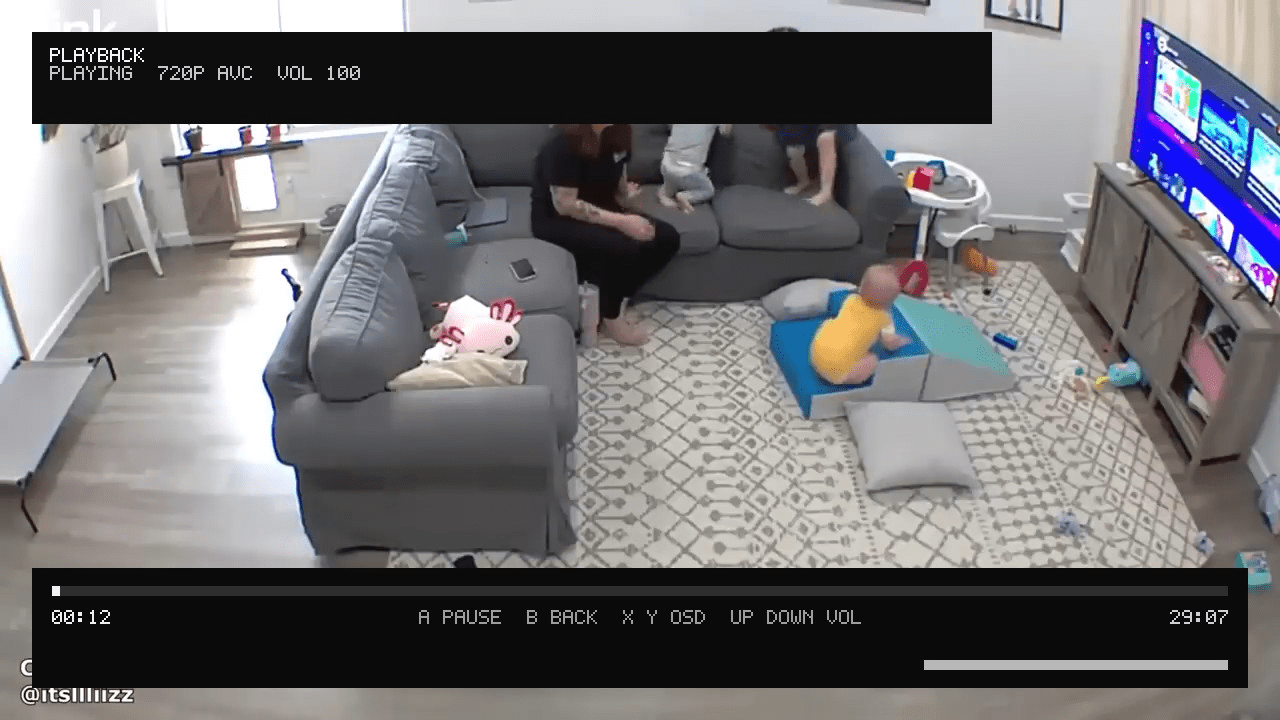
=== Player === | === Player === | ||
A - Pause/Resume | |||
B - Exit player | |||
Up/Down - Volume | |||
X/Y - Toggle OSD overlay | |||
==Screenshots== | ==Screenshots== | ||
{| style= | {| style="max-width:80%; margin-left:0em;" | ||
| | | | ||
https://dlhb.gamebrew.org/switchhomebrews/images/SwitchNewPipe-01.png | https://dlhb.gamebrew.org/switchhomebrews/images/SwitchNewPipe-01.png | ||
| Line 120: | Line 105: | ||
== External links == | == External links == | ||
* | * GitHub - https://github.com/mirusu400/switch-newpipe | ||
* | * Homebrew App Store - https://hb-app.store/switch/switchnewpipe | ||
Latest revision as of 07:09, 22 June 2026
| Switch-NewPipe | |
|---|---|
 | |
| General | |
| Author | mirusu400 |
| Type | Media Players |
| Version | 0.0.3 |
| License | GPL-3.0 |
| Last Updated | 2026/04/26 |
| Links | |
| Download | |
| Website | |
| Source | |
Switch-NewPipe is a free, open-source YouTube client for Nintendo Switch homebrew. It is inspired by NewPipe and requires no Google account, with no ads and no tracking.
Features
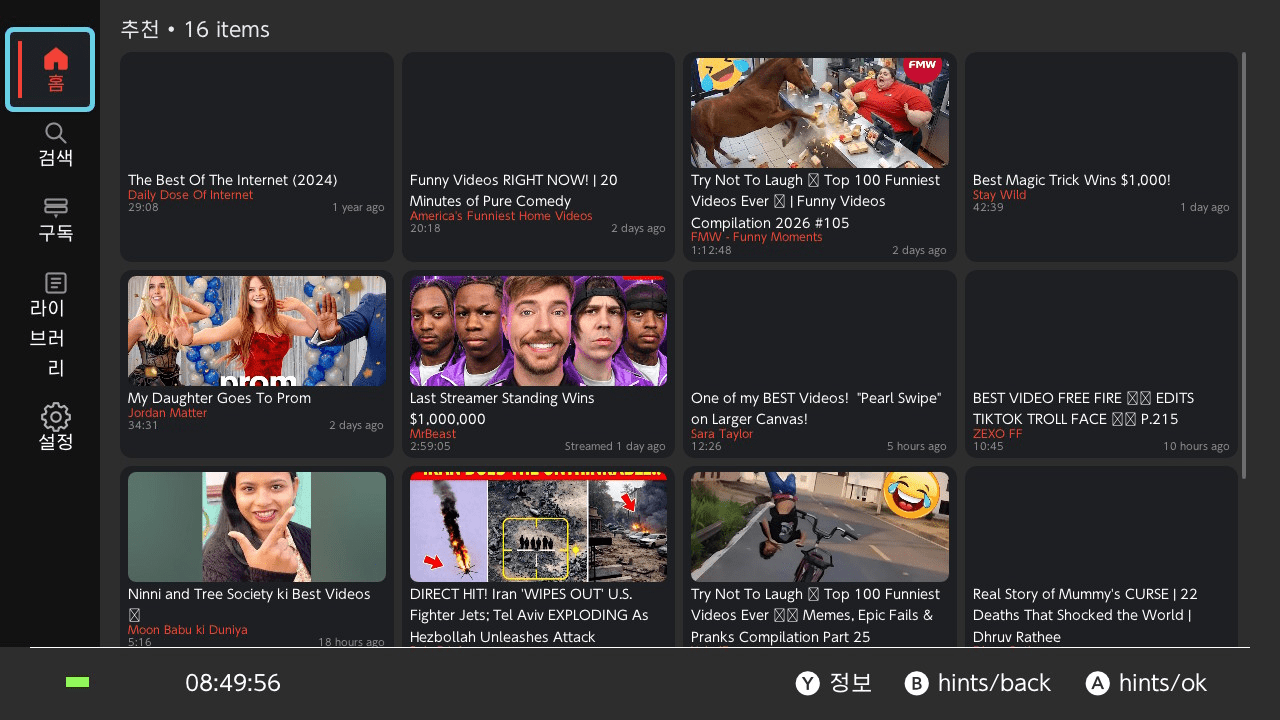
- Browse Home, Search, Subscriptions, Library, and Settings.
- Watch YouTube at 720p (HLS streaming, no throttle).
- Search for any video and play it immediately.
- Log in with cookies to see subscriptions and personalized recommendations.
- Save watch history and favorites locally.
- English and Korean UI.
Installation
Make sure your Switch has Atmosphere CFW with the Homebrew Menu.
Download switch_newpipe.nro from the latest release.
Copy it to sdmc:/switch/switch_newpipe.nro.
Launch from the Homebrew Menu.
User guide
Login (optional)
Switch-NewPipe uses cookie import for YouTube login, with no OAuth or Google sign-in required. To set it up:
- Export your YouTube cookies from a browser (using a cookie export extension).
- Save the file as
sdmc:/switch/switch_newpipe_auth.txt. - Restart the app.
Supported formats are a raw Cookie header, JSON {"cookie_header":"..."}, or Netscape cookies.txt. Once logged in, the "Subscriptions" tab and personalized Home recommendations become available.
Playback Quality
Configure in the "Settings" tab between three modes:
| Mode | Description |
|---|---|
| Standard 720p | Best quality. Tries 720p HLS first, falls back gracefully |
| Compatibility | Prefers progressive MP4 (video and audio combined) |
| Data Saver | Lower quality around 480p to save bandwidth |
Data files
All data is stored on the SD card:
| File | Purpose |
|---|---|
sdmc:/switch/switch_newpipe.log |
Debug log |
sdmc:/switch/switch_newpipe_settings.json |
Settings |
sdmc:/switch/switch_newpipe_library.json |
Watch history and favorites |
sdmc:/switch/switch_newpipe_session.json |
Login session |
sdmc:/switch/switch_newpipe_auth.txt |
Cookie import (user-provided) |
Controls
Main UI
A - Play video from list
Y - Open video details
X - Refresh/Reset defaults
RB - Manage login session (Subscriptions tab)
Player
A - Pause/Resume
B - Exit player
Up/Down - Volume
X/Y - Toggle OSD overlay
Screenshots
|
|
External links
- GitHub - https://github.com/mirusu400/switch-newpipe
- Homebrew App Store - https://hb-app.store/switch/switchnewpipe