
OpenVitaLiero: Difference between revisions
More actions
Created page with "{{Infobox Vita Homebrews |title=OpenVitaLiero |image=OpenVitaLiero.png |description=Port of OpenLiero for PSVita. |author=Ak1M1223 |lastupdated=2026/05/17 |type=Arcade Games |version=0.3 |license=N/A |download=https://dlhb.gamebrew.org/vitahomebrews/OpenVitaLiero.7z |website=https://github.com/Ak1M1223/vitaliero |source=https://github.com/Ak1M1223/vitaliero |donation= }} {{#seo: |title=Vita Homebrew Games (Arcade Games) - GameBrew |title_mode=append |image=OpenVitaLiero...." |
No edit summary |
||
| Line 19: | Line 19: | ||
|image_alt=OpenVitaLiero | |image_alt=OpenVitaLiero | ||
}} | }} | ||
Earthworm simulation game based on a real physical model. Features: 2 worms, 40 weapons, great playability. Four game modes: Kill'em All, Game of Tag, Capture the Flag and Simple CtF! | Earthworm simulation game based on a real physical model. Features: 2 worms, 40 weapons, great playability. | ||
Four game modes: Kill'em All, Game of Tag, Capture the Flag and Simple CtF! | |||
== Installation == | == Installation == | ||
Copy <code>openlierovita.vpk</code> to the folder of your choosing and install it through VitaShell or a similar program. | |||
Create a folder on your Vita at <code>ux0:data/openliero</code> and copy the <code>TC</code> folder to it. The directory should look like: <code>ux0:data/openliero/TC/*</code> | |||
If you want to add levels, mods, or other content, place them in the <code>ux0:data/openliero</code> directory. Folders for mappacks are also supported. Use the original project to generate data from legacy liero. | |||
== User guide == | |||
Select acts as an Escape Key. | |||
Start acts as an Enter Key. | |||
Set up Left and Right player configs and keybinds. | |||
== Controls == | == Controls == | ||
D-Pad Up/Down - Aim up/down | |||
D-Pad Left/Right - Left/Right | |||
Cross - Shot | |||
Circle - Jump | |||
Triangle+D-Pad Left/Right - Change weapon | |||
Square - Dig | |||
==Screenshots== | ==Screenshots== | ||
| Line 67: | Line 68: | ||
== External links == | == External links == | ||
* | * GitHub - https://github.com/Ak1M1223/vitaliero | ||
* VitaDB - https://www.rinnegatamante.eu/vitadb/#/info/1398 | * VitaDB - https://www.rinnegatamante.eu/vitadb/#/info/1398 | ||
Latest revision as of 05:06, 22 May 2026
| OpenVitaLiero | |
|---|---|
 | |
| General | |
| Author | Ak1M1223 |
| Type | Arcade Games |
| Version | 0.3 |
| License | N/A |
| Last Updated | 2026/05/17 |
| Links | |
| Download | |
| Website | |
| Source | |
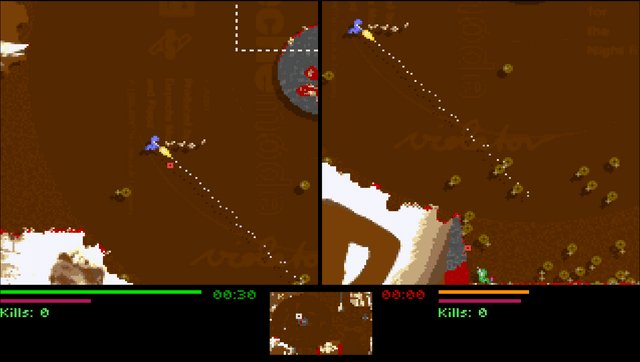
Earthworm simulation game based on a real physical model. Features: 2 worms, 40 weapons, great playability.
Four game modes: Kill'em All, Game of Tag, Capture the Flag and Simple CtF!
Installation
Copy openlierovita.vpk to the folder of your choosing and install it through VitaShell or a similar program.
Create a folder on your Vita at ux0:data/openliero and copy the TC folder to it. The directory should look like: ux0:data/openliero/TC/*
If you want to add levels, mods, or other content, place them in the ux0:data/openliero directory. Folders for mappacks are also supported. Use the original project to generate data from legacy liero.
User guide
Select acts as an Escape Key.
Start acts as an Enter Key.
Set up Left and Right player configs and keybinds.
Controls
D-Pad Up/Down - Aim up/down
D-Pad Left/Right - Left/Right
Cross - Shot
Circle - Jump
Triangle+D-Pad Left/Right - Change weapon
Square - Dig
Screenshots
Changelog
v0.3
- Added joystick control.
- New default configuration sets the right player as a CPU and adds generic names (Player/Bot).
v0.2
- Added Vita bubble menu icons and splashscreen.
- Added Vita textbox/displaybox handling (for names, profile names, configs, etc.).
- Added default configuration generation compatible with Vita.
- Fixed laggy controls.
- Disabled replay functionality (double SDL windows on PSVita are considered pointless); recording is still an option and is off by default.
v0.1
- First release. Many things might not work.
- Included OpenLiero data files.