
Doodle 3DS: Difference between revisions
More actions
Created page with " {{Infobox 3DS Homebrews |title=Doodle |image=Doodle3DS.png |description=A collaborative drawing application for 3DS consoles. |author=Thomas Armstrong |lastupdated=2024/12/30 |type=Other Apps |version=1.0.1 |license=MIT |download=https://dlhb.gamebrew.org/3dshomebrews/Doodle3DS.7z |website=https://github.com/ArmstrongThomas/Doodle |source=https://github.com/ArmstrongThomas/Doodle }} Doodle is a simple drawing application designed for the Nintendo 3DS platform. It allows..." |
1.3.3 |
||
| (One intermediate revision by the same user not shown) | |||
| Line 1: | Line 1: | ||
{{Infobox 3DS Homebrews | {{Infobox 3DS Homebrews | ||
|title=Doodle | |title=Collab Doodle | ||
|image=Doodle3DS.png | |image=Doodle3DS.png | ||
|description=A collaborative drawing application for 3DS consoles. | |description=A collaborative drawing application for 3DS consoles. | ||
|author=Thomas Armstrong | |author=Thomas Armstrong | ||
|lastupdated= | |lastupdated=2026/07/01 | ||
|type=Other Apps | |type=Other Apps | ||
|version=1. | |version=1.3.3 | ||
|license=MIT | |license=MIT | ||
|download=https://dlhb.gamebrew.org/3dshomebrews/Doodle3DS.7z | |download=https://dlhb.gamebrew.org/3dshomebrews/Doodle3DS.7z | ||
| Line 13: | Line 12: | ||
|source=https://github.com/ArmstrongThomas/Doodle | |source=https://github.com/ArmstrongThomas/Doodle | ||
}} | }} | ||
Doodle is a | Collab Doodle is a Nintendo 3DS homebrew client for drawing together on shared server-backed canvases. The bottom screen is the drawing surface, and the top screen shows a minimap, channel/status information, controls, and the current app version. | ||
Server Information: | Server Information: | ||
* Live canvas viewer: https://doodle.7db.pw/ | |||
* Gallery: https://doodle.7db.pw/gallery.html | |||
* Legacy gallery redirect: http://server1.rpgwo.org/ | |||
== Features == | |||
* Real-time collaborative drawing with the 3DS touchscreen. | |||
* Top-screen minimap with viewport marker. | |||
* Zoom levels: <code>0.5x</code>, <code>1x</code>, <code>2x</code>, and <code>4x</code>. | |||
* Named channels: <code>main</code>, <code>sketch</code>, and <code>test</code>. | |||
* Channel switch UI on the 3DS. | |||
* Color picker, color sampling, brush size/shape controls, and quick eraser. | |||
* Color-square picker with hue strip and circle/box/dither/eraser brush modes. | |||
* Device identity, display name, backup-code recovery, and connected-user list. | |||
* Mod/admin canvas tools with snapshot, clear, and selection-style fill rectangle. | |||
* Compressed canvas snapshots using zlib. | |||
* Server update checks with manifest, size, and SHA-256 verification. | |||
* App metadata/icon via SMDH, including the visible app version/build label. | |||
* Optional <code>.cia</code> packaging when <code>makerom.exe</code> is installed. | |||
== Installation == | |||
Copy the .3dsx to the SD card, run it with the Homebrew Launcher. | |||
Or send it with 3dslink while the Homebrew Launcher netloader is waiting: | |||
3dslink -a <3ds-ip> -r 10 Doodle.3dsx | |||
== Controls == | == Controls == | ||
Touch bottom screen - Draw | |||
Circle Pad - Pan viewport | |||
Hold D-Pad Left or A+Drag stylus - Pan viewport | |||
Hold L or R - Temporarily switch to eraser; release to return to the previous brush | |||
Hold D-Pad Right - Show zoom buttons on the right side of the bottom screen | |||
Hold Y - Show zoom buttons on the left side of the bottom screen | |||
Hold D-Pad Right or Y+Tap [+] - Zoom in | |||
Hold D-Pad Right or Y+Tap [-] - Zoom out | |||
Start - Refresh canvas from server | |||
Select - Open menu | |||
Menu includes channels, connected users, controls, status, identity, admin tools, and exit | |||
B or D-Pad Down - Toggle color picker | |||
Color picker tabs - COLOR and MOD | |||
MOD tab - Snapshot, clear canvas, and fill rectangle. Fill rectangle arms a selection; release stylus to fill using the selected color | |||
X - | Hold D-Pad Up or X+Tap canvas - Sample color | ||
== Screenshots == | == Screenshots == | ||
| Line 43: | Line 75: | ||
== Changelog == | == Changelog == | ||
'''v1.3.3''' | |||
* Text chat has been removed so Collab Doodle can stay focused on shared drawing. | |||
* What's new: | |||
** Added a dedicated eraser tool. | |||
** Hold L or R to temporarily switch to the eraser, then release to return to your previous brush. | |||
** Added Circle Pad panning support. | |||
** Improved the dither brush. | |||
** A random drawing color is chosen when the app starts. | |||
** Color sampling with Up or X now updates the color picker correctly. | |||
** Added better disconnect handling, including a popup when the app loses connection. | |||
** Updated the rules/tutorial flow and controls text. | |||
'''v1.3.0''' | |||
* New | |||
** Public chat is now available from the in-app menu. | |||
** New messages can play a soft notification sound. | |||
** Chat sound can be toggled on or off from the chat screen. | |||
** Recent chat messages load automatically when opening chat. | |||
** Long chat messages wrap better. | |||
** Chat messages can be reported from the 3DS. | |||
** The connected user list is now visible in chat. | |||
** Your name and identity now persist between launches. | |||
* How to Use Chat | |||
** Press <code>SELECT</code> to open the menu. | |||
** Choose <code>Chat</code>. | |||
** Tap <code>Send</code> or press <code>A</code> to open the keyboard. | |||
** Type your message and confirm. | |||
** Use <code>Up/Down</code> to select older or newer messages. | |||
** Tap <code>Report</code> to report the selected message. | |||
** Use <code>Sound On/Off</code> to toggle chat notification sounds. | |||
** Only the most recent public chat messages are shown. | |||
* Setting Your Identity | |||
** Press <code>SELECT</code> to open the menu. | |||
** Choose <code>Identity</code>. | |||
** Press <code>A</code> to change your display name. | |||
** Press <code>Y</code> to create or view your backup code. | |||
** Save your backup code somewhere safe. | |||
** Your backup code can be used later to recover your identity on another device. | |||
'''v1.2.2''' | |||
* What's New | |||
** Improved update checking so the app can find new versions more reliably. | |||
** Added support for updating older versions of the app during the server move. | |||
** Improved support for both <code>.3dsx</code> and <code>.cia</code> versions. | |||
** Added early account/identity support so moderation and safety features can work better. | |||
** General connection and compatibility improvements. | |||
* About Identities | |||
** Collab Doodle now creates a simple identity for your 3DS. This helps the server remember who you are between launches and allows moderation tools to work properly if someone misuses the shared canvas. | |||
** You may also see or create a backup code. Keep this somewhere safe if you want to recover your identity later, such as after changing SD cards or using a different 3DS. | |||
'''v1.2.0''' | |||
* New bottom-screen tool palette with Color and Mod tabs. | |||
* Color-square picker with hue strip. | |||
* Circle, box, and dither brush modes. | |||
* Cleaner mod/admin tools, including snapshot, clear canvas, and selection-style fill rectangle. | |||
* Persistent 3DS identity with display names, backup codes, and account recovery. | |||
* Connected-user list and improved top-screen status/menu flow. | |||
'''v1.1.1''' | |||
* Implemented zoom functionality! | |||
* Zoom levels: 0.5x, 1x, 2x, and 4x. | |||
'''v1.0.1''' | '''v1.0.1''' | ||
Network Updates: | * Network Updates: | ||
** Updated backend connection code to support domains for server connection | |||
** Added some reconnect functionality | |||
'''v1.0.0''' | '''v1.0.0''' | ||
* Initial release. | * Initial release. | ||
Latest revision as of 02:41, 3 July 2026
| Collab Doodle | |
|---|---|
 | |
| General | |
| Author | Thomas Armstrong |
| Type | Other Apps |
| Version | 1.3.3 |
| License | MIT License |
| Last Updated | 2026/07/01 |
| Links | |
| Download | |
| Website | |
| Source | |
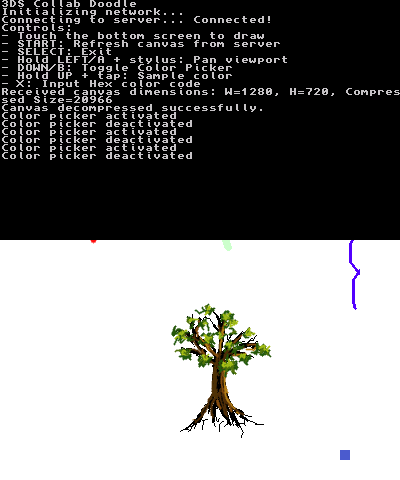
Collab Doodle is a Nintendo 3DS homebrew client for drawing together on shared server-backed canvases. The bottom screen is the drawing surface, and the top screen shows a minimap, channel/status information, controls, and the current app version.
Server Information:
- Live canvas viewer: https://doodle.7db.pw/
- Gallery: https://doodle.7db.pw/gallery.html
- Legacy gallery redirect: http://server1.rpgwo.org/
Features
- Real-time collaborative drawing with the 3DS touchscreen.
- Top-screen minimap with viewport marker.
- Zoom levels:
0.5x,1x,2x, and4x. - Named channels:
main,sketch, andtest. - Channel switch UI on the 3DS.
- Color picker, color sampling, brush size/shape controls, and quick eraser.
- Color-square picker with hue strip and circle/box/dither/eraser brush modes.
- Device identity, display name, backup-code recovery, and connected-user list.
- Mod/admin canvas tools with snapshot, clear, and selection-style fill rectangle.
- Compressed canvas snapshots using zlib.
- Server update checks with manifest, size, and SHA-256 verification.
- App metadata/icon via SMDH, including the visible app version/build label.
- Optional
.ciapackaging whenmakerom.exeis installed.
Installation
Copy the .3dsx to the SD card, run it with the Homebrew Launcher.
Or send it with 3dslink while the Homebrew Launcher netloader is waiting:
3dslink -a <3ds-ip> -r 10 Doodle.3dsx
Controls
Touch bottom screen - Draw
Circle Pad - Pan viewport
Hold D-Pad Left or A+Drag stylus - Pan viewport
Hold L or R - Temporarily switch to eraser; release to return to the previous brush
Hold D-Pad Right - Show zoom buttons on the right side of the bottom screen
Hold Y - Show zoom buttons on the left side of the bottom screen
Hold D-Pad Right or Y+Tap [+] - Zoom in
Hold D-Pad Right or Y+Tap [-] - Zoom out
Start - Refresh canvas from server
Select - Open menu
Menu includes channels, connected users, controls, status, identity, admin tools, and exit
B or D-Pad Down - Toggle color picker
Color picker tabs - COLOR and MOD
MOD tab - Snapshot, clear canvas, and fill rectangle. Fill rectangle arms a selection; release stylus to fill using the selected color
Hold D-Pad Up or X+Tap canvas - Sample color
Screenshots
Changelog
v1.3.3
- Text chat has been removed so Collab Doodle can stay focused on shared drawing.
- What's new:
- Added a dedicated eraser tool.
- Hold L or R to temporarily switch to the eraser, then release to return to your previous brush.
- Added Circle Pad panning support.
- Improved the dither brush.
- A random drawing color is chosen when the app starts.
- Color sampling with Up or X now updates the color picker correctly.
- Added better disconnect handling, including a popup when the app loses connection.
- Updated the rules/tutorial flow and controls text.
v1.3.0
- New
- Public chat is now available from the in-app menu.
- New messages can play a soft notification sound.
- Chat sound can be toggled on or off from the chat screen.
- Recent chat messages load automatically when opening chat.
- Long chat messages wrap better.
- Chat messages can be reported from the 3DS.
- The connected user list is now visible in chat.
- Your name and identity now persist between launches.
- How to Use Chat
- Press
SELECTto open the menu. - Choose
Chat. - Tap
Sendor pressAto open the keyboard. - Type your message and confirm.
- Use
Up/Downto select older or newer messages. - Tap
Reportto report the selected message. - Use
Sound On/Offto toggle chat notification sounds. - Only the most recent public chat messages are shown.
- Press
- Setting Your Identity
- Press
SELECTto open the menu. - Choose
Identity. - Press
Ato change your display name. - Press
Yto create or view your backup code. - Save your backup code somewhere safe.
- Your backup code can be used later to recover your identity on another device.
- Press
v1.2.2
- What's New
- Improved update checking so the app can find new versions more reliably.
- Added support for updating older versions of the app during the server move.
- Improved support for both
.3dsxand.ciaversions. - Added early account/identity support so moderation and safety features can work better.
- General connection and compatibility improvements.
- About Identities
- Collab Doodle now creates a simple identity for your 3DS. This helps the server remember who you are between launches and allows moderation tools to work properly if someone misuses the shared canvas.
- You may also see or create a backup code. Keep this somewhere safe if you want to recover your identity later, such as after changing SD cards or using a different 3DS.
v1.2.0
- New bottom-screen tool palette with Color and Mod tabs.
- Color-square picker with hue strip.
- Circle, box, and dither brush modes.
- Cleaner mod/admin tools, including snapshot, clear canvas, and selection-style fill rectangle.
- Persistent 3DS identity with display names, backup codes, and account recovery.
- Connected-user list and improved top-screen status/menu flow.
v1.1.1
- Implemented zoom functionality!
- Zoom levels: 0.5x, 1x, 2x, and 4x.
v1.0.1
- Network Updates:
- Updated backend connection code to support domains for server connection
- Added some reconnect functionality
v1.0.0
- Initial release.