
CEC Tool 3DS: Difference between revisions
From GameBrew
More actions
No edit summary |
|||
| (One intermediate revision by the same user not shown) | |||
| Line 2: | Line 2: | ||
|title=CEC Tool | |title=CEC Tool | ||
|image=CECTool3DS.png | |image=CECTool3DS.png | ||
|description= | |description=Utility to help you inspect and debug the contents of your CEC/StreetPass data. | ||
|author=sorunome | |author=sorunome | ||
|lastupdated=2025/11/01 | |lastupdated=2025/11/01 | ||
| Line 19: | Line 19: | ||
|image_alt=CEC Tool | |image_alt=CEC Tool | ||
}} | }} | ||
CEC Tool is a 3DS utility for inspecting, debugging, and exporting CEC (StreetPass) data on the Nintendo 3DS. CEC (Communication Exchange for Console) is the system used by the 3DS for StreetPass functionality. | |||
== Features == | == Features == | ||
* Inspect CEC/StreetPass data stored on the console | * Inspect CEC/StreetPass data stored on the console. | ||
* Debug StreetPass data | * Debug StreetPass data. | ||
* Export CEC/StreetPass data | * Export CEC/StreetPass data. | ||
== Installation == | == Installation == | ||
Available in both 3DSX and CIA formats. | Available in both 3DSX and CIA formats. | ||
3DSX: | |||
* Download <code>cec-tool.3dsx</code> from the GitLab releases page. | |||
* Place the file in the <code>/3ds/</code> folder on your SD card. | |||
* Launch via the Homebrew Launcher. | |||
* | CIA: | ||
* | * Download <code>cec-tool.cia</code> from the GitLab releases page. | ||
* Install using [[FBI 3DS|FBI]] or another CIA installer. | |||
* Launch from the HOME Menu. | |||
==Screenshots== | ==Screenshots== | ||
https://dlhb.gamebrew.org/3dshomebrews/images/CECTool3DS-01.png | https://dlhb.gamebrew.org/3dshomebrews/images/CECTool3DS-01.png | ||
https://dlhb.gamebrew.org/3dshomebrews/images/CECTool3DS-02.png | https://dlhb.gamebrew.org/3dshomebrews/images/CECTool3DS-02.png | ||
==Changelog== | ==Changelog== | ||
'''v1.0''' | '''v1.0''' | ||
* First Release. | * First Release. | ||
==Credits== | |||
* Programming: Sorunome | |||
* Music: Batteries | |||
* Logo & Banner Art: Hana | |||
* Banner Animation: Miles | |||
== External links == | == External links == | ||
* | * GitHub - https://gitlab.com/sorunome/cectool | ||
* GBAtemp - https://gbatemp.net/threads/cec-tool-debug-your-consoles-cec-streetpass-data.676743/ | |||
Latest revision as of 04:33, 16 March 2026
| CEC Tool | |
|---|---|
 | |
| General | |
| Author | sorunome |
| Type | Utilities |
| Version | 0.1.0 |
| License | GPL-3.0 |
| Last Updated | 2025/11/01 |
| Links | |
| Download | |
| Website | |
| Source | |
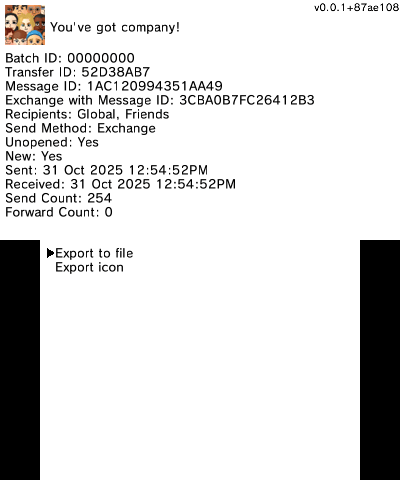
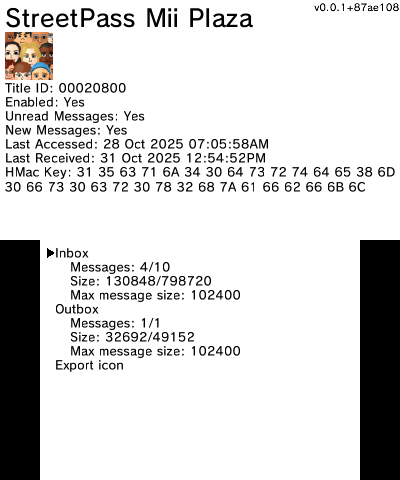
CEC Tool is a 3DS utility for inspecting, debugging, and exporting CEC (StreetPass) data on the Nintendo 3DS. CEC (Communication Exchange for Console) is the system used by the 3DS for StreetPass functionality.
Features
- Inspect CEC/StreetPass data stored on the console.
- Debug StreetPass data.
- Export CEC/StreetPass data.
Installation
Available in both 3DSX and CIA formats.
3DSX:
- Download
cec-tool.3dsxfrom the GitLab releases page. - Place the file in the
/3ds/folder on your SD card. - Launch via the Homebrew Launcher.
CIA:
- Download
cec-tool.ciafrom the GitLab releases page. - Install using FBI or another CIA installer.
- Launch from the HOME Menu.
Screenshots
Changelog
v1.0
- First Release.
Credits
- Programming: Sorunome
- Music: Batteries
- Logo & Banner Art: Hana
- Banner Animation: Miles