
KeyX Switch: Difference between revisions
From GameBrew
More actions
No edit summary |
No edit summary |
||
| (5 intermediate revisions by one other user not shown) | |||
| Line 4: | Line 4: | ||
|description=Nintendo Switch Key Helper - Supports Turbo and Button Remapping. | |description=Nintendo Switch Key Helper - Supports Turbo and Button Remapping. | ||
|author=TOM-BadEN | |author=TOM-BadEN | ||
|lastupdated=2025/12/ | |lastupdated=2025/12/26 | ||
|type=Overlays | |type=Overlays | ||
|version=1. | |version=1.5.6 | ||
|license=Mixed | |license=Mixed | ||
|download=https://dlhb.gamebrew.org/switchhomebrews/KeyXSwitch.7z | |download=https://dlhb.gamebrew.org/switchhomebrews/KeyXSwitch.7z | ||
| Line 23: | Line 23: | ||
== Features == | == Features == | ||
* General: | * General: | ||
** | ** Beautiful and modern UI design. | ||
** Dynamically modify turbo and mapping settings. | ** Dynamically modify turbo and mapping settings. | ||
** Optional | ** Record macros directly using Tesla overlay with comprehensive guidance. | ||
** Optional notification popups. | |||
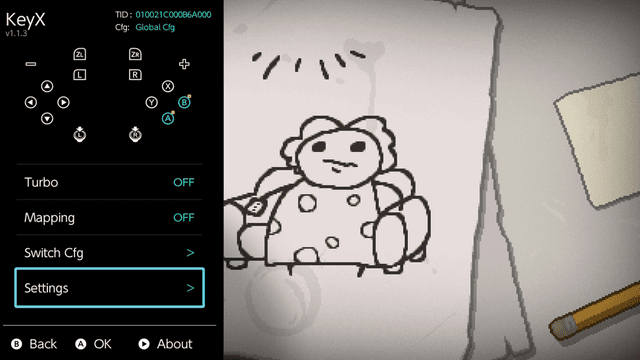
** Blue icons on home page indicate remapped buttons. | |||
** Yellow badges indicate turbo-enabled buttons. | |||
** Red badges indicate macro-bound buttons. | |||
* Key Mapping: | * Key Mapping: | ||
** Remap 16 buttons (A/B/X/Y/L/R/ZL/ZR/D-pad/SELECT/START/L3/R3). | ** Remap 16 buttons (A/B/X/Y/L/R/ZL/ZR/D-pad/SELECT/START/L3/R3). | ||
| Line 39: | Line 43: | ||
** Global and per-game configuration. | ** Global and per-game configuration. | ||
** Auto-remembers on/off state. | ** Auto-remembers on/off state. | ||
* Macro: | |||
** Auto-remembers macro function on/off state. | |||
** Both stick and button states are recorded. | |||
** Maximum recording duration: 30 seconds. | |||
** Recording frame rate: 120 FPS. | |||
** Press shortcut key once for single playback. | |||
** Hold shortcut key for loop playback. | |||
** Press shortcut key again during playback to cancel. | |||
** beautiful macro editor. | |||
** Online macro download supported, contributions welcome. | |||
* Memory Usage: | * Memory Usage: | ||
** System module: only | ** System module: only 343 KB. | ||
** Notification popup: extra 688 KB. | ** Notification popup: extra 688 KB. | ||
** Popup only uses memory when triggered. | ** Popup only uses memory when triggered. | ||
| Line 51: | Line 65: | ||
*/atmosphere/contents/0100000000251020 | */atmosphere/contents/0100000000251020 | ||
*/switch/.overlays/ovl-KeyX.ovl | */switch/.overlays/ovl-KeyX.ovl | ||
For versions 1.4.2 and later, you can directly update by pressing + in the settings interface. | |||
Supported languages: | Supported languages: | ||
| Line 66: | Line 82: | ||
* nl.json (Dutch) | * nl.json (Dutch) | ||
== User guide == | |||
Current function performance issues: | Current function performance issues: | ||
<div style="flex; max-width: 700px; min-width: 300px;"> | <div style="flex; max-width: 700px; min-width: 300px;"> | ||
{| class="wikitable | {| class="wikitable style="width: 100%;" | ||
|- | |- | ||
! style="text-align: center;"| Function | ! style="text-align: center;"| Function | ||
| Line 95: | Line 112: | ||
|- | |- | ||
| style="text-align: center;"| Macro | | style="text-align: center;"| Macro | ||
| style="text-align: center;"| | | style="text-align: center;"| Perfect | ||
| style="text-align: center;"| | | style="text-align: center;"| Perfect | ||
| style="text-align: center;"| Not Available | | style="text-align: center;"| Not Available | ||
| style="text-align: center;"| Perfect | | style="text-align: center;"| Perfect | ||
| style="text-align: center;"| | | style="text-align: center;"| Perfect | ||
| style="text-align: center;"| Not Tested ③ | | style="text-align: center;"| Not Tested ③ | ||
|} | |} | ||
{| class="wikitable | {| class="wikitable style="width: 100%;" | ||
|- | |- | ||
! style="text-align: center;"| Combined Functions | ! style="text-align: center;"| Combined Functions | ||
| Line 140: | Line 157: | ||
'''Notes:''' | '''Notes:''' | ||
* ① Only the | * ① Only one side of the controller is allowed to use turbo mode. For unknown reasons, if both sides support turbo, the joystick may fail to auto-reset after completely stopping button presses, requiring manual touch to restore. | ||
* ② Low probability that after completely stopping button presses, the joystick may fail to auto-reset, requiring manual touch to restore. | * ② Low probability that after completely stopping button presses, the joystick may fail to auto-reset, requiring manual touch to restore. | ||
* ③ Theoretically the same effect as Octopus, but I don't have a PRO controller, so it's just theoretical. | * ③ Theoretically the same effect as Octopus, but I don't have a PRO controller, so it's just theoretical. | ||
==Screenshots== | ==Screenshots== | ||
| Line 149: | Line 165: | ||
==Changelog== | ==Changelog== | ||
'''v1.5.6''' | |||
* The macro store server download link has been changed to improve security | |||
* Users on version 1.55 are advised to update to 1.56 as soon as possible, older versions will no longer be able to download | |||
* Optimized OVL memory management, crashes caused by ovlloader being set to 4MB will no longer occur | |||
* Fixed an issue where, when playing a macro (without joystick data), manual joystick input by the user would prevent automatic centering | |||
* The system module memory usage has been temporarily increased to 550KB, the next version will rewrite the recording and playback algorithms to support longer macros and reduce memory usage back to around 300KB | |||
* The default naming format for locally recorded macros has been changed to “date_hour_minute_second” | |||
* The macro management UI has been redesigned | |||
* The macro detail description area now supports scrolling | |||
* After deleting a macro file, returning to the game list screen will now correctly refresh the macro count for that game | |||
* In the OVL main interface, the configuration switch option now directly displays the currently active configuration on the right side | |||
* A new web store option has been added to the bottom-right corner of the macro store macro list screen | |||
* In the macro store macro detail screen, the file path text has been removed and is now replaced with the download count | |||
* The macro store macro detail screen now detects and indicates whether the current macro is already installed | |||
* The macro store now hides games that have server records but a macro count of 0 | |||
'''v1.5.5''' | |||
* Added upload functionality, available globally. The upload button is located at the bottom right of the macro details page. | |||
* Welcome everyone to upload submissions. The server repository will be synced to GitHub Repo | |||
* Added the ability to edit macro store description information. | |||
* Optimized OVL memory usage. | |||
* Updated the changelog interface to support scrolling. | |||
* For Traditional Chinese users, the changelog display has been changed from English to Simplified Chinese. | |||
* Fixed the issue where usage instructions were not fully displayed on the macro details page. | |||
* Fixed a potential crash during recording caused by threading issues. | |||
* Thanks to [https://github.com/do-kiss @do-kiss] (忘忧) for providing the server and webpage. | |||
'''v1.5.4''' | |||
* Fixed the issue where macros downloaded in v1.5.3 were not visible in the macro list | |||
* After updating, previously invisible macros may not show localized names. You can delete and re-download them to fix this | |||
'''v1.5.3''' | |||
* Controller Adaptation | |||
** Completely solved the bug where playing macros with joycon and pro controller may cause the joystick to freeze | |||
** Added a switch in JoyCon to toggle rapid fire for the left or right controller | |||
* Macro Store | |||
** Added macro store function, one-click download macros to switch | |||
** In the store, you can directly see macro related introduction, such as author, usage instructions | |||
** Accessing the store in-game will directly return the macros for that game | |||
** Accessing the store when no game is running will directly return all installed game macros | |||
** This is a community-based store, so the number of macros is temporarily very few | |||
** Related servers have been set up in China, due to network restrictions, only domestic network can directly upload their own macros | |||
** This upload function will be online in the next version | |||
** Users in other regions can submit PR to my macro repository, or directly send macros to me | |||
** In the future, macros on the Chinese server will also be regularly copied to the github repository | |||
* Macro Detail Interface | |||
** Added macro metadata file, macros downloaded from the store will directly display Simplified/Traditional/English names | |||
** Macros downloaded from the store can view related usage instructions in the macro detail interface | |||
** The shortcut setting interface added single play, loop play, interrupt play prompt texts | |||
** Fixed the issue when renaming macro files, duplicate file was not handled | |||
* Macro Editor | |||
** Now when you save editor content, it will back up the original file, can be used to restore when modification goes wrong | |||
** Rewrote editor data processing code, now processing of macro file data will be more accurate | |||
** Editor added copy forward/backward, move forward/backward, modify joystick, delete joystick and other editing functions | |||
** Note, modifying joystick changes the original coordinate full data joystick to virtual direction joystick, which will greatly reduce joystick precision | |||
** Reset action and modify time functions now support batch operation | |||
** Modify time function save button changed from A to + | |||
** Now the action list will not be automatically merged after user modification | |||
** Now when saving macros in editor, will not automatically add no-action at the end | |||
** Fixed the issue of timeline total length drawing exception when total macro time changes | |||
** Fixed the issue that undo button outside of Chinese does not automatically highlight | |||
* Macro Recording | |||
** Now after recording is completed, the no-action frames at the end of macro data will be automatically deleted | |||
* Macro List | |||
** Now when the number of macros in the game directory is 0, it will no longer be displayed in the list | |||
** Added text showing the number of macros owned to the right of the game name list item | |||
* Macro Playback | |||
** Now, when playing a macro that contains joystick data, user inputs will not be applied to the joystick | |||
** This change is to solve the problem that playing macros may cause joystick freezing | |||
** And macros with joystick data themselves should not receive additional user input | |||
* Others | |||
** Added German support, thanks to [https://github.com/HeikesFootSlave @HeikesFootSlave] for providing German translation text | |||
** Now when opening ovl plugin, it will automatically detect whether there is a new version, if so, the update button will highlight to remind | |||
** libultrahand library updated to the latest version | |||
** Fixed curl resource leak issue | |||
** Fixed the issue that when the network is poor in the update interface, exiting will block for a period of time | |||
'''v1.4.3''' | |||
* To fix the crash issue introduced in version 1.4.2, this version has been released | |||
* In version 1.4.2, the newly added network functionality can cause a crash if Tesla’s ovlloader memory is set to 4MB. | |||
* Updated the libultrahand library to the latest version. | |||
* Made minor UI adjustments to the script settings screen. | |||
* Thanks to [https://github.com/ppkantorski @ppkantorski] for providing the fix | |||
'''v1.4.2''' | |||
* Added a check-for-updates feature. You can press the + button in the settings menu to update online. | |||
* A brand-new macro recording, playback, and editing algorithm. Old version macros (V1) remain compatible. | |||
* The macro (V2) recording sampling rate has been upgraded from 60 FPS to 120 FPS. | |||
* Improved the recording and playback accuracy of macros (V2). | |||
* Significantly reduced the file size of macros (V2). Reduced by 20%–50% compared to V1. | |||
* Fixed the gaps between timeline color blocks in the macro editor. | |||
'''v1.4.1''' | |||
* Added Macro Editor in OVL | |||
** Modern and polished UI design | |||
** Supports creating, deleting, and resetting actions | |||
** Supports batch editing actions (batch only supports reset or delete) | |||
** Supports undoing changes (cannot undo after saving) | |||
* Added Whitelist Feature | |||
** When the whitelist is enabled, all features of this project can be used in non-game applications (such as emulators) | |||
** The whitelist can be configured directly in the OVL menu | |||
* Added Ultra-Fast Mode for Turbo Speed | |||
** Due to underlying limitations, the turbo frequency cannot remain stable. It works, but precise timing control is not possible | |||
* Optimized Popup Notification Text Logic | |||
** Now supports accurate notifications for specific feature states | |||
** Includes built-in multilingual support | |||
* Redesigned Macro Hotkey Settings Interface | |||
** More intuitive and convenient | |||
* Optimized OVL Macro Code Structure, Decoupling UI and Data Processing | |||
'''v1.3.1''' | |||
* Fixed an BUG with JoyCon and Pro Controllers, where enabling both Turbo and Mapping at the same time could cause incorrect button behavior | |||
* Fixed an BUG where the Mapping feature was not properly reset in certain cases, when switching between Global and Per-game configuration modes | |||
* Fixed incorrect state memory logic for Global / Per-game configuration modes | |||
* The updated logic is as follows: | |||
** The Auto Turbo and Auto Mapping switches apply only to Global configuration mode | |||
** When you launch a game, if the current configuration is Global, the system checks the Auto Turbo / Auto Mapping switches. If the switches are enabled, the corresponding features will be automatically turned on. | |||
** Note: These Auto switches only take effect when launching a game and only in Global configuration mode. | |||
** When you launch a game, if the configuration is set to Per-game, the system decides whether features should auto-start based on their toggle states when you last exited that game. | |||
** For example, if Turbo was enabled in game A when you exited it, Turbo will automatically be enabled again the next time you launch game A. | |||
'''v1.3.0''' | '''v1.3.0''' | ||
* Adjusted some UI text. | * Adjusted some UI text. | ||
Latest revision as of 10:41, 27 December 2025
| KeyX | |
|---|---|
 | |
| General | |
| Author | TOM-BadEN |
| Type | Overlays |
| Version | 1.5.6 |
| License | Mixed |
| Last Updated | 2025/12/26 |
| Links | |
| Download | |
| Website | |
| Source | |
KeyX (formerly AutoKeyLoop) is a button assistant homebrew with turbo and key remapping support. Features global or per-game configuration with auto-start memory. Consists of Tesla overlay and system module.
Features
- General:
- Beautiful and modern UI design.
- Dynamically modify turbo and mapping settings.
- Record macros directly using Tesla overlay with comprehensive guidance.
- Optional notification popups.
- Blue icons on home page indicate remapped buttons.
- Yellow badges indicate turbo-enabled buttons.
- Red badges indicate macro-bound buttons.
- Key Mapping:
- Remap 16 buttons (A/B/X/Y/L/R/ZL/ZR/D-pad/SELECT/START/L3/R3).
- Works together with turbo without conflicts.
- Perfectly avoids system warning popups about button changes.
- Global and per-game configuration.
- Auto-remembers on/off state.
- Turbo:
- Turbo for 12 buttons (A/B/X/Y/L/R/ZL/ZR/D-pad).
- Multiple buttons can turbo simultaneously.
- Non-turbo buttons work normally during turbo.
- Customizable press and release duration.
- Global and per-game configuration.
- Auto-remembers on/off state.
- Macro:
- Auto-remembers macro function on/off state.
- Both stick and button states are recorded.
- Maximum recording duration: 30 seconds.
- Recording frame rate: 120 FPS.
- Press shortcut key once for single playback.
- Hold shortcut key for loop playback.
- Press shortcut key again during playback to cancel.
- beautiful macro editor.
- Online macro download supported, contributions welcome.
- Memory Usage:
- System module: only 343 KB.
- Notification popup: extra 688 KB.
- Popup only uses memory when triggered.
Installation
The CN and EN versions differ only in the Tesla overlay title; everything else is identical.
Copy files to SD card root:
- /atmosphere/contents/4100000002025924/
- /atmosphere/contents/0100000000251020
- /switch/.overlays/ovl-KeyX.ovl
For versions 1.4.2 and later, you can directly update by pressing + in the settings interface.
Supported languages:
- en.json (English)
- zh-cn.json (No need to add, already hardcoded)
- zh-tw.json (Traditional Chinese)
- ja.json (Japanese)
- ko.json (Korean)
- fr.json (French)
- de.json (German)
- it.json (Italian)
- es.json (Spanish)
- pt.json (Portuguese)
- ru.json (Russian)
- nl.json (Dutch)
User guide
Current function performance issues:
| Function | Joycon | 3rd-Party Split (MoPai Twin Star Gen2) | JC(Bluetooth) | LITE | 3rd-Party Regular (Octopus 4) | PRO |
|---|---|---|---|---|---|---|
| Turbo | Perfect ① | Perfect ① | Not Available | Perfect | Available ② | Not Tested ③ |
| Key Mapping | Perfect | Perfect | Perfect | Perfect | Perfect | Perfect |
| Macro | Perfect | Perfect | Not Available | Perfect | Perfect | Not Tested ③ |
| Combined Functions | Joycon | 3rd-Party Split (MoPai Twin Star Gen2) | JC(Bluetooth) | LITE | 3rd-Party Regular (Octopus 4) | PRO |
|---|---|---|---|---|---|---|
| Turbo + Mapping | Perfect ① | Perfect ① | Not Available | Perfect | Available ② | Not Tested ③ |
| Turbo + Macro | Turbo function temporarily disabled during macro playback | |||||
| Mapping + Macro | If the keys being played have been remapped, incorrect input may occur |
Notes:
- ① Only one side of the controller is allowed to use turbo mode. For unknown reasons, if both sides support turbo, the joystick may fail to auto-reset after completely stopping button presses, requiring manual touch to restore.
- ② Low probability that after completely stopping button presses, the joystick may fail to auto-reset, requiring manual touch to restore.
- ③ Theoretically the same effect as Octopus, but I don't have a PRO controller, so it's just theoretical.
Screenshots
Changelog
v1.5.6
- The macro store server download link has been changed to improve security
- Users on version 1.55 are advised to update to 1.56 as soon as possible, older versions will no longer be able to download
- Optimized OVL memory management, crashes caused by ovlloader being set to 4MB will no longer occur
- Fixed an issue where, when playing a macro (without joystick data), manual joystick input by the user would prevent automatic centering
- The system module memory usage has been temporarily increased to 550KB, the next version will rewrite the recording and playback algorithms to support longer macros and reduce memory usage back to around 300KB
- The default naming format for locally recorded macros has been changed to “date_hour_minute_second”
- The macro management UI has been redesigned
- The macro detail description area now supports scrolling
- After deleting a macro file, returning to the game list screen will now correctly refresh the macro count for that game
- In the OVL main interface, the configuration switch option now directly displays the currently active configuration on the right side
- A new web store option has been added to the bottom-right corner of the macro store macro list screen
- In the macro store macro detail screen, the file path text has been removed and is now replaced with the download count
- The macro store macro detail screen now detects and indicates whether the current macro is already installed
- The macro store now hides games that have server records but a macro count of 0
v1.5.5
- Added upload functionality, available globally. The upload button is located at the bottom right of the macro details page.
- Welcome everyone to upload submissions. The server repository will be synced to GitHub Repo
- Added the ability to edit macro store description information.
- Optimized OVL memory usage.
- Updated the changelog interface to support scrolling.
- For Traditional Chinese users, the changelog display has been changed from English to Simplified Chinese.
- Fixed the issue where usage instructions were not fully displayed on the macro details page.
- Fixed a potential crash during recording caused by threading issues.
- Thanks to @do-kiss (忘忧) for providing the server and webpage.
v1.5.4
- Fixed the issue where macros downloaded in v1.5.3 were not visible in the macro list
- After updating, previously invisible macros may not show localized names. You can delete and re-download them to fix this
v1.5.3
- Controller Adaptation
- Completely solved the bug where playing macros with joycon and pro controller may cause the joystick to freeze
- Added a switch in JoyCon to toggle rapid fire for the left or right controller
- Macro Store
- Added macro store function, one-click download macros to switch
- In the store, you can directly see macro related introduction, such as author, usage instructions
- Accessing the store in-game will directly return the macros for that game
- Accessing the store when no game is running will directly return all installed game macros
- This is a community-based store, so the number of macros is temporarily very few
- Related servers have been set up in China, due to network restrictions, only domestic network can directly upload their own macros
- This upload function will be online in the next version
- Users in other regions can submit PR to my macro repository, or directly send macros to me
- In the future, macros on the Chinese server will also be regularly copied to the github repository
- Macro Detail Interface
- Added macro metadata file, macros downloaded from the store will directly display Simplified/Traditional/English names
- Macros downloaded from the store can view related usage instructions in the macro detail interface
- The shortcut setting interface added single play, loop play, interrupt play prompt texts
- Fixed the issue when renaming macro files, duplicate file was not handled
- Macro Editor
- Now when you save editor content, it will back up the original file, can be used to restore when modification goes wrong
- Rewrote editor data processing code, now processing of macro file data will be more accurate
- Editor added copy forward/backward, move forward/backward, modify joystick, delete joystick and other editing functions
- Note, modifying joystick changes the original coordinate full data joystick to virtual direction joystick, which will greatly reduce joystick precision
- Reset action and modify time functions now support batch operation
- Modify time function save button changed from A to +
- Now the action list will not be automatically merged after user modification
- Now when saving macros in editor, will not automatically add no-action at the end
- Fixed the issue of timeline total length drawing exception when total macro time changes
- Fixed the issue that undo button outside of Chinese does not automatically highlight
- Macro Recording
- Now after recording is completed, the no-action frames at the end of macro data will be automatically deleted
- Macro List
- Now when the number of macros in the game directory is 0, it will no longer be displayed in the list
- Added text showing the number of macros owned to the right of the game name list item
- Macro Playback
- Now, when playing a macro that contains joystick data, user inputs will not be applied to the joystick
- This change is to solve the problem that playing macros may cause joystick freezing
- And macros with joystick data themselves should not receive additional user input
- Others
- Added German support, thanks to @HeikesFootSlave for providing German translation text
- Now when opening ovl plugin, it will automatically detect whether there is a new version, if so, the update button will highlight to remind
- libultrahand library updated to the latest version
- Fixed curl resource leak issue
- Fixed the issue that when the network is poor in the update interface, exiting will block for a period of time
v1.4.3
- To fix the crash issue introduced in version 1.4.2, this version has been released
- In version 1.4.2, the newly added network functionality can cause a crash if Tesla’s ovlloader memory is set to 4MB.
- Updated the libultrahand library to the latest version.
- Made minor UI adjustments to the script settings screen.
- Thanks to @ppkantorski for providing the fix
v1.4.2
- Added a check-for-updates feature. You can press the + button in the settings menu to update online.
- A brand-new macro recording, playback, and editing algorithm. Old version macros (V1) remain compatible.
- The macro (V2) recording sampling rate has been upgraded from 60 FPS to 120 FPS.
- Improved the recording and playback accuracy of macros (V2).
- Significantly reduced the file size of macros (V2). Reduced by 20%–50% compared to V1.
- Fixed the gaps between timeline color blocks in the macro editor.
v1.4.1
- Added Macro Editor in OVL
- Modern and polished UI design
- Supports creating, deleting, and resetting actions
- Supports batch editing actions (batch only supports reset or delete)
- Supports undoing changes (cannot undo after saving)
- Added Whitelist Feature
- When the whitelist is enabled, all features of this project can be used in non-game applications (such as emulators)
- The whitelist can be configured directly in the OVL menu
- Added Ultra-Fast Mode for Turbo Speed
- Due to underlying limitations, the turbo frequency cannot remain stable. It works, but precise timing control is not possible
- Optimized Popup Notification Text Logic
- Now supports accurate notifications for specific feature states
- Includes built-in multilingual support
- Redesigned Macro Hotkey Settings Interface
- More intuitive and convenient
- Optimized OVL Macro Code Structure, Decoupling UI and Data Processing
v1.3.1
- Fixed an BUG with JoyCon and Pro Controllers, where enabling both Turbo and Mapping at the same time could cause incorrect button behavior
- Fixed an BUG where the Mapping feature was not properly reset in certain cases, when switching between Global and Per-game configuration modes
- Fixed incorrect state memory logic for Global / Per-game configuration modes
- The updated logic is as follows:
- The Auto Turbo and Auto Mapping switches apply only to Global configuration mode
- When you launch a game, if the current configuration is Global, the system checks the Auto Turbo / Auto Mapping switches. If the switches are enabled, the corresponding features will be automatically turned on.
- Note: These Auto switches only take effect when launching a game and only in Global configuration mode.
- When you launch a game, if the configuration is set to Per-game, the system decides whether features should auto-start based on their toggle states when you last exited that game.
- For example, if Turbo was enabled in game A when you exited it, Turbo will automatically be enabled again the next time you launch game A.
v1.3.0
- Adjusted some UI text.
- Added joystick press options to the macro hotkey selection list.
- Merged the Tubro speed selection options into a single option.
- The Tubro delayed start feature can now be turned off manually.
v1.2.9
- Added Japanese translation.
- Thanks to @yyoossk for providing it.
- Added Traditional Chinese.
- Thanks to @david082321 for providing it.
v1.2.8
- Redesigned the macro hotkey configuration, allowing free customization of 1 key, 2 key, or 3 key combinations, for example hotkey A or ZL + A.
- Turbo on Joy-Con is now limited to the right Joy-Con only, fixing the issue where stuck buttons or analog sticks could occur.
- Improved controller detection and handling, now supports using the Joy-Con attached to the console together with a Bluetooth Pro Controller.
- Optimized the page navigation logic in the ovl plugin.
- Fixed a crash bug caused by a specific macro setting in the ovl plugin.
- Fixed an issue where the game focus system failed to correctly identify the TID for some DLC or titles after an update.
- Current feature support status for different controllers in the project.
v1.2.7
- Fixed a bug where requesting the pdmqry service could cause the system service session count to overflow, leading to a crash.
- Currently, this bug has only been observed in the game Taiko no Tatsujin Rhythm Festival (01002460135A4000), causing it to crash.
- Thanks to @masagrator for providing the solution.
v1.2.6
- Added key macro functionality.
- The red badge on the home page indicates that the key has a macro bound.
- Macros can be recorded directly using the Tesla plugin, and the recording guide is complete and visually refined.
- Added keyboard input module, allowing file renaming through Tesla.
- Both stick and button states will be recorded.
- Maximum recording duration is 30 seconds.
- Recording frame rate is 60 FPS.
- Pressing the corresponding shortcut key plays once.
- Holding the corresponding shortcut key loops playback.
- Pressing the shortcut key again during playback cancels playback.
- Fixes:
- Fixed a bug where an IPC call could cause Tesla to freeze.
- Fixed an issue where using turbo and remapping simultaneously could cause key confusion.
- Fixed some bugs that I already forgot what they were.
- Others:
- Compiled with the latest libnx, it now supports HOS21.
- Refactored the refresh mechanism of the ovl plugin.
- Completely refactored the automatic key (turbo and macro) module in the system module.
- Memory usage increased from 297 KB to 343 KB.
v1.1.6
- Added turbo activation delay detection to prevent accidental triggering of the turbo function.
- The turbo function now supports all models.
- Optimized the smoothness of the turbo function on LITE models.
- Note: Due to underlying system limitations, multi-button turbo on JC controllers performs only moderately. I’ve tried my best. It works perfectly on LITE models.
- Fixes
- Fixed a BUG where a buffer overflow could cause a crash.
- Fixed a BUG where, in some cases, Tesla plugin IPC calls could cause a freeze.
v1.1.5
- Fixed a bug where the mapping feature could not work properly on non-LITE models in some cases.
- Changed the plugin’s configuration file path from /config/AutoKeyLoop to /config/KeyX.
- If you have been using this plugin before, you can manually update the configuration path to avoid losing your settings.
- Note
- Remapping function works on all models
- Turbo function still only works on LITE models
- The CN and EN versions differ only in the Tesla overlay title; everything else is identical.
v1.1.4
- Tesla Ovl
- Fixed a bug, where IPC communication failed when switching configurations, if both mapping and Turbo functions were disabled.
- Note
- Remapping function works on all models
- Turbo function still only works on LITE models
- The CN and EN versions differ only in the Tesla overlay title; everything else is identical.
v1.1.3
- Added Button Remapping Feature
- Supports remapping between 16 buttons (A/B/X/Y/L/R/ZL/ZR/D-Pad/SELECT/START/L3/R3)
- Can be enabled simultaneously with turbo function without conflicts
- Perfectly bypasses system warning popups about button modifications
- Global configuration and per-game configuration
- Automatically remembers on/off state
- Optimizations
- Turbo threads merged from 2 into 1
- Significant code optimization throughout the entire project
- System module now only uses 297 KB of RAM
- Turbo and remapping functions pause when game is switched to background
- Tesla Overlay
- Tesla overlay has been significantly redesigned to accommodate the new remapping feature
- Added reset function to turbo button settings
- Note
- Remapping function works on all models
- Turbo function still only works on LITE models
- The CN and EN versions differ only in the Tesla overlay title; everything else is identical
v1.0.3
- Added multi-language support (currently only EN)
- Users who require other languages can provide their own translations
- See the README for how to add them
- Please note that only Switch Lite is currently supported
- The CN and EN versions are completely identical, except for the plugin title
v1.0.2
- First Release
Credits
- libnx - Switch development library
- libultrahand - Tesla Overlay framework
- minIni-nx - INI config parser library