
PkDex Switch: Difference between revisions
More actions
No edit summary |
1.6.5 |
||
| (6 intermediate revisions by 2 users not shown) | |||
| Line 4: | Line 4: | ||
|description=Offline Pokedex for Switch Games. | |description=Offline Pokedex for Switch Games. | ||
|author=Insektaure | |author=Insektaure | ||
|lastupdated= | |lastupdated=2026/02/28 | ||
|type=Other Apps | |type=Other Apps | ||
|version=1.5 | |version=1.6.5 | ||
|license=GPL-2.0 | |license=GPL-2.0 | ||
|download=https://dlhb.gamebrew.org/switchhomebrews/pkDexSwitch.7z | |download=https://dlhb.gamebrew.org/switchhomebrews/pkDexSwitch.7z | ||
| Line 30: | Line 30: | ||
** Galar (Gen 8 - Sword & Shield + Isle of Armor & Crown Tundra DLC) | ** Galar (Gen 8 - Sword & Shield + Isle of Armor & Crown Tundra DLC) | ||
** Paldea (Gen 9 - Scarlet & Violet + The Teal Mask & The Indigo Disk DLC) | ** Paldea (Gen 9 - Scarlet & Violet + The Teal Mask & The Indigo Disk DLC) | ||
** Kalos (Legends: Z-A) | ** Kalos (Legends: Z-A + Mega-Dimension DLC) | ||
* '''Detailed Pokémon Information''': | * '''Detailed Pokémon Information''': | ||
** National and Regional Pokédex numbers. | ** National and Regional Pokédex numbers. | ||
| Line 42: | Line 42: | ||
* '''Pokémon Tracker''': | * '''Pokémon Tracker''': | ||
** Track caught Pokémon by marking them as caught on the list. | ** Track caught Pokémon by marking them as caught on the list. | ||
** Caught Pokémon are highlighted in the list. | ** Caught Pokémon are highlighted in the list with icons for easy identification. | ||
** Toggle caught status by pressing the <code>Y</code> button on the list entry. | |||
** Can track Regular, Shiny, Alpha & Shiny Alpha separately (if available in selected game). | |||
** Bulk Actions: Press the <code>X</code> button to mark or clear an entire region's dex at once (e.g. mark all as Caught, clear all Shiny, etc.) | |||
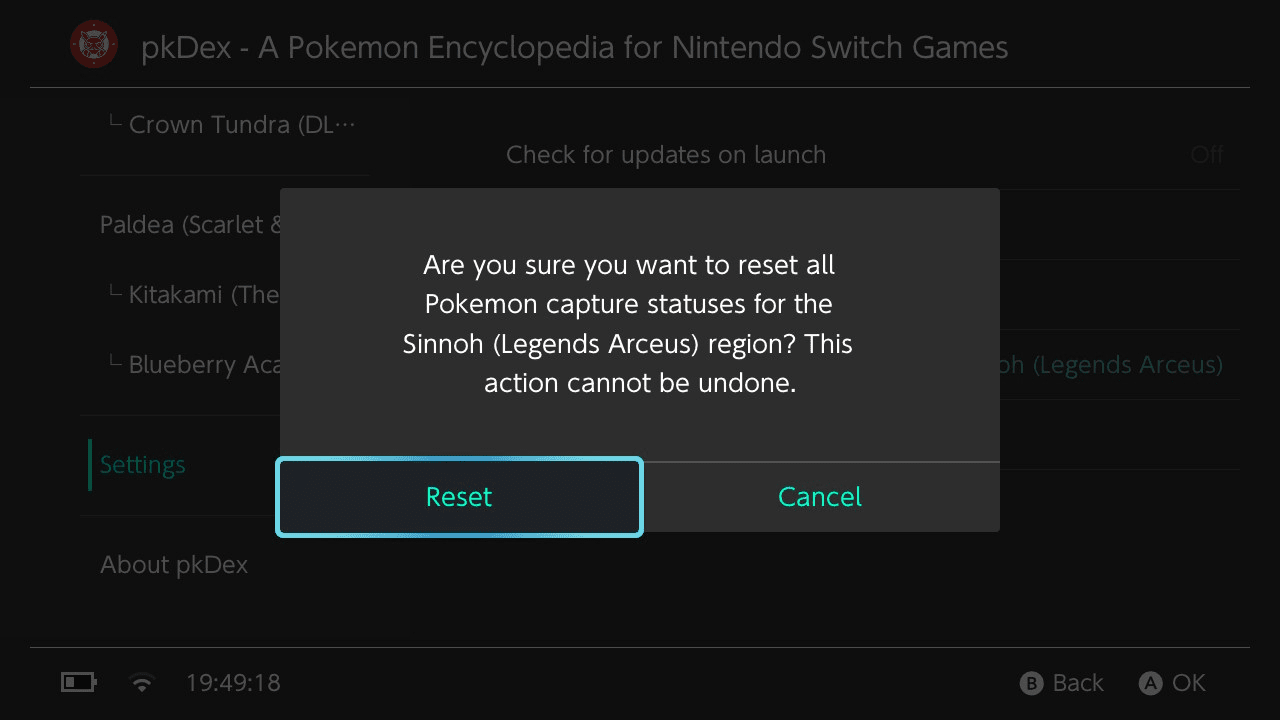
** Ability to reset caught status for all Pokémon from the <code>settings</code> menu. | ** Ability to reset caught status for all Pokémon from the <code>settings</code> menu. | ||
** Ability to reset caught status for specific Region from the <code>settings</code> menu. | ** Ability to reset caught status for specific Region from the <code>settings</code> menu. | ||
| Line 60: | Line 63: | ||
* '''Cross-Platform Compatibility''': | * '''Cross-Platform Compatibility''': | ||
** Nintendo Switch (primary target). | ** Nintendo Switch (primary target). | ||
== Installation == | |||
Download the latest pkDex.nro and pkDexUpdater.nro (optional, can be downloaded from the main app). | |||
Copy pkDex.nroand pkDexUpdater.nro to be inside the /switch directory on your Switch's SD Card. | |||
(Optional) Extract the optional High Res img pack on the root of the Switch' SD Card -recommended-. | |||
Open the app (applet or takeover mode). | |||
== User guide == | == User guide == | ||
| Line 75: | Line 87: | ||
** Location information | ** Location information | ||
** Version exclusivity | ** Version exclusivity | ||
* Press the <code>Y</code> button to mark a Pokémon as caught or | * Press the <code>Y</code> button to open a Pokémon tracker menu to mark or unmark a Pokémon as caught. | ||
* Marking a Pokémon as caught will create a <code>pkDex.tracker.{REGION}.ini</code> file in the <code>/switch/pkDex</code> directory. | * Press the <code>X</code> button to open the Bulk Actions menu, allowing you to mark or clear capture status for all Pokémon in the current region at once. | ||
Unmarking a Pokémon will set the corresponding line in <code>pkDex.tracker.{REGION}.ini</code> file accordingly. | * Marking a Pokémon as caught will create a <code>pkDex.tracker.{REGION}.ini</code> file in the <code>/switch/pkDex</code> directory. | ||
* Use the settings menu to enable or disable automatic new version checks & | ** Unmarking a Pokémon will set the corresponding line in <code>pkDex.tracker.{REGION}.ini</code> file accordingly. | ||
* Use the settings menu to enable or disable automatic new version checks & check for available updates manually. | |||
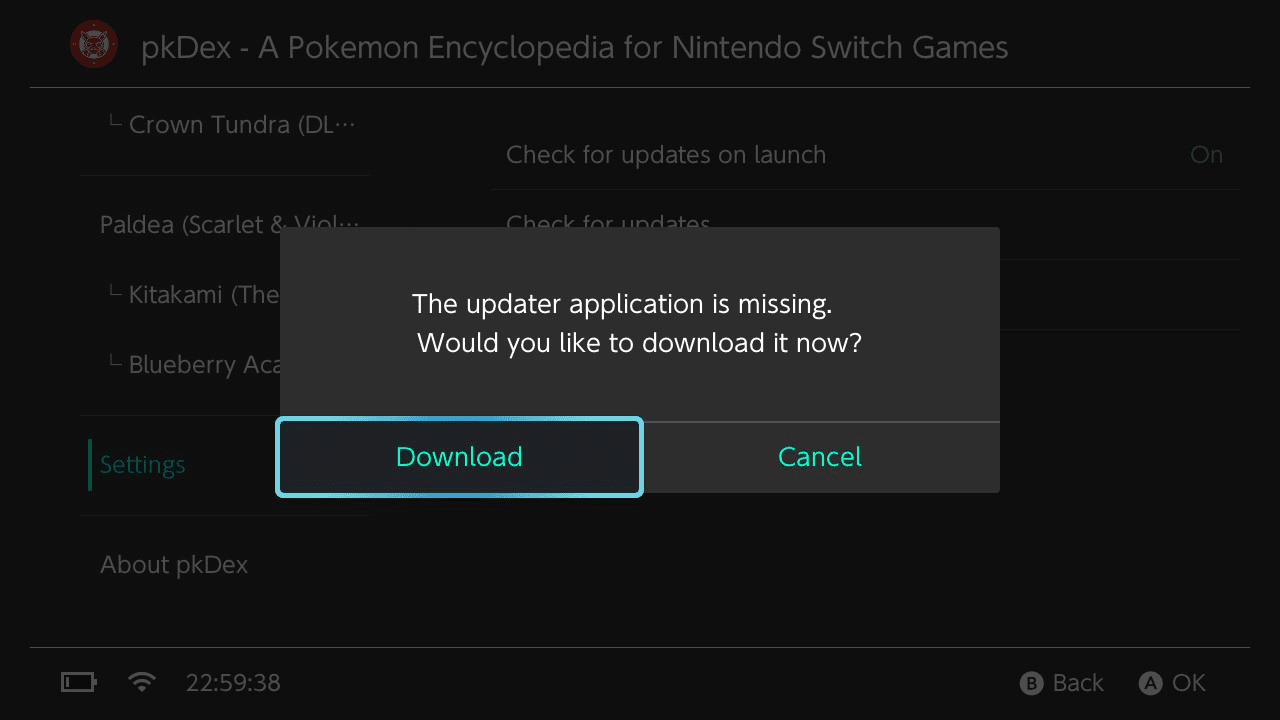
* Use the settings menu to download updates directly from the application (requires the <code>pkDexUpdater</code> application to be present to use update file). | * Use the settings menu to download updates directly from the application (requires the <code>pkDexUpdater</code> application to be present to use update file). | ||
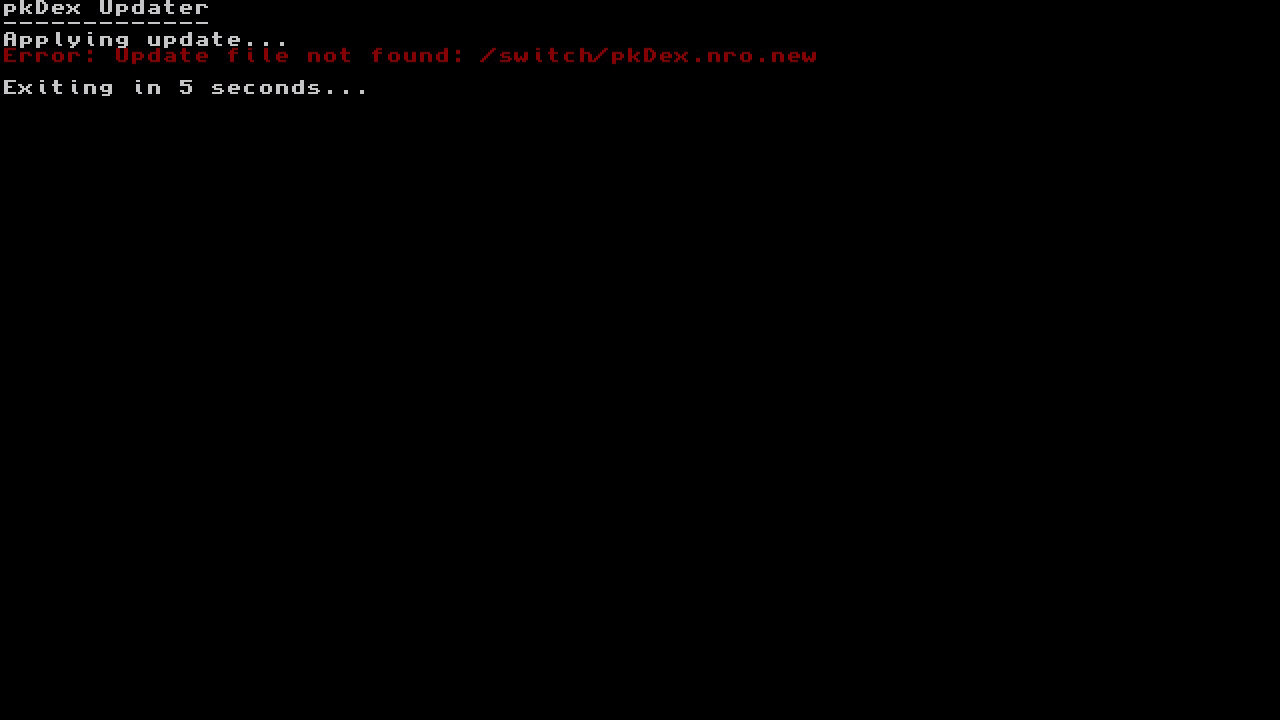
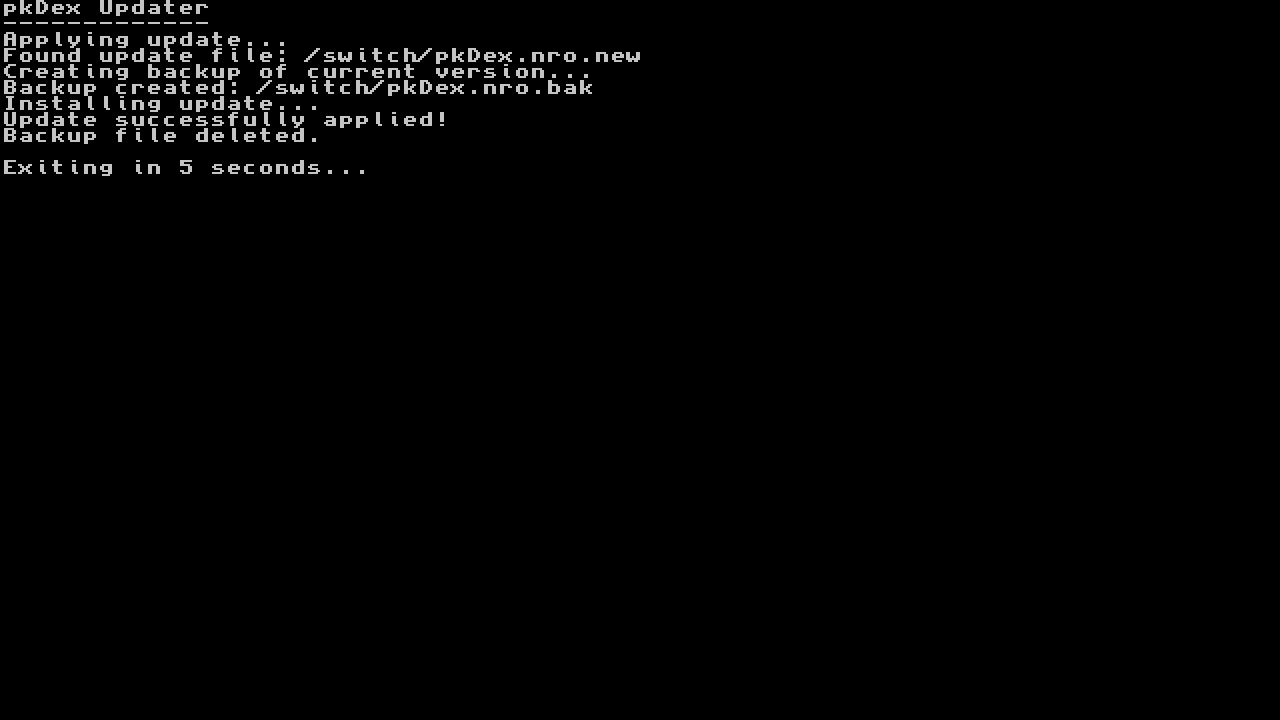
* Use the included updater application (<code>pkDexUpdater.nro</code>) to apply the downloaded update file. | * Use the included updater application (<code>pkDexUpdater.nro</code>) to apply the downloaded update file. | ||
* Use the settings menu to Download & | * Use the settings menu to Download & Extract the High Resolution images pack directly from the application (requires an internet connection). | ||
=== How to update === | === How to update === | ||
| Line 106: | Line 119: | ||
* Download the updater application if it is not present | * Download the updater application if it is not present | ||
* Reset caught Pokémon status | * Reset caught Pokémon status | ||
* Download & | * Hide the bottom status bar | ||
* Change language for UI & data (if available) | |||
* Download & Extract the High Resolution images pack directly from the application (requires an internet connection) | |||
Enabling automatic update checks will prompt the application to check for the latest version on startup, ensuring you always have the most up-to-date information. | |||
You can download updates at any time from the <code>settings</code> menu ("Check for updates" button). | You can download updates at any time from the <code>settings</code> menu ("Check for updates" button). | ||
| Line 127: | Line 143: | ||
==Changelog== | ==Changelog== | ||
'''v1.6.5''' | |||
* New Features: | |||
** Bulk Actions (X button): Mark or clear capture status for all Pokémon in a region at once (e.g. mark all as Caught, clear all Shiny). Includes confirmation dialog before applying. | |||
** Multi-Select Mode (ZL button): Toggle multi-select mode, then use A to pick individual Pokémon. Press Y to apply status changes to all selected at once. Selection is preserved between status changes, allowing multiple statuses to be applied without re-selecting. | |||
** Multi-Select Header: A sticky header displays when in multi-select mode, showing the current selection count. | |||
* Improvements: | |||
** Shortened hint bar labels to fit all button hints on screen. | |||
** Optimized bulk operations to read/write tracker files only once regardless of Pokémon count. | |||
'''v1.6.4''' | |||
* Replace XML pokedex format with Json | |||
* Add FireRed & LeafGreen initial pokedex support | |||
'''v1.6.3''' | |||
* Minor Feature release - Main App : | |||
** Update Shiny Lock status for Mega-Dimension DLC | |||
'''v1.6.2''' | |||
* Minor Feature release - Main App : | |||
** Update German translation for Mega-Dimension DLC (Thanks @Dev9212) | |||
'''v1.6.1''' | |||
* New Feature release - Main App : | |||
** Add Pokemon Legends Z-A Mega-Dimension DLC Pokedex support | |||
** Add Diance & Mewtwo to the Kalos Pokedex (Mystery Gift Sidequest) | |||
'''v1.6.0''' | |||
* New Feature release - Main App : | |||
** Add i18n translation support for : | |||
*** French (Transl. by [https://github.com/Insektaure @Insektaure]) | |||
*** German (Transl. by [https://github.com/Insektaure @Insektaure] & [https://github.com/Dev9212 @Dev9212], UI with AI assistance) | |||
*** Spanish (UI Transl. with AI assistance -fixes appreciated-) | |||
*** Italian (UI Transl. with AI assistance -fixes appreciated-) | |||
*** Japanese (UI Transl. with AI assistance -fixes appreciated-) | |||
** Adjust navigation button in Pokemon view for consistency | |||
** Tracker : | |||
*** Can now track Regular, Shiny, Alpha & Shiny Alpha separately | |||
*** Previous tracking file are backwards compatible (will be updated on status change) | |||
*** Replaced yellow background color for captured status by icons on the right | |||
** Settings menu : | |||
*** Add option to change application language (English, French, German, Spanish, Italian, Japanese) | |||
** Fix wrong National N° for some Pokemon in : | |||
*** Blueberry Academy | |||
*** Isle of Armor | |||
*** Paldea | |||
** Other improvements | |||
*** Json files are now minified at build to help reduce application size | |||
*** Added custom font to improve readability and support more characters for i18n | |||
'''v1.5.2''' | |||
* Minor Feature release - Main App : | |||
** Recompiled version using new libNX 4.10.0 for HOS 21.0.0 support ([https://github.com/Insektaure/pkDex/issues/3 #3]) | |||
* Updater App : | |||
** Recompiled version using new libNX 4.10.0 for HOS 21.0.0 support ([https://github.com/Insektaure/pkDex/issues/3 #3]) | |||
'''v1.5.1''' | '''v1.5.1''' | ||
*Update Kalos (Legends: Z-A) locations & shiny lock status. | * Minor Feature release - Main App : | ||
** Update Kalos (Legends: Z-A) locations & shiny lock status. | |||
'''v1.5.0''' | '''v1.5.0''' | ||
*Add Pokemon Legends Z-A Pokedex support. | * Minor Feature release - Main App : | ||
** Add Pokemon Legends Z-A Pokedex support. | |||
'''v1.4.0''' | '''v1.4.0''' | ||
*Add option to Download & Extract the High-Resolution Images Pack directly from the main application (since v1.4.0 and up). | * New Feature release - Main App: | ||
*Add an option to Download the High-Resolution Images Pack directly from the application. | ** Add option to Download & Extract the High-Resolution Images Pack directly from the main application (since v1.4.0 and up). | ||
*Add an option to Extract the downloaded High-Resolution Images Pack directly from the application. | * Settings menu: | ||
** Add an option to Download the High-Resolution Images Pack directly from the application. | |||
** Add an option to Extract the downloaded High-Resolution Images Pack directly from the application. | |||
'''v1.3.2''' | '''v1.3.2''' | ||
*Add Changelog menu | * Minor Feature release - Main App : | ||
*Can now hide the main app bottom status bar. | ** Add Changelog menu. | ||
* Settings menu: | |||
** Can now hide the main app bottom status bar. | |||
'''v1.3.1''' | '''v1.3.1''' | ||
*Tracker now use one file per region to save "Captured" statuses instead of a big one (faster Read / Write). | * Minor Feature release - Main App : | ||
*Can now select & reset per region "Captured" statuses instead of all regions without distinction (this cannot be undone -for now-). | ** Tracker now use one file per region to save "Captured" statuses instead of a big one (faster Read / Write). | ||
* Settings menu : | |||
** Can now select & reset per region "Captured" statuses instead of all regions without distinction (this cannot be undone -for now-). | |||
'''v1.3.0''' | '''v1.3.0''' | ||
*Update file can be redownloaded (prompt to force download is update file already exist). | * New Feature release - Main App : | ||
*Add Pokemon Tracker system. | ** Update file can be redownloaded (prompt to force download is update file already exist). | ||
** Add Pokemon Tracker system. | |||
*** Can now toggle "Captured" status on the list to mark Pokemon as Captured. | |||
*** You can now keep track of what's missing in your collection (useful for Shiny Hunt) | |||
* Settings menu : | |||
** Add an option to reset all "captured" status (this cannot be undone -for now-) | |||
'''v1.2.0''' | '''v1.2.0''' | ||
*Can download the Updater app directly from the main application if missing (since v1.2.0 and up). | * New Feature release - Main App : | ||
*Add new Updater app to update to latest version available directly from the Nintendo Switch. | ** Can download the Updater app directly from the main application if missing (since v1.2.0 and up). | ||
* Updater App : | |||
** Add new Updater app to update to latest version available directly from the Nintendo Switch. | |||
'''v1.1.1''' | '''v1.1.1''' | ||
*Added Shiny Locked flag on pokemon view. | * Update release - Main App : | ||
** Added Shiny Locked flag on pokemon view. | |||
'''v1.1.0''' | '''v1.1.0''' | ||
*Disable automatic update check on startup (for those who prefer not to check for updates on launch). | * New Feature release - Main App : | ||
*Manually check if an update is available (network connection needed). | ** Update check on startup (to ensure you have the latest version -Enable by default-) (network connection needed) | ||
** Update checks is only available since this release, previous ones don't have this feature ! | |||
* New Settings menu : | |||
** Disable automatic update check on startup (for those who prefer not to check for updates on launch). | |||
** Manually check if an update is available (network connection needed). | |||
'''v1.0''' | '''v1.0''' | ||
* First Release. | * First Release. | ||
| Line 162: | Line 246: | ||
* Switchbrew for their research and [https://github.com/switchbrew/libnx libnx] which makes it possible to create homebrew | * Switchbrew for their research and [https://github.com/switchbrew/libnx libnx] which makes it possible to create homebrew | ||
* ReSwitched for their research, [https://github.com/Atmosphere-NX/Atmosphere Atmosphere], and [https://github.com/Atmosphere-NX/libstratosphere libstratosphere] which is invaluable for Switch homebrew | * ReSwitched for their research, [https://github.com/Atmosphere-NX/Atmosphere Atmosphere], and [https://github.com/Atmosphere-NX/libstratosphere libstratosphere] which is invaluable for Switch homebrew | ||
* @Dev9212 for helping on the German translation | |||
== External links == | == External links == | ||
* GitHub - https://github.com/Insektaure/pkDex | * GitHub - https://github.com/Insektaure/pkDex | ||
* | * Homebrew App Store - https://hb-app.store/switch/pkDex | ||
Latest revision as of 00:10, 20 March 2026
| pkDex | |
|---|---|
 | |
| General | |
| Author | Insektaure |
| Type | Other Apps |
| Version | 1.6.5 |
| License | GPL-2.0 |
| Last Updated | 2026/02/28 |
| Links | |
| Download | |
| Website | |
| Source | |
pkDex is a fanmade Pokémon encyclopedia (Pokédex) that lets you explore Pokémon data, built using the Borealis UI framework.
You can browse and view detailed information about Pokémon from various regions across different generations of the Pokémon games.
Features
- Multi-Region Support: Browse Pokémon from different regions:
- Kanto (Gen 1 - Let's Go Pikachu & Eevee)
- Sinnoh (Gen 4 - Brilliant Diamond & Shining Pearl)
- Sinnoh Arceus (Legends: Arceus)
- Galar (Gen 8 - Sword & Shield + Isle of Armor & Crown Tundra DLC)
- Paldea (Gen 9 - Scarlet & Violet + The Teal Mask & The Indigo Disk DLC)
- Kalos (Legends: Z-A + Mega-Dimension DLC)
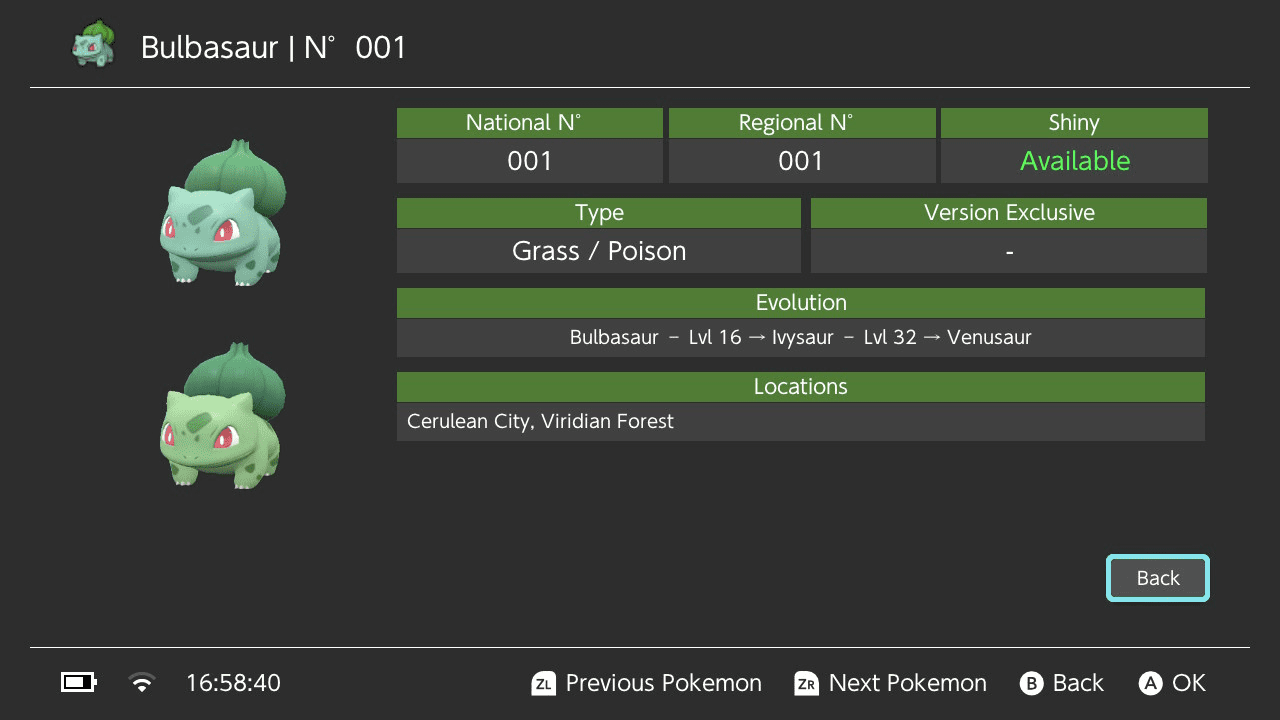
- Detailed Pokémon Information:
- National and Regional Pokédex numbers.
- Shiny Lock status.
- Pokémon types.
- Evolution information.
- Game version exclusivity.
- In-game locations.
- Images of both standard and shiny forms.
- Packaged low resolution images, with dynamic loading high resolution if available on the SD card.
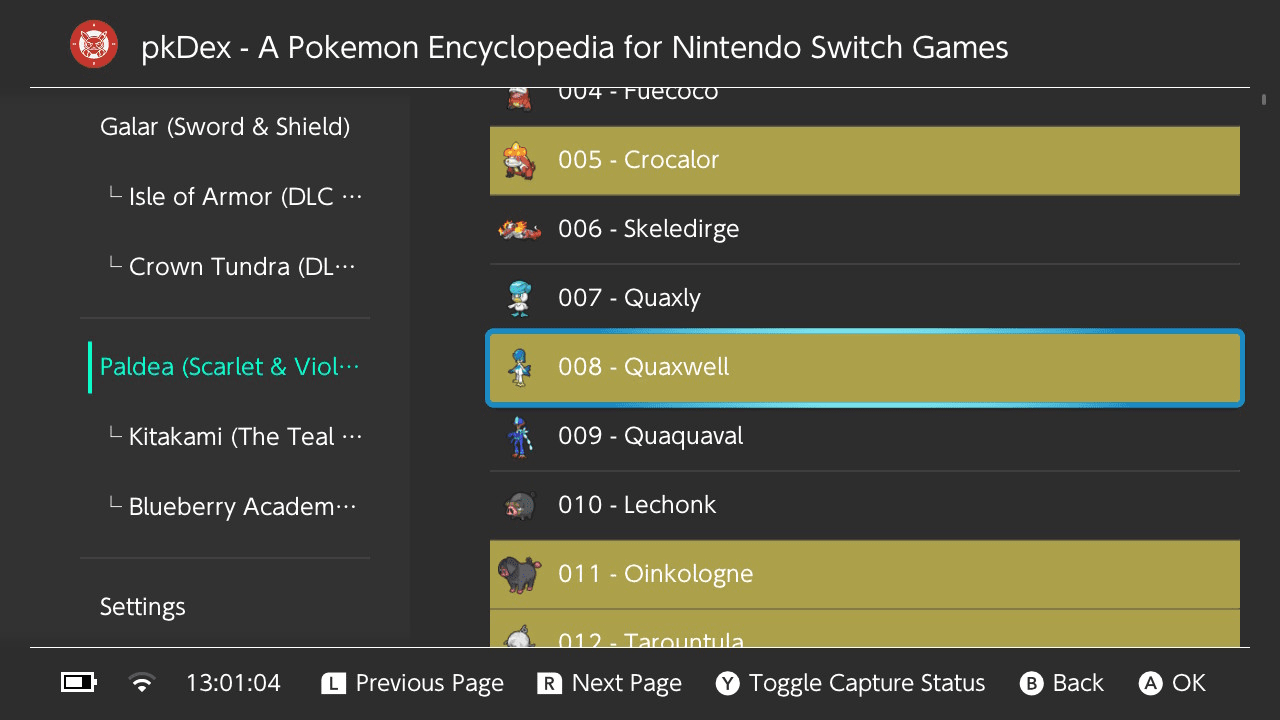
- Pokémon Tracker:
- Track caught Pokémon by marking them as caught on the list.
- Caught Pokémon are highlighted in the list with icons for easy identification.
- Toggle caught status by pressing the
Ybutton on the list entry. - Can track Regular, Shiny, Alpha & Shiny Alpha separately (if available in selected game).
- Bulk Actions: Press the
Xbutton to mark or clear an entire region's dex at once (e.g. mark all as Caught, clear all Shiny, etc.) - Ability to reset caught status for all Pokémon from the
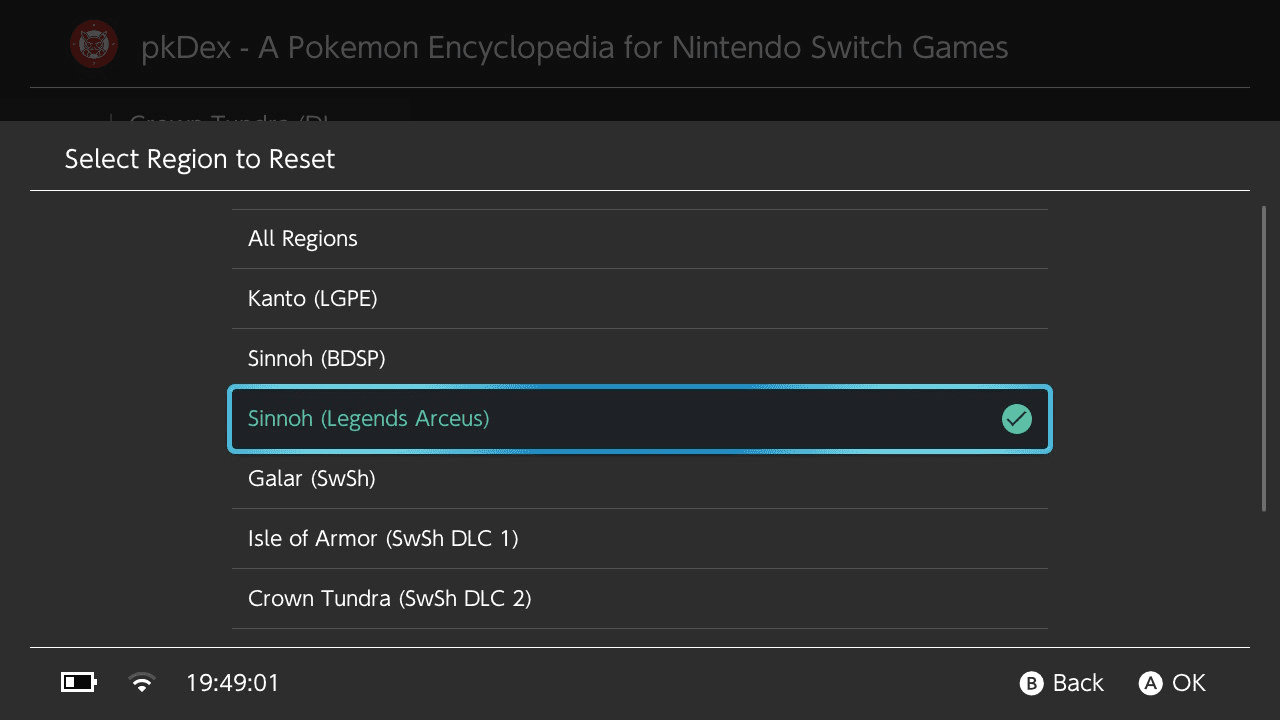
settingsmenu. - Ability to reset caught status for specific Region from the
settingsmenu. - Caught status is saved in a
pkDex.tracker.{REGION}.inifile in the/switch/pkDexdirectory (1 file per region).
- User-Friendly Interface:
- Organized by regions with section headers.
- Efficient list navigation with recycling views.
- Detailed view for each Pokémon.
- Dark theme support.
- Settings / QoL:
- Update check on startup (to ensure you have the latest version). Enable by default.
- Disable automatic update check on startup (for those who prefer not to check for updates).
- Download updates directly from the application (must use the included Updater to apply update).
- If the updater application is not present, it will prompt you to download it from the
settingsmenu when trying to launch it. - Can hide the bottom status bar.
- Download & Extract the High Resolution images pack directly from the application from the
settingsmenu (requires an internet connection).
- Cross-Platform Compatibility:
- Nintendo Switch (primary target).
Installation
Download the latest pkDex.nro and pkDexUpdater.nro (optional, can be downloaded from the main app).
Copy pkDex.nroand pkDexUpdater.nro to be inside the /switch directory on your Switch's SD Card.
(Optional) Extract the optional High Res img pack on the root of the Switch' SD Card -recommended-.
Open the app (applet or takeover mode).
User guide
How to use
- Launch the application on your device.
- Navigate through the tabs to select a Pokémon region.
- Browse the list of Pokémon, organized by their regional Pokédex numbers.
- Select a Pokémon to view detailed information, including:
- Images (standard and shiny forms)
- National Pokédex number
- Regional Pokédex number
- Shiny Lock status
- Type information
- Evolution details
- Location information
- Version exclusivity
- Press the
Ybutton to open a Pokémon tracker menu to mark or unmark a Pokémon as caught. - Press the
Xbutton to open the Bulk Actions menu, allowing you to mark or clear capture status for all Pokémon in the current region at once. - Marking a Pokémon as caught will create a
pkDex.tracker.{REGION}.inifile in the/switch/pkDexdirectory.- Unmarking a Pokémon will set the corresponding line in
pkDex.tracker.{REGION}.inifile accordingly.
- Unmarking a Pokémon will set the corresponding line in
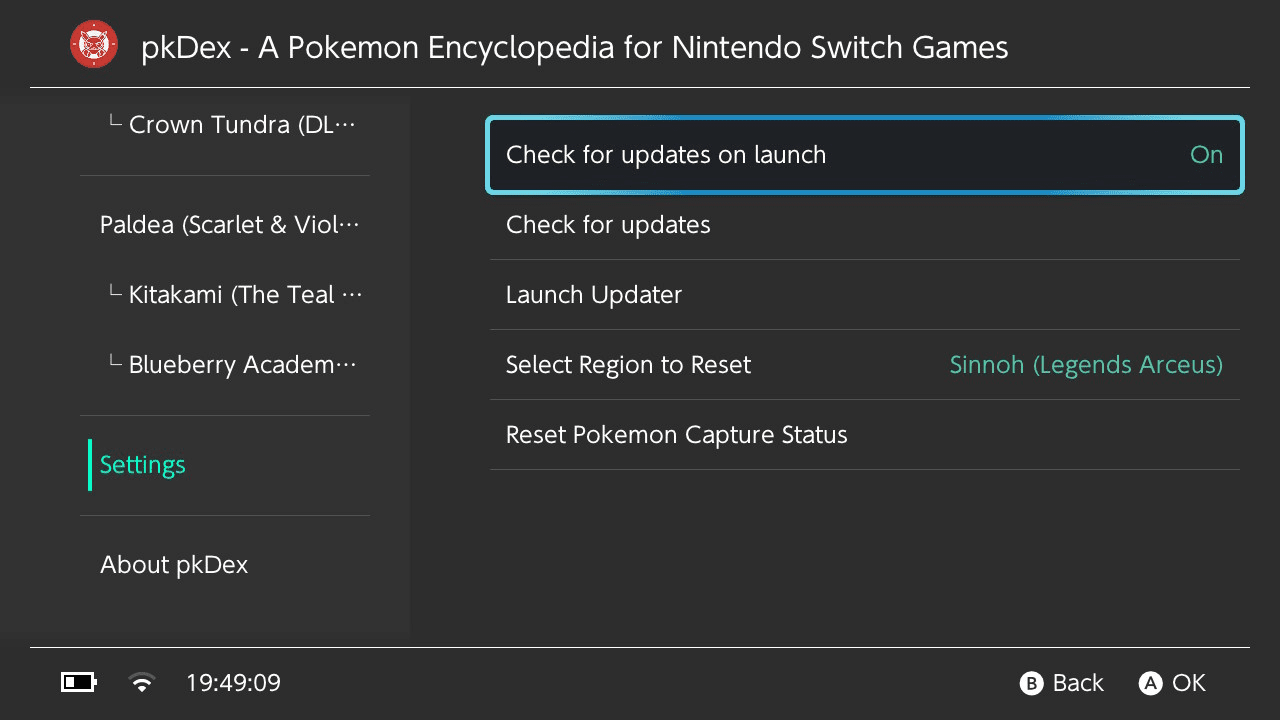
- Use the settings menu to enable or disable automatic new version checks & check for available updates manually.
- Use the settings menu to download updates directly from the application (requires the
pkDexUpdaterapplication to be present to use update file). - Use the included updater application (
pkDexUpdater.nro) to apply the downloaded update file. - Use the settings menu to Download & Extract the High Resolution images pack directly from the application (requires an internet connection).
How to update
To update the application, you can use the included updater application (pkDexUpdater.nro):
- Ensure your Nintendo Switch is connected to the internet.
- Go to the settings menu and check for updates.
If an update is available, the application will prompt you to download it.
If you want to update automatically:
- Click the
Launch Updaterbutton in the settings menu of the main application. - If you don't have the Updater, you will be prompted to download it directly from the application settings.
- The updater will apply the downloaded update file to the main application, ensuring you have the latest features and bug fixes.
If you prefer to update manually:
- Download the latest version from the releases page.
App settings
The application includes a settings menu that allows users to:
- Enable or disable automatic update checks on startup
- Check for updates manually
- Download updates directly from the application
- Download the updater application if it is not present
- Reset caught Pokémon status
- Hide the bottom status bar
- Change language for UI & data (if available)
- Download & Extract the High Resolution images pack directly from the application (requires an internet connection)
Enabling automatic update checks will prompt the application to check for the latest version on startup, ensuring you always have the most up-to-date information.
You can download updates at any time from the settings menu ("Check for updates" button).
Changing the settings will generate a config.ini file in the /config/pkDex directory, which will be used to store user preferences.
Screenshots
|
|
Changelog
v1.6.5
- New Features:
- Bulk Actions (X button): Mark or clear capture status for all Pokémon in a region at once (e.g. mark all as Caught, clear all Shiny). Includes confirmation dialog before applying.
- Multi-Select Mode (ZL button): Toggle multi-select mode, then use A to pick individual Pokémon. Press Y to apply status changes to all selected at once. Selection is preserved between status changes, allowing multiple statuses to be applied without re-selecting.
- Multi-Select Header: A sticky header displays when in multi-select mode, showing the current selection count.
- Improvements:
- Shortened hint bar labels to fit all button hints on screen.
- Optimized bulk operations to read/write tracker files only once regardless of Pokémon count.
v1.6.4
- Replace XML pokedex format with Json
- Add FireRed & LeafGreen initial pokedex support
v1.6.3
- Minor Feature release - Main App :
- Update Shiny Lock status for Mega-Dimension DLC
v1.6.2
- Minor Feature release - Main App :
- Update German translation for Mega-Dimension DLC (Thanks @Dev9212)
v1.6.1
- New Feature release - Main App :
- Add Pokemon Legends Z-A Mega-Dimension DLC Pokedex support
- Add Diance & Mewtwo to the Kalos Pokedex (Mystery Gift Sidequest)
v1.6.0
- New Feature release - Main App :
- Add i18n translation support for :
- French (Transl. by @Insektaure)
- German (Transl. by @Insektaure & @Dev9212, UI with AI assistance)
- Spanish (UI Transl. with AI assistance -fixes appreciated-)
- Italian (UI Transl. with AI assistance -fixes appreciated-)
- Japanese (UI Transl. with AI assistance -fixes appreciated-)
- Adjust navigation button in Pokemon view for consistency
- Tracker :
- Can now track Regular, Shiny, Alpha & Shiny Alpha separately
- Previous tracking file are backwards compatible (will be updated on status change)
- Replaced yellow background color for captured status by icons on the right
- Settings menu :
- Add option to change application language (English, French, German, Spanish, Italian, Japanese)
- Fix wrong National N° for some Pokemon in :
- Blueberry Academy
- Isle of Armor
- Paldea
- Other improvements
- Json files are now minified at build to help reduce application size
- Added custom font to improve readability and support more characters for i18n
- Add i18n translation support for :
v1.5.2
- Minor Feature release - Main App :
- Recompiled version using new libNX 4.10.0 for HOS 21.0.0 support (#3)
- Updater App :
- Recompiled version using new libNX 4.10.0 for HOS 21.0.0 support (#3)
v1.5.1
- Minor Feature release - Main App :
- Update Kalos (Legends: Z-A) locations & shiny lock status.
v1.5.0
- Minor Feature release - Main App :
- Add Pokemon Legends Z-A Pokedex support.
v1.4.0
- New Feature release - Main App:
- Add option to Download & Extract the High-Resolution Images Pack directly from the main application (since v1.4.0 and up).
- Settings menu:
- Add an option to Download the High-Resolution Images Pack directly from the application.
- Add an option to Extract the downloaded High-Resolution Images Pack directly from the application.
v1.3.2
- Minor Feature release - Main App :
- Add Changelog menu.
- Settings menu:
- Can now hide the main app bottom status bar.
v1.3.1
- Minor Feature release - Main App :
- Tracker now use one file per region to save "Captured" statuses instead of a big one (faster Read / Write).
- Settings menu :
- Can now select & reset per region "Captured" statuses instead of all regions without distinction (this cannot be undone -for now-).
v1.3.0
- New Feature release - Main App :
- Update file can be redownloaded (prompt to force download is update file already exist).
- Add Pokemon Tracker system.
- Can now toggle "Captured" status on the list to mark Pokemon as Captured.
- You can now keep track of what's missing in your collection (useful for Shiny Hunt)
- Settings menu :
- Add an option to reset all "captured" status (this cannot be undone -for now-)
v1.2.0
- New Feature release - Main App :
- Can download the Updater app directly from the main application if missing (since v1.2.0 and up).
- Updater App :
- Add new Updater app to update to latest version available directly from the Nintendo Switch.
v1.1.1
- Update release - Main App :
- Added Shiny Locked flag on pokemon view.
v1.1.0
- New Feature release - Main App :
- Update check on startup (to ensure you have the latest version -Enable by default-) (network connection needed)
- Update checks is only available since this release, previous ones don't have this feature !
- New Settings menu :
- Disable automatic update check on startup (for those who prefer not to check for updates on launch).
- Manually check if an update is available (network connection needed).
v1.0
- First Release.
Credits
- Borealis UI Framework: A hardware-accelerated UI library for Nintendo Switch homebrew, developed by natinusala and contributors. GitHub Repository
- Pokémon Data: All Pokémon names, images, and data are property of Nintendo, Game Freak, and The Pokémon Company.
- Development: pkDex is developed by Insektaure.
- Datasets: Pokémon data sourced from various community resources and official game data (serebii.net / pokemondb.net / bulbapedia.bulbagarden.net).
- Switchbrew for their research and libnx which makes it possible to create homebrew
- ReSwitched for their research, Atmosphere, and libstratosphere which is invaluable for Switch homebrew
- @Dev9212 for helping on the German translation
External links
- GitHub - https://github.com/Insektaure/pkDex
- Homebrew App Store - https://hb-app.store/switch/pkDex