
NXFixCheat Switch: Difference between revisions
From GameBrew
More actions
Created page with "{{Infobox Switch Homebrews |title=NXFixCheat |image=NXFixCheatSwitch.png |description=Quick Atmosphere Cheat Toggle Tool. |author=jiraiya78 |lastupdated=2025/07/31 |type=Other Apps |version=1.0 |license=GPL-3.0 |download=https://dlhb.gamebrew.org/switchhomebrews/NXFixCheatSwitch.7z |website=https://gbatemp.net/threads/nx-fixcheat-quick-atmosphere-cheat-toggle-tool.673874/ |source=https://github.com/jiraiya78/nxfixcheat |donation= }} {{#seo: |title=Switch Homebrew Apps (O..." |
No edit summary |
||
| (One intermediate revision by the same user not shown) | |||
| Line 19: | Line 19: | ||
|image_alt=NXFixCheat | |image_alt=NXFixCheat | ||
}} | }} | ||
A simple Nintendo Switch homebrew tool for easily toggling Atmosphere cheat settings, including auto-enable cheats and remembering cheat states. | |||
With NXFixCheat, you can quickly enable or disable cheat options without editing config files manually. | |||
== Features == | == Features == | ||
* | * Toggle auto-enable cheats - Quickly enable or disable default cheat activation (<code>dmnt_cheats_enabled_by_default</code>) in <code>system_settings.ini</code>. | ||
* | * Toggle remember cheat state - Set whether Atmosphere should remember the last cheat toggle state (<code>dmnt_always_save_cheat_toggles</code>). | ||
* | * Automatic backup - Backs up your current config file before applying any changes. | ||
* | * Template restoration - If your config is missing, a template is automatically copied and used. | ||
* | * Simple menu navigation - Navigate using your controller’s D-Pad and buttons. | ||
* | * Reboot option - Optionally reboot to Homebrew Menu after applying changes. | ||
== | ==Installation== | ||
Place the compiled <code>.nro</code> file in your <code>sdmc:/switch/nxfixcheat/</code> folder. | |||
Ensure <code>system_settings_template.ini</code> exists in <code>sdmc:/switch/nxfixcheat/</code> for recovery if your config file is missing. | |||
Launch the application via the Homebrew Menu. | |||
* | == User guide == | ||
=== Disclaimer === | |||
* Use at your own risk. | |||
* Modifying system files can cause unexpected behavior. | |||
* Always keep backups of your configuration files. | |||
If the file is missing, a template is copied from: | === How it works === | ||
* NXFixCheat modifies <code>sdmc:/atmosphere/config/system_settings.ini</code> on your SD card. | |||
* If the file is missing, a template is copied from <code>sdmc:/switch/nxfixcheat/system_settings_template.ini</code>. | |||
* A backup of your current config is saved to <code>sdmc:/atmosphere/config/system_settings_backup.ini</code>. | |||
* | === Menu overview === | ||
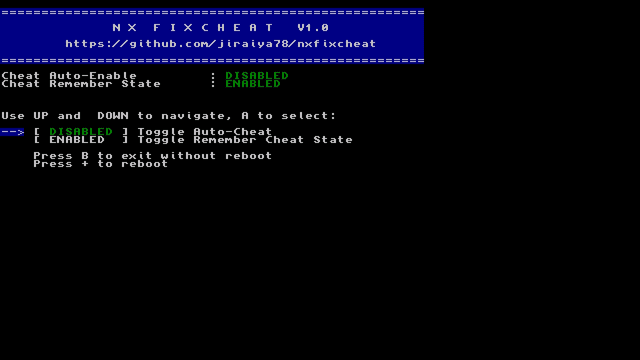
* Toggle Auto-Cheat - Enable or disable automatic cheat activation for all games. | |||
* Toggle Remember Cheat State - Decide if Atmosphere should save and restore last cheat states. | |||
* Exit - Close the app without rebooting. | |||
* Reboot - Reboot to payload or Homebrew Menu for settings to take effect. | |||
== Controls == | |||
Up/Down - Move between options | |||
A - Select/Toggle | |||
B - Exit | |||
Plus - Reboot to HBMenu | |||
==Screenshots== | ==Screenshots== | ||
[[image:NXFixCheatSwitch.png]] | [[image:NXFixCheatSwitch.png|link=]] | ||
==Changelog== | ==Changelog== | ||
'''v1.0''' | '''v1.0''' | ||
* First Release. | * First Release. | ||
== External links == | == External links == | ||
* | * GitHub - https://github.com/jiraiya78/nxfixcheat | ||
* GBAtemp - https://gbatemp.net/threads/nx-fixcheat-quick-atmosphere-cheat-toggle-tool.673874/ | |||
Latest revision as of 04:45, 26 October 2025
| NXFixCheat | |
|---|---|
 | |
| General | |
| Author | jiraiya78 |
| Type | Other Apps |
| Version | 1.0 |
| License | GPL-3.0 |
| Last Updated | 2025/07/31 |
| Links | |
| Download | |
| Website | |
| Source | |
A simple Nintendo Switch homebrew tool for easily toggling Atmosphere cheat settings, including auto-enable cheats and remembering cheat states.
With NXFixCheat, you can quickly enable or disable cheat options without editing config files manually.
Features
- Toggle auto-enable cheats - Quickly enable or disable default cheat activation (
dmnt_cheats_enabled_by_default) insystem_settings.ini. - Toggle remember cheat state - Set whether Atmosphere should remember the last cheat toggle state (
dmnt_always_save_cheat_toggles). - Automatic backup - Backs up your current config file before applying any changes.
- Template restoration - If your config is missing, a template is automatically copied and used.
- Simple menu navigation - Navigate using your controller’s D-Pad and buttons.
- Reboot option - Optionally reboot to Homebrew Menu after applying changes.
Installation
Place the compiled .nro file in your sdmc:/switch/nxfixcheat/ folder.
Ensure system_settings_template.ini exists in sdmc:/switch/nxfixcheat/ for recovery if your config file is missing.
Launch the application via the Homebrew Menu.
User guide
Disclaimer
- Use at your own risk.
- Modifying system files can cause unexpected behavior.
- Always keep backups of your configuration files.
How it works
- NXFixCheat modifies
sdmc:/atmosphere/config/system_settings.inion your SD card. - If the file is missing, a template is copied from
sdmc:/switch/nxfixcheat/system_settings_template.ini. - A backup of your current config is saved to
sdmc:/atmosphere/config/system_settings_backup.ini.
Menu overview
- Toggle Auto-Cheat - Enable or disable automatic cheat activation for all games.
- Toggle Remember Cheat State - Decide if Atmosphere should save and restore last cheat states.
- Exit - Close the app without rebooting.
- Reboot - Reboot to payload or Homebrew Menu for settings to take effect.
Controls
Up/Down - Move between options
A - Select/Toggle
B - Exit
Plus - Reboot to HBMenu
Screenshots
Changelog
v1.0
- First Release.