
Fallout CE Switch: Difference between revisions
More actions
No edit summary |
No edit summary |
||
| (2 intermediate revisions by 2 users not shown) | |||
| Line 4: | Line 4: | ||
|description=Fallout for the Nintendo Switch. Homebrew port. | |description=Fallout for the Nintendo Switch. Homebrew port. | ||
|author=ryandeering | |author=ryandeering | ||
|lastupdated= | |lastupdated=2026/05/21 | ||
|type=Role Playing | |type=Role Playing | ||
|version=1. | |version=1.1.0 | ||
|license=Mixed | |license=Mixed | ||
|download=https://dlhb.gamebrew.org/switchhomebrews/FalloutCESwitch.7z | |download=https://dlhb.gamebrew.org/switchhomebrews/FalloutCESwitch.7z | ||
|website= | |website=https://github.com/ryandeering/fallout2-ce-switch | ||
|source=https://github.com/ryandeering/fallout-ce-switch | |source=https://github.com/ryandeering/fallout-ce-switch | ||
|donation= | |donation= | ||
| Line 19: | Line 19: | ||
|image_alt=Fallout CE Switch | |image_alt=Fallout CE Switch | ||
}} | }} | ||
Fallout Community Edition (Switch) is a homebrew port of the original Fallout for the Nintendo Switch | Fallout Community Edition (Switch) is a homebrew port of the original Fallout for the Nintendo Switch. | ||
You must own the game to play and have a Switch capable of running | You must own the game to play and have a Switch capable of running unsigned code, so you need a Switch running on custom firmware to run the port. Needless to say, this is not an official effort from Interplay or Bethesda. | ||
== Installation == | == Installation == | ||
Purchase your copy on [https://www.gog.com/en/game/fallout GOG] or [https://store.steampowered.com/app/38400/ Steam]. The files need to be from a Windows installation. | |||
Download the latest [https://github.com/ryandeering/fallout-ce-switch/releases/latest release] or build from the source. See YAML pipelines for reference. | |||
Drag the installation files into a new folder called <code>fallout1</code> in your <code>switch</code> folder on the root of your SD card. You can have <code>fallout1</code> directly in the root too. | |||
Create a file named <code>fallout1_nx.ini</code> in your <code>fallout1</code> folder to override defaults. If missing, the game now creates it on first launch. | |||
In the fallout1_nx.ini file, paste the following content: | |||
<pre>[MAIN] | <pre>[MAIN] | ||
SCR_WIDTH=1708 | SCR_WIDTH=1708 | ||
| Line 35: | Line 38: | ||
SCALE_2X=1 | SCALE_2X=1 | ||
; Change resolution and determine scaling. SCALE_2X=1 will turn 2x scaling on. SCALE_2X=0 will turn it off. </pre> | ; Change resolution and determine scaling. SCALE_2X=1 will turn 2x scaling on. SCALE_2X=0 will turn it off. </pre> | ||
Put the necessary executable in your <code>switch</code> folder on the root of your SD card, either <code>.nro</code> or <code>.nso</code>. | |||
(Note: Fallout 1 CE saves from PC and other CE versions should usually work on Switch, and Switch saves work back on PC. This is experimental and may cause save state corruption. Some saves from different game versions or heavily modded setups may fail to load. Make backups before moving saves between platforms. And keep multiple saves! Quick save/quick loading currently save/load twice.) | |||
== Configuration == | |||
</ | * Cursor Sensitivity: Adjustable in options via mouse sensitivity. Note this will affect cursor speedup as well. | ||
* Resolution: You can configure resolution and scaling through a config file. Create a file in your <code>fallout1</code> folder called <code>fallout1_nx.ini</code> - It needs to follow the following structure: | |||
== Controls == | == Controls == | ||
{| style="max-width:80%; margin-left:0em;" | {| style="max-width:80%; margin-left:0em;" | ||
| | | | ||
https://dlhb.gamebrew.org/switchhomebrews/images/FalloutCESwitch- | https://dlhb.gamebrew.org/switchhomebrews/images/FalloutCESwitch-02.png | ||
|} | |} | ||
Basic touchscreen support is implemented. | |||
Native on-screen keyboard support is implemented for saves, talking to NPCs, naming characters, changing amounts with sellers. | |||
==Media== | ==Media== | ||
'''New Native Switch Ports | Fallout 1+2 ( No Emulation ) How to Install, Tips + Tricks''' ([https://www.youtube.com/watch?v=ogmiwhk15HI Son of a Zet]) <br> | '''New Native Switch Ports | Fallout 1+2 ( No Emulation ) How to Install, Tips + Tricks''' ([https://www.youtube.com/watch?v=ogmiwhk15HI Son of a Zet]) <br> | ||
<youtube width= | <youtube width="640">ogmiwhk15HI</youtube> | ||
==Changelog== | ==Changelog== | ||
'''v1.1.0 - QOL tweaks''' | |||
* '''Performance & stability''' | |||
** Faster loading. Art assets are pre-cached at startup, so maps, saves and area transitions load quicker. Note that initial load will be a bit longer. I would expect less stutter if any also. | |||
** Runtime diagnostics overlay. Press L+R+Right Stick Click for live FPS, frame time, memory usage and startup load timing. More a curio than useful to average person using this, but at least you can tell me if there's bad framerate somewhere! | |||
* '''Controls''' | |||
** L shoulder button now toggles active item, to stop using the cursor to do it. Should make switching items much, much smoother. | |||
** Pressing the left stick now opens the native keyboard when a text input field is present. Otherwise, it's stealth mode. | |||
** No more accidental double-triggers on menus, inventory, the Skilldex and quick save/load. | |||
* '''Native keyboard''' | |||
** Character names, save names and search dialogs all use the Switch software keyboard, sorry about this not being included on initial release. | |||
** Item quantity dialogs use a dedicated numeric keypad instead of increment and decrement buttons. | |||
** The "Ask About" dialog for dialogue with NPCs opens the keyboard automatically. | |||
* '''Save compatibility''' | |||
** Save files from the PC version of Fallout 1 CE generally work on Switch now, and Switch saves work back on PC. Some heavily modded or unusual saves may still fail to load. This is experimental. | |||
** Make backups before moving saves between platforms. | |||
* '''Setup and configuration''' | |||
** <code>fallout1_nx.ini</code> is created automatically on first launch with sensible defaults. | |||
** Introduced <code>fallout1</code> fallback folder on root of SD card, like the Fallout 2 port. | |||
'''v1.0''' | '''v1.0''' | ||
* First Release. | * First Release. | ||
== Credits == | == Credits == | ||
* | * Interplay: For developing and publishing the original game. | ||
* | * alexbatalov and fallout-ce Contributors: For their excellent work in keeping this game modern. | ||
* | * Romane: For the graphics. | ||
== External links == | == External links == | ||
* | * GitHub - https://github.com/ryandeering/fallout-ce-switch | ||
Latest revision as of 01:36, 24 May 2026
| Fallout CE Switch | |
|---|---|
 | |
| General | |
| Author | ryandeering |
| Type | Role Playing |
| Version | 1.1.0 |
| License | Mixed |
| Last Updated | 2026/05/21 |
| Links | |
| Download | |
| Website | |
| Source | |
Fallout Community Edition (Switch) is a homebrew port of the original Fallout for the Nintendo Switch.
You must own the game to play and have a Switch capable of running unsigned code, so you need a Switch running on custom firmware to run the port. Needless to say, this is not an official effort from Interplay or Bethesda.
Installation
Purchase your copy on GOG or Steam. The files need to be from a Windows installation.
Download the latest release or build from the source. See YAML pipelines for reference.
Drag the installation files into a new folder called fallout1 in your switch folder on the root of your SD card. You can have fallout1 directly in the root too.
Create a file named fallout1_nx.ini in your fallout1 folder to override defaults. If missing, the game now creates it on first launch.
In the fallout1_nx.ini file, paste the following content:
[MAIN]
SCR_WIDTH=1708
SCR_HEIGHT=960
SCALE_2X=1
; Change resolution and determine scaling. SCALE_2X=1 will turn 2x scaling on. SCALE_2X=0 will turn it off.
Put the necessary executable in your switch folder on the root of your SD card, either .nro or .nso.
(Note: Fallout 1 CE saves from PC and other CE versions should usually work on Switch, and Switch saves work back on PC. This is experimental and may cause save state corruption. Some saves from different game versions or heavily modded setups may fail to load. Make backups before moving saves between platforms. And keep multiple saves! Quick save/quick loading currently save/load twice.)
Configuration
- Cursor Sensitivity: Adjustable in options via mouse sensitivity. Note this will affect cursor speedup as well.
- Resolution: You can configure resolution and scaling through a config file. Create a file in your
fallout1folder calledfallout1_nx.ini- It needs to follow the following structure:
Controls
|
|
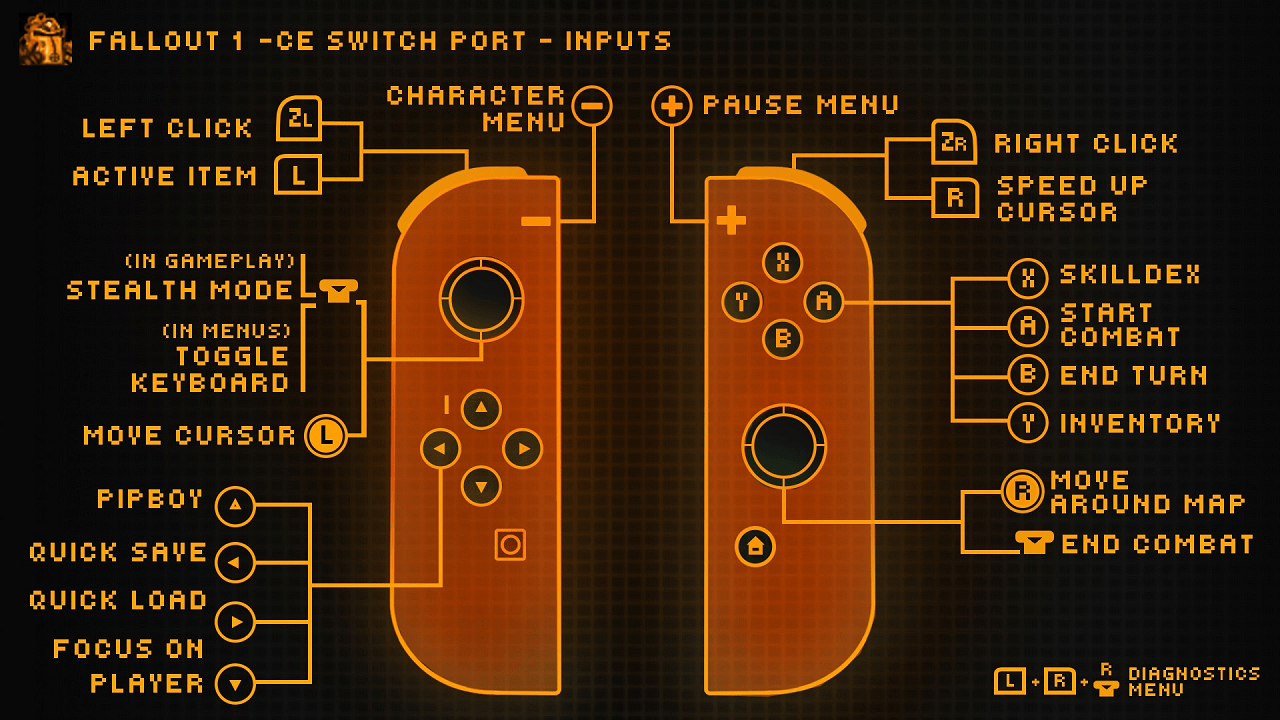
Basic touchscreen support is implemented.
Native on-screen keyboard support is implemented for saves, talking to NPCs, naming characters, changing amounts with sellers.
Media
New Native Switch Ports | Fallout 1+2 ( No Emulation ) How to Install, Tips + Tricks (Son of a Zet)
Changelog
v1.1.0 - QOL tweaks
- Performance & stability
- Faster loading. Art assets are pre-cached at startup, so maps, saves and area transitions load quicker. Note that initial load will be a bit longer. I would expect less stutter if any also.
- Runtime diagnostics overlay. Press L+R+Right Stick Click for live FPS, frame time, memory usage and startup load timing. More a curio than useful to average person using this, but at least you can tell me if there's bad framerate somewhere!
- Controls
- L shoulder button now toggles active item, to stop using the cursor to do it. Should make switching items much, much smoother.
- Pressing the left stick now opens the native keyboard when a text input field is present. Otherwise, it's stealth mode.
- No more accidental double-triggers on menus, inventory, the Skilldex and quick save/load.
- Native keyboard
- Character names, save names and search dialogs all use the Switch software keyboard, sorry about this not being included on initial release.
- Item quantity dialogs use a dedicated numeric keypad instead of increment and decrement buttons.
- The "Ask About" dialog for dialogue with NPCs opens the keyboard automatically.
- Save compatibility
- Save files from the PC version of Fallout 1 CE generally work on Switch now, and Switch saves work back on PC. Some heavily modded or unusual saves may still fail to load. This is experimental.
- Make backups before moving saves between platforms.
- Setup and configuration
fallout1_nx.iniis created automatically on first launch with sensible defaults.- Introduced
fallout1fallback folder on root of SD card, like the Fallout 2 port.
v1.0
- First Release.
Credits
- Interplay: For developing and publishing the original game.
- alexbatalov and fallout-ce Contributors: For their excellent work in keeping this game modern.
- Romane: For the graphics.