
Hill Climb Racing Vita: Difference between revisions
From GameBrew
More actions
No edit summary |
|||
| (3 intermediate revisions by the same user not shown) | |||
| Line 2: | Line 2: | ||
|title=Hill Climb Racing Vita | |title=Hill Climb Racing Vita | ||
|image=HillClimbRacingVita.png | |image=HillClimbRacingVita.png | ||
|description=Port of Hill | |description=Port of Hill Climb Racing for PS Vita. | ||
|author=MemoryHunter | |author=MemoryHunter | ||
|lastupdated=2025/ | |lastupdated=2025/11/05 | ||
|type=Racing | |type=Racing | ||
|version= | |version=Beta 2 | ||
|license=MIT | |license=MIT | ||
|download=https://dlhb.gamebrew.org/vitahomebrews/HillClimbRacingVita.7z | |download=https://dlhb.gamebrew.org/vitahomebrews/HillClimbRacingVita.7z | ||
| Line 19: | Line 19: | ||
|image_alt=Hill Climb Racing Vita | |image_alt=Hill Climb Racing Vita | ||
}} | }} | ||
Port of the Android release of Hill Climb Racing for PS Vita. | |||
== Installation == | |||
'''Instructions:''' | |||
*Install [[Kubridge Vita|Kubridge]] and [[FdFix Vita|FdFix]] by copying <code>kubridge.skprx</code> and <code>fd_fix.skprx</code> to your taiHEN plugins folder (usually <code>ur0:tai</code>) and adding two entries to your <code>config.txt</code> under *KERNEL: | |||
''' | |||
* Install [[Kubridge Vita|Kubridge]] and [[FdFix Vita|FdFix]] by copying <code>kubridge.skprx</code> and <code>fd_fix.skprx</code> to your taiHEN plugins folder (usually <code>ur0:tai</code>) and adding two entries to your <code>config.txt</code> under | |||
<pre> *KERNEL | <pre> *KERNEL | ||
ur0:tai/kubridge.skprx | ur0:tai/kubridge.skprx | ||
ur0:tai/fd_fix.skprx</pre> | ur0:tai/fd_fix.skprx</pre> | ||
*Note: Don't install fd_fix.skprx if you're using rePatch plugin. | |||
*Make sure you have <code>libshacccg.suprx</code> in the ur0:/data/ folder on your console. If you don't, follow [https://samilops2.gitbook.io/vita-troubleshooting-guide/shader-compiler/extract-libshacccg.suprx this guide] to extract it. | |||
*Lwgally obtain your copy of [https://play.google.com/store/apps/details?id=com.fingersoft.hillclimb&hl=en Hill Climb Racing] version 1.18.0 for Android in form of an .apk file. | |||
*Open the .apk with any zip explorer (like [https://www.7-zip.org/ 7-Zip]) and extract <code>assets</code> folder from the .apk into <code>ux0:data/hcr</code>. Also, extract <code>libgame.so</code> from <code>lib/armeabi-v7a/</code> in the same directory. | |||
*Place the .apk< itself inside <code>ux0:data/hcr</code> and rename to <code>base.apk</code>. | |||
*Install hcr.vpk (from [https://github.com/memory-hunter/hill-climb-racing-vita/releases/latest Releases]). | |||
'''Folder layout:''' | |||
<pre> └── hcr/ | <pre> └── hcr/ | ||
├── assets/ | ├── assets/ | ||
├── libgame.so | ├── libgame.so | ||
└── base.apk</pre> | └── base.apk</pre> | ||
(Note: Remove ux0:data/hcr/gxp and ux0:data/shader_cache/HCR00000 folders when updating to the new version.) | |||
== Controls == | == Controls == | ||
L / R | L/R - Brake/Accelerate | ||
Circle | Circle - Back | ||
==Screenshots== | ==Screenshots== | ||
| Line 62: | Line 53: | ||
==Known issues== | ==Known issues== | ||
* | * Before the game jumps to the loading screen after launching it, or after finishing a play session, don't quit the game immediately. | ||
* | ** Wait for around 3 seconds and then quit, otherwise your game may crash or your save data may be corrupted. | ||
* | ** If you still happen to crash/corrupt your save file, there is a backup inside <code>ux0:/data/hcr</code> folder with the name <code>SharedPreferences.bin.bak</code>. Simply remove the <code>.bak</code> by renaming and the game should work again, but some progress may be lost. | ||
* When selecting levels or cars, wait until it responds, because it's loading things in the background. | |||
* There is a moment after lots of gameplay, that when you get to the death screen, the game will start lagging and you will have massive FPS drop. It is yet to be figured out why does this happen. | |||
** It is recommended to patiently wait until you can proceed to the selection menu, and restart the game. | |||
** Else, just restart the game in the middle of the laggy sequence, but progress will be lost. | |||
See [https://github.com/memory-hunter/hill-climb-racing-vita/issues Issues] for currently know problems. | |||
==Changelog== | ==Changelog== | ||
'''beta2''' | |||
* Fixes [https://github.com/memory-hunter/hill-climb-racing-vita/issues/2 #2]. | |||
* Before the start of the game, the savedata is backed up in the <code>ux0:/data/hcr</code> folder as <code>SharedPreferences.bin.bak</code>. If you happen to crash the game while a load/save happens, and then you try entering the game again but it crashes, delete the current <code>SharedPreferences.bin</code> file, copy over the <code>.bak</code> file and remove the <code>.bak</code> from the name. | |||
* New livearea assets. | |||
'''beta1''' | '''beta1''' | ||
* First Release. | * First Release. | ||
| Line 74: | Line 76: | ||
* [https://github.com/Rinnegatamante/ Rinnegatamante] for VitaGL and lots of help with understanding and debugging the loader. | * [https://github.com/Rinnegatamante/ Rinnegatamante] for VitaGL and lots of help with understanding and debugging the loader. | ||
* [https://github.com/PatnosDD PatnosD] for giving me the motivation to do this game as my first .so loader port. | * [https://github.com/PatnosDD PatnosD] for giving me the motivation to do this game as my first .so loader port. | ||
* [https://github.com/v-atamanenko/ gl33ntwine] for the [https://github.com/v-atamanenko/soloader-boilerplate/ SoLoBoP (. | * [https://github.com/v-atamanenko/ gl33ntwine] for the [https://github.com/v-atamanenko/soloader-boilerplate/ SoLoBoP (.so loader boilerplate)], help with the SharedPreferences parsing functions, this README.md as a template copied from [https://github.com/v-atamanenko/baba-is-you-vita/ Baba is You! port] and overall help. | ||
* Everybody who has helped me in Vita Nuova discord while asking questions. | * Everybody who has helped me in Vita Nuova discord while asking questions. | ||
== External links == | == External links == | ||
* | * GitHub - https://github.com/memory-hunter/hill-climb-racing-vita | ||
* VitaDB - https://www.rinnegatamante.eu/vitadb/#/info/1340 | * VitaDB - https://www.rinnegatamante.eu/vitadb/#/info/1340 | ||
[[Category:Mobile game ports on Vita]] | |||
[[Category:Vita game ports]] | |||
Latest revision as of 03:00, 7 November 2025
| Hill Climb Racing Vita | |
|---|---|
 | |
| General | |
| Author | MemoryHunter |
| Type | Racing |
| Version | Beta 2 |
| License | MIT License |
| Last Updated | 2025/11/05 |
| Links | |
| Download | |
| Website | |
| Source | |
Port of the Android release of Hill Climb Racing for PS Vita.
Installation
Instructions:
- Install Kubridge and FdFix by copying
kubridge.skprxandfd_fix.skprxto your taiHEN plugins folder (usuallyur0:tai) and adding two entries to yourconfig.txtunder *KERNEL:
  *KERNEL
  ur0:tai/kubridge.skprx
  ur0:tai/fd_fix.skprx
- Note: Don't install fd_fix.skprx if you're using rePatch plugin.
- Make sure you have
libshacccg.suprxin the ur0:/data/ folder on your console. If you don't, follow this guide to extract it. - Lwgally obtain your copy of Hill Climb Racing version 1.18.0 for Android in form of an .apk file.
- Open the .apk with any zip explorer (like 7-Zip) and extract
assetsfolder from the .apk intoux0:data/hcr. Also, extractlibgame.sofromlib/armeabi-v7a/in the same directory. - Place the .apk< itself inside
ux0:data/hcrand rename tobase.apk. - Install hcr.vpk (from Releases).
Folder layout:
 └── hcr/
  ├── assets/
  ├── libgame.so
  └── base.apk
(Note: Remove ux0:data/hcr/gxp and ux0:data/shader_cache/HCR00000 folders when updating to the new version.)
Controls
L/R - Brake/Accelerate
Circle - Back
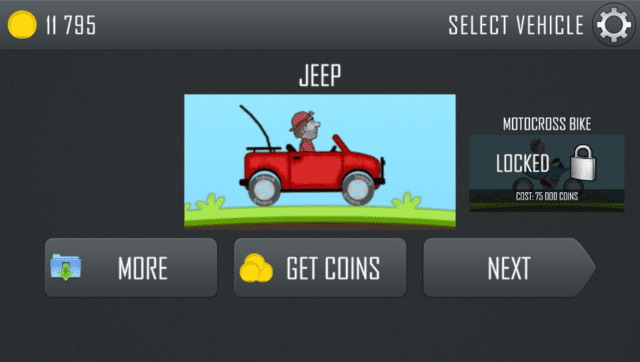
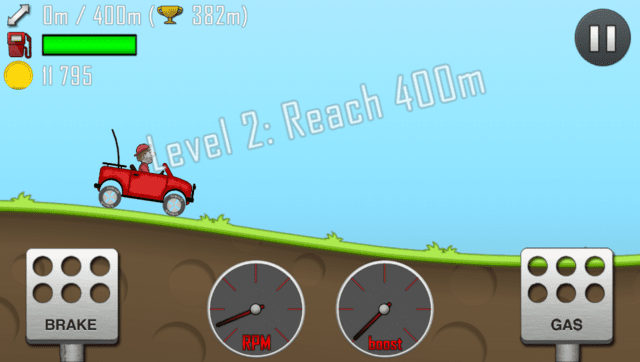
Screenshots
Known issues
- Before the game jumps to the loading screen after launching it, or after finishing a play session, don't quit the game immediately.
- Wait for around 3 seconds and then quit, otherwise your game may crash or your save data may be corrupted.
- If you still happen to crash/corrupt your save file, there is a backup inside
ux0:/data/hcrfolder with the nameSharedPreferences.bin.bak. Simply remove the.bakby renaming and the game should work again, but some progress may be lost.
- When selecting levels or cars, wait until it responds, because it's loading things in the background.
- There is a moment after lots of gameplay, that when you get to the death screen, the game will start lagging and you will have massive FPS drop. It is yet to be figured out why does this happen.
- It is recommended to patiently wait until you can proceed to the selection menu, and restart the game.
- Else, just restart the game in the middle of the laggy sequence, but progress will be lost.
See Issues for currently know problems.
Changelog
beta2
- Fixes #2.
- Before the start of the game, the savedata is backed up in the
ux0:/data/hcrfolder asSharedPreferences.bin.bak. If you happen to crash the game while a load/save happens, and then you try entering the game again but it crashes, delete the currentSharedPreferences.binfile, copy over the.bakfile and remove the.bakfrom the name. - New livearea assets.
beta1
- First Release.
Credits
- Andy "The FloW" Nguyen for the original .so loader.
- Rinnegatamante for VitaGL and lots of help with understanding and debugging the loader.
- PatnosD for giving me the motivation to do this game as my first .so loader port.
- gl33ntwine for the SoLoBoP (.so loader boilerplate), help with the SharedPreferences parsing functions, this README.md as a template copied from Baba is You! port and overall help.
- Everybody who has helped me in Vita Nuova discord while asking questions.