
NX Mod Manager Switch: Difference between revisions
More actions
No edit summary |
3.2.9 |
||
| (11 intermediate revisions by 2 users not shown) | |||
| Line 4: | Line 4: | ||
|description=Nintendo Switch Mod Manager. | |description=Nintendo Switch Mod Manager. | ||
|author=TOM-BadEN | |author=TOM-BadEN | ||
|lastupdated= | |lastupdated=2026/07/13 | ||
|type=Utilities | |type=Utilities | ||
|version=2. | |version=3.2.9 | ||
|license= | |license=GPL-2.0 | ||
|download=https://dlhb.gamebrew.org/switchhomebrews/NXModManagerSwitch.7z | |download=https://dlhb.gamebrew.org/switchhomebrews/NXModManagerSwitch.7z | ||
|website=https://gbatemp.net/threads/nx-mod-manager-v2-0-0-a-local-mod-manager-for-the-nintendo-switch.675101/ | |website=https://gbatemp.net/threads/nx-mod-manager-v2-0-0-a-local-mod-manager-for-the-nintendo-switch.675101/ | ||
| Line 19: | Line 19: | ||
|image_alt=NX Mod Manager | |image_alt=NX Mod Manager | ||
}} | }} | ||
NX Mod Manager is a | NX Mod Manager is a mod management tool designed specifically for the Nintendo Switch platform. The current version features a complete code rewrite and underlying architecture redesign, with significant improvements in both functionality and stability. The project is fully open-source and permanently free, with no paid content of any kind. It supports online browsing and downloading of mods, and provides a complete on-device management workflow, allowing mod acquisition and management without manually handling the SD card. The development and maintenance of online mod resources relies on the participation and contribution of the community. | ||
'''Note:''' Please use at your own risk. | |||
== Features == | == Features == | ||
* | * Game Management - Add games from installed game list or by manually entering TID; supports game removal and favorites. | ||
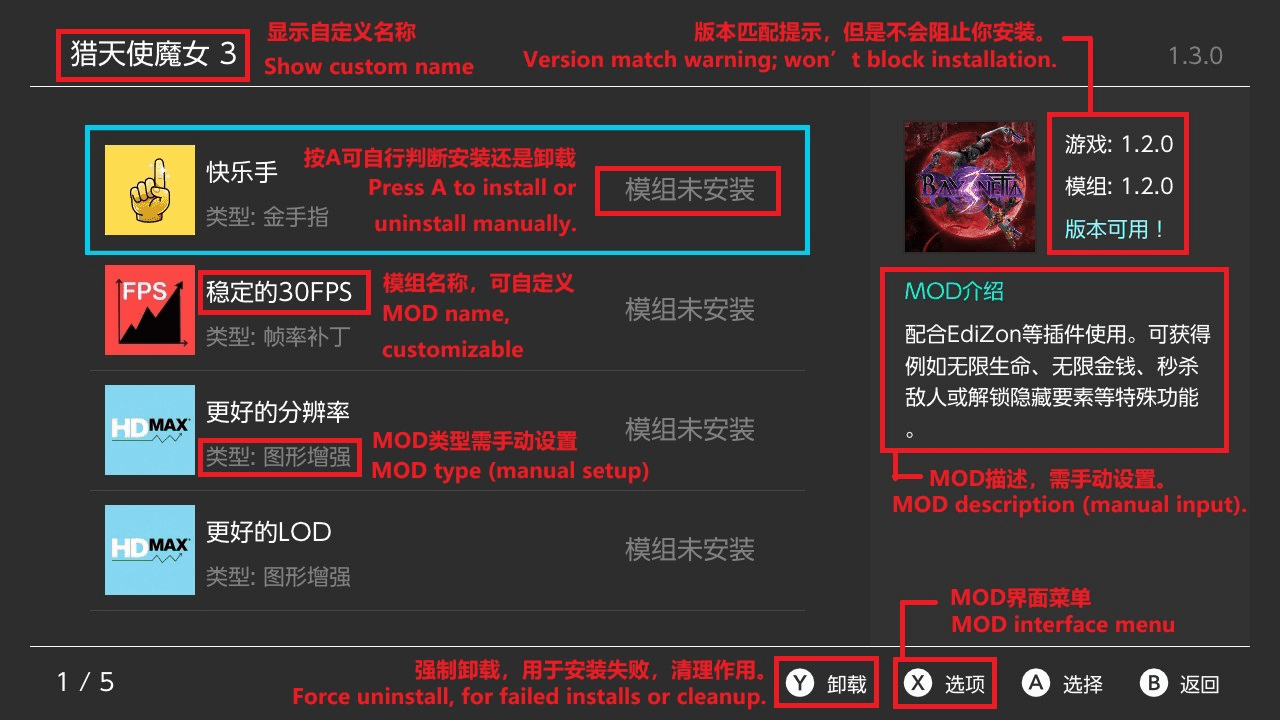
* | * Mod Management - Add, install, uninstall, and remove mods; compatible with both ZIP archives and folder formats. | ||
* Supports | * Patch Conversion - Automatically converts pchtxt text patches to IPS patches during mod installation. | ||
* | * Smart Detection - Automatically identifies mod files with non-standard directory structures and detects file conflicts between mods. | ||
* | * Smart Search - Supports pinyin, polyphone, initials, fuzzy matching and other search methods, deeply adapted for Chinese users. | ||
* | * Mod Toggle - One-click disable or restore all mods for quick game issue troubleshooting. | ||
* File Transfer - Supports MTP (USB wired) and FTP (Wi-Fi wireless) for transferring mods to the console. | |||
* Online Store - Built-in mod store with browsing, searching, downloading and uploading; includes like and comment features. | |||
* Customization - Customize various content such as game name, mod name, description, version, author, and type. | |||
* Multi-language - Simplified Chinese, Traditional Chinese, and English interfaces. | |||
* Theme Switching - Light and dark themes with automatic system-following option. | |||
* Auto Update - Check and download new versions within the app. | |||
* Force Cleanup - Fix reference count corruption caused by abnormal interruptions. | |||
== Installation | == Installation == | ||
Download the [https://github.com/TOM-BadEN/NX-Mod-Manager/releases latest .nro file] and install it on your SD card. | |||
For detailed usage instructions, please view the basic tutorial within the app under "About" or the [https://www.bilibili.com/video/BV1zd5o6wE5B/ video tutorial]. | |||
==Screenshots== | ==Screenshots== | ||
| Line 94: | Line 55: | ||
|} | |} | ||
==Changelog== | ==Changelog== | ||
'''v3.2.9''' | |||
* A few users may crash after auto-update finishes | |||
* No need to worry, this bug was accidentally added last version, restart your device to resolve it | |||
* I’ve been busy lately, so this version is mainly for bug fixes | |||
* The next version will add more support, including Don't Starve, RAR and 7z | |||
* The program will force you to update if a new version is detected on startup | |||
* Because many users using old versions reported to me that they couldn't find features that belong to the new version | |||
* Redesigned layouts for long-text popups, more intuitive and neat | |||
* Fixed auto game version update failure on firmware 21-22 | |||
* Fixed crashes caused by continuous popups in extreme cases | |||
* Fixed store mod detail page navigation logic inconsistent with intuition | |||
* Fixed missing sound when clicking buttons on the second screenshot of mod detail page | |||
* Fixed progress bar briefly showing 100% during auto-update | |||
* Fixed screen flicker when switching tabs on plugin page | |||
* Fixed upload failure when upload page uses non-Chinese language | |||
* Surprisingly, no users reported this bug | |||
* Non-Simplified Chinese users shouldn’t upload on Simplified Chinese page, which breaks auto-translation | |||
'''v3.2.8''' | |||
* Optimized serial number adaptation mechanism for Monster Hunter Rise mod files | |||
* A bubble notification will pop up in the upper right corner when a new version is detected | |||
* Game icons on the store page are cached locally to greatly improve loading speed | |||
* Significantly boosted icon loading speed after searching and filtering on the store page | |||
* Reorganized and categorized the function settings menu on the homepage | |||
* Added an icon repair function in the function settings menu | |||
* Added CPU acceleration function in the function settings menu (recommended to enable) | |||
* Added a button on the store page to view the web address of uploaded mods | |||
* Added author link viewing feature on the store mod detail page | |||
* Fixed the issue where non-standard aspect ratio images would have stretched edges in the image viewer on the store mod detail page | |||
* Fixed the problem that overly long comments cannot wrap lines correctly on the message board | |||
* Adjusted partial UI texts | |||
* Optimized other task workflows | |||
'''v3.2.7''' | |||
* Self-update from v3.1.7 may crash. Restart to recover | |||
* Added mod support for Asian and European versions of Monster Hunter Rise | |||
* Supports mod install and uninstall for versions v3.4.1-v16.0.2 | |||
* The manager automatically corrects special mod file numbering for this game | |||
* Because this game's rules are complex, please follow these rules: | |||
* Clear existing Monster Hunter Rise mods from the SD card before using the manager | |||
* Do not manually modify this game's mod files or use third-party tools while using the manager | |||
* If an issue occurs, use Force Clean to remove all mod files for this game from the SD card | |||
* Download limit messages now show the specific rules | |||
* Comment nickname settings moved to the home page Settings menu | |||
* A quick setup window appears when commenting in the store page without a nickname | |||
* Uninstalling now always removes <code>romfs_metadata.bin</code> | |||
* Mod installation now filters out files and folders starting with <code>.</code> | |||
* After searching in the store page, the B button now resets the search | |||
* Fixed abnormal CPU usage caused by memory monitoring | |||
* Fixed possible home page card display issues after adding a game | |||
'''v3.1.7''' | |||
* Emergency update to fix a bug. Monster Hunter mod support has been postponed to the next release | |||
* Fixed an issue introduced in v3.1.6 that could cause the FTP server to hang during startup | |||
* Anonymous users on the message board will now see their display name correctly localized based on the selected language | |||
* Timestamps in update logs are now automatically converted to the local time zone | |||
'''v3.1.6''' | |||
* Preview: the next version will add support for Monster Hunter mods | |||
* Fixed the issue where store icon loading and mod downloads became extremely slow during evening hours due to server bandwidth throttling by the service provider | |||
* Thanks to @[https://github.com/huangsam04 huangsam04] for generously providing a mirror server for file acceleration | |||
* Added a Y button on the store mod details page to view the mod update history | |||
* The local mod details page now automatically checks whether downloaded mods have available updates | |||
* When a mod file on the cloud is updated, it can now be directly updated and downloaded from the store mod details page to replace the original mod | |||
* Improved mod download speed, but considering server pressure, the limit has only been raised and not completely removed | |||
* Reused TCP connections to improve icon loading speed on the store game list page | |||
* romts_metadata.bin is now forcibly deleted when uninstalling a mod | |||
* Fixed an issue that occasionally caused the page title bar to flicker | |||
* Fixed a memory leak in the store | |||
* Fixed an issue where full Pinyin search could not be used in the store search function | |||
'''v3.1.5''' | |||
* Fixed an issue where the game version displayed in the store would not update correctly after the installed game version on the console changed | |||
* Fixed an issue where local data for downloaded mods could be lost after entering the store from the mod list page (causing mod icons to appear as question marks) | |||
* Improved the store's detection mechanism for downloaded mods (please do not manually delete mod files inside the SD card's mods2 directory, as doing so will still prevent the mod from being downloaded again) | |||
* Fixed an issue where the focus box would briefly flicker after returning to the home page from the mod list page after adding a new mod | |||
* Improved the automatic cleanup process triggered when mod installation fails, including a new warning sound effect and a red progress bar during the cleanup phase | |||
* Updated the download rate limit message to: “Server resources are limited. Downloads are restricted to once every 30 seconds. Thank you for your understanding.” | |||
* Minor adjustments to various UI details and text presentation | |||
'''v3.1.4''' | |||
* Fixed several missing English text entries | |||
* Sorry, I’ve been too busy and forgot to test the multilingual support in the previous version. | |||
'''v3.1.3''' | |||
* Fixed compatibility issues with certain 19.x firmware versions, such as 19.0.1 | |||
* Fixed an issue where the interface would not refresh immediately after closing the mod install/uninstall completion popup with the B button | |||
* Fixed freezes and crashes caused by focus issues when opening the menu during page transitions | |||
'''v3.1.2''' | |||
* Redesigned the Home, Store, and Local Add pages from a 9-grid layout to a large card layout for a more modern UI | |||
* Added page transition animations to improve visual distinction when switching between certain pages | |||
* Home, Store, and Local pages can now be quickly switched using trigger buttons | |||
* Added skeleton screen loading effect to the Store game list page | |||
* Added "Return to Home" and "Mod List" buttons to the post-download dialog in the Store | |||
* Added "Return to Home" button to the completion dialog in Local Add | |||
* The top title on the Mod List and Store pages now displays the game version number for locally installed games | |||
* Adjusted the long-press dialog text on first launch of the Home page for better guidance | |||
* The Store button on the Home page has been merged into the X menu | |||
* The Favorites menu option on the Home page is now triggered directly via the + button | |||
* Added "Sort by Count" and "Sort by Recent" options to the Home page X menu | |||
* Added a toggle to disable button sound effects in the Home page settings menu | |||
* Significantly adjusted text and function option positions in the Home page X menu to improve interaction and guidance | |||
* Added a long-press dialog on first entry to the Mod List page for better guidance | |||
* Removed the + Store button from the Mod List page; it has been merged into the X menu | |||
* Significantly adjusted text and function option positions in the Mod List page X menu to improve interaction and guidance | |||
* The Mod List page now allows deletion of the last remaining mod | |||
* Added quick access to the Store page and Local Add menu via trigger buttons on the Mod List page | |||
* Added a long-press dialog on first entry to the Local Add page for better guidance | |||
* The game list on the Local Add page is now sorted exclusively by recently played order | |||
* The tutorial QR code on the About/Plugins page is now scannable | |||
* Completely rebuilt asynchronous threading to enhance stability and improve page transition smoothness | |||
* Fixed a crash caused by entering non-English characters via the native keyboard when using a custom keyboard | |||
* Fixed a crash caused by games using the new NACP format (e.g., The Legend of Zelda: Breath of the Wild version 1.9.0) | |||
'''v3.0.2''' | |||
* Fixed an issue where the focus behaved incorrectly when removing the last game | |||
* Fixed an issue where the homepage would not display games after adding mods via network or locally on first use of the project | |||
* Reduced the number of times the SD card game directory name uses the TID when automatically adding games (thanks to [https://github.com/WE1ZARD @WE1ZARD] for the cleaning algorithm) | |||
* Added a "Reset Status" feature, located at Home → Menu → Manage Games → Reset Status. This allows users to clear all internally saved project state data, such as mod installation status and conflict records, after reinstalling the Atmosphère modpack using a delete-and-reinstall method | |||
'''v3.0.1''' | |||
* Fixed the issue where using the Disable Mod, Restore Mod, or Force Clean functions failed to correctly handle IPS (exefs_patches) files | |||
'''v3.0.0''' | |||
*Although this is a subsequent version, it is a major overhaul: the entire project has been rewritten, and the architecture has been redesigned. It is incompatible with the old version of the manager. Users of the old version must first use the old manager to uninstall all installed mods before installing the new version. | |||
*Completely new UI design, improved quality. | |||
*Redesigned various interactions, enhanced user experience. | |||
*Added online mod download feature, covering 200+ games and 380 mods in total, including hundreds of exclusive mods. Thanks to Qingfeng Mingyue for the free contribution. | |||
*Two theme color schemes available, freely switchable. | |||
*Mod store content supports Simplified Chinese, Traditional Chinese, and English, and automatically adapts to the user's system language. | |||
*Mod store content supports fuzzy search by Pinyin, initials, or English. | |||
*Supports <code>pchtxt</code> files, which are automatically converted to IPS files during installation. | |||
*Adopts a new custom keyboard in multiple places, improving aesthetics and smoothness. | |||
*Full touch support, can be used entirely without a controller. | |||
*Supports self-updating plugins, no need to monitor release pages. | |||
*Game names customizable, can be fetched from the server database, supporting Simplified Chinese, Traditional Chinese, and English. | |||
*Plugin text itself supports multiple languages; currently only Simplified Chinese, Traditional Chinese, and English. If you wish to add new languages, please do not submit a PR directly, as this is a release repository, not the native repository. Contact the author through the proper channels. | |||
*Added one-click disable all mods function, convenient for quick debugging. | |||
*Added forced clean-up feature (see in-plugin instructions for details). | |||
*Optimized multi-mod file conflict detection and resolution. | |||
*Added intelligent mod file path recognition, no longer need to fully follow the old mod file structure. | |||
*Added FTP feature, supporting mod file transfer to a relay station via FTP. | |||
*Rewritten MTP feature for more stable transfer (however, folder-based mods may still cause MTP freezing; in such cases, it is recommended to package as ZIP or use FTP). | |||
'''v2.2.7''' | |||
*Recompiled with the latest libnx, supporting AMS 1.10 and HOS 21. | |||
*Fixed the issue where zip files with additional "." in the filename could not be recognized. | |||
'''v2.2.6''' | '''v2.2.6''' | ||
*Optimized conflict detection logic, now allowing multiple mods to share common files. | *Optimized conflict detection logic, now allowing multiple mods to share common files. | ||
| Line 103: | Line 202: | ||
*Adjusted some details. | *Adjusted some details. | ||
'''v2.2.4''' | '''v2.2.4''' | ||
*Fixed an issue where MTP transfers of large files could occasionally freeze (thanks to | *Fixed an issue where MTP transfers of large files could occasionally freeze (thanks to TotalJustice's libhaze fix). | ||
*Added conflict detection when installing MODs: if the target path contains the same file, the system will compare and identify conflicting MODs. | *Added conflict detection when installing MODs: if the target path contains the same file, the system will compare and identify conflicting MODs. | ||
*Added automatic cleanup of installed files when installation is interrupted by pressing B. | *Added automatic cleanup of installed files when installation is interrupted by pressing B. | ||
*Added automatic cleanup of installed files if installation fails due to an error. | *Added automatic cleanup of installed files if installation fails due to an error. | ||
*Adjusted the text position in confirmation dialogs: previously centered, now centered horizontally but left-aligned. | *Adjusted the text position in confirmation dialogs: previously centered, now centered horizontally but left-aligned. | ||
*Changed the Y button label from | *Changed the Y button label from "Uninstall" to "Force Clean". | ||
*Added confirmation dialog text for Force Clean. | *Added confirmation dialog text for Force Clean. | ||
*Added dynamic timer display in the console during MTP transfers. | *Added dynamic timer display in the console during MTP transfers. | ||
| Line 141: | Line 240: | ||
**Fixed an issue where folders containing a dot were misidentified as files | **Fixed an issue where folders containing a dot were misidentified as files | ||
**Fixed an exception with down-key navigation in the 3×3 grid under special conditions | **Fixed an exception with down-key navigation in the 3×3 grid under special conditions | ||
**Fixed some minor bugs that | **Fixed some minor bugs that didn't affect usage (details forgotten) | ||
'''v2.0.3''' | '''v2.0.3''' | ||
*Fixed an issue where the scanned game version on the Switch remained outdated after the game version changed. | *Fixed an issue where the scanned game version on the Switch remained outdated after the game version changed. | ||
| Line 156: | Line 255: | ||
**Added the ability to add games directly from installed games into the mod manager, avoiding the need for complex manual configuration. | **Added the ability to add games directly from installed games into the mod manager, avoiding the need for complex manual configuration. | ||
*Installed Games Interface | *Installed Games Interface | ||
**A new interface has been added to support the | **A new interface has been added to support the "Add Game" function from the main interface. | ||
*MOD Interface | *MOD Interface | ||
**Added menu functionality for the X button. | **Added menu functionality for the X button. | ||
| Line 182: | Line 281: | ||
*Added support for installing MODs in ZIP format, primarily targeting large MODs, significantly improving installation speed. | *Added support for installing MODs in ZIP format, primarily targeting large MODs, significantly improving installation speed. | ||
*Refactored the installation and uninstallation code. | *Refactored the installation and uninstallation code. | ||
*For example, the Lin | *For example, the Lin Ke'er MOD consists of 2,732 files totaling 500 MB. | ||
*Slightly improved file-based installation speed, reducing the time from 1:50–2:00 to 1:40–1:55. | *Slightly improved file-based installation speed, reducing the time from 1:50–2:00 to 1:40–1:55. | ||
*Slightly improved uninstallation speed, now completing in most cases within 20 seconds (previously around 20 seconds). | *Slightly improved uninstallation speed, now completing in most cases within 20 seconds (previously around 20 seconds). | ||
*Greatly improved installation speed for ZIP-based MODs. When the Lin | *Greatly improved installation speed for ZIP-based MODs. When the Lin Ke'er MOD was packaged as a ZIP, installation time decreased from 1:40–1:55 to 1:05–1:20. | ||
*The larger the MOD, the greater the relative performance improvement. For details on configuring ZIP installation, see the provided template or README. | *The larger the MOD, the greater the relative performance improvement. For details on configuring ZIP installation, see the provided template or README. | ||
'''v1.1.0''' | '''v1.1.0''' | ||
| Line 199: | Line 298: | ||
== Credits & Libraries == | == Credits & Libraries == | ||
Thanks to the following open-source projects: | |||
{| class="wikitable" | |||
|- | |||
! Project | |||
! Description | |||
! Author | |||
|- | |||
| [https://github.com/xfangfang/borealis borealis] | |||
| UI Framework | |||
| [https://github.com/xfangfang xfangfang], [https://github.com/natinusala natinusala] | |||
|- | |||
| [https://github.com/Atmosphere-NX/Atmosphere/tree/master/troposphere/haze libhaze] | |||
| MTP | |||
| [https://github.com/ITotalJustice ITotalJustice] | |||
|- | |||
| [https://github.com/ITotalJustice/ftpsrv ftpsrv] | |||
| FTP | |||
| [https://github.com/ITotalJustice ITotalJustice] | |||
|- | |||
| [https://github.com/ibireme/yyjson yyjson] | |||
| High-performance JSON parsing | |||
| [https://github.com/ibireme ibireme] | |||
|- | |||
| [https://github.com/wolfgitpr/cpp-pinyin cpp-pinyin] | |||
| Pinyin search | |||
| [https://github.com/wolfgitpr wolfgitpr] | |||
|- | |||
| [https://github.com/sammycage/lunasvg lunasvg] | |||
| SVG rendering | |||
| [https://github.com/sammycage sammycage] | |||
|- | |||
| [https://github.com/nayuki/QR-Code-generator QR-Code-generator] | |||
| QR code generation | |||
| [https://github.com/nayuki nayuki] | |||
|- | |||
| [https://github.com/richgel999/miniz miniz] | |||
| ZIP compression & decompression | |||
| [https://github.com/richgel999 richgel999] | |||
|- | |||
| [https://github.com/DarkMatterCore/libnxtc libnxtc] | |||
| Game info caching | |||
| [https://github.com/DarkMatterCore DarkMatterCore] | |||
|} | |||
== External links == | == External links == | ||
* | * GitHub - https://github.com/TOM-BadEN/NX-Mod-Manager | ||
* | * GBAtemp - https://gbatemp.net/threads/nx-mod-manager-v2-0-0-a-local-mod-manager-for-the-nintendo-switch.675101/ | ||
* Homebrew App Store - https://hb-app.store/switch/NXModManager | |||
Latest revision as of 02:08, 17 July 2026
| NX Mod Manager | |
|---|---|
 | |
| General | |
| Author | TOM-BadEN |
| Type | Utilities |
| Version | 3.2.9 |
| License | GPL-2.0 |
| Last Updated | 2026/07/13 |
| Links | |
| Download | |
| Website | |
| Source | |
NX Mod Manager is a mod management tool designed specifically for the Nintendo Switch platform. The current version features a complete code rewrite and underlying architecture redesign, with significant improvements in both functionality and stability. The project is fully open-source and permanently free, with no paid content of any kind. It supports online browsing and downloading of mods, and provides a complete on-device management workflow, allowing mod acquisition and management without manually handling the SD card. The development and maintenance of online mod resources relies on the participation and contribution of the community.
Note: Please use at your own risk.
Features
- Game Management - Add games from installed game list or by manually entering TID; supports game removal and favorites.
- Mod Management - Add, install, uninstall, and remove mods; compatible with both ZIP archives and folder formats.
- Patch Conversion - Automatically converts pchtxt text patches to IPS patches during mod installation.
- Smart Detection - Automatically identifies mod files with non-standard directory structures and detects file conflicts between mods.
- Smart Search - Supports pinyin, polyphone, initials, fuzzy matching and other search methods, deeply adapted for Chinese users.
- Mod Toggle - One-click disable or restore all mods for quick game issue troubleshooting.
- File Transfer - Supports MTP (USB wired) and FTP (Wi-Fi wireless) for transferring mods to the console.
- Online Store - Built-in mod store with browsing, searching, downloading and uploading; includes like and comment features.
- Customization - Customize various content such as game name, mod name, description, version, author, and type.
- Multi-language - Simplified Chinese, Traditional Chinese, and English interfaces.
- Theme Switching - Light and dark themes with automatic system-following option.
- Auto Update - Check and download new versions within the app.
- Force Cleanup - Fix reference count corruption caused by abnormal interruptions.
Installation
Download the latest .nro file and install it on your SD card.
For detailed usage instructions, please view the basic tutorial within the app under "About" or the video tutorial.
Screenshots
|
|

Changelog
v3.2.9
- A few users may crash after auto-update finishes
- No need to worry, this bug was accidentally added last version, restart your device to resolve it
- I’ve been busy lately, so this version is mainly for bug fixes
- The next version will add more support, including Don't Starve, RAR and 7z
- The program will force you to update if a new version is detected on startup
- Because many users using old versions reported to me that they couldn't find features that belong to the new version
- Redesigned layouts for long-text popups, more intuitive and neat
- Fixed auto game version update failure on firmware 21-22
- Fixed crashes caused by continuous popups in extreme cases
- Fixed store mod detail page navigation logic inconsistent with intuition
- Fixed missing sound when clicking buttons on the second screenshot of mod detail page
- Fixed progress bar briefly showing 100% during auto-update
- Fixed screen flicker when switching tabs on plugin page
- Fixed upload failure when upload page uses non-Chinese language
- Surprisingly, no users reported this bug
- Non-Simplified Chinese users shouldn’t upload on Simplified Chinese page, which breaks auto-translation
v3.2.8
- Optimized serial number adaptation mechanism for Monster Hunter Rise mod files
- A bubble notification will pop up in the upper right corner when a new version is detected
- Game icons on the store page are cached locally to greatly improve loading speed
- Significantly boosted icon loading speed after searching and filtering on the store page
- Reorganized and categorized the function settings menu on the homepage
- Added an icon repair function in the function settings menu
- Added CPU acceleration function in the function settings menu (recommended to enable)
- Added a button on the store page to view the web address of uploaded mods
- Added author link viewing feature on the store mod detail page
- Fixed the issue where non-standard aspect ratio images would have stretched edges in the image viewer on the store mod detail page
- Fixed the problem that overly long comments cannot wrap lines correctly on the message board
- Adjusted partial UI texts
- Optimized other task workflows
v3.2.7
- Self-update from v3.1.7 may crash. Restart to recover
- Added mod support for Asian and European versions of Monster Hunter Rise
- Supports mod install and uninstall for versions v3.4.1-v16.0.2
- The manager automatically corrects special mod file numbering for this game
- Because this game's rules are complex, please follow these rules:
- Clear existing Monster Hunter Rise mods from the SD card before using the manager
- Do not manually modify this game's mod files or use third-party tools while using the manager
- If an issue occurs, use Force Clean to remove all mod files for this game from the SD card
- Download limit messages now show the specific rules
- Comment nickname settings moved to the home page Settings menu
- A quick setup window appears when commenting in the store page without a nickname
- Uninstalling now always removes
romfs_metadata.bin - Mod installation now filters out files and folders starting with
. - After searching in the store page, the B button now resets the search
- Fixed abnormal CPU usage caused by memory monitoring
- Fixed possible home page card display issues after adding a game
v3.1.7
- Emergency update to fix a bug. Monster Hunter mod support has been postponed to the next release
- Fixed an issue introduced in v3.1.6 that could cause the FTP server to hang during startup
- Anonymous users on the message board will now see their display name correctly localized based on the selected language
- Timestamps in update logs are now automatically converted to the local time zone
v3.1.6
- Preview: the next version will add support for Monster Hunter mods
- Fixed the issue where store icon loading and mod downloads became extremely slow during evening hours due to server bandwidth throttling by the service provider
- Thanks to @huangsam04 for generously providing a mirror server for file acceleration
- Added a Y button on the store mod details page to view the mod update history
- The local mod details page now automatically checks whether downloaded mods have available updates
- When a mod file on the cloud is updated, it can now be directly updated and downloaded from the store mod details page to replace the original mod
- Improved mod download speed, but considering server pressure, the limit has only been raised and not completely removed
- Reused TCP connections to improve icon loading speed on the store game list page
- romts_metadata.bin is now forcibly deleted when uninstalling a mod
- Fixed an issue that occasionally caused the page title bar to flicker
- Fixed a memory leak in the store
- Fixed an issue where full Pinyin search could not be used in the store search function
v3.1.5
- Fixed an issue where the game version displayed in the store would not update correctly after the installed game version on the console changed
- Fixed an issue where local data for downloaded mods could be lost after entering the store from the mod list page (causing mod icons to appear as question marks)
- Improved the store's detection mechanism for downloaded mods (please do not manually delete mod files inside the SD card's mods2 directory, as doing so will still prevent the mod from being downloaded again)
- Fixed an issue where the focus box would briefly flicker after returning to the home page from the mod list page after adding a new mod
- Improved the automatic cleanup process triggered when mod installation fails, including a new warning sound effect and a red progress bar during the cleanup phase
- Updated the download rate limit message to: “Server resources are limited. Downloads are restricted to once every 30 seconds. Thank you for your understanding.”
- Minor adjustments to various UI details and text presentation
v3.1.4
- Fixed several missing English text entries
- Sorry, I’ve been too busy and forgot to test the multilingual support in the previous version.
v3.1.3
- Fixed compatibility issues with certain 19.x firmware versions, such as 19.0.1
- Fixed an issue where the interface would not refresh immediately after closing the mod install/uninstall completion popup with the B button
- Fixed freezes and crashes caused by focus issues when opening the menu during page transitions
v3.1.2
- Redesigned the Home, Store, and Local Add pages from a 9-grid layout to a large card layout for a more modern UI
- Added page transition animations to improve visual distinction when switching between certain pages
- Home, Store, and Local pages can now be quickly switched using trigger buttons
- Added skeleton screen loading effect to the Store game list page
- Added "Return to Home" and "Mod List" buttons to the post-download dialog in the Store
- Added "Return to Home" button to the completion dialog in Local Add
- The top title on the Mod List and Store pages now displays the game version number for locally installed games
- Adjusted the long-press dialog text on first launch of the Home page for better guidance
- The Store button on the Home page has been merged into the X menu
- The Favorites menu option on the Home page is now triggered directly via the + button
- Added "Sort by Count" and "Sort by Recent" options to the Home page X menu
- Added a toggle to disable button sound effects in the Home page settings menu
- Significantly adjusted text and function option positions in the Home page X menu to improve interaction and guidance
- Added a long-press dialog on first entry to the Mod List page for better guidance
- Removed the + Store button from the Mod List page; it has been merged into the X menu
- Significantly adjusted text and function option positions in the Mod List page X menu to improve interaction and guidance
- The Mod List page now allows deletion of the last remaining mod
- Added quick access to the Store page and Local Add menu via trigger buttons on the Mod List page
- Added a long-press dialog on first entry to the Local Add page for better guidance
- The game list on the Local Add page is now sorted exclusively by recently played order
- The tutorial QR code on the About/Plugins page is now scannable
- Completely rebuilt asynchronous threading to enhance stability and improve page transition smoothness
- Fixed a crash caused by entering non-English characters via the native keyboard when using a custom keyboard
- Fixed a crash caused by games using the new NACP format (e.g., The Legend of Zelda: Breath of the Wild version 1.9.0)
v3.0.2
- Fixed an issue where the focus behaved incorrectly when removing the last game
- Fixed an issue where the homepage would not display games after adding mods via network or locally on first use of the project
- Reduced the number of times the SD card game directory name uses the TID when automatically adding games (thanks to @WE1ZARD for the cleaning algorithm)
- Added a "Reset Status" feature, located at Home → Menu → Manage Games → Reset Status. This allows users to clear all internally saved project state data, such as mod installation status and conflict records, after reinstalling the Atmosphère modpack using a delete-and-reinstall method
v3.0.1
- Fixed the issue where using the Disable Mod, Restore Mod, or Force Clean functions failed to correctly handle IPS (exefs_patches) files
v3.0.0
- Although this is a subsequent version, it is a major overhaul: the entire project has been rewritten, and the architecture has been redesigned. It is incompatible with the old version of the manager. Users of the old version must first use the old manager to uninstall all installed mods before installing the new version.
- Completely new UI design, improved quality.
- Redesigned various interactions, enhanced user experience.
- Added online mod download feature, covering 200+ games and 380 mods in total, including hundreds of exclusive mods. Thanks to Qingfeng Mingyue for the free contribution.
- Two theme color schemes available, freely switchable.
- Mod store content supports Simplified Chinese, Traditional Chinese, and English, and automatically adapts to the user's system language.
- Mod store content supports fuzzy search by Pinyin, initials, or English.
- Supports
pchtxtfiles, which are automatically converted to IPS files during installation. - Adopts a new custom keyboard in multiple places, improving aesthetics and smoothness.
- Full touch support, can be used entirely without a controller.
- Supports self-updating plugins, no need to monitor release pages.
- Game names customizable, can be fetched from the server database, supporting Simplified Chinese, Traditional Chinese, and English.
- Plugin text itself supports multiple languages; currently only Simplified Chinese, Traditional Chinese, and English. If you wish to add new languages, please do not submit a PR directly, as this is a release repository, not the native repository. Contact the author through the proper channels.
- Added one-click disable all mods function, convenient for quick debugging.
- Added forced clean-up feature (see in-plugin instructions for details).
- Optimized multi-mod file conflict detection and resolution.
- Added intelligent mod file path recognition, no longer need to fully follow the old mod file structure.
- Added FTP feature, supporting mod file transfer to a relay station via FTP.
- Rewritten MTP feature for more stable transfer (however, folder-based mods may still cause MTP freezing; in such cases, it is recommended to package as ZIP or use FTP).
v2.2.7
- Recompiled with the latest libnx, supporting AMS 1.10 and HOS 21.
- Fixed the issue where zip files with additional "." in the filename could not be recognized.
v2.2.6
- Optimized conflict detection logic, now allowing multiple mods to share common files.
- Removed the feature to cancel mod uninstallation by pressing B.
- Fixed a critical bug in file-type mod installation.
v2.2.5
- Added Bilibili video tutorial and GitHub QR code images to the guide.
- Adjusted some details.
v2.2.4
- Fixed an issue where MTP transfers of large files could occasionally freeze (thanks to TotalJustice's libhaze fix).
- Added conflict detection when installing MODs: if the target path contains the same file, the system will compare and identify conflicting MODs.
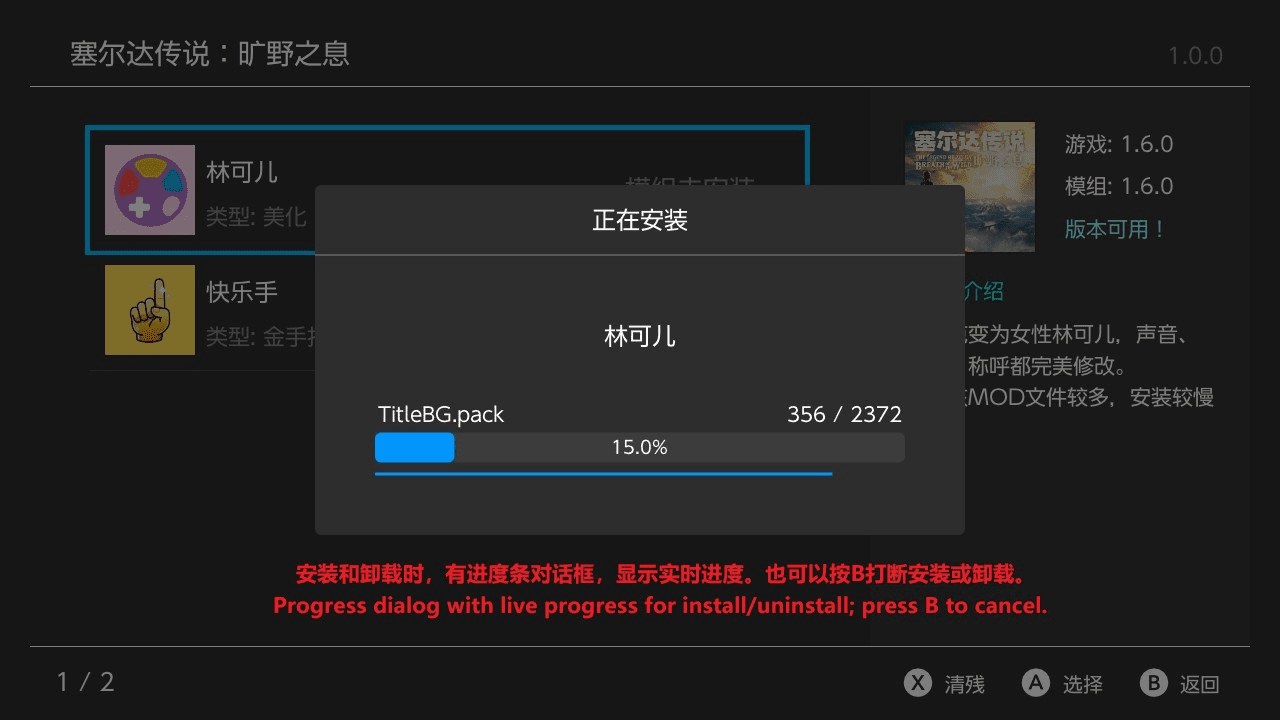
- Added automatic cleanup of installed files when installation is interrupted by pressing B.
- Added automatic cleanup of installed files if installation fails due to an error.
- Adjusted the text position in confirmation dialogs: previously centered, now centered horizontally but left-aligned.
- Changed the Y button label from "Uninstall" to "Force Clean".
- Added confirmation dialog text for Force Clean.
- Added dynamic timer display in the console during MTP transfers.
- Fixed an error in MOD list sorting.
v2.1.4
- Added transfer speed information to the MTP transfer interface
- Slightly improved MTP stability for LITE models
- Completed the missing text in languages other than Simplified Chinese
v2.1.3
- Home Screen
- Added favorite marking feature
- Added search function, supporting touch, pinyin, fuzzy, initials, and full spelling search
- Added MTP transfer option in the menu (experimental; known issue: on LITE, uploading files larger than 1.5 GB will freeze)
- Added Remove Game option in the menu; removed mods will be moved to the addmod folder
- Added View Location option in the menu
- Added pre-sorting: games are displayed in A–Z order when opening the plugin
- Add Game Screen
- Added search function
- Added a reminder when installing mods if the version does not match
- Mod Screen
- Added Remove Mod option in the menu
- Added View Location option in the menu
- Others
- Simplified version comparison rules: now only compares the numeric part
- Added repeat input for Up/Down keys when held
- Adjusted the add function: it can only be used after the home scan finishes, to avoid blocking
- Removed the mod count display at the bottom left of the add-mod list, since long text in other languages caused overlap
- Adjusted some details to improve user experience (forgot the exact changes)
- Bug Fixes
- Fixed an exception where modifying the version number did not update the corresponding JSON file
- Fixed an issue where some game icons failed to load
- Fixed an issue where folders containing a dot were misidentified as files
- Fixed an exception with down-key navigation in the 3×3 grid under special conditions
- Fixed some minor bugs that didn't affect usage (details forgotten)
v2.0.3
- Fixed an issue where the scanned game version on the Switch remained outdated after the game version changed.
v2.0.2
- Fixed a bug that caused the program to crash when adding mods.
v2.0.1
- Fix the issue where the text on the virtual keyboard is invisible when the Switch theme is set to the light theme.
- Newly added games will now appear at the top of the page, eliminating the need to search for them.
v2.0.0
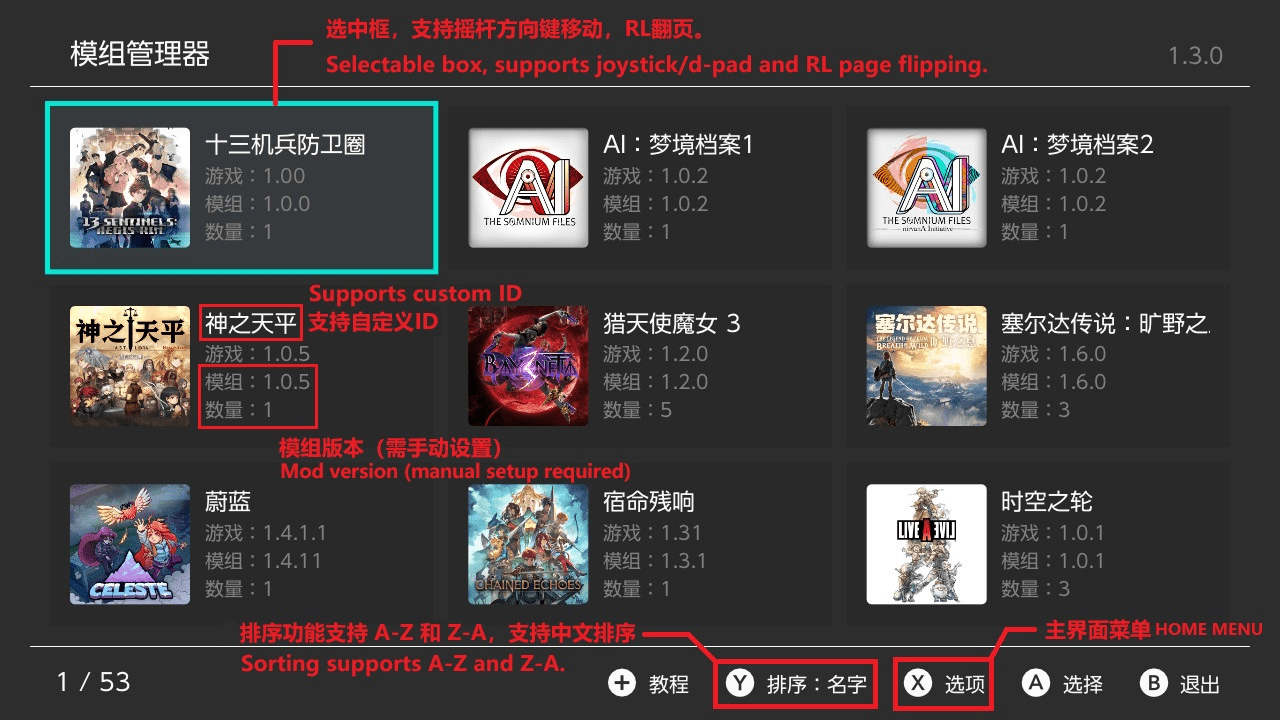
- Main Interface
- The vertical list interface has been rebuilt into a grid interface, allowing more content to be displayed at once.
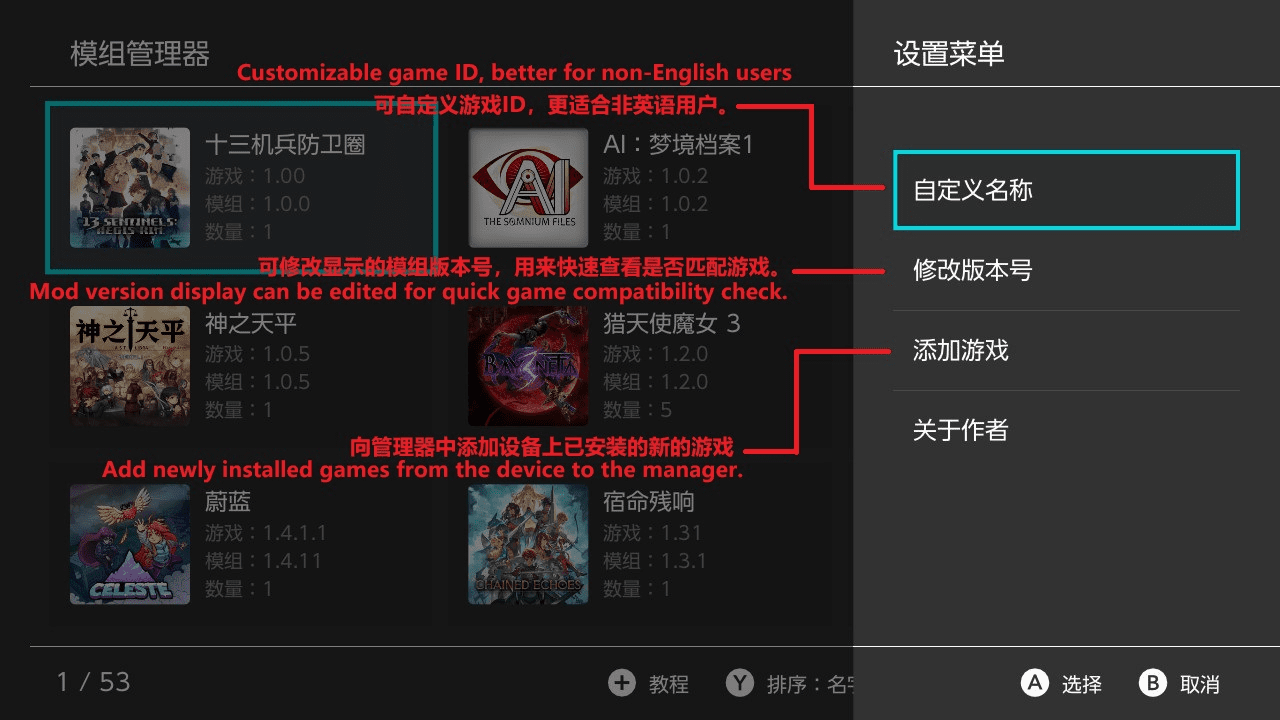
- Added menu functionality for the X button.
- Supports custom game names and mod version editing (display purposes only).
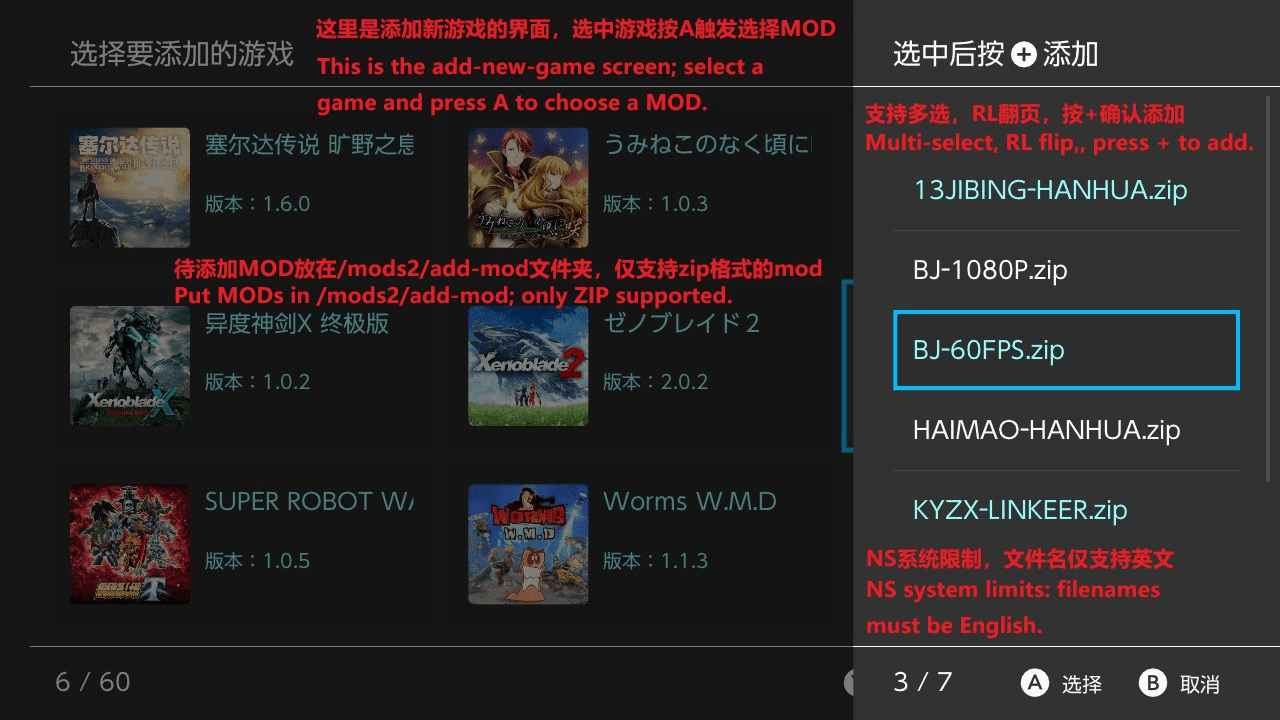
- Added the ability to add games directly from installed games into the mod manager, avoiding the need for complex manual configuration.
- Installed Games Interface
- A new interface has been added to support the "Add Game" function from the main interface.
- MOD Interface
- Added menu functionality for the X button.
- Supports custom mod names, mod type modification, and adding mod descriptions.
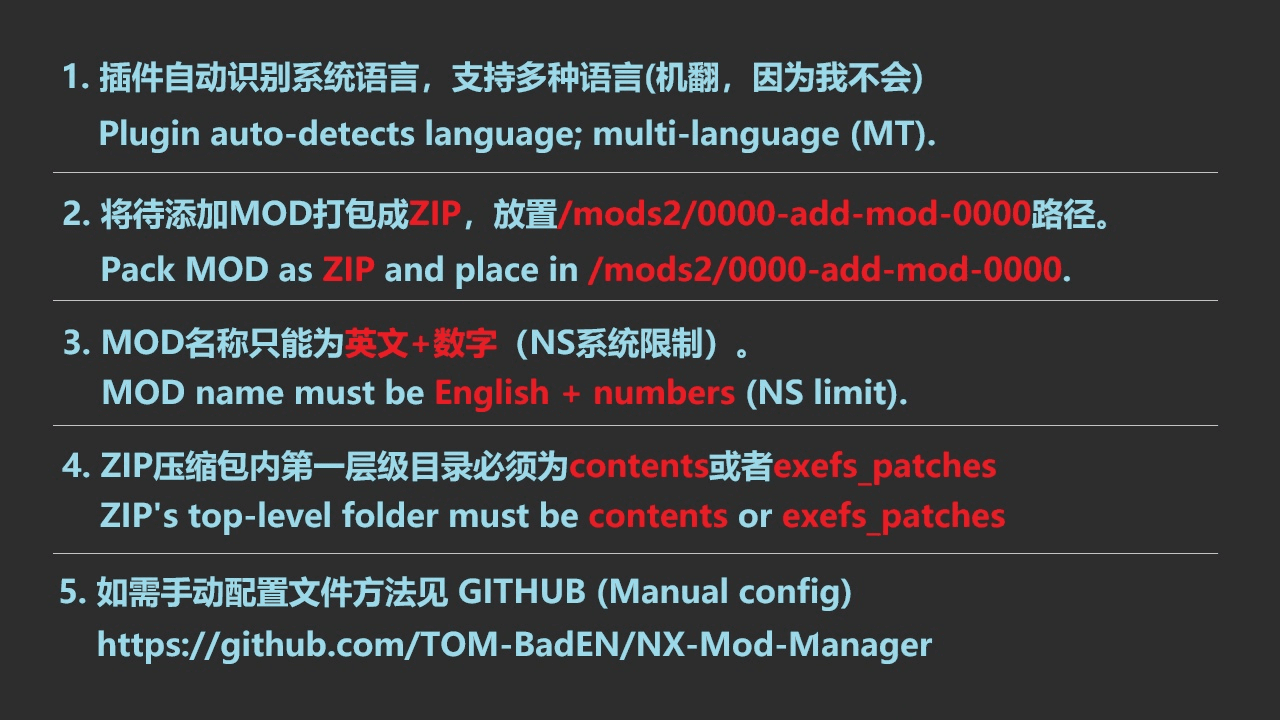
- Supports appending mods freely, with mod files placed in /mods2/0000-add-mod-0000.
- Tutorial Interface
- The tutorial interface has been rebuilt. Previously, it was all text-heavy and hard to follow; now it is image-based.
- Others
- Added pinyin sorting, allowing Chinese game names to be sorted alphabetically.
- Fixed a bug that could cause installed mods to fail.
- Fixed several minor bugs that did not affect functionality.
v1.3.0
- Significantly improved ZIP MOD uninstallation speed
- Linkoer can now be uninstalled within 20 seconds.
- Princess Flower uninstallation improved from 3 minutes 30 seconds to 1 minute 30 seconds.
- Significantly improved installation speed for file-based MODs
- Linkoer installation improved from 1 minute 40–50 seconds to 1 minute–1 minute 20 seconds.
- Princess Flower installation previously unmeasured, now takes 7 minutes 10 seconds; using ZIP-based MOD installation is recommended.
- Significantly improved installation speed for ZIP-based MODs
- Linkoer installation improved from 1 minute 5–20 seconds to a more stable time, close to 1 minute 5 seconds.
- Princess Flower installation improved from 6 minutes 13 seconds to 4 minutes 50 seconds–5 minutes 10 seconds.
- Adjusted the file count background layer in the progress dialog to ensure it is not obscured by file names.
- Fixed a minor bug that does not affect usage.
v1.2.0
- Added support for installing MODs in ZIP format, primarily targeting large MODs, significantly improving installation speed.
- Refactored the installation and uninstallation code.
- For example, the Lin Ke'er MOD consists of 2,732 files totaling 500 MB.
- Slightly improved file-based installation speed, reducing the time from 1:50–2:00 to 1:40–1:55.
- Slightly improved uninstallation speed, now completing in most cases within 20 seconds (previously around 20 seconds).
- Greatly improved installation speed for ZIP-based MODs. When the Lin Ke'er MOD was packaged as a ZIP, installation time decreased from 1:40–1:55 to 1:05–1:20.
- The larger the MOD, the greater the relative performance improvement. For details on configuring ZIP installation, see the provided template or README.
v1.1.0
- Modified the bottom-left text in the game and mod interface from "Total" to "Current Index / Total".
- Fixed two minor bugs that did not affect usability.
- Added a per-file copy progress bar in the installation dialog, which only appears for large files.
- Significantly improved mod uninstallation speed. For example, uninstalling the "Lin Ke'er MOD" is reduced from over 1 minute 30 seconds to about 20 seconds.
- Slightly improved mod installation speed. For example, installing the "Lin Ke'er MOD" is reduced from 2:00–2:10 to 1:50–2:00.
- The "Lin Ke'er MOD" contains a total of 2732 files.
- Added timing display for installation and uninstallation completion. If under 1 second, it will display as 0.1s.
v1.0
- First Release.
Credits & Libraries
Thanks to the following open-source projects:
| Project | Description | Author |
|---|---|---|
| borealis | UI Framework | xfangfang, natinusala |
| libhaze | MTP | ITotalJustice |
| ftpsrv | FTP | ITotalJustice |
| yyjson | High-performance JSON parsing | ibireme |
| cpp-pinyin | Pinyin search | wolfgitpr |
| lunasvg | SVG rendering | sammycage |
| QR-Code-generator | QR code generation | nayuki |
| miniz | ZIP compression & decompression | richgel999 |
| libnxtc | Game info caching | DarkMatterCore |