
Pomegranate 3DS: Difference between revisions
From GameBrew
More actions
No edit summary |
No edit summary |
||
| (One intermediate revision by one other user not shown) | |||
| Line 4: | Line 4: | ||
|description=A GUI music player and organizer. | |description=A GUI music player and organizer. | ||
|author=sheepy0125 | |author=sheepy0125 | ||
|lastupdated= | |lastupdated=2026/02/14 | ||
|type=Media Players | |type=Media Players | ||
|version=1.1. | |version=1.1.5 | ||
|license=MIT | |license=MIT | ||
|download=https://dlhb.gamebrew.org/3dshomebrews/Pomegranate3DS.7z | |download=https://dlhb.gamebrew.org/3dshomebrews/Pomegranate3DS.7z | ||
| Line 78: | Line 78: | ||
==Screenshots== | ==Screenshots== | ||
https://dlhb.gamebrew.org/3dshomebrews/images/Pomegranate3DS-01.png | https://dlhb.gamebrew.org/3dshomebrews/images/Pomegranate3DS-01.png | ||
https://dlhb.gamebrew.org/3dshomebrews/images/Pomegranate3DS-02.png | https://dlhb.gamebrew.org/3dshomebrews/images/Pomegranate3DS-02.png | ||
==Changelog== | ==Changelog== | ||
'''v1.1.5''' | |||
* Opus support (by [https://github.com/l1npengtul @l1npengtul]) | |||
* Plugin system and offline [https://web.archive.org/web/20161207115744/http://www.audioscrobbler.net/wiki/Portable_Player_Logging scrobbler.log] support | |||
'''v1.1.4''' | '''v1.1.4''' | ||
* Bumper controls for next song (triple tap R) and previous song (triple tap L). | * Bumper controls for next song (triple tap R) and previous song (triple tap L). | ||
Latest revision as of 03:31, 17 February 2026
| Pomegranate | |
|---|---|
 | |
| General | |
| Author | sheepy0125 |
| Type | Media Players |
| Version | 1.1.5 |
| License | MIT License |
| Last Updated | 2026/02/14 |
| Links | |
| Download | |
| Website | |
| Source | |
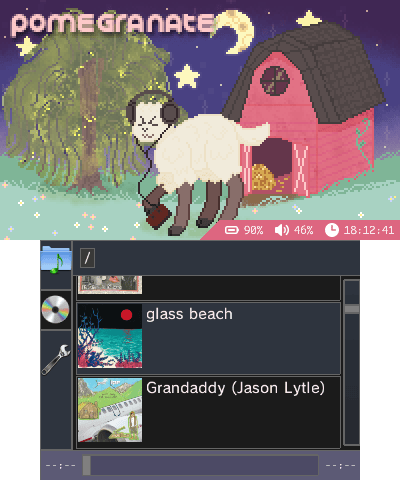
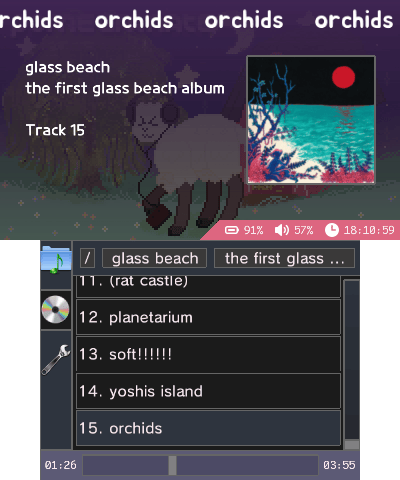
A GUI music player and organizer for Nintendo 3DS.
Features
- Audio playback
- flac
- mp3
- m4a
- Pausing
- Seeking
- Track metadata
- Album art
- From metadata
- From indexing
- Bumper controls
- Pause/play
- Next / previous
- Playlists
- Enqueuing songs
- Loop
- Shuffle
- Music organization
- Folder-based navigation
- Metadata-based indexing navigation
- Cool UI
Usage
Indexing
Indexing organizes your music by artist -> album -> tracks by looking at the metadata of every file recursively from your selected root directory.
To get started:
- go to the settings menu,
- choose a music library folder,
- go to the the CD menu,
- scroll to the bottom,
- and press "reindex."
This process will take quite a bit of time (~1-5 sec/song, depending on the format!).
Bumper controls
| Input | Action |
|---|---|
| double (2x) tap R | pause or play |
| double (2x) tap L | stop playback |
| triple (3x) tap R | next song |
| triple (3x) tap L | previous song |
Screenshots
Changelog
v1.1.5
- Opus support (by @l1npengtul)
- Plugin system and offline scrobbler.log support
v1.1.4
- Bumper controls for next song (triple tap R) and previous song (triple tap L).
- Fix regression of crashing on certain songs with large sample buffers.
- Fix hanging on non-main thread panics.
- Fix wrong inferred track number for files with numbers after the track number (e.g. 38 123456 Pokémon.flac).
v1.1.3
- Added auto-playing the next song in folder or album (start of song queue).
- Rudimentary theming support (custom color schemes, c.f. https://git.sr.ht/~sheepy/pomegranate/tree/main/item/meta/theming.md).
- Fixed a few home-menu and hanging related bugs.
v1.1.2
- Faster indexing on a separate thread.
v1.1.1
- Fixed console freezing on power button press and home menu.
v1.1.0
- Indexing now caches decoded 128x128 album art images. These cached album arts are instead loaded for the playback UI, with decoding the PNG/JPEG/etc. image as a fallback (much faster load times for indexed songs).
- No longer crashes when loading a folder with hundreds of files/directories.
- Updated banner.
- Fixed evil bug (thread channel deadlock, caused intermittent hanging).
- Minor bugfixes.
v1.0
- First Release.
Credits
- Backgrounds
- Icons
- Audio
- Banner audio: Cipher by Kevin MacLeod, source
