
Labyrinth DS: Difference between revisions
More actions
| (2 intermediate revisions by the same user not shown) | |||
| Line 28: | Line 28: | ||
You must place the tile into the board, but you do not need to move your pawn every turn. Note that tiles can only be placed on locations marked with an arrow. The loose tile can be rotated by tapping it. | You must place the tile into the board, but you do not need to move your pawn every turn. Note that tiles can only be placed on locations marked with an arrow. The loose tile can be rotated by tapping it. | ||
Placing a | Placing a tile moves an entire row or column, opens new path and closes others. Use this to your advantage when trying to reach your treasure, or to block your opponent's way. An arrow on the opposite side of where you placed your tile will be marked with a red cross. It is not allowed to directly negate a previous player's change to the labyrinth. | ||
After placing a tile, you will be able to move the pawn by tapping a tile on the board that your pawn can reach. If placing a tile pushes the pawn off the board, the pawn is moved to the newly placed tile. | After placing a tile, you will be able to move the pawn by tapping a tile on the board that your pawn can reach. If placing a tile pushes the pawn off the board, the pawn is moved to the newly placed tile. | ||
In the real game, you can only hunt for the first treasure on your list. This treasure will be displayed to the right of the board. You will have the opportunity to undo your current move and try again by pressing the arrow button. | In the real game, you can only hunt for the first treasure on your list. This treasure will be displayed to the right of the board. You will have the opportunity to undo your current move and try again by pressing the arrow button. | ||
Latest revision as of 01:09, 28 July 2025
| Labyrinth | |
|---|---|
 | |
| General | |
| Author | Schmendrick |
| Type | Board |
| Version | 110817 |
| License | N/A |
| Last Updated | 2011/08/17 |
| Links | |
| Download | |
| Website | |
This is a DS adaptation of the Ravensburger boardgame Labyrinth.
Features
- Fancy graphics.
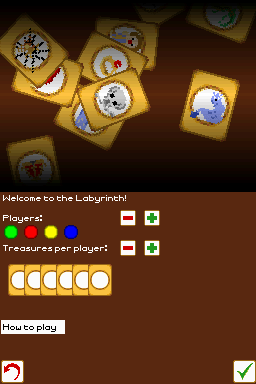
- 1 to 4 players + simple player AI.
User guide
The goal is to collected all your assigned treasures , and bringing them back to your starting point. The player who achieves this first wins the game.
Turns consist of three parts:
- Shove the loose tile into the board.
- Move your pawn.
- Pass the DS to the next player.
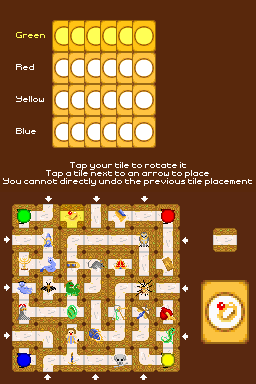
You must place the tile into the board, but you do not need to move your pawn every turn. Note that tiles can only be placed on locations marked with an arrow. The loose tile can be rotated by tapping it.
Placing a tile moves an entire row or column, opens new path and closes others. Use this to your advantage when trying to reach your treasure, or to block your opponent's way. An arrow on the opposite side of where you placed your tile will be marked with a red cross. It is not allowed to directly negate a previous player's change to the labyrinth.
After placing a tile, you will be able to move the pawn by tapping a tile on the board that your pawn can reach. If placing a tile pushes the pawn off the board, the pawn is moved to the newly placed tile.
In the real game, you can only hunt for the first treasure on your list. This treasure will be displayed to the right of the board. You will have the opportunity to undo your current move and try again by pressing the arrow button.
Your opponents will be hunting for treasures as well; try to beat them to it, and if they're on their way home after collecting all their treasures, block their passage in an attempt to stall them.
Controls
Operate with Stylus.
(Note: To change a player to AI and back, tap the player's icon in the menu.)
Screenshots
Online emulator
| Nintendo DS | Keyboard |
|---|---|

|

|

|

|

|

|

|

|

|

|

|

|

|

|

|

|

|

|
Known issues
While the AI is 'thinking', screen may flicker.
Changelog
v110817
- Updated libnds.
- Sped up pathfinder demo.
- Added simple player AI.
v110726
- Flickering has been fixed.
1.0
- Screen tends to flicker.
- Rotated sprites don't look as good as non-rotated sprites.