
NXDucoMiner Switch: Difference between revisions
From GameBrew
More actions
Created page with "{{Infobox Switch Homebrews |title=NXDucoMiner |image=NXDucoMinerSwitch.png |description=A multithreaded DUCO Miner for the Nintendo Switch. |author=tbwcjw |lastupdated=2025/05/23 |type=Other Apps |version=25.05.23_1 |license=GPL-3.0 |download=https://dlhb.gamebrew.org/switchhomebrews/NXDucoMinerSwitch.7z |website=https://github.com/tbwcjw/nxducominer |source=https://github.com/tbwcjw/nxducominer |donation= }} {{#seo: |title=Switch Homebrew Apps (Other Apps) - GameBrew |t..." |
m Text replacement - "ForTheUsers - " to "Homebrew App Store - " |
||
| (2 intermediate revisions by the same user not shown) | |||
| Line 4: | Line 4: | ||
|description=A multithreaded DUCO Miner for the Nintendo Switch. | |description=A multithreaded DUCO Miner for the Nintendo Switch. | ||
|author=tbwcjw | |author=tbwcjw | ||
|lastupdated=2025/ | |lastupdated=2025/07/22 | ||
|type=Other Apps | |type=Other Apps | ||
|version=25. | |version=25.07.22_13.16 | ||
|license=GPL-3.0 | |license=GPL-3.0 | ||
|download=https://dlhb.gamebrew.org/switchhomebrews/NXDucoMinerSwitch.7z | |download=https://dlhb.gamebrew.org/switchhomebrews/NXDucoMinerSwitch.7z | ||
| Line 19: | Line 19: | ||
|image_alt=NXDucoMiner | |image_alt=NXDucoMiner | ||
}} | }} | ||
NX-Duco-Miner is a SHA1 mining tool for the Duino-coin cryptocurrency | NX-Duco-Miner is a SHA1 mining tool for the Duino-coin cryptocurrency [https://duinocoin.com/ DUCO]. | ||
== | ==Features== | ||
* Unzip | *Multithreading for mining. | ||
*Automatic node selection. | |||
*CPU Boosting. | |||
*Duino-coin wallet IoT integration. | |||
*A web dashboard. | |||
==Installation== | |||
Unzip release.zip, copy the switch/ folder to the root of your SD card. | |||
Edit config.txt: | |||
{| class="wikitable" | {| class="wikitable" | ||
| Line 53: | Line 60: | ||
| <code>difficulty</code> | | <code>difficulty</code> | ||
| <code>str</code> | | <code>str</code> | ||
| The starting difficulty. The node will automatically negotiate the difficulty. Valid starting difficulties are <code>LOW</code> <code>MEDIUM</code> <code>NET</code> and <code>EXTREME</code>. | | The starting difficulty. The node will automatically negotiate the difficulty. Valid starting difficulties are <code>LOW</code> <code>MEDIUM</code> <code>NET</code> and <code>EXTREME</code>. <code>LOW</code> is recommended for this application. <code>EXTREME</code> is not used anywhere officially. More information on difficulties can be found [https://github.com/revoxhere/duino-coin/tree/useful-tools?tab=readme-ov-file#duco-s1-mining here]. | ||
|- | |- | ||
| <code>rig_id</code> | | <code>rig_id</code> | ||
| Line 76: | Line 83: | ||
| Either <code>true</code> or <code>false</code>. The web dashboard will run on port 8080 of the switch's IP address. | | Either <code>true</code> or <code>false</code>. The web dashboard will run on port 8080 of the switch's IP address. | ||
|} | |} | ||
==Screenshots== | ==Screenshots== | ||
https://dlhb.gamebrew.org/switchhomebrews/images/NXDucoMinerSwitch-01.png | https://dlhb.gamebrew.org/switchhomebrews/images/NXDucoMinerSwitch-01.png | ||
| Line 138: | Line 90: | ||
==Changelog== | ==Changelog== | ||
'''v25.07.22_13.16''' | |||
* Changes: | |||
** Added node name as identifier, when automatically selecting node. | |||
* Bug Fixes: | |||
** IoT would send on each thread regardless of miner id. | |||
** Buffer tweaks; allocation sizes. | |||
'''v25.05.23_12.29''' | '''v25.05.23_12.29''' | ||
*Changes: | *Changes: | ||
| Line 155: | Line 113: | ||
== External links == | == External links == | ||
* | * GitHub - https://github.com/tbwcjw/nxducominer | ||
* | * Homebrew App Store - https://hb-app.store/switch/NXDucoMiner | ||
Latest revision as of 10:44, 23 November 2025
| NXDucoMiner | |
|---|---|
 | |
| General | |
| Author | tbwcjw |
| Type | Other Apps |
| Version | 25.07.22_13.16 |
| License | GPL-3.0 |
| Last Updated | 2025/07/22 |
| Links | |
| Download | |
| Website | |
| Source | |
NX-Duco-Miner is a SHA1 mining tool for the Duino-coin cryptocurrency DUCO.
Features
- Multithreading for mining.
- Automatic node selection.
- CPU Boosting.
- Duino-coin wallet IoT integration.
- A web dashboard.
Installation
Unzip release.zip, copy the switch/ folder to the root of your SD card.
Edit config.txt:
| Key | Type | Description |
|---|---|---|
node
|
str
|
The IP address of the node to connect to. Can be found manually here. If left empty the application will use https://server.duinocoin.com/getPool to find one. |
port
|
int
|
The port of the node. If this is left blank, the application will find a node using the method above. Regardless if the node is set.
|
wallet_address
|
str
|
The address/username of your duinocoin wallet. |
miner_key
|
str
|
As specified in Wallet > Settings > Miner Key. Leave blank if not applicable.
|
difficulty
|
str
|
The starting difficulty. The node will automatically negotiate the difficulty. Valid starting difficulties are LOW MEDIUM NET and EXTREME. LOW is recommended for this application. EXTREME is not used anywhere officially. More information on difficulties can be found here.
|
rig_id
|
str
|
A friendly name for your miner which displays in the wallet. |
cpu_boost
|
bool
|
Either true or false.Using ApmCpuBoostMode with mode |
iot
|
bool
|
Either true or false. Upload IoT data to your wallet (Temperature, Battery charge).
|
threads
|
int
|
Number of threads to mine on. Between 1 and 6. |
web_dashboard
|
bool
|
Either true or false. The web dashboard will run on port 8080 of the switch's IP address.
|
Screenshots
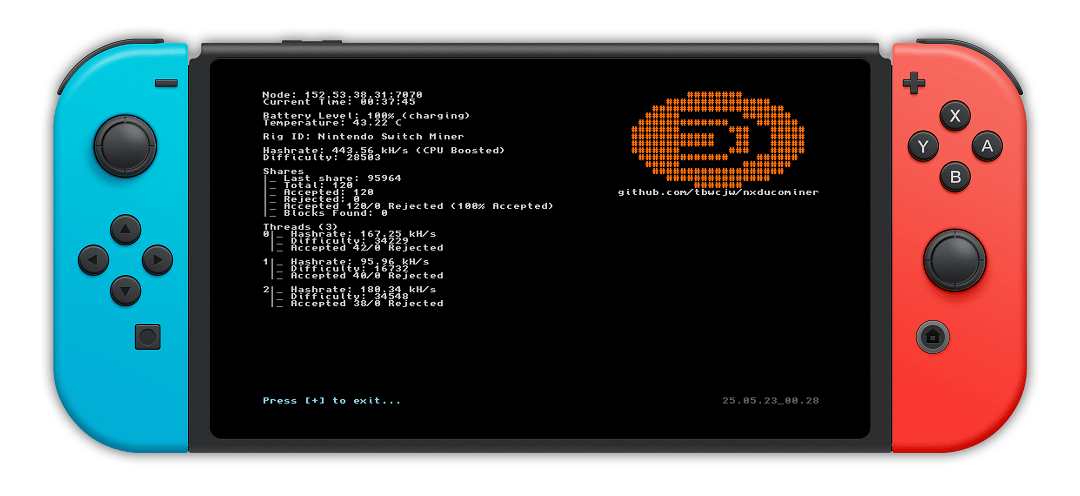
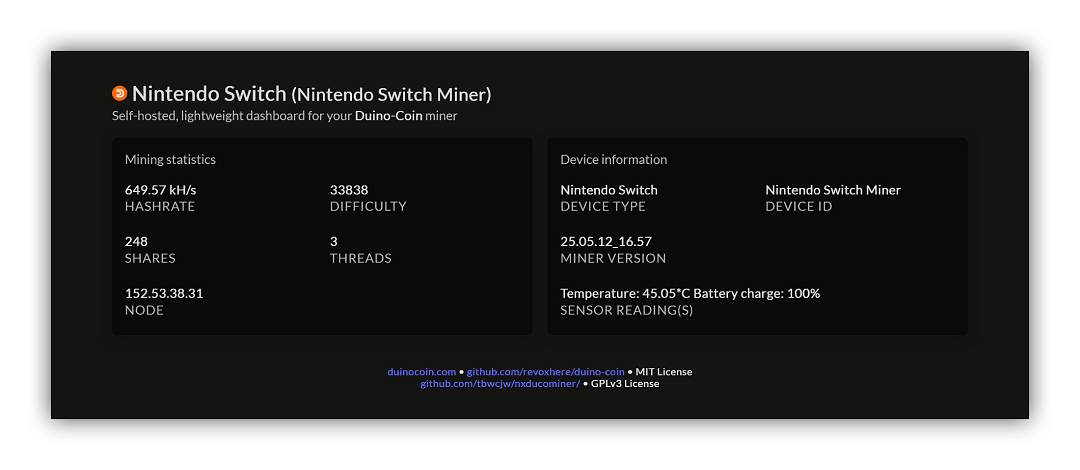
Changelog
v25.07.22_13.16
- Changes:
- Added node name as identifier, when automatically selecting node.
- Bug Fixes:
- IoT would send on each thread regardless of miner id.
- Buffer tweaks; allocation sizes.
v25.05.23_12.29
- Changes:
- Added charge state (Charging, Discharging, Charging slowly, Plugged in not charging).
- Various layout tweaks.
- On connection loss, the miner will retry until reconnected.
- Errors in the mining loop now display under respective threads.
- Bug Fixes:
- Exiting CURL at the wrong time would crash the application.
- Cleanup would try to close a thread before it has been created.
- Threads would get caught in a tight loop and never cancel.
v25.05.23_1
- First Release.
Credits
- JSON Parser: zserge/jsmn, MIT License.
External links
- GitHub - https://github.com/tbwcjw/nxducominer
- Homebrew App Store - https://hb-app.store/switch/NXDucoMiner