
Macros-NX Switch: Difference between revisions
From GameBrew
More actions
Created page with "{{Infobox Switch Homebrews |title=Macros-NX |image=MacrosNXSwitch.png |description=Macro Builder for Nintendo Switch. |author=TheStonedModder |lastupdated=2025/05/15 |type=PC Utilities |version=1.0.0 |license=N/A |download=https://dlhb.gamebrew.org/switchhomebrews/MacrosNXSwitch.7z |website=https://gbatemp.net/threads/release-macros-nx-build-run-and-share-macros.671113/ |source=https://github.com/ItsDeidara/Macros-NX |donation= }} {{#seo: |title=Switch Homebrew PC Tools..." |
|||
| (One intermediate revision by the same user not shown) | |||
| Line 19: | Line 19: | ||
|image_alt=Macros-NX | |image_alt=Macros-NX | ||
}} | }} | ||
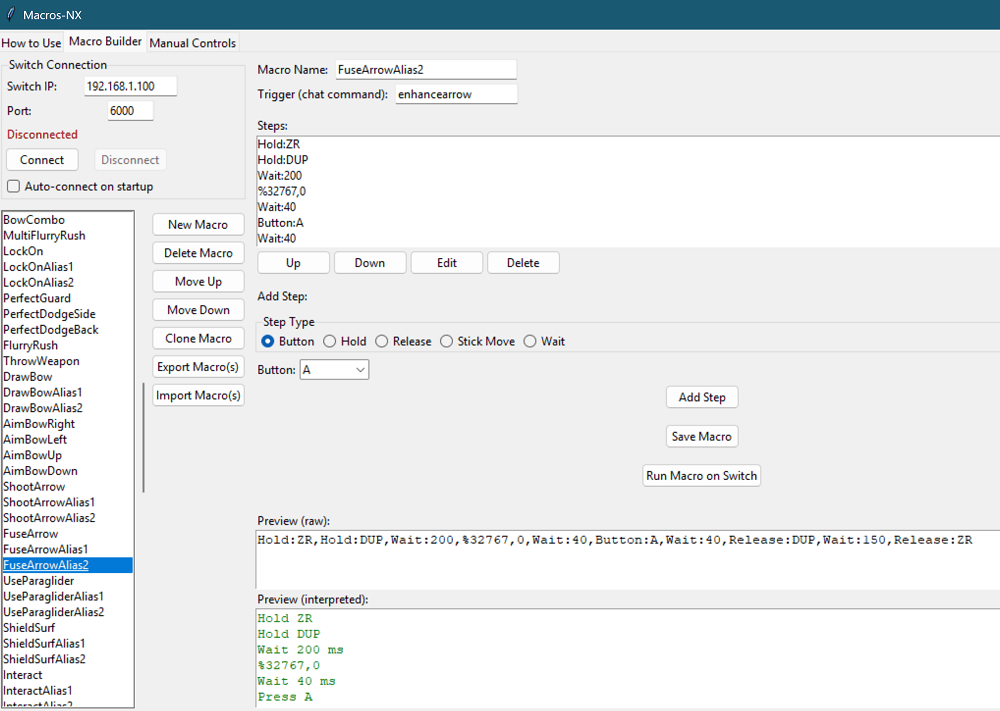
Macros-NX is a Python-based GUI application that can create, edit, and execute controller macros on a Nintendo Switch via [[sys-botbase Switch|sys-botbase]]. | |||
It allows automation of button presses, stick movements, and complex input sequences. | |||
== Features == | == Features == | ||
* Visual macro builder with drag-and-drop step editing | * Visual macro builder with drag-and-drop step editing. | ||
* Support for all Switch buttons and both sticks | * Support for all Switch buttons and both sticks. | ||
* Macro import/export (JSON) | * Macro import/export (JSON). | ||
* Manual controls for real-time input | * Manual controls for real-time input. | ||
* Step types: Button, Hold, Release, Stick Move, Wait | * Step types: Button, Hold, Release, Stick Move, Wait. | ||
* Stick grid for precise analog input | * Stick grid for precise analog input. | ||
* Macro preview (raw and interpreted) | * Macro preview (raw and interpreted). | ||
* Save/load macros and configuration | * Save/load macros and configuration. | ||
* Robust error handling and user feedback | * Robust error handling and user feedback. | ||
* Auto-connect to Switch on startup | * Auto-connect to Switch on startup. | ||
== | == Installation == | ||
Prerequisites: | |||
* Python 3.7 or higher | * Python 3.7 or higher | ||
* sys-botbase installed on the Nintendo Switch. | * sys-botbase installed on the Nintendo Switch. | ||
Install Python dependencies: | |||
* If using rye: <code>rye sync</code> | |||
* If ssing pip: <code>pip install -r requirements.txt</code> | |||
Install sys-botbase on the Nintendo Switch: | |||
* Download from [https://github.com/olliz0r/sys-botbase here]. | |||
* Extract to the Switch's SD card and reboot the console. | |||
Run the Macros-NX application: | |||
* Using Python: <code>python macroBuilder.py</code> | |||
* On Windows: Double-click <code>open_macroBuilder.bat</code> | |||
== | ==User guide== | ||
Connect your Switch: | |||
* Launch Macros-NX, enter the Switch's IP address and port (default is 6000). | |||
* Click the "Connect" button. | |||
Building and Running Macros: | |||
* Navigate to the "Macro Builder" tab. | |||
* Add or edit steps using the drag-and-drop interface. | |||
* Import or export macros in JSON format as needed. | |||
Test macros: | |||
* Click "Run Macro on Switch" to execute the macro. | |||
Manual controls: | |||
* Use the "Manual Controls" tab to send real-time inputs to the Switch. | * Use the "Manual Controls" tab to send real-time inputs to the Switch. | ||
See the in-app "How to Use" tab for detailed instructions and troubleshooting tips. | |||
==Screenshots== | ==Screenshots== | ||
| Line 79: | Line 78: | ||
== External links == | == External links == | ||
* | * GitHub - https://github.com/ItsDeidara/Macros-NX | ||
* GBAtemp - https://gbatemp.net/threads/release-macros-nx-build-run-and-share-macros.671113/ | |||
Latest revision as of 02:05, 27 May 2025
| Macros-NX | |
|---|---|
 | |
| General | |
| Author | TheStonedModder |
| Type | PC Utilities |
| Version | 1.0.0 |
| License | N/A |
| Last Updated | 2025/05/15 |
| Links | |
| Download | |
| Website | |
| Source | |
Macros-NX is a Python-based GUI application that can create, edit, and execute controller macros on a Nintendo Switch via sys-botbase.
It allows automation of button presses, stick movements, and complex input sequences.
Features
- Visual macro builder with drag-and-drop step editing.
- Support for all Switch buttons and both sticks.
- Macro import/export (JSON).
- Manual controls for real-time input.
- Step types: Button, Hold, Release, Stick Move, Wait.
- Stick grid for precise analog input.
- Macro preview (raw and interpreted).
- Save/load macros and configuration.
- Robust error handling and user feedback.
- Auto-connect to Switch on startup.
Installation
Prerequisites:
- Python 3.7 or higher
- sys-botbase installed on the Nintendo Switch.
Install Python dependencies:
- If using rye:
rye sync - If ssing pip:
pip install -r requirements.txt
Install sys-botbase on the Nintendo Switch:
- Download from here.
- Extract to the Switch's SD card and reboot the console.
Run the Macros-NX application:
- Using Python:
python macroBuilder.py - On Windows: Double-click
open_macroBuilder.bat
User guide
Connect your Switch:
- Launch Macros-NX, enter the Switch's IP address and port (default is 6000).
- Click the "Connect" button.
Building and Running Macros:
- Navigate to the "Macro Builder" tab.
- Add or edit steps using the drag-and-drop interface.
- Import or export macros in JSON format as needed.
Test macros:
- Click "Run Macro on Switch" to execute the macro.
Manual controls:
- Use the "Manual Controls" tab to send real-time inputs to the Switch.
See the in-app "How to Use" tab for detailed instructions and troubleshooting tips.
Screenshots
Changelog
v1.0
- First Release.