
MasterVolume Switch: Difference between revisions
From GameBrew
More actions
Created page with "{{Infobox Switch Homebrews |title=MasterVolume |image=MasterVolumeSwitch.png |description=Control the master volume of the Nintendo Switch. |author=averne |lastupdated=2025/05/10 |type=Overlays |version=1.2.1 |license=GPL-3.0 |download=https://dlhb.gamebrew.org/switchhomebrews/MasterVolumeSwitch.7z |website=https://github.com/averne/MasterVolume |source=https://github.com/averne/MasterVolume |donation= }} {{#seo: |title=Switch Homebrew Apps (Overlays) - GameBrew |title_m..." |
No edit summary |
||
| (2 intermediate revisions by 2 users not shown) | |||
| Line 4: | Line 4: | ||
|description=Control the master volume of the Nintendo Switch. | |description=Control the master volume of the Nintendo Switch. | ||
|author=averne | |author=averne | ||
|lastupdated= | |lastupdated=2026/05/17 | ||
|type=Overlays | |type=Overlays | ||
|version=1.2. | |version=1.2.3 | ||
|license=GPL-3.0 | |license=GPL-3.0 | ||
|download=https://dlhb.gamebrew.org/switchhomebrews/MasterVolumeSwitch.7z | |download=https://dlhb.gamebrew.org/switchhomebrews/MasterVolumeSwitch.7z | ||
| Line 20: | Line 20: | ||
}} | }} | ||
A Tesla overlay to adjust the master volume of the Nintendo Switch. This will be applied to every audio sink. | A Tesla overlay to adjust the master volume of the Nintendo Switch. This will be applied to every audio sink. | ||
==Installation== | |||
Make sure you have [[Tesla Menu Switch|Tesla Menu]] and [[NX-ovlloader Switch|nx-ovlloader]] installed. | |||
Extract the zip file to the root of the SD card. | |||
==Screenshots== | ==Screenshots== | ||
[[image:MasterVolumeSwitch.png]] | [[image:MasterVolumeSwitch.png|link=]] | ||
==Changelog== | ==Changelog== | ||
'''v1.2.3''' | |||
* Fix broken patch generation. | |||
'''v1.2.2''' | |||
* Fix patch generation for 22.0.0. | |||
'''v1.2.1''' | '''v1.2.1''' | ||
*Add binary patches to restore master volume >1 functionality on 20.0+ firmware (thanks @masagrator). | *Add binary patches to restore master volume >1 functionality on 20.0+ firmware (thanks @masagrator). | ||
| Line 39: | Line 48: | ||
== External links == | == External links == | ||
* | * GitHub - https://github.com/averne/MasterVolume | ||
Latest revision as of 03:19, 17 May 2026
| MasterVolume | |
|---|---|
 | |
| General | |
| Author | averne |
| Type | Overlays |
| Version | 1.2.3 |
| License | GPL-3.0 |
| Last Updated | 2026/05/17 |
| Links | |
| Download | |
| Website | |
| Source | |
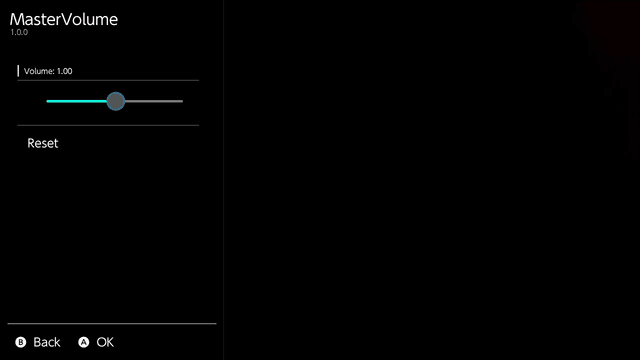
A Tesla overlay to adjust the master volume of the Nintendo Switch. This will be applied to every audio sink.
Installation
Make sure you have Tesla Menu and nx-ovlloader installed.
Extract the zip file to the root of the SD card.
Screenshots
Changelog
v1.2.3
- Fix broken patch generation.
v1.2.2
- Fix patch generation for 22.0.0.
v1.2.1
- Add binary patches to restore master volume >1 functionality on 20.0+ firmware (thanks @masagrator).
v1.2.0
- Add option to force speaker output.
v1.1.1
- Increase max gain to x8.
v1.1.0
- Nonlinear slider gives more precision for the lower values
- Bumped maximum master volume to 5
- Added state loading/saving to preserve settings between reboots
v1.0
- First Release.