|
|
| (One intermediate revision by one other user not shown) |
| Line 19: |
Line 19: |
| |image_alt=NSFW | | |image_alt=NSFW |
| }} | | }} |
| NSFW (Nintendo Switch File Wizard) is a command-line tool designed to verify, diagnose, and convert Nintendo Switch NSP (Nintendo Submission Package) files into a standardized, deterministic format. This standardization enhances the accuracy of archival and preservation efforts by ensuring consistent file structures and hashes across different dumps. | | NSFW (Nintendo Switch File Wizard) is a command-line tool for verifying NSP file integrity, identifying issues, and converting to a [https://github.com/emargee/nsfw/blob/main/StandardNSP.md deterministic standard format] for preservation. |
| == Installation ==
| |
| # Extract the latest release of <code>nsfw</code> (that matches your system architecture) to a directory of your choice.
| |
| # (''Optional'') Extract latest <code>titledb.db</code> from <code>titledb.zip</code> to a directory called <code>titledb</code> in the same directory as the executable.
| |
| == What is a "Standard NSP"? ==
| |
| See [https://github.com/emargee/nsfw/blob/main/StandardNSP.md Standard NSP] for more information.
| |
|
| |
|
| == Validate (<code>v</code>) ==
| | '''Note:''' This is designed only for use with legally created backups of games you own. |
| <pre>DESCRIPTION:
| |
| Validates NSP.
| |
|
| |
|
| USAGE:
| | == Installation == |
| nsfw validate <NSP_FILE> [OPTIONS]
| | Important notes: |
| | | * This is an experimental software, behavior may change between versions. |
| ARGUMENTS:
| | * Please always maintain backups of your original files. |
| <NSP_FILE> Path to NSP file
| |
| | |
| OPTIONS:
| |
| DEFAULT
| |
| -h, --help Prints help information
| |
| -v, --version Prints version information
| |
| -k, --keys <FILE> ~/.switch/prod.keys Path to NSW keys file
| |
| -c, --cert <FILE> ~/.switch/common.cert Path to 0x700-byte long common certificate chain file
| |
| -x, --extract Extract NSP contents to output directory
| |
| -s, --standard Convert to Standardised NSP
| |
| -r, --rename Rename NSP to match TitleDB. No other actions performed
| |
| -o, --nspdir <DIR> ./nsp Path to standardised NSP output directory
| |
| --cdndir <DIR> ./cdn Path to CDN output directory
| |
| -d, --dryrun Prints actions to be performed but does not execute any of them
| |
| --titledb <FILE> ./titledb/titledb.db Path to titledb.db file
| |
| -y, --verify Verify title against TitleDB
| |
| --related-titles For DLC, print related titles (from TitleDb)
| |
| --regional-titles Print regional title variations (from TitleDb)
| |
| -u, --updates Print title update versions (from TitleDb)
| |
| --nl Do not include any languages in output filename
| |
| --sl Use short language codes in output filename
| |
| --skip-hash When re-naming files, skip NCA hash validation
| |
| -q, --quiet Set output level to 'quiet'. Minimal display for details
| |
| -V, --full Set output level to 'full'. Full break-down on NSP structure
| |
| --force-hash Force hash verification of bad NCA files (where header validation has already failed)
| |
| -X, --extract-all Extract all files from NSP (including loose files)
| |
| --keep-deltas When creating a standard NSP, include Delta Fragment files
| |
| --force-convert Force conversion of NSP to standard NSP (even if already in standard format)
| |
| --overwrite Overwrite any existing files
| |
| --keep-name Keep original name (from filename) when converting to standard NSP
| |
| -Z, --delete-source DANGER! - Delete source NSP file after conversion
| |
| --force-extract Force extraction of NSP contents (even if validation fails)
| |
| --show-keys Show NCA encryption keys
| |
| --dump-headers When extracting, also dump NCA headers as binary files</pre>
| |
| | |
| === Validate - Example Usage ===
| |
| Validate
| |
| | |
| <code>./nsfw v <PATH_TO_NSP_FILE></code>
| |
| | |
| Validate - Full Details
| |
| | |
| <code>./nsfw v --full <PATH_TO_NSP_FILE></code>
| |
| | |
| Validate - Minimal details
| |
| | |
| <code>./nsfw v --quiet <PATH_TO_NSP_FILE></code>
| |
| | |
| Validate - Verify against TitleDB - Uses TitleDB to check title and metadata (if found).
| |
| | |
| <code>./nsfw v --verify <PATH_TO_NSP_FILE></code>
| |
| | |
| Validate - Regional Titles - Uses TitleDB to print regional language variations of the title (if found).
| |
| | |
| <code>./nsfw v --verify --regional-titles <PATH_TO_NSP_FILE></code>
| |
| | |
| Validate - Related Titles - If file is DLC, print other possible DLC titles (if found).
| |
| | |
| <code>./nsfw v --verify --related-titles <PATH_TO_NSP_FILE></code>
| |
| | |
| Validate - Updates - Uses TitleDB to list updates for the title (if found).
| |
| | |
| <code>./nsfw v --updates --related-titles <PATH_TO_NSP_FILE></code>
| |
| | |
| Validate - Force Hash - By default, if header validation fails, the NCA file will not be hashed, as the file is already invalid. This option will force the NCA file to be hashed regardless of header validity.
| |
| | |
| <code>./nsfw v --force-hash <PATH_TO_NSP_FILE></code>
| |
| | |
| Batch verification is also supported (Output is set to <code>--quiet</code> by default):
| |
| | |
| <code>./nsfw v <PATH_TO_NSP_DIRECTORY></code>
| |
| | |
| === Rename (<code>v -r</code>) - Example Usage ===
| |
| Validate and Rename - If validation passes, then original file is renamed.
| |
| | |
| <code>./nsfw v -r <PATH_TO_NSP_FILE></code>
| |
| | |
| Validate and Rename - Dry Run - Will validate and print name but will not action any changes.
| |
| | |
| <code>./nsfw v -r -d <PATH_TO_NSP_FILE></code>
| |
| | |
| Validate and Rename - No Languages - Will not include any languages in the output filename.
| |
| | |
| <code>./nsfw v -r --nl <PATH_TO_NSP_FILE></code>
| |
| | |
| Validate and Rename - Short Languages - Will use short language codes in the output filename.
| |
| | |
| <code>./nsfw v -r --sl <PATH_TO_NSP_FILE></code>
| |
| | |
| Validate and Rename - Skip Hash - Will skip hash validation of NCA files. Useful for files that have already been validated and just need to be renamed. This option will only work for renaming.
| |
| | |
| <code>./nsfw v -r --skip-hash <PATH_TO_NSP_FILE></code>
| |
| === Extract (<code>v -x</code>) - Example Usage ===
| |
| Extract NSP file to No-Intro CDN format.
| |
| | |
| Validate and Extract - If validation passes, the original file is extracted to a directory defined by the <code>--cdndir</code> option.
| |
| | |
| <code>./nsfw v -x <PATH_TO_NSP_FILE></code>
| |
| | |
| Validate and Extract - Dry Run - Will validate and print actions but will not execute them.
| |
| | |
| <code>./nsfw v -x -d <PATH_TO_NSP_FILE></code>
| |
| | |
| Validate and Extract - Extract All - Will extract all files from the NSP (including loose files).
| |
| | |
| <code>./nsfw v -x --extract-all <PATH_TO_NSP_FILE></code>
| |
| | |
| === Create "Standard NSP" (<code>v -s</code>) - Example Usage ===
| |
| Will re-create the NSP file in a standardised format, normalising ticket properties and and re-ordering the NCA files to match the order in the CNMT file.
| |
| | |
| Important
| |
| | |
| This will not fix any signature or validation problems with the NSP file. It will abort if any validation errors are found.
| |
| | |
| Warning
| |
| | |
| This process will '''exclude''' Delta Fragment files from the rebuilt NSP as they effect standardisation. To include these please use the <code>--keep-deltas</code> option.
| |
| | |
| Create "Standard NSP" - Will write the new NSP file to the directory defined by the <code>--nspdir</code> option.
| |
| | |
| <code>./nsfw v -s <PATH_TO_NSP_FILE></code>
| |
| | |
| Create "Standard NSP" - Dry Run - Will validate and print actions but will not execute them.
| |
| | |
| <code>./nsfw v -s -d <PATH_TO_NSP_FILE></code>
| |
| | |
| Create "Standard NSP" - Short Languages + TitleDB Verify - Will use short language codes and verify title name against TitleDB (if available).
| |
| | |
| <code>./nsfw v -s --sl -y <PATH_TO_NSP_FILE></code>
| |
| | |
| Create "Standard NSP" - Short Languages + TitleDB Verify + Delete source - Will use short language codes and verify title name against TitleDB (if available) this will also '''DELETE''' the original/source file if conversion is successful.
| |
| | |
| <code>./nsfw v -s --sl -y -Z <PATH_TO_NSP_FILE></code>
| |
| | |
| == Analyse Ticket (<code>t</code>) ==
| |
| <pre>DESCRIPTION:
| |
| Read & print ticket properties from Ticket file.
| |
| | |
| USAGE:
| |
| nsfw ticket <TIK_FILE> [OPTIONS]
| |
| | |
| ARGUMENTS:
| |
| <TIK_FILE> Path to tik file
| |
| | |
| OPTIONS:
| |
| DEFAULT
| |
| -h, --help Prints help information
| |
| -v, --version Prints version information
| |
| -c, --cert <FILE> ~/.switch/common.cert Path to 0x700-byte long common certificate chain file</pre>
| |
| | |
| == Analyse CNMT (<code>m</code>) ==
| |
| <pre>DESCRIPTION:
| |
| Reads & print properties from CNMT NCA file.
| |
| | |
| USAGE:
| |
| nsfw cnmt <META_NCA_FILE> [OPTIONS]
| |
| | |
| ARGUMENTS:
| |
| <META_NCA_FILE> Path to CNMT NCA file
| |
| | |
| OPTIONS:
| |
| DEFAULT
| |
| -h, --help Prints help information
| |
| -v, --version Prints version information
| |
| -k, --keys <FILE> ~/.switch/prod.keys Path to NSW keys file</pre>
| |
| | |
| == Query TitleDB (<code>q</code>) ==
| |
| <pre>DESCRIPTION:
| |
| Query TitleDB for Title ID.
| |
| | |
| USAGE:
| |
| nsfw query <TITLEID> [OPTIONS]
| |
| | |
| ARGUMENTS:
| |
| <TITLEID> Title ID to search for
| |
| | |
| OPTIONS:
| |
| DEFAULT
| |
| -h, --help Prints help information
| |
| -v, --version Prints version information
| |
| --titledb <FILE> ./titledb/titledb.db Path to titledb.db file</pre>
| |
| | |
| == CDN2NSP (<code>c2n</code>) ==
| |
| Will convert a No-Intro CDN format folder into a "Standard NSP" file.
| |
| | |
| <pre>DESCRIPTION:
| |
| Deterministically recreates NSP files from extracted CDN data following nxdumptool NSP generation guidelines.
| |
|
| |
|
| USAGE:
| | Instructions: |
| nsfw cdn2nsp [OPTIONS]
| | * Extract the latest release of <code>nsfw</code> (that matches your system architecture) to a directory of your choice. |
| | * (Optional) For title verification: |
| | ** Extract <code>titledb.db</code> from titledb.zip. |
| | ** Place it in a <code>titledb</code> subfolder alongside the executable. |
|
| |
|
| OPTIONS:
| | [https://github.com/emargee/nsfw/blob/main/README.md Example usages]. |
| DEFAULT
| |
| -h, --help Prints help information
| |
| -v, --version Prints version information
| |
| -i, --cdndir <DIR> ./cdn Path to directory with extracted CDN data (will be processed recursively)
| |
| -k, --keys <FILE> ~/.switch/prod.keys Path to NSW keys file
| |
| -c, --cert <FILE> ~/.switch/common.cert Path to 0x700-byte long common certificate chain file
| |
| -o, --outdir <DIR> ./out Path to output directory
| |
| -d, --dryrun Process files but do not generate NSP</pre>
| |
|
| |
|
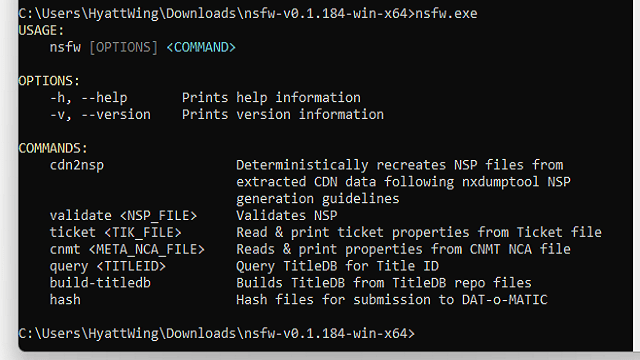
| === CDN2NSP - Example Usage === | | == Screenshots == |
| Convert CDN to NSP - Will convert all files in the <code>--cdndir</code> directory and write the new NSP file to the directory defined by the <code>--outdir</code> option.
| | https://dlhb.gamebrew.org/switchhomebrews/images/NSFWSwitch.png |
|
| |
|
| <code>./nsfw c2n</code>
| | == Credits == |
| | LibHac - https://github.com/Thealexbarney/LibHac/ by @thealexbarney |
|
| |
|
| === CDN2NSP - Dry Run - Example Usage ===
| | DarkMatterCore - https://github.com/DarkMatterCore/ by @DarkMatterCore |
| Convert CDN to NSP - Dry Run - Will convert all files in the <code>--cdndir</code> directory and print actions but will not execute them.
| |
|
| |
|
| <code>./nsfw c2n -d</code>
| | TitleDB - https://github.com/blawar/titledb for metadata verification |
|
| |
|
| == External links == | | == External links == |
| * Github - https://github.com/emargee/nsfw | | * GitHub - https://github.com/emargee/nsfw |