
NX Save Sync Switch: Difference between revisions
From GameBrew
More actions
Created page with "{{Infobox Switch Homebrews |title=NX Save Sync |image=NXSaveSyncSwitch.png |description=Switch homebrew app to sync save files between console and emulator. |author=Xc987 |lastupdated=2025/04/25 |type=Utilities |version=2.1.0 |license=MIT |download=https://dlhb.gamebrew.org/switchhomebrews/NXSaveSyncSwitch.7z |website=https://github.com/Xc987/NX-Save-Sync |source=https://github.com/Xc987/NX-Save-Sync |donation= }} {{#seo: |title=Switch Homebrew Apps (Utilities) - GameBre..." |
No edit summary |
||
| (3 intermediate revisions by one other user not shown) | |||
| Line 4: | Line 4: | ||
|description=Switch homebrew app to sync save files between console and emulator. | |description=Switch homebrew app to sync save files between console and emulator. | ||
|author=Xc987 | |author=Xc987 | ||
|lastupdated=2025/ | |lastupdated=2025/11/29 | ||
|type=Utilities | |type=Utilities | ||
|version=2. | |version=2.3.0 | ||
|license=MIT | |license=MIT | ||
|download=https://dlhb.gamebrew.org/switchhomebrews/NXSaveSyncSwitch.7z | |download=https://dlhb.gamebrew.org/switchhomebrews/NXSaveSyncSwitch.7z | ||
| Line 19: | Line 19: | ||
|image_alt=NX Save Sync | |image_alt=NX Save Sync | ||
}} | }} | ||
A homebrew app for syncing Nintendo Switch save files between your console and PC emulator. | |||
== | ==Features== | ||
*Transfer saves between Switch and PC. | |||
*Supports single or multiple titles at once. | |||
*Simple IP-based connection over local network. | |||
== User guide == | |||
=== Sync from switch to pc === | === Sync from switch to pc === | ||
* | On your Switch: | ||
* Select | * Launch the NX Save Sync app. | ||
* If no errors | * Press ZL/ZR or L/R to switch users. | ||
* Open | * Navigate to the Send tab and select "Start server". | ||
* | * Switch between pages (with left/right) and select the save files you want to transfer: | ||
* | ** A - Select a single title. | ||
* If | ** Y - Toggle multiple titles (select/deselect). | ||
** X - Select all titles. | |||
** Confirm with A (not including the currently hovered title). | |||
* If no errors occurred, you should see the Switch's IP in yellow. | |||
On your PC: | |||
* Open the PC app. | |||
* (First-time setup) In the PC app's Config tab, enter the Switch's IP. | |||
* Go to the Receive tab and select "Connect to Switch". | |||
* (First sync only) Paste your emulator's save directory (Warning: The directory contents will be deleted). | |||
* If successful, saves will be sent from Switch to PC. | |||
=== Sync from pc to switch === | === Sync from pc to switch === | ||
* Open | On your PC: | ||
* Select the title(s) | * Open the PC app, go to the Send tab and select "Start server". | ||
* If no errors | * Choose the title(s) to transfer (or select all). | ||
* Run | * If no errors occurred, you should see the PC's IP. | ||
* | |||
* If no errors | On your Switch: | ||
* Launch the NX Save Sync app. | |||
* (First-time setup) In the Config tab, select "Set PC IP" and enter the PC's IP. | |||
* Navigate to the Receive tab and select "Connect to PC". | |||
* If successful, saves will be sent from PC to Switch. | |||
===Sync from primary Switch to secondary Switch=== | |||
* Run app on primary Switch, go to Send tab and select "Start server". | |||
* Select the title(s) you want to send. | |||
* If no errors occurred, you should see switch IP in yellow. | |||
* Run app on secondary Switch, go to Config tab and set the secondary switch IP. | |||
* Go to Receive tab and select "Connect to secondary switch". | |||
* If no errors occurred, the save file should be sent from primary Switch to secondary Switch. | |||
Note: During sync between switch and pc, both devices must be on the same network | '''Note:''' | ||
* The same process is for syncing from secondary switch to primary Switch. | |||
* During sync between switch and pc, both devices must be on the same network. | |||
==Screenshots== | ==Screenshots== | ||
| Line 50: | Line 79: | ||
https://dlhb.gamebrew.org/switchhomebrews/images/NXSaveSyncSwitch-04.png | https://dlhb.gamebrew.org/switchhomebrews/images/NXSaveSyncSwitch-04.png | ||
==Changelog== | ==Changelog== | ||
'''2.3.0''' | |||
* speed up title scanning. | |||
* add linux support [https://github.com/Xc987/NX-Save-Sync/pull/4 #4]. | |||
* show total size when selecting multiple titles in switch app. | |||
* add config to scan uninstalled titles in switch app. | |||
* add config to hide titles with empty save file. | |||
* change to getsockname to get local ip [https://github.com/Xc987/NX-Save-Sync/issues/7 #7]. | |||
* swap recieve and send tab place in desktop app. | |||
* update libnx | |||
'''2.2.0''' | |||
* Print title save file size in MB / KB in switch app. | |||
* Allow exiting while waiting for pc to connect or waiting for pc to start server in switch app. | |||
* Allow selecting device and BCAT as the user in switch app. | |||
* When receiving saves, skip titles not installed in switch app [https://github.com/Xc987/NX-Save-Sync/issues/3 #3]. | |||
* Allow using switch app after sending / receiving. | |||
* Add secondary switch ip config in switch and desktop app [https://github.com/Xc987/NX-Save-Sync/issues/3 #3]. | |||
* Add zip compression config in switch app. | |||
* Add option to delete saved titles in desktop app. | |||
* Add debug window in desktop app. | |||
* Add pop up to keep or delete temp files in switch (deleted automatically in desktop app). | |||
* Make copy and download buffer bigger to speed up the process in switch app. | |||
'''v2.1.0''' | '''v2.1.0''' | ||
*Add selecting multiple or all titles in switch and desktop app [https://github.com/Xc987/NX-Save-Sync/issues/1 #1] | *Add selecting multiple or all titles in switch and desktop app [https://github.com/Xc987/NX-Save-Sync/issues/1 #1]. | ||
*Add listing saved titles and add a new title in desktop app | *Add listing saved titles and add a new title in desktop app. | ||
*Fix pushing from switch to pc titles with special or non ascii chars in the name [https://github.com/Xc987/NX-Save-Sync/issues/2 #2] | *Fix pushing from switch to pc titles with special or non ascii chars in the name [https://github.com/Xc987/NX-Save-Sync/issues/2 #2]. | ||
*List only titles that have a save file for the selected user in switch app | *List only titles that have a save file for the selected user in switch app. | ||
'''v2.0.0''' | '''v2.0.0''' | ||
*Add gui for pc app and make switch app gui | *Add gui for pc app and make switch app gui a bit better. | ||
*Fix save file commiting on switch app | *Fix save file commiting on switch app. | ||
*Add changeable pc app themes | *Add changeable pc app themes. | ||
*Remove option exit switch app while waiting for pc to start server or for pc to connect to switch | *Remove option exit switch app while waiting for pc to start server or for pc to connect to switch. | ||
'''v1.2.0''' | '''v1.2.0''' | ||
*add pushing new save file from pc to switch | *add pushing new save file from pc to switch. | ||
*options can be selected by keyboard arrows, make the terminal output more fancy in pc app | *options can be selected by keyboard arrows, make the terminal output more fancy in pc app. | ||
*switch / pc ip can be set and changed both in pc and switch app | *switch / pc ip can be set and changed both in pc and switch app. | ||
*the user can now be changed by pressing ZL / ZR, no need for user selection pop up in switch app | *the user can now be changed by pressing ZL / ZR, no need for user selection pop up in switch app. | ||
*while waiting for pc to start server or for pc to download zip file, process can be canceled | *while waiting for pc to start server or for pc to download zip file, process can be canceled. | ||
'''v1.1.0''' | '''v1.1.0''' | ||
*Add switch app icon | *Add switch app icon. | ||
*Make switch app console output more fancy | *Make switch app console output more fancy. | ||
*Move config file to APPDATA | *Move config file to APPDATA. | ||
*Turn python file into windows executable | *Turn python file into windows executable. | ||
'''v1.0.0''' | '''v1.0.0''' | ||
*Initial release. | *Initial release. | ||
== External links == | == External links == | ||
* | * GitHub - https://github.com/Xc987/NX-Save-Sync | ||
* | * Homebrew App Store - https://hb-app.store/switch/NXSaveSync | ||
Latest revision as of 00:40, 7 December 2025
| NX Save Sync | |
|---|---|
 | |
| General | |
| Author | Xc987 |
| Type | Utilities |
| Version | 2.3.0 |
| License | MIT License |
| Last Updated | 2025/11/29 |
| Links | |
| Download | |
| Website | |
| Source | |
A homebrew app for syncing Nintendo Switch save files between your console and PC emulator.
Features
- Transfer saves between Switch and PC.
- Supports single or multiple titles at once.
- Simple IP-based connection over local network.
User guide
Sync from switch to pc
On your Switch:
- Launch the NX Save Sync app.
- Press ZL/ZR or L/R to switch users.
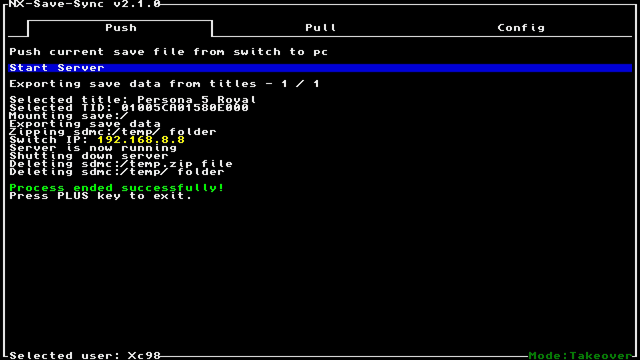
- Navigate to the Send tab and select "Start server".
- Switch between pages (with left/right) and select the save files you want to transfer:
- A - Select a single title.
- Y - Toggle multiple titles (select/deselect).
- X - Select all titles.
- Confirm with A (not including the currently hovered title).
- If no errors occurred, you should see the Switch's IP in yellow.
On your PC:
- Open the PC app.
- (First-time setup) In the PC app's Config tab, enter the Switch's IP.
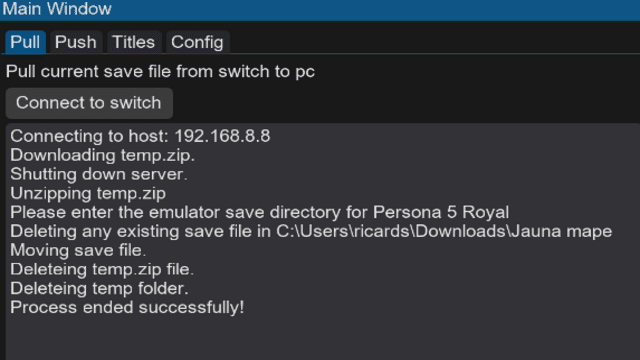
- Go to the Receive tab and select "Connect to Switch".
- (First sync only) Paste your emulator's save directory (Warning: The directory contents will be deleted).
- If successful, saves will be sent from Switch to PC.
Sync from pc to switch
On your PC:
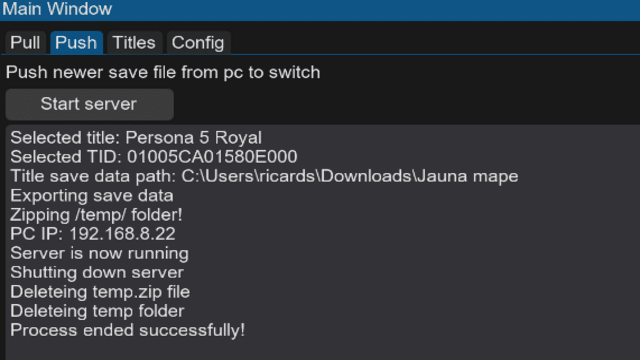
- Open the PC app, go to the Send tab and select "Start server".
- Choose the title(s) to transfer (or select all).
- If no errors occurred, you should see the PC's IP.
On your Switch:
- Launch the NX Save Sync app.
- (First-time setup) In the Config tab, select "Set PC IP" and enter the PC's IP.
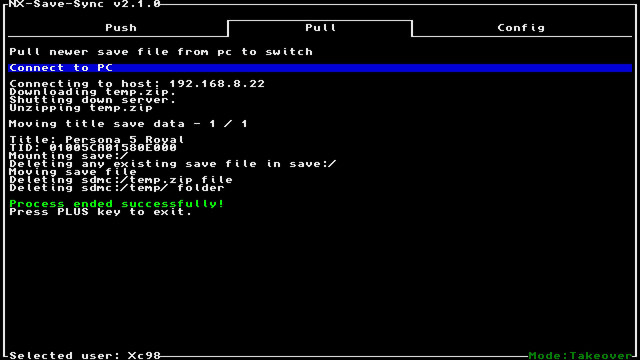
- Navigate to the Receive tab and select "Connect to PC".
- If successful, saves will be sent from PC to Switch.
Sync from primary Switch to secondary Switch
- Run app on primary Switch, go to Send tab and select "Start server".
- Select the title(s) you want to send.
- If no errors occurred, you should see switch IP in yellow.
- Run app on secondary Switch, go to Config tab and set the secondary switch IP.
- Go to Receive tab and select "Connect to secondary switch".
- If no errors occurred, the save file should be sent from primary Switch to secondary Switch.
Note:
- The same process is for syncing from secondary switch to primary Switch.
- During sync between switch and pc, both devices must be on the same network.
Screenshots
Changelog
2.3.0
- speed up title scanning.
- add linux support #4.
- show total size when selecting multiple titles in switch app.
- add config to scan uninstalled titles in switch app.
- add config to hide titles with empty save file.
- change to getsockname to get local ip #7.
- swap recieve and send tab place in desktop app.
- update libnx
2.2.0
- Print title save file size in MB / KB in switch app.
- Allow exiting while waiting for pc to connect or waiting for pc to start server in switch app.
- Allow selecting device and BCAT as the user in switch app.
- When receiving saves, skip titles not installed in switch app #3.
- Allow using switch app after sending / receiving.
- Add secondary switch ip config in switch and desktop app #3.
- Add zip compression config in switch app.
- Add option to delete saved titles in desktop app.
- Add debug window in desktop app.
- Add pop up to keep or delete temp files in switch (deleted automatically in desktop app).
- Make copy and download buffer bigger to speed up the process in switch app.
v2.1.0
- Add selecting multiple or all titles in switch and desktop app #1.
- Add listing saved titles and add a new title in desktop app.
- Fix pushing from switch to pc titles with special or non ascii chars in the name #2.
- List only titles that have a save file for the selected user in switch app.
v2.0.0
- Add gui for pc app and make switch app gui a bit better.
- Fix save file commiting on switch app.
- Add changeable pc app themes.
- Remove option exit switch app while waiting for pc to start server or for pc to connect to switch.
v1.2.0
- add pushing new save file from pc to switch.
- options can be selected by keyboard arrows, make the terminal output more fancy in pc app.
- switch / pc ip can be set and changed both in pc and switch app.
- the user can now be changed by pressing ZL / ZR, no need for user selection pop up in switch app.
- while waiting for pc to start server or for pc to download zip file, process can be canceled.
v1.1.0
- Add switch app icon.
- Make switch app console output more fancy.
- Move config file to APPDATA.
- Turn python file into windows executable.
v1.0.0
- Initial release.
External links
- GitHub - https://github.com/Xc987/NX-Save-Sync
- Homebrew App Store - https://hb-app.store/switch/NXSaveSync