
WII-BLOOD: Difference between revisions
From GameBrew
More actions
No edit summary |
No edit summary |
||
| (4 intermediate revisions by 2 users not shown) | |||
| Line 8: | Line 8: | ||
|version=2025 | |version=2025 | ||
|license=N/A | |license=N/A | ||
|download=https://dlhb.gamebrew.org/wiihomebrews/ | |download=https://dlhb.gamebrew.org/wiihomebrews/WiiBLOOD.zip | ||
|website=https://gbatemp.net/threads/release-wii-blood.670100/ | |website=https://gbatemp.net/threads/release-wii-blood.670100/ | ||
|source= | |source= | ||
| Line 19: | Line 19: | ||
|image_alt=WII-BLOOD | |image_alt=WII-BLOOD | ||
}} | }} | ||
Wii-BLOOD is a homebrew port of the classic 1997 PC first-person shooter Blood, developed for the Nintendo Wii and Wii U's (vWii mode). | Wii-BLOOD is a homebrew port of the classic 1997 PC first-person shooter Blood, developed by nitr8 for the Nintendo Wii and Wii U's (vWii mode). | ||
Based on the NBlood source port, | Based on the NBlood source port, it supports both the original campaign and addons like Cryptic Passage and Death Wish. | ||
The | ==Installation== | ||
Requirements | |||
* A Nintendo Wii or Wii U (vWii mode) with the Homebrew Channel installed. | |||
* A Wii Classic Controller connected to the Wiimote. | |||
* An SD card (preferred) or USB drive. | |||
* The game assets from the original Blood game (updated to the latest version). | |||
Instructions: | |||
* Copy the <code>APPS</code> folder from the release to the root of your SD card or USB drive. | * Copy the <code>APPS</code> folder from the release to the root of your SD card or USB drive. | ||
* Place the necessary game data files (e.g., <code>BLOOD.INI</code>, <code>BLOOD.RFF</code>, <code>TILES000.ART</code>, etc.) into the <code>/gamedata</code> directory. | * Place the necessary game data files (e.g., <code>BLOOD.INI</code>, <code>BLOOD.RFF</code>, <code>TILES000.ART</code>, etc.) into the <code>/gamedata/</code> directory. | ||
* For cutscenes, add <code>.SMK</code> and <code>.WAV</code> files to <code>/gamedata/movie/</code>. | |||
* For addons, place their files into <code>/gamedata/addons/Cryptic Passage/</code> or <code>/gamedata/addons/DW/</code>. Cutscenes files go into <code>/gamedata/movie/</code>. | |||
* After running the game, select the ini file from the file selector menu: | |||
** <code>BLOOD.INI</code> (for the main game) | |||
** <code>/addons/Cryptic Passage/CRYPTIC.INI</code> (for Cryptic Passage) | |||
** <code>/addons/DW/DW.INI</code> (for Death Wish) | |||
<pre> | Game asset files:<pre> | ||
BLOOD.INI | BLOOD.INI | ||
BLOOD.RFF | BLOOD.RFF | ||
| Line 70: | Line 75: | ||
</pre> | </pre> | ||
==Screenshots== | |||
https://dlhb.gamebrew.org/wiihomebrews/images/WIIBLOOD-01.png | |||
https://dlhb.gamebrew.org/wiihomebrews/images/WIIBLOOD-02.png | |||
==Media== | ==Media== | ||
'''Blood gameplay (PC Game, 1997)''' ([https://www.youtube.com/watch?v=mjsSYGlxzzY Squakenet]) <br> | '''Blood gameplay (PC Game, 1997)''' ([https://www.youtube.com/watch?v=mjsSYGlxzzY Squakenet]) <br> | ||
<youtube width= | <youtube width="640">mjsSYGlxzzY</youtube> | ||
== | ==Credits== | ||
The NBLOOD Team | |||
== External links == | == External links == | ||
* | * GBAtemp - https://gbatemp.net/threads/release-wii-blood.670100/ | ||
Latest revision as of 13:03, 27 April 2025
| WII-BLOOD | |
|---|---|
 | |
| General | |
| Author | nitr8 |
| Type | Shooter |
| Version | 2025 |
| License | N/A |
| Last Updated | 2025/04/26 |
| Links | |
| Download | |
| Website | |
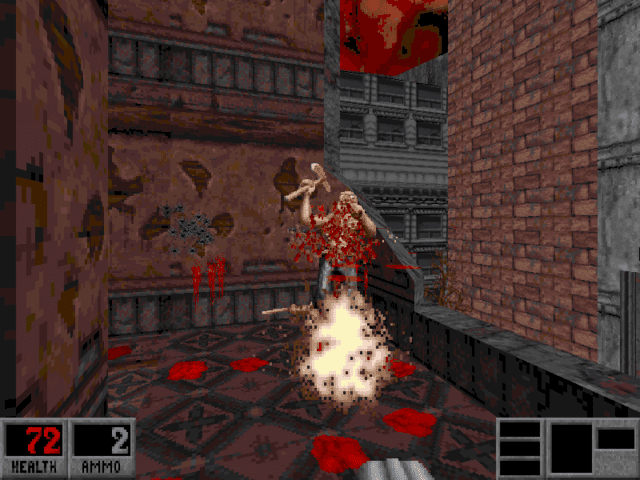
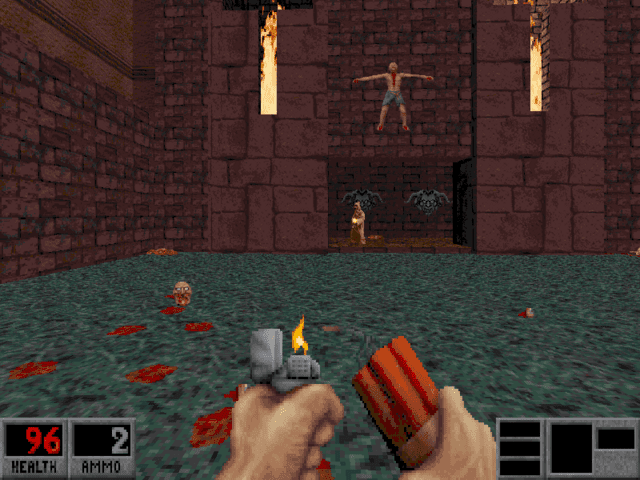
Wii-BLOOD is a homebrew port of the classic 1997 PC first-person shooter Blood, developed by nitr8 for the Nintendo Wii and Wii U's (vWii mode).
Based on the NBlood source port, it supports both the original campaign and addons like Cryptic Passage and Death Wish.
Installation
Requirements
- A Nintendo Wii or Wii U (vWii mode) with the Homebrew Channel installed.
- A Wii Classic Controller connected to the Wiimote.
- An SD card (preferred) or USB drive.
- The game assets from the original Blood game (updated to the latest version).
Instructions:
- Copy the
APPSfolder from the release to the root of your SD card or USB drive. - Place the necessary game data files (e.g.,
BLOOD.INI,BLOOD.RFF,TILES000.ART, etc.) into the/gamedata/directory. - For cutscenes, add
.SMKand.WAVfiles to/gamedata/movie/. - For addons, place their files into
/gamedata/addons/Cryptic Passage/or/gamedata/addons/DW/. Cutscenes files go into/gamedata/movie/. - After running the game, select the ini file from the file selector menu:
BLOOD.INI(for the main game)/addons/Cryptic Passage/CRYPTIC.INI(for Cryptic Passage)/addons/DW/DW.INI(for Death Wish)
Game asset files:
BLOOD.INI
BLOOD.RFF
BLOOD000.DEM
BLOOD001.DEM
BLOOD002.DEM
BLOOD003.DEM
COMMIT.DAT
GUI.RFF
MAPEDIT.INI
SOUNDS.RFF
SURFACE.DAT
TABLES.DAT
TENGAME.INI
TILES000.ART
TILES001.ART
TILES002.ART
TILES003.ART
TILES004.ART
TILES005.ART
TILES006.ART
TILES007.ART
TILES008.ART
TILES009.ART
TILES010.ART
TILES011.ART
TILES012.ART
TILES013.ART
TILES014.ART
TILES015.ART
TILES016.ART
TILES017.ART
VOXEL.DAT
Screenshots
Media
Blood gameplay (PC Game, 1997) (Squakenet)
Credits
The NBLOOD Team