
Blockamok Remix Wii: Difference between revisions
From GameBrew
More actions
No edit summary |
No edit summary |
||
| (4 intermediate revisions by 2 users not shown) | |||
| Line 4: | Line 4: | ||
|description=A CPU-only, from-scratch 3D game written in C, where you dodge blocks. | |description=A CPU-only, from-scratch 3D game written in C, where you dodge blocks. | ||
|author=Mode8fx | |author=Mode8fx | ||
|lastupdated= | |lastupdated=2025/11/10 | ||
|type=Action | |type=Action | ||
|version=1. | |version=1.2 | ||
|license=MIT | |license=MIT | ||
|download=https://dlhb.gamebrew.org/wiihomebrews/BlockamokRemixWii.7z | |download=https://dlhb.gamebrew.org/wiihomebrews/BlockamokRemixWii.7z | ||
| Line 19: | Line 19: | ||
|image_alt=Blockamok Remix | |image_alt=Blockamok Remix | ||
}} | }} | ||
BlockAmok is a fast-paced, physics-based arcade puzzle game developed by Mode8fx. | |||
The goal is simple: you must remove blocks from a tower without letting the sheep perched on top fall. | |||
Available for PC, Linux, [[Blockamok Remix Switch|Switch]], [[Blockamok Remix Wii U|Wii U]], [[Blockamok Remix Wii|Wii]], Gamecube, [[Blockamok Remix PSP|PSP]], [[Blockamok Remix 3DS|3DS]], Android and [[Blockamok Remix Vita|Vita]]. | |||
== Features == | == Features == | ||
* Physics-based block destruction | * Physics-based block destruction. | ||
* Sheep balancing mechanic | * Sheep balancing mechanic. | ||
* Intuitive Wii Remote controls | * Intuitive Wii Remote controls. | ||
* Simple and addictive gameplay | * Simple and addictive gameplay. | ||
* Unique levels and randomized block setups | * Unique levels and randomized block setups. | ||
==Installation== | |||
Download the latest release [https://github.com/Mode8fx/blockamok/releases here]. | |||
Place the game files in the /apps/blockamok/ directory on your SD card. | |||
Launch using the Homebrew Channel. | |||
== Controls == | == Controls == | ||
Pointer – Aim at the blocks | |||
A – Shoot | |||
B – Cycle camera angles | |||
==Screenshots== | ==Screenshots== | ||
| Line 54: | Line 55: | ||
<youtube width="640">Lq200VEU2gQ</youtube> | <youtube width="640">Lq200VEU2gQ</youtube> | ||
==Changelog== | ==Changelog== | ||
'''v1.2''' | |||
* Changes | |||
** Added widescreen! (Or whatever your system's fullscreen is.) Overlay options are still present if you'd prefer to play with a square aspect ratio. | |||
*** Widescreen may result in slightly worse performance on some systems, but New 3DS is the only one where it's actually noticeable in my experience. | |||
** Added three new background/overlay color options and one new block color option. | |||
*** Also reorganized background/overlay color options. | |||
** Added Spawn Area setting that allows the player to change the size of the block spawn area. | |||
*** A larger area will be more visually appealing but have worse performance on weak devices. Conversely, a smaller area will look more cramped but improve framerate. | |||
** Adjusted HUD element positions. | |||
** Assorted minor polish. | |||
** [Android] Increased block spawn boundaries from 10.0 to 12.0 (same as PC). | |||
** [PC] Config file now stores WINDOW_WIDTH and WINDOW_HEIGHT instead of just WINDOW_SIZE (which previously set both width and height). | |||
** [Switch] Very slightly increased block spawn boundaries from 8.7 to 8.8. | |||
** [Vita] Slightly improved performance. Minimum no-overclock framerate increased from ~45 FPS to ~52 FPS. | |||
* Bug Fixes | |||
** High score is no longer saved if debug mode is used during a game. No cheating! | |||
** [Android] Fixed startup crash on some Android versions. | |||
** [PC] Toggling fullscreen no longer resets visual settings. | |||
'''v1.1''' | |||
*Technical Improvements: | |||
**Significantly optimized rendering and block logic. This means higher framerates on all systems (sometimes much higher)! | |||
***The goal was usually to reach 60 FPS on the most intense settings while maintaining good block spawn boundaries, though some consoles only reach this target on less intense difficulties. | |||
***If you're curious, here's a breakdown of how much performance has been improved on each system. | |||
**Increased cube spawn boundaries on almost all consoles to take advantage of improved performance. The only exception is Wii U, where boundaries are reduced. | |||
**Other minor optimizations and polish. | |||
**[Linux] Changed save data location to point to current executable directory instead. | |||
**[Linux] Enabled fullscreen by default. | |||
**[Wii U] Reduced framerate to 540p for better performance (it basically looks the same as in 1080p anyway). | |||
*Changes: | |||
**Enhanced controller support! Input is now read from all connected controllers, and you can freely connect/disconnect controllers as desired. | |||
**Added Block Transparency setting. Disabling this can slightly improve performance if needed. | |||
**Added Frame Rate setting, intended for weak hardware. | |||
**Made True Analog (formerly called Type B) the default control scheme. | |||
**Made Pitch Black the default overlay color. | |||
**Renamed and reorganized some menu options. | |||
**Added version number to credits. | |||
**[Vita] Restored Giant block setting. | |||
*Bug Fixes: | |||
**[Gamecube] Fixed save data reading/writing (mostly; see known bug below). | |||
**[Vita] Fixed crash on high intensities. | |||
**[Windows+Linux] Fixed save data not being read when you run the game from a directory other than the one containing the executable. | |||
'''v1.0''' | '''v1.0''' | ||
* First Release. | * First Release. | ||
Latest revision as of 02:58, 15 November 2025
| Blockamok Remix | |
|---|---|
 | |
| General | |
| Author | Mode8fx |
| Type | Action |
| Version | 1.2 |
| License | MIT License |
| Last Updated | 2025/11/10 |
| Links | |
| Download | |
| Website | |
| Source | |
BlockAmok is a fast-paced, physics-based arcade puzzle game developed by Mode8fx.
The goal is simple: you must remove blocks from a tower without letting the sheep perched on top fall.
Available for PC, Linux, Switch, Wii U, Wii, Gamecube, PSP, 3DS, Android and Vita.
Features
- Physics-based block destruction.
- Sheep balancing mechanic.
- Intuitive Wii Remote controls.
- Simple and addictive gameplay.
- Unique levels and randomized block setups.
Installation
Download the latest release here.
Place the game files in the /apps/blockamok/ directory on your SD card.
Launch using the Homebrew Channel.
Controls
Pointer – Aim at the blocks
A – Shoot
B – Cycle camera angles
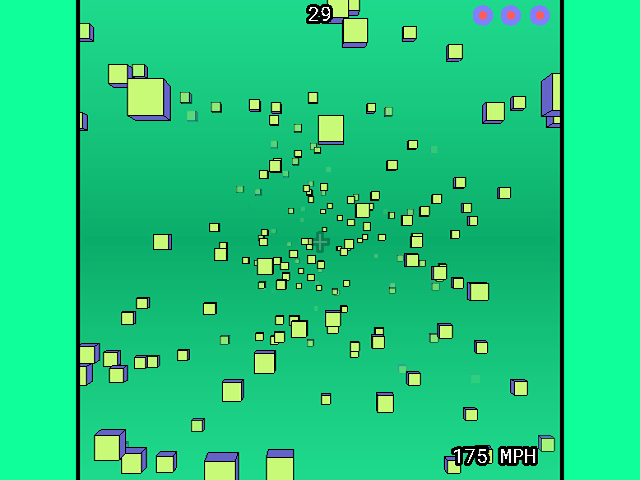
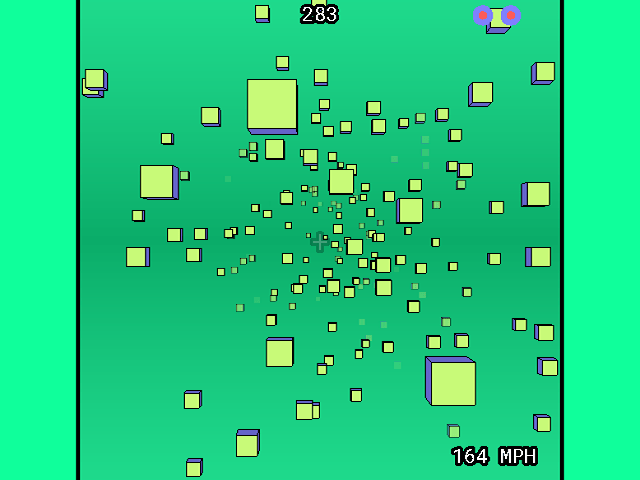
Screenshots
Media
Blockamok Remix Gameplay (Wii, Gamecube, Vita, and more) (Mode8fx)
Changelog
v1.2
- Changes
- Added widescreen! (Or whatever your system's fullscreen is.) Overlay options are still present if you'd prefer to play with a square aspect ratio.
- Widescreen may result in slightly worse performance on some systems, but New 3DS is the only one where it's actually noticeable in my experience.
- Added three new background/overlay color options and one new block color option.
- Also reorganized background/overlay color options.
- Added Spawn Area setting that allows the player to change the size of the block spawn area.
- A larger area will be more visually appealing but have worse performance on weak devices. Conversely, a smaller area will look more cramped but improve framerate.
- Adjusted HUD element positions.
- Assorted minor polish.
- [Android] Increased block spawn boundaries from 10.0 to 12.0 (same as PC).
- [PC] Config file now stores WINDOW_WIDTH and WINDOW_HEIGHT instead of just WINDOW_SIZE (which previously set both width and height).
- [Switch] Very slightly increased block spawn boundaries from 8.7 to 8.8.
- [Vita] Slightly improved performance. Minimum no-overclock framerate increased from ~45 FPS to ~52 FPS.
- Added widescreen! (Or whatever your system's fullscreen is.) Overlay options are still present if you'd prefer to play with a square aspect ratio.
- Bug Fixes
- High score is no longer saved if debug mode is used during a game. No cheating!
- [Android] Fixed startup crash on some Android versions.
- [PC] Toggling fullscreen no longer resets visual settings.
v1.1
- Technical Improvements:
- Significantly optimized rendering and block logic. This means higher framerates on all systems (sometimes much higher)!
- The goal was usually to reach 60 FPS on the most intense settings while maintaining good block spawn boundaries, though some consoles only reach this target on less intense difficulties.
- If you're curious, here's a breakdown of how much performance has been improved on each system.
- Increased cube spawn boundaries on almost all consoles to take advantage of improved performance. The only exception is Wii U, where boundaries are reduced.
- Other minor optimizations and polish.
- [Linux] Changed save data location to point to current executable directory instead.
- [Linux] Enabled fullscreen by default.
- [Wii U] Reduced framerate to 540p for better performance (it basically looks the same as in 1080p anyway).
- Significantly optimized rendering and block logic. This means higher framerates on all systems (sometimes much higher)!
- Changes:
- Enhanced controller support! Input is now read from all connected controllers, and you can freely connect/disconnect controllers as desired.
- Added Block Transparency setting. Disabling this can slightly improve performance if needed.
- Added Frame Rate setting, intended for weak hardware.
- Made True Analog (formerly called Type B) the default control scheme.
- Made Pitch Black the default overlay color.
- Renamed and reorganized some menu options.
- Added version number to credits.
- [Vita] Restored Giant block setting.
- Bug Fixes:
- [Gamecube] Fixed save data reading/writing (mostly; see known bug below).
- [Vita] Fixed crash on high intensities.
- [Windows+Linux] Fixed save data not being read when you run the game from a directory other than the one containing the executable.
v1.0
- First Release.
External links
- GitHub - https://github.com/Mode8fx/blockamok
- itch.io - https://mode8fx.itch.io/blockamok-remix