
NX Fetch Switch: Difference between revisions
From GameBrew
More actions
No edit summary |
No edit summary |
||
| (3 intermediate revisions by 2 users not shown) | |||
| Line 4: | Line 4: | ||
|description=Switch neofetch homebrew app. | |description=Switch neofetch homebrew app. | ||
|author=Xc987 | |author=Xc987 | ||
|lastupdated=2025/ | |lastupdated=2025/11/29 | ||
|type=Utilities | |type=Utilities | ||
|version=1. | |version=1.4.0 | ||
|license=MIT | |license=MIT | ||
|download=https://dlhb.gamebrew.org/switchhomebrews/NXFetchSwitch.7z | |download=https://dlhb.gamebrew.org/switchhomebrews/NXFetchSwitch.7z | ||
| Line 29: | Line 29: | ||
[[image:NXFetchSwitch.png|link=]] | [[image:NXFetchSwitch.png|link=]] | ||
==Changelog== | ==Changelog== | ||
'''v1.4.0''' | |||
* Print controller battery value and connection type. | |||
* Print system theme and if custom custom themes are used. | |||
* Print total amount of installed titles. | |||
* Print nand system storage usage. | |||
* Print soc temp. | |||
* Print hekate version. | |||
* Print hardware type. | |||
* Print inserted gamecard. | |||
* The ram usage should be shown more precisely. | |||
* Update libnx. | |||
'''v1.3.0''' | '''v1.3.0''' | ||
* If user hasnt been preselected, it will display the first user. The displayed user can be changed by pressing L / R. | * If user hasnt been preselected, it will display the first user. The displayed user can be changed by pressing L / R. | ||
| Line 52: | Line 63: | ||
== External links == | == External links == | ||
* GitHub - https://github.com/Xc987/NX-Fetch | * GitHub - https://github.com/Xc987/NX-Fetch | ||
* | * Homebrew App Store - https://hb-app.store/switch/NXFetch | ||
Latest revision as of 03:35, 30 November 2025
| NX Fetch | |
|---|---|
 | |
| General | |
| Author | Xc987 |
| Type | Utilities |
| Version | 1.4.0 |
| License | MIT License |
| Last Updated | 2025/11/29 |
| Links | |
| Download | |
| Website | |
| Source | |
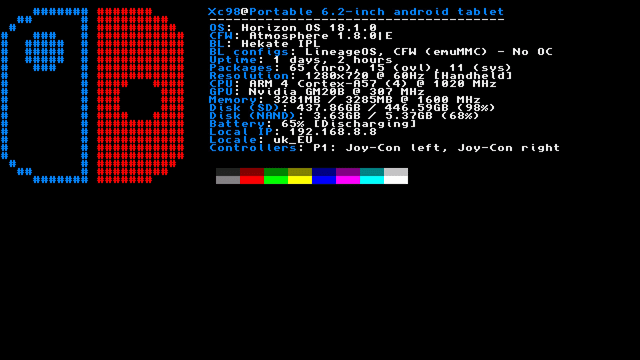
NX Fetch is a homebrew application that displays system information alongside a ASCII art rendering of the Switch logo, much like how Neofetch presents Linux distro logos on PC terminals.
Controls
D-Pad Left/Right - Cycle through different Joy-Con color themes in the ASCII art
L/R - Change the selected user shown at the top of the screen
Screenshots
Changelog
v1.4.0
- Print controller battery value and connection type.
- Print system theme and if custom custom themes are used.
- Print total amount of installed titles.
- Print nand system storage usage.
- Print soc temp.
- Print hekate version.
- Print hardware type.
- Print inserted gamecard.
- The ram usage should be shown more precisely.
- Update libnx.
v1.3.0
- If user hasnt been preselected, it will display the first user. The displayed user can be changed by pressing L / R.
- Print resolution in docked mode and display hz.
- Print SD and NAND disk procentage usage.
- Print all connected controllers (P1 to P8 connected via bluetooth and connected in handheld).
- Update the printed info category text ("BL", "CFW" etc) accent color if joycon ascii colors are changed.
v1.2.0
- Print local ip.
- Print locale (language_region).
v1.1.0
- New app icon.
- Changable switch joycon colors.
- Print hekate configs (LineageOS or Linux).
- Print battery info.
v1.0
- First Release.
Credits
Credits go to Kipi000 and his project NSW-Fetch.
External links
- GitHub - https://github.com/Xc987/NX-Fetch
- Homebrew App Store - https://hb-app.store/switch/NXFetch