
TKMM-NX Switch: Difference between revisions
More actions
Created page with "{{Infobox Switch Homebrews |title=TKMM-NX |image=TKMMNXSwitch.png |description=Lightweight OS for the Nintendo Switch. |author=TKMM-Team |lastupdated=2025/02/23 |type=Operating Systems |version=2.0.0-beta2 |license=Mixed |download=https://dlhb.gamebrew.org/switchhomebrews/TKMMNXSwitch.7z |website=https://tkmm.org/index.html |source=https://github.com/TKMM-Team/TKMM-NX |donation= }} {{#seo: |title=Switch Homebrew Apps (Operating Systems) - GameBrew |title_mode=append |ima..." |
2.1.6 |
||
| (11 intermediate revisions by 2 users not shown) | |||
| Line 4: | Line 4: | ||
|description=Lightweight OS for the Nintendo Switch. | |description=Lightweight OS for the Nintendo Switch. | ||
|author=TKMM-Team | |author=TKMM-Team | ||
|lastupdated= | |lastupdated=2026/07/16 | ||
|type=Operating Systems | |type=Operating Systems | ||
|version=2. | |version=2.1.6 | ||
|license=Mixed | |license=Mixed | ||
|download=https:// | |download=https://tkmm.org/downloads/index.html?tabs=switch | ||
|website=https://tkmm.org/index.html | |website=https://tkmm.org/index.html | ||
|source=https://github.com/TKMM-Team/TKMM-NX | |source=https://github.com/TKMM-Team/TKMM-NX | ||
| Line 18: | Line 18: | ||
|image=TKMMNXSwitch.png | |image=TKMMNXSwitch.png | ||
|image_alt=TKMM-NX | |image_alt=TKMM-NX | ||
}} | }}<!--TKMMNXSwitch.7z--> | ||
TKMM-NX is a | TKMM-NX is a mod manager for Tears of the Kingdom (TKMM) that runs directly on the Nintendo Switch. | ||
Developed by the TKMM Team, TKMM-NX is a Linux-based operating system built upon [https://github.com/libretro/Lakka-LibreELEC Lakka (a lightweight Linux distribution focused on emulation)]. | |||
==Installation== | ==Installation== | ||
Download the OS Image from [https://github.com/TKMM-Team/TKMM-NX/releases Releases]. | |||
Copy the tkmm and bootloader folders to the root directory of the SD card. | |||
Boot into RCM (Recovery Mode) on the Nintendo Switch. | |||
Inject the Hekate payload using a compatible method. | |||
In the Hekate menu, navigate to "More Configs" and select "TKMM" to boot into the TKMM-NX environment. | |||
'''Updating:''' | |||
TKMM should prompt you when it detects an update (if connected to wifi), when selecting "Yes" on the update prompt, the update will be downloaded and your Switch will reboot to the new version. | |||
If you ever need to update manually, download the latest [https://github.com/TKMM-Team/TKMM-NX/releases/latest/download/update.tar update tarball] and place it under "tkmm/storage/.update/" on your micro SD card. The next time you boot to TKMM-NX, the update will be installed. | |||
==Screenshots== | ==Screenshots== | ||
| Line 51: | Line 50: | ||
==Changelog== | ==Changelog== | ||
'''v2.1.6''' | |||
* Update readme + Bump OS version. | |||
'''v2.1.4''' | |||
* Bump OS version. | |||
'''v2.1.3''' | |||
* Bump OS version. | |||
'''v2.1.2''' | |||
* Bump OS version. | |||
'''v2.1.1''' | |||
* Bump OS version. | |||
'''v2.1.0''' | |||
* Change OS versioning scheme. | |||
'''v2.0.3''' | |||
* dotnet-runtime: Updated to 10.0.9 | |||
* dotnet-sdk: Updated to 10.0.301 | |||
'''v2.0.2''' | |||
* Adjust workflow. | |||
'''v2.0.1''' | |||
* Revert "Temp fix for dotnet runtime". | |||
'''v2.0.0-rev-nx1''' | |||
* Temp fix for dotnet runtime. | |||
'''v2.0.0''' | |||
* Merge remote-tracking branch 'origin/main' into upfs-support. | |||
'''v2.0.0-beta3''' | |||
*Enabled eMMC in boot script. | |||
'''v2.0.0-beta2''' | '''v2.0.0-beta2''' | ||
* Update game dump error messages | * Update game dump error messages. | ||
* Disable optimizer by default | * Disable optimizer by default. | ||
* Use direct index merging for game__component__ConditionParam (*) | * Use direct index merging for game__component__ConditionParam (*). | ||
* Delete UltraCam config when optimizer is disabled | * Delete UltraCam config when optimizer is disabled. | ||
* Bind the home button to reboot popup | * Bind the home button to reboot popup. | ||
* Remove manual setup from NX setup wizard | * Remove manual setup from NX setup wizard. | ||
* Fix auto-updater checksum parser | * Fix auto-updater checksum parser. | ||
* Fix process name resolver | * Fix process name resolver. | ||
* Fix BYML change tracking mergeable addition resolver | * Fix BYML change tracking mergeable addition resolver. | ||
(* Requires changelog rebuild) | |||
'''v1.0''' | '''v1.0''' | ||
* First Release. | * First Release. | ||
== The Team | == Credits == | ||
* | The Team: | ||
* | * [https://github.com/ArchLeaders Arch Leaders]: Lead TKMM Developer | ||
* | * [https://github.com/LordBubblesDev Lord Bubbles]: TKMM-NX Developer & Maintainer | ||
* | * [https://github.com/AsteroidPizza39 Aster]: Co-Founder, Artist, & Operations Manager | ||
* | * [https://github.com/The5thTear The5thTear]: Co-Founder & Developer | ||
* [https://github.com/okmika Mikachan]: Developer | |||
* The [https://switchroot.org/ | Special Thanks: | ||
* The [https://www.lakka.tv/ | * The [https://switchroot.org/ Switchroot] community for pioneering open-source development on the Nintendo Switch. | ||
* The [https://libreelec.tv/ | * The [https://www.lakka.tv/ Lakka] team, for its work that allowed us to create a custom OS for TKMM on Switch. | ||
* The [https://libreelec.tv/ LibreELEC] team for creating the Linux distribution upon which all of this is built. | |||
== External links == | == External links == | ||
* | * Official Website - https://tkmm.org/index.html | ||
* | * GitHub - https://github.com/TKMM-Team/TKMM-NX | ||
* Homebrew App Store - https://hb-app.store/switch/TKMM-NX | |||
* GameBanana - https://gamebanana.com/tools/19164 | * GameBanana - https://gamebanana.com/tools/19164 | ||
Latest revision as of 02:08, 17 July 2026
| TKMM-NX | |
|---|---|
 | |
| General | |
| Author | TKMM-Team |
| Type | Operating Systems |
| Version | 2.1.6 |
| License | Mixed |
| Last Updated | 2026/07/16 |
| Links | |
| Download | |
| Website | |
| Source | |
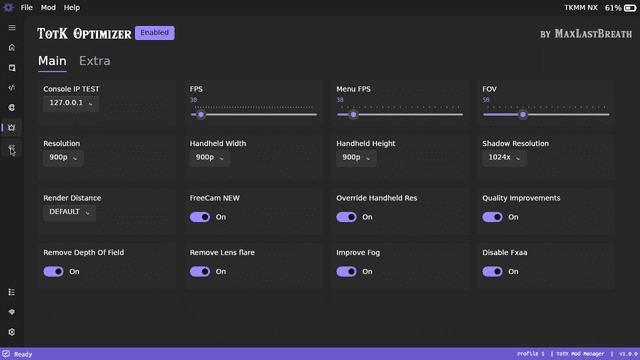
TKMM-NX is a mod manager for Tears of the Kingdom (TKMM) that runs directly on the Nintendo Switch.
Developed by the TKMM Team, TKMM-NX is a Linux-based operating system built upon Lakka (a lightweight Linux distribution focused on emulation).
Installation
Download the OS Image from Releases.
Copy the tkmm and bootloader folders to the root directory of the SD card.
Boot into RCM (Recovery Mode) on the Nintendo Switch.
Inject the Hekate payload using a compatible method.
In the Hekate menu, navigate to "More Configs" and select "TKMM" to boot into the TKMM-NX environment.
Updating:
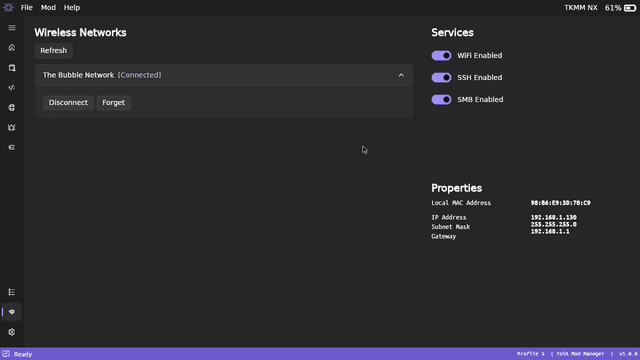
TKMM should prompt you when it detects an update (if connected to wifi), when selecting "Yes" on the update prompt, the update will be downloaded and your Switch will reboot to the new version.
If you ever need to update manually, download the latest update tarball and place it under "tkmm/storage/.update/" on your micro SD card. The next time you boot to TKMM-NX, the update will be installed.
Screenshots


Changelog
v2.1.6
- Update readme + Bump OS version.
v2.1.4
- Bump OS version.
v2.1.3
- Bump OS version.
v2.1.2
- Bump OS version.
v2.1.1
- Bump OS version.
v2.1.0
- Change OS versioning scheme.
v2.0.3
- dotnet-runtime: Updated to 10.0.9
- dotnet-sdk: Updated to 10.0.301
v2.0.2
- Adjust workflow.
v2.0.1
- Revert "Temp fix for dotnet runtime".
v2.0.0-rev-nx1
- Temp fix for dotnet runtime.
v2.0.0
- Merge remote-tracking branch 'origin/main' into upfs-support.
v2.0.0-beta3
- Enabled eMMC in boot script.
v2.0.0-beta2
- Update game dump error messages.
- Disable optimizer by default.
- Use direct index merging for game__component__ConditionParam (*).
- Delete UltraCam config when optimizer is disabled.
- Bind the home button to reboot popup.
- Remove manual setup from NX setup wizard.
- Fix auto-updater checksum parser.
- Fix process name resolver.
- Fix BYML change tracking mergeable addition resolver.
(* Requires changelog rebuild)
v1.0
- First Release.
Credits
The Team:
- Arch Leaders: Lead TKMM Developer
- Lord Bubbles: TKMM-NX Developer & Maintainer
- Aster: Co-Founder, Artist, & Operations Manager
- The5thTear: Co-Founder & Developer
- Mikachan: Developer
Special Thanks:
- The Switchroot community for pioneering open-source development on the Nintendo Switch.
- The Lakka team, for its work that allowed us to create a custom OS for TKMM on Switch.
- The LibreELEC team for creating the Linux distribution upon which all of this is built.
External links
- Official Website - https://tkmm.org/index.html
- GitHub - https://github.com/TKMM-Team/TKMM-NX
- Homebrew App Store - https://hb-app.store/switch/TKMM-NX
- GameBanana - https://gamebanana.com/tools/19164