
RAI Loader 3DS: Difference between revisions
More actions
Created page with "{{Infobox 3DS Homebrews |title=RAI Loader |image=RAILoader3DS.png |description=The first AI Roleplay App for 3DS. |author=Extintor Incendiandose |lastupdated=2025/01/18 |type=Other Apps |version=2025 |license=Mixed |download=https://dlhb.gamebrew.org/3dshomebrews/RAILoader3DS.7z |website=https://jalm24.itch.io/rai-loader |source= |donation= }} {{#seo: |title= (Other Apps) - GameBrew |title_mode=append |image=RAILoader3DS.png |image_alt=RAI Loader }} RAI Loader is an expe..." |
No edit summary |
||
| (8 intermediate revisions by 2 users not shown) | |||
| Line 4: | Line 4: | ||
|description=The first AI Roleplay App for 3DS. | |description=The first AI Roleplay App for 3DS. | ||
|author=Extintor Incendiandose | |author=Extintor Incendiandose | ||
|lastupdated=2025/ | |lastupdated=2025/09/18 | ||
|type=Other Apps | |type=Other Apps | ||
|version= | |version=1.7 | ||
|license=Mixed | |license=Mixed | ||
| | |downloadraw=[https://jalm24.itch.io/rai-loader Download on itch.io] | ||
|website=https://jalm24.itch.io/rai-loader | |website=https://jalm24.itch.io/rai-loader | ||
|source= | |source= | ||
| Line 18: | Line 18: | ||
|image=RAILoader3DS.png | |image=RAILoader3DS.png | ||
|image_alt=RAI Loader | |image_alt=RAI Loader | ||
}} | }}<!--https://dlhb.gamebrew.org/3dshomebrews/RAILoader3DS.7z--> | ||
RAI Loader is an experimental AI roleplay chat app developed for the Nintendo 3DS. It | RAI Loader is an experimental AI roleplay chat app developed for the Nintendo 3DS. It doesn't really outdo any similar Android apps and is more of a fun project built with C++ using devkitPro libraries and a special rest api. | ||
Unlike many AI chat apps, RAI Loader doesn't rely on big servers. It just communicates with an external rest api, and everything else happens locally on your console using specific JSON files. | |||
Unlike many AI chat apps, RAI Loader | |||
Each character file requires a .t3x file containing a 128x128 pixel sprite, said file represents the icon or profile picture of the chat you want to talk to. | |||
Chats are not saved 100% so every time you change chat or json file the AI will forget any conversation, resetting the memory at that moment. | |||
The app includes a single default personality in case you don't load any JSON file, a friendly robot that answers your questions and likes to talk to you. Currently two character packs are included (one in English and one in Spanish) containing 6 well-known characters: | |||
* Tony Stark (Iron Man) | |||
* Lucy (Cyberpunk Edgerunners) | |||
* Shanks (One Piece) | |||
* Megumin (Konosuba) | |||
* Sukuna (Jujutsu Kaisen) | |||
* Rias Gremory (High School DxD) | |||
* Simon "Ghost" Riley (Call Of Duty) | |||
* Hitori Gotoh (Bocchi the Rock) | |||
* Satoru Gojo (Jujutsu Kaisen) | |||
* Shinobu Kocho (Demon Slayer) | |||
'''Note:''' Internet access is required. | |||
== | ==Installation== | ||
Copy the folder ChaiCharaFolder to the 3ds folder on your SD card. | |||
JSON and .t3x files for the characters you want to use go inside ChaiCharaFolder. | |||
==How to | ==User guide== | ||
How to load a character: | |||
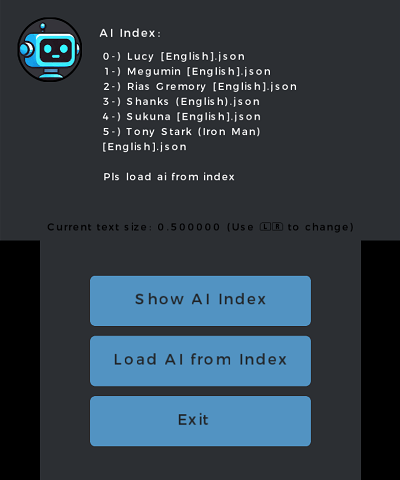
* Tap "Show Ai Index" to see a list of available characters in ChaiCharaFolder. | |||
* Then press "Load Ai from Index" and enter the index number for the character you want. | |||
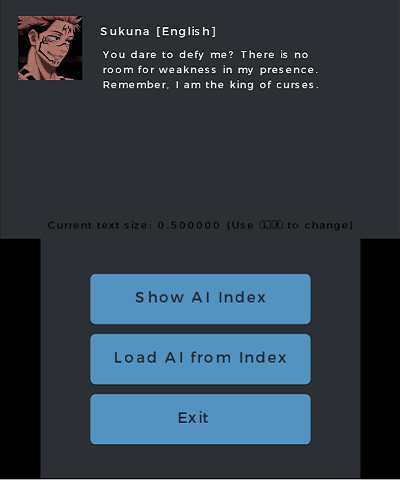
Once you have loaded the character you want to chat with you just have to press the A button and the text input will be displayed using the virtual keyboard of the Nintendo 3DS. | |||
==Screenshots== | ==Screenshots== | ||
https://dlhb.gamebrew.org/3dshomebrews/images/RAILoader3DS-01.png | https://dlhb.gamebrew.org/3dshomebrews/images/RAILoader3DS-01.png | ||
https://dlhb.gamebrew.org/3dshomebrews/images/RAILoader3DS-02.png | https://dlhb.gamebrew.org/3dshomebrews/images/RAILoader3DS-02.png | ||
https:// | ==Media== | ||
'''RAI Loader Update 1.6 full test on emulator''' ([https://www.youtube.com/watch?v=ZcPKqNi4sG4 Extintor Incendiandose]) <br> | |||
<youtube>ZcPKqNi4sG4</youtube> | |||
==Changelog== | ==Changelog== | ||
'''v1.7''' | |||
*Wnew in this version? | |||
** No more loading characters from the index! I've finally implemented buttons corresponding to each character available in the app, so you no longer have to show the index and then type it, just click on the character you want. Just like any AI-powered roleplay chat app for Android. | |||
** Updated model, now instead of using the old gemini 1.5 flash and its limit of 50 messages per day for the free api, the gemini 2.5 flash lite will be used and its limit of 2000 messages per day . | |||
***Although of course, these messages are total, so if a single person spends the 2K messages then no one will be able to continue using the app. This will be temporary, someday if I start earning something with my games I suppose I will have to switch to the paid api to not have any limit. | |||
** After several updates and a lot of trial and error... finally you can change the api key! | |||
***That's right, you can use your own google ai studio api key in case the app stops working, to use another api key other than the default one you must edit the json file in the "3ds/RAI-Loader/Chats&Config" folder, when running the application the apikey that you have placed will be used, if you remove the api key from that json then the app will return to using the default api. | |||
*UI improvements: | |||
** To send messages, you no longer have to press the A button. Instead, you have to type in the input box and then press the send button. | |||
** New credits window. You can still see the old credits window by pressing X, although the new window includes QR codes for almost all of my social media accounts. | |||
*Other changes and fixes | |||
** Version and Revision Check: They are now automatic when opening the app, the "revision" has now been fully implemented, in case of minor changes in future revisions the corresponding message will appear | |||
** Optimization: Minor changes were made to improve app performance, there was some lag when pressing buttons (they didn't change color fast enough) but now theres no lag on the UI Uwu | |||
** Error messages have been added! When the API responds with an error code, before, nothing would happen and you wouldn't be able to tell what had happened, but now you can. In case of a 429 error, it's likely that the API's free limit has been reached haha. | |||
** ChaiCharaFolder renamed to RAI-Loader: So you'll have to rename the folder or move your characters somewhere else. | |||
'''v1.6''' | |||
* Config System | |||
**It's now possible to change some AI response settings, such as Top-P and temperature. These configured parameters are saved in a file called config.bin on the console's SD card. I haven't tried it yet, but this implementation should make it possible for the app to work without the ChaiCharaFolder... I think... that hasn't been tested yet, hehe. | |||
*Uncensored Mode | |||
**It's now possible to disable the censorship present in AI responses, although rather than disabling it, it becomes a bit lewd or aggressive to the AI, so instead of calling it "censorship," I named it "NSFW." I don't think it's a problem or a misunderstanding. In future updates, I may need to add a filter to ensure that ONLY people over 18 can use this mode. | |||
*Improvements to language settings | |||
**I know it's somewhat redundant to mention this, but now the settings menu doesn't close when you click on the flag corresponding to the language you want to use. | |||
*Interface and button improvements | |||
**The icons have been replaced with more stylized ones that reflect RaiBot's essence. Animations (color changes) have also been added when holding down the icon buttons. This had not been done previously due to differences between drawing a recolorable rectangle and changing the color or adding an additional tint to a sprite in citro2d. | |||
*New Base Characters | |||
**Ikaros from Sora No Otoshimono and Levi Ackerman from Attack On Titan. | |||
'''v1.5''' | |||
* Language System 80% functional: | |||
**For now, only Spanish and English are available. The language settings are not saved; when you close the app, it will return to English. When loading a personality, it is recommended to load that personality's language (this is because two prompts have been added for testing purposes, one for each language, so I'm not sure how consistent the response will be; more testing is needed). | |||
* Version Management System (a bit primitive) | |||
**By pressing one of the buttons on the touchscreen, you can check if the version of RAI-Loader you are running is the most recent. This system simply connects to a public JSON file on GitHub and verifies that its values match those of the app. | |||
**You can easily see which version of RAI-Loader you have in the lower right corner of the Nintendo 3DS touchscreen. | |||
* Drastic Changes to Personality JSON Files | |||
**The structure has been completely changed. It is no longer necessary to type the entire roleplay prompt, only the character's characteristics and the first message sent, for example: | |||
<pre> | |||
{ | |||
"contents": [ | |||
{ | |||
"role": "model", | |||
"parts": [ | |||
{ | |||
"text": "this is the AI First Message!\n" | |||
} | |||
] | |||
} | |||
], | |||
"CharacterInfo": { | |||
"name": "characterName", | |||
"description": "a guy", | |||
"personality": "trash, hate everyone", | |||
"appearance": "ugly and many othes things" | |||
} | |||
} | |||
</pre> | |||
* Wi-Fi and Battery Indicators | |||
**Basic indicators have been added. Wi-Fi signal strength and battery life are very basic indicators, so they're not really that useful. The only difference is between a full and half charge, and a maximum Wi-Fi signal or no Wi-Fi signal. | |||
*Added a credits panel. | |||
**Press X to see who contributed to the project! | |||
*Bug Fixes | |||
**Fixed an error when loading characters where if the previous and new characters both had a PNG file instead of a T3X file, the image wouldn't be replaced with the new one, instead the previous one would prevail. | |||
**Fixed an issue where writing a message longer than 2.3 lines was not possible. This was due to filters applied to the text. All types of filtering for inappropriate text or invalid characters have been removed. | |||
**New bugs are expected due to this. For now, only one serious one has been detected (when the 1024-character limit is reached, nothing happens; the user can continue typing, but only 1024 characters will be sent as the message content). | |||
'''v2025/03/09''' | |||
* Support for 64x64 pixel PNG files as profile picture for characters (without removing support for t3x files with 128x128 pixel images). | |||
* Total change in the structure of the personality JSON, additionally now instead of just including the personality the ENTIRE roleplay prompt must be included, to compare the changes you only need to open the JSON file and you will notice it right away. | |||
* Info Button, shows a small information window with the directory where the personalities go and which button to press to write a message. | |||
* Improvements in the Zoom of the text, it is now possible to scroll to the AI message with the up and down buttons of the D-Pad of the Nintendo 3DS. | |||
'''v2025''' | '''v2025''' | ||
* First Release. | * First Release. | ||
== External links == | == External links == | ||
* | * itch.io - https://jalm24.itch.io/rai-loader | ||
Latest revision as of 01:50, 21 September 2025
| RAI Loader | |
|---|---|
 | |
| General | |
| Author | Extintor Incendiandose |
| Type | Other Apps |
| Version | 1.7 |
| License | Mixed |
| Last Updated | 2025/09/18 |
| Links | |
| Download on itch.io | |
| Website | |
RAI Loader is an experimental AI roleplay chat app developed for the Nintendo 3DS. It doesn't really outdo any similar Android apps and is more of a fun project built with C++ using devkitPro libraries and a special rest api.
Unlike many AI chat apps, RAI Loader doesn't rely on big servers. It just communicates with an external rest api, and everything else happens locally on your console using specific JSON files.
Each character file requires a .t3x file containing a 128x128 pixel sprite, said file represents the icon or profile picture of the chat you want to talk to.
Chats are not saved 100% so every time you change chat or json file the AI will forget any conversation, resetting the memory at that moment.
The app includes a single default personality in case you don't load any JSON file, a friendly robot that answers your questions and likes to talk to you. Currently two character packs are included (one in English and one in Spanish) containing 6 well-known characters:
- Tony Stark (Iron Man)
- Lucy (Cyberpunk Edgerunners)
- Shanks (One Piece)
- Megumin (Konosuba)
- Sukuna (Jujutsu Kaisen)
- Rias Gremory (High School DxD)
- Simon "Ghost" Riley (Call Of Duty)
- Hitori Gotoh (Bocchi the Rock)
- Satoru Gojo (Jujutsu Kaisen)
- Shinobu Kocho (Demon Slayer)
Note: Internet access is required.
Installation
Copy the folder ChaiCharaFolder to the 3ds folder on your SD card.
JSON and .t3x files for the characters you want to use go inside ChaiCharaFolder.
User guide
How to load a character:
- Tap "Show Ai Index" to see a list of available characters in ChaiCharaFolder.
- Then press "Load Ai from Index" and enter the index number for the character you want.
Once you have loaded the character you want to chat with you just have to press the A button and the text input will be displayed using the virtual keyboard of the Nintendo 3DS.
Screenshots
Media
RAI Loader Update 1.6 full test on emulator (Extintor Incendiandose)
Changelog
v1.7
- Wnew in this version?
- No more loading characters from the index! I've finally implemented buttons corresponding to each character available in the app, so you no longer have to show the index and then type it, just click on the character you want. Just like any AI-powered roleplay chat app for Android.
- Updated model, now instead of using the old gemini 1.5 flash and its limit of 50 messages per day for the free api, the gemini 2.5 flash lite will be used and its limit of 2000 messages per day .
- Although of course, these messages are total, so if a single person spends the 2K messages then no one will be able to continue using the app. This will be temporary, someday if I start earning something with my games I suppose I will have to switch to the paid api to not have any limit.
- After several updates and a lot of trial and error... finally you can change the api key!
- That's right, you can use your own google ai studio api key in case the app stops working, to use another api key other than the default one you must edit the json file in the "3ds/RAI-Loader/Chats&Config" folder, when running the application the apikey that you have placed will be used, if you remove the api key from that json then the app will return to using the default api.
- UI improvements:
- To send messages, you no longer have to press the A button. Instead, you have to type in the input box and then press the send button.
- New credits window. You can still see the old credits window by pressing X, although the new window includes QR codes for almost all of my social media accounts.
- Other changes and fixes
- Version and Revision Check: They are now automatic when opening the app, the "revision" has now been fully implemented, in case of minor changes in future revisions the corresponding message will appear
- Optimization: Minor changes were made to improve app performance, there was some lag when pressing buttons (they didn't change color fast enough) but now theres no lag on the UI Uwu
- Error messages have been added! When the API responds with an error code, before, nothing would happen and you wouldn't be able to tell what had happened, but now you can. In case of a 429 error, it's likely that the API's free limit has been reached haha.
- ChaiCharaFolder renamed to RAI-Loader: So you'll have to rename the folder or move your characters somewhere else.
v1.6
- Config System
- It's now possible to change some AI response settings, such as Top-P and temperature. These configured parameters are saved in a file called config.bin on the console's SD card. I haven't tried it yet, but this implementation should make it possible for the app to work without the ChaiCharaFolder... I think... that hasn't been tested yet, hehe.
- Uncensored Mode
- It's now possible to disable the censorship present in AI responses, although rather than disabling it, it becomes a bit lewd or aggressive to the AI, so instead of calling it "censorship," I named it "NSFW." I don't think it's a problem or a misunderstanding. In future updates, I may need to add a filter to ensure that ONLY people over 18 can use this mode.
- Improvements to language settings
- I know it's somewhat redundant to mention this, but now the settings menu doesn't close when you click on the flag corresponding to the language you want to use.
- Interface and button improvements
- The icons have been replaced with more stylized ones that reflect RaiBot's essence. Animations (color changes) have also been added when holding down the icon buttons. This had not been done previously due to differences between drawing a recolorable rectangle and changing the color or adding an additional tint to a sprite in citro2d.
- New Base Characters
- Ikaros from Sora No Otoshimono and Levi Ackerman from Attack On Titan.
v1.5
- Language System 80% functional:
- For now, only Spanish and English are available. The language settings are not saved; when you close the app, it will return to English. When loading a personality, it is recommended to load that personality's language (this is because two prompts have been added for testing purposes, one for each language, so I'm not sure how consistent the response will be; more testing is needed).
- Version Management System (a bit primitive)
- By pressing one of the buttons on the touchscreen, you can check if the version of RAI-Loader you are running is the most recent. This system simply connects to a public JSON file on GitHub and verifies that its values match those of the app.
- You can easily see which version of RAI-Loader you have in the lower right corner of the Nintendo 3DS touchscreen.
- Drastic Changes to Personality JSON Files
- The structure has been completely changed. It is no longer necessary to type the entire roleplay prompt, only the character's characteristics and the first message sent, for example:
{
    "contents": [
        {
            "role": "model",
            "parts": [
                {
                    "text": "this is the AI First Message!\n"
                }
            ]
        }
    ],
    "CharacterInfo": {
        "name": "characterName",
        "description": "a guy",
        "personality": "trash, hate everyone",
        "appearance": "ugly and many othes things"
    }
}
- Wi-Fi and Battery Indicators
- Basic indicators have been added. Wi-Fi signal strength and battery life are very basic indicators, so they're not really that useful. The only difference is between a full and half charge, and a maximum Wi-Fi signal or no Wi-Fi signal.
- Added a credits panel.
- Press X to see who contributed to the project!
- Bug Fixes
- Fixed an error when loading characters where if the previous and new characters both had a PNG file instead of a T3X file, the image wouldn't be replaced with the new one, instead the previous one would prevail.
- Fixed an issue where writing a message longer than 2.3 lines was not possible. This was due to filters applied to the text. All types of filtering for inappropriate text or invalid characters have been removed.
- New bugs are expected due to this. For now, only one serious one has been detected (when the 1024-character limit is reached, nothing happens; the user can continue typing, but only 1024 characters will be sent as the message content).
v2025/03/09
- Support for 64x64 pixel PNG files as profile picture for characters (without removing support for t3x files with 128x128 pixel images).
- Total change in the structure of the personality JSON, additionally now instead of just including the personality the ENTIRE roleplay prompt must be included, to compare the changes you only need to open the JSON file and you will notice it right away.
- Info Button, shows a small information window with the directory where the personalities go and which button to press to write a message.
- Improvements in the Zoom of the text, it is now possible to scroll to the AI message with the up and down buttons of the D-Pad of the Nintendo 3DS.
v2025
- First Release.
External links
- itch.io - https://jalm24.itch.io/rai-loader