
Shoot Lapin PSP: Difference between revisions
From GameBrew
More actions
Created page with "{{Infobox PSP Homebrews |title=Shoot Lapin |image=shootlapinpsp.png |description=Rayman Raving Rabbids fangame. |author=gorglucks |lastupdated=2009/04/03 |type=Shooter |format= |version=2.2 |license=Mixed |download=https://dlhb.gamebrew.org/psphomebrew/shootlapin.zip |website=http://www.gorglucks.com/ |source=https://dlhb.gamebrew.org/psphomebrew/shootlapin.zip }} Rayman Raving Rabbids fangame. == User guide == Launch the plunger at rabbits that appear in front of you...." |
No edit summary |
||
| Line 48: | Line 48: | ||
== External links == | == External links == | ||
* Author's website - http://www.gorglucks.com/ | * Author's website - http://www.gorglucks.com/ | ||
[[Category:Lua games on PSP]] | |||
Latest revision as of 10:51, 11 January 2025
| Shoot Lapin | |
|---|---|
 | |
| General | |
| Author | gorglucks |
| Type | Shooter |
| Version | 2.2 |
| License | Mixed |
| Last Updated | 2009/04/03 |
| Links | |
| Download | |
| Website | |
| Source | |
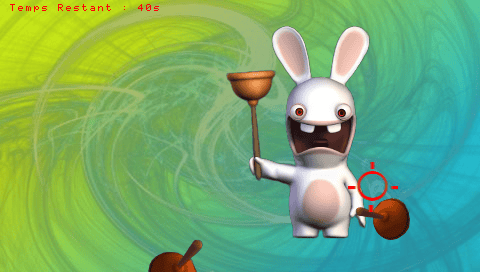
Rayman Raving Rabbids fangame.
User guide
Launch the plunger at rabbits that appear in front of you.
You must shoot them as quickly as possible.
Controls
Cross - Select menu option
R - Shoot
D-Pad/Analog - Aim
Start - Pause menu
Circle - Back in the menu
Pause:
Cross - Resume
Select - Return to menu
Screenshots
Compatibility
Tested on 5.00 M33 6.
Known issues
In the pause menu it says to press Start to return, but you actually need to press Select.
External links
- Author's website - http://www.gorglucks.com/