
Unreal Vita: Difference between revisions
From GameBrew
More actions
Created page with "{{Infobox Vita Homebrews |title=Unreal Vita |image=UnrealVita.png |description=Port of Unreal for PSVita. |author=fgsfds |lastupdated=2024/12/22 |type=Shooter |version=r2 |license= |download=https://dlhb.gamebrew.org/vitahomebrews/UnrealVita.7z |website=https://github.com/fgsfdsfgs/UE1 |source=https://github.com/fgsfdsfgs/UE1 |donation= }} {{#seo: |title=Vita Homebrew Games (Shooter) - GameBrew |title_mode=append |image=UnrealVita.png |image_alt=Unreal Vita }} Porting Un..." |
r7 |
||
| (5 intermediate revisions by 2 users not shown) | |||
| Line 2: | Line 2: | ||
|title=Unreal Vita | |title=Unreal Vita | ||
|image=UnrealVita.png | |image=UnrealVita.png | ||
|description=Port of Unreal for | |description=Port of Unreal for PS Vita. | ||
|author=fgsfds | |author=fgsfds | ||
|lastupdated= | |lastupdated=2025/11/16 | ||
|type=Shooter | |type=Shooter | ||
|version= | |version=r7 | ||
|license= | |license=N/A | ||
|download=https:// | |download=https://github.com/fgsfdsfgs/UE1/releases | ||
|website=https://github.com/fgsfdsfgs/UE1 | |website=https://github.com/fgsfdsfgs/UE1 | ||
|source=https://github.com/fgsfdsfgs/UE1 | |source=https://github.com/fgsfdsfgs/UE1 | ||
| Line 18: | Line 18: | ||
|image=UnrealVita.png | |image=UnrealVita.png | ||
|image_alt=Unreal Vita | |image_alt=Unreal Vita | ||
}} | }}<!--UnrealVita.7z--> | ||
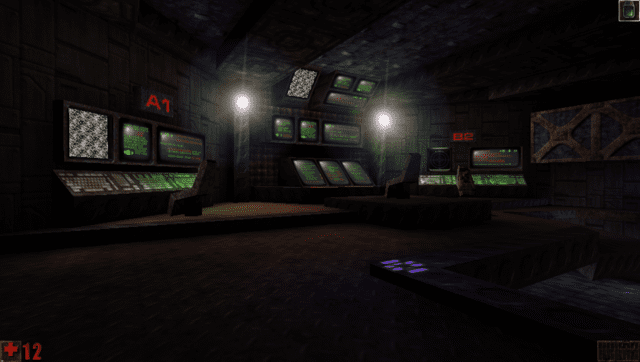
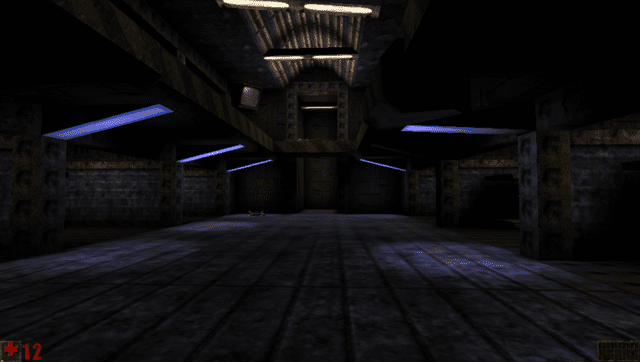
Porting Unreal to the | Porting Unreal to the PS Vita involves using the reconstructed source code of Unreal Engine 1 v200. Unreal is a first-person shooter video game originally developed by Epic MegaGames and Digital Extremes, and published by GT Interactive for Microsoft Windows in May 1998. | ||
==Features== | |||
* Added SDL2 windowing/client driver (NSDLDrv). | |||
* Added GLES2 and fixed pipeline GL graphics drivers (NOpenGLESDrv and NOpenGLDrv). | |||
* Added OpenAL + libxmp audio driver (NOpenALDrv). | |||
* Added GCC support and fixed a bunch of related bugs. | |||
* Supported platforms: Windows (x86), Linux (x86, ARM32) and PSVita (ARM32). | |||
* Editor UI is not supported. | |||
== | ==Installation== | ||
===Requirements=== | ===Requirements=== | ||
* Assets from the original Unreal v200 retail release or from the v205 demo. Other versions have not been tested. | |||
* libshacccg.suprx | * libshacccg.suprx | ||
* kubridge.skprx | * kubridge.skprx | ||
== | === Linux and Windows === | ||
* | * Install the original retail v200 release of Unreal or the v205 demo. | ||
* Copy over the new files: | |||
** If you downloaded a ZIP from [https://github.com/fgsfdsfgs/UE1/releases Releases]: | |||
*** Unzip said ZIP to the <code>Unreal</code> folder. Overwrite everything. | |||
** If you built the game yourself: | |||
*** Copy the .dll/.so/.exe/.bin files you built to <code>Unreal/System</code>. Overwrite everything. | |||
*** Copy the contents of <code>Engine/Config</code> to <code>Unreal/System</code>. Overwrite everything. | |||
* Run <code>System/Unreal.exe</code>. | |||
=== PS Vita === | |||
* Install the original retail v200 release of Unreal or the v205 demo onto your PC. | * Install the original retail v200 release of Unreal or the v205 demo onto your PC. | ||
* Copy the contents of | * Copy the contents of the <code>Unreal</code> folder to <code>ux0:/data/unreal/</code> on your PS Vita. | ||
* Copy | * Copy the <code>unreal</code> folder from <code>unreal-arm-psvita-gcc.zip</code> to <code>ux0:/data/</code>. Overwrite everything. | ||
* | * Install <code>unreal.vpk</code> from <code>unreal-arm-psvita-gcc.zip</code>. | ||
* Run Unreal. | * Run Unreal. | ||
Update warning: Due to how the save list works in vanilla Unreal, do not replace your current Unreal.ini when updating if you have saved games, or the save list in the Load Game menu will become empty. You still need to replace the other files, though. | |||
==Screenshots== | ==Screenshots== | ||
| Line 49: | Line 60: | ||
==Changelog== | ==Changelog== | ||
'''psvita-r7''' | |||
* Performance improvements (PR [https://github.com/fgsfdsfgs/UE1/pull/45 #45]). | |||
* Fixed potential collision hash-related crash. | |||
* Fixed potential division by zero crash. | |||
* Probably some other fixes. | |||
'''psvita-r6''' | |||
* Fixed the fan in Rrajigar Mines pushing you too fast at 60 FPS. | |||
* Fixed lighting effects that are based on level time. | |||
* Adjusted gamma calculation slightly. | |||
* FOV should now be adjusted for widescreen (set <code>AutoFOV=0</code> under <code>[NOpenGLESDrv.NOpenGLESRenderDevice]</code> in <code>Unreal.ini</code> to disable). | |||
* Added a way to lock the game to 30 FPS (set <code>SwapInterval=2</code> in <code>Unreal.ini</code> under <code>[NOpenGLESDrv.NOpenGLESRenderDevice]</code>). | |||
* Probably some other fixes. | |||
'''psvita-r5''' | |||
*Fixed crash at the end of the game. | |||
'''psvita-r4''' | |||
*Fixed saves crashing the game when WLAN is off. | |||
'''psvita-r3''' | |||
* Fixed overwriting saves. | |||
* Dug.unr (Depths of Rrajigar) should now load. | |||
* Fixed startup.png. | |||
'''psvita-r2''' | '''psvita-r2''' | ||
* Possibly fixed save corruption bug. | * Possibly fixed save corruption bug. | ||
* Config should now save when exiting via the PS button. | * Config should now save when exiting via the PS button. | ||
* Brightness is now implemented. | * Brightness is now implemented. | ||
'''psvita-r1''' | '''psvita-r1''' | ||
* First Release. | * First Release. | ||
== External links == | == External links == | ||
* | * GitHub - https://github.com/fgsfdsfgs/UE1 | ||
* GBAtemp - https://gbatemp.net/threads/unreal-pc-port-arm-psvita-gcc-r1-fgsfds.664671/ | |||
* VitaDB - https://www.rinnegatamante.eu/vitadb/#/info/1242 | * VitaDB - https://www.rinnegatamante.eu/vitadb/#/info/1242 | ||
[[Category:PC game ports on Vita]] | |||
[[Category:Vita game ports]] | |||
Latest revision as of 02:08, 17 July 2026
| Unreal Vita | |
|---|---|
 | |
| General | |
| Author | fgsfds |
| Type | Shooter |
| Version | r7 |
| License | N/A |
| Last Updated | 2025/11/16 |
| Links | |
| Download | |
| Website | |
| Source | |
Porting Unreal to the PS Vita involves using the reconstructed source code of Unreal Engine 1 v200. Unreal is a first-person shooter video game originally developed by Epic MegaGames and Digital Extremes, and published by GT Interactive for Microsoft Windows in May 1998.
Features
- Added SDL2 windowing/client driver (NSDLDrv).
- Added GLES2 and fixed pipeline GL graphics drivers (NOpenGLESDrv and NOpenGLDrv).
- Added OpenAL + libxmp audio driver (NOpenALDrv).
- Added GCC support and fixed a bunch of related bugs.
- Supported platforms: Windows (x86), Linux (x86, ARM32) and PSVita (ARM32).
- Editor UI is not supported.
Installation
Requirements
- Assets from the original Unreal v200 retail release or from the v205 demo. Other versions have not been tested.
- libshacccg.suprx
- kubridge.skprx
Linux and Windows
- Install the original retail v200 release of Unreal or the v205 demo.
- Copy over the new files:
- If you downloaded a ZIP from Releases:
- Unzip said ZIP to the
Unrealfolder. Overwrite everything.
- Unzip said ZIP to the
- If you built the game yourself:
- Copy the .dll/.so/.exe/.bin files you built to
Unreal/System. Overwrite everything. - Copy the contents of
Engine/ConfigtoUnreal/System. Overwrite everything.
- Copy the .dll/.so/.exe/.bin files you built to
- If you downloaded a ZIP from Releases:
- Run
System/Unreal.exe.
PS Vita
- Install the original retail v200 release of Unreal or the v205 demo onto your PC.
- Copy the contents of the
Unrealfolder toux0:/data/unreal/on your PS Vita. - Copy the
unrealfolder fromunreal-arm-psvita-gcc.ziptoux0:/data/. Overwrite everything. - Install
unreal.vpkfromunreal-arm-psvita-gcc.zip. - Run Unreal.
Update warning: Due to how the save list works in vanilla Unreal, do not replace your current Unreal.ini when updating if you have saved games, or the save list in the Load Game menu will become empty. You still need to replace the other files, though.
Screenshots
Changelog
psvita-r7
- Performance improvements (PR #45).
- Fixed potential collision hash-related crash.
- Fixed potential division by zero crash.
- Probably some other fixes.
psvita-r6
- Fixed the fan in Rrajigar Mines pushing you too fast at 60 FPS.
- Fixed lighting effects that are based on level time.
- Adjusted gamma calculation slightly.
- FOV should now be adjusted for widescreen (set
AutoFOV=0under[NOpenGLESDrv.NOpenGLESRenderDevice]inUnreal.inito disable). - Added a way to lock the game to 30 FPS (set
SwapInterval=2inUnreal.iniunder[NOpenGLESDrv.NOpenGLESRenderDevice]). - Probably some other fixes.
psvita-r5
- Fixed crash at the end of the game.
psvita-r4
- Fixed saves crashing the game when WLAN is off.
psvita-r3
- Fixed overwriting saves.
- Dug.unr (Depths of Rrajigar) should now load.
- Fixed startup.png.
psvita-r2
- Possibly fixed save corruption bug.
- Config should now save when exiting via the PS button.
- Brightness is now implemented.
psvita-r1
- First Release.