
SwitchWave: Difference between revisions
From GameBrew
More actions
No edit summary |
No edit summary |
||
| (2 intermediate revisions by one other user not shown) | |||
| Line 4: | Line 4: | ||
|description=SwitchWave is a media player for the Nintendo Switch. | |description=SwitchWave is a media player for the Nintendo Switch. | ||
|author=averne | |author=averne | ||
|lastupdated= | |lastupdated=2026/05/23 | ||
|type=Media Players | |type=Media Players | ||
|version=1. | |version=1.1.1 | ||
|license=GPL-3.0 | |license=GPL-3.0 | ||
|download=https://dlhb.gamebrew.org/switchhomebrews/SwitchWave.7z | |download=https://dlhb.gamebrew.org/switchhomebrews/SwitchWave.7z | ||
| Line 19: | Line 19: | ||
|image_alt=SwitchWave | |image_alt=SwitchWave | ||
}} | }} | ||
A hardware-accelerated media player for the Nintendo Switch, built on mpv and FFmpeg. | |||
It aims at providing a smooth and feature-complete experience, for both quick playback and video enthusiasts. | |||
== Features == | == Features == | ||
| Line 34: | Line 36: | ||
** Custom post-processing shaders | ** Custom post-processing shaders | ||
* Custom audio backend for mpv using native Nintendo APIs, supporting layouts up to 5.1 surround | * Custom audio backend for mpv using native Nintendo APIs, supporting layouts up to 5.1 surround | ||
* Network playback through Samba, NFS or SFTP | * Network playback through HTTP/S, Samba, NFS or SFTP | ||
* External drive support using [[Libusbhsfs Switch]] | * External drive support using [[Libusbhsfs Switch]] | ||
* Rich and responsive user interface, even under load | * Rich and responsive user interface, even under load | ||
== | == Installation == | ||
Download the [https://github.com/averne/SwitchWave/releases/latest latest release], and extract it to the root of your sd card (be careful to merge and not overwrite folders). | |||
Network shares can be configured through the app, as can mpv settings via the built-in editor (refer to the [https://mpv.io/manual/master/ manual]). | |||
Most relevant runtime parameters can be dynamically adjusted during playback through the menu, or failing that, the console ([https://mpv.io/manual/master/#console manual]) | |||
==Screenshots== | ==Screenshots== | ||
| Line 52: | Line 56: | ||
https://dlhb.gamebrew.org/switchhomebrews/images/SwitchWave-04.png | https://dlhb.gamebrew.org/switchhomebrews/images/SwitchWave-04.png | ||
==Changelog== | ==Changelog== | ||
'''v1.1.1''' | |||
* Bug fixes for HTTP(S)/USB mounts. | |||
'''v1.1.0''' | |||
* Build for new FW. | |||
* Add http/s network support (thanks [https://github.com/ViRb3 @ViRb3]). | |||
'''v1.0.1''' | '''v1.0.1''' | ||
* Fixes playback of files with very long paths in the recent tab. | * Fixes playback of files with very long paths in the recent tab. | ||
| Line 64: | Line 73: | ||
== External links == | == External links == | ||
* | * GitHub - https://github.com/averne/SwitchWave | ||
* GBAtemp - https://gbatemp.net/threads/switchwave-a-hardware-accelerated-media-player.662393/ | |||
Latest revision as of 01:17, 24 May 2026
| SwitchWave | |
|---|---|
 | |
| General | |
| Author | averne |
| Type | Media Players |
| Version | 1.1.1 |
| License | GPL-3.0 |
| Last Updated | 2026/05/23 |
| Links | |
| Download | |
| Website | |
| Source | |
A hardware-accelerated media player for the Nintendo Switch, built on mpv and FFmpeg.
It aims at providing a smooth and feature-complete experience, for both quick playback and video enthusiasts.
Features
- Custom hardware acceleration backend for FFmpeg, with dynamic frequency scaling. The following codecs can be decoded:
- MPEG1/2/4
- VC1
- H.264/AVC (10+ bit not supported by hardware)
- H.265/HEVC (12+ bit not supported by hardware)
- VP8
- VP9 (10+ bit not supported by hardware)
- Custom graphics backend for mpv using deko3d, supporting:
- Playback at 4k60fps
- Direct rendering (faster software decoding)
- Custom post-processing shaders
- Custom audio backend for mpv using native Nintendo APIs, supporting layouts up to 5.1 surround
- Network playback through HTTP/S, Samba, NFS or SFTP
- External drive support using Libusbhsfs Switch
- Rich and responsive user interface, even under load
Installation
Download the latest release, and extract it to the root of your sd card (be careful to merge and not overwrite folders).
Network shares can be configured through the app, as can mpv settings via the built-in editor (refer to the manual).
Most relevant runtime parameters can be dynamically adjusted during playback through the menu, or failing that, the console (manual)
Screenshots
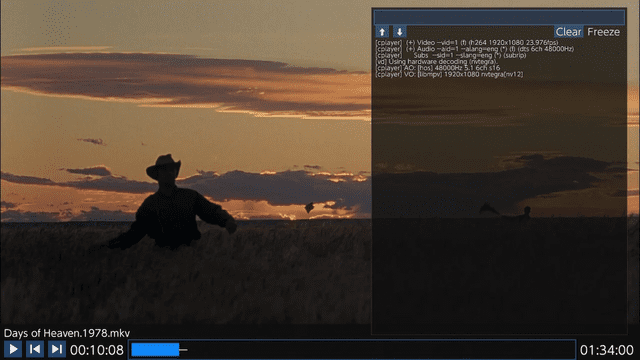
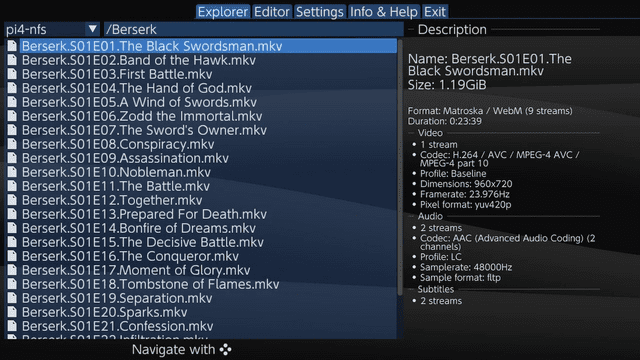
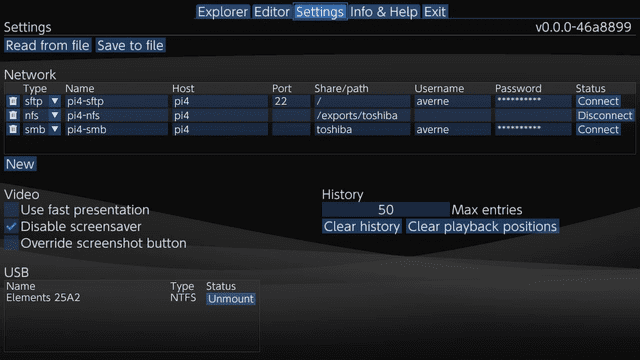
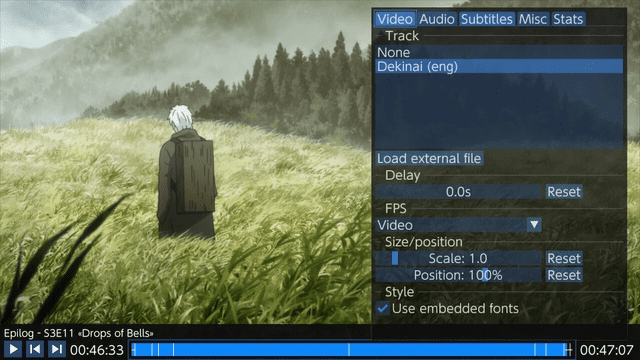
Changelog
v1.1.1
- Bug fixes for HTTP(S)/USB mounts.
v1.1.0
- Build for new FW.
- Add http/s network support (thanks @ViRb3).
v1.0.1
- Fixes playback of files with very long paths in the recent tab.
- Fixes a rare corruption of native screenshots.
- Miscellaneous UX improvements.
v1.0
- First Release.
Credits
- Behemoth for the screenshot button overriding method.