
PS4 PKG Manager: Difference between revisions
More actions
No edit summary |
|||
| (6 intermediate revisions by 2 users not shown) | |||
| Line 4: | Line 4: | ||
|description=Light-weight, cross-platform desktop application to manage large collections of PS4 PKG files. | |description=Light-weight, cross-platform desktop application to manage large collections of PS4 PKG files. | ||
|author=hippie68 | |author=hippie68 | ||
|lastupdated= | |lastupdated=2025/01/29 | ||
|type=PC Utilities | |type=PC Utilities | ||
|version=# | |version=#8 | ||
|license=Mixed | |license=Mixed | ||
|download=https://dlhb.gamebrew.org/ps4homebrews/ps4pkgmanager.7z | |download=https://dlhb.gamebrew.org/ps4homebrews/ps4pkgmanager.7z?0130 | ||
|website=https://github.com/hippie68/ps4-pkg-manager | |website=https://github.com/hippie68/ps4-pkg-manager | ||
|source=https://github.com/hippie68/ps4-pkg-manager | |source=https://github.com/hippie68/ps4-pkg-manager | ||
| Line 18: | Line 18: | ||
|image=ps4pkgmanager.png | |image=ps4pkgmanager.png | ||
|image_alt=PS4 PKG Manager | |image_alt=PS4 PKG Manager | ||
}} | |||
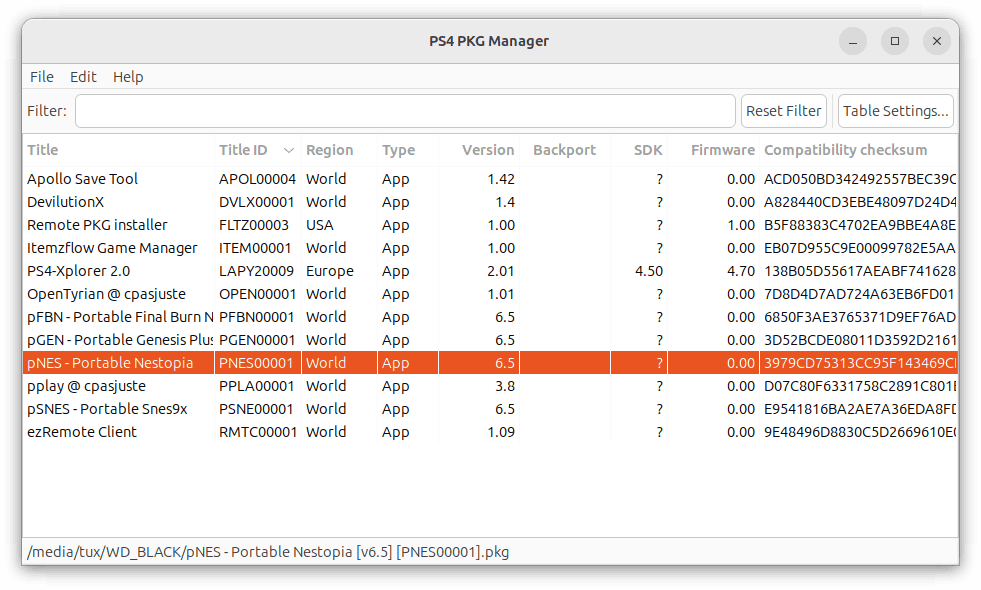
PS4 PKG Manager is a desktop application written in Java that lets you manage PS4 PKG files by storing their meta in a database. Once scanned, the PKG collection can be browsed without requiring physical access to the original files. | |||
You can interact with PKGs via a context menu, which supports custom commands ("Custom Actions") to integrate third-party tools that accept command-line arguments. | |||
==User guide== | |||
=== Requirements === | |||
This application is primarily made for Linux and macOS. | |||
It requires Java Runtime Environment (JRE), minimum version 17 LTS (JDK not required). | |||
*Linux: Install via openjdk JRE packages | |||
*Windows and macOS: [https://adoptium.net/temurin/releases/?os=any&arch=x64&package=jre&version=21 Eclipse Temurin] | |||
If you want to be able to start the .jar file with a mouse click, download the installer (not .zip/.tar.gz) and have "Associate .jar" selected during installation. | |||
=== PKG properties === | |||
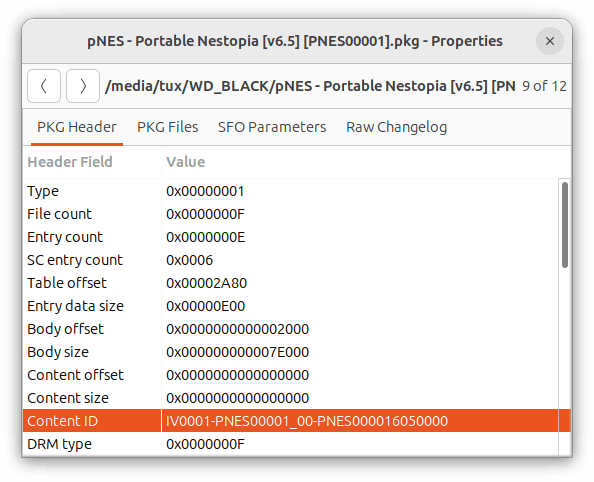
The Properties window provides detailed information about a selected PKG file and can be accessed by double-clicking a list item or using the context menu. | |||
The window includes multiple tabs. In the "PKG Files" tab, files can be extracted by opening a context menu and selecting "Extract File...". | |||
=== Custom | === Custom actions === | ||
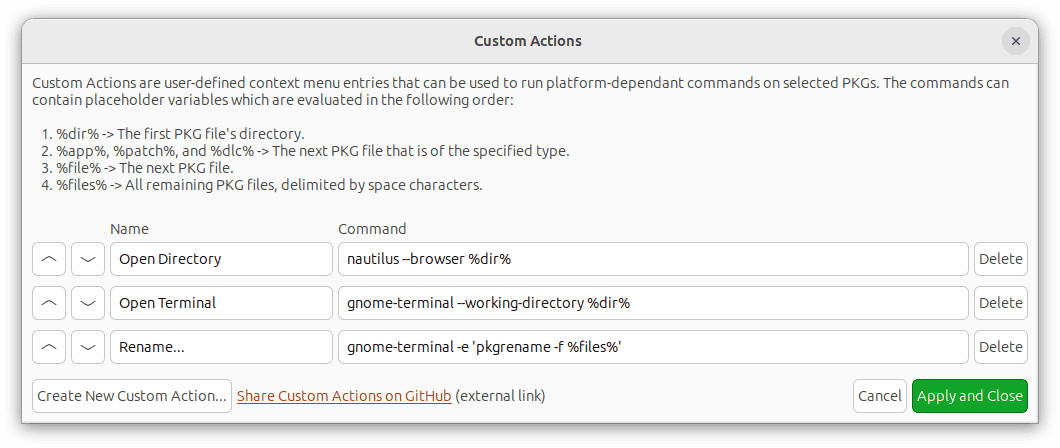
Custom Actions extend the context menu so that external tools can be run on the selected PKGs. | |||
They are stored in a text file (actions.txt), editable without running PKG Manager. The file's location can be found in the "About" dialog. | |||
The format is <code>Name | Command</code>, where the first | separates the action name from the command. | |||
https:// | For a list of command suggestions, see [https://github.com/hippie68/ps4-pkg-manager/discussions/2 Custom Actions]. | ||
=== Tabs === | === Tabs === | ||
Here you can manage multiple PKG lists for different purposes. | |||
"File" > "New Tab" creates a new tab. Tabs can be renamed, moved, or closed via a context menu. | |||
Each tab supports custom column layouts that can be rearranged by drag-and-drop, and their visibility can be toggled as needed. | |||
Tabs can function as standalone lists or monitor for specific directories directories (see Synchronized Directories). | |||
=== Synchronized | === Synchronized directories === | ||
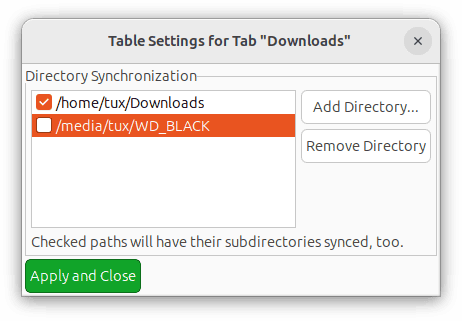
This feature, found under | This feature, found under "Table Settings", can monitor specified directories for any changes to PKG files, and update the table automatically when files are added, modified or removed. If a directory's checkbox is enabled, subdirectories are also monitored. | ||
External drives can be monitored as well; they are automatically detected and scanned for changes once mounted. | External drives can be monitored as well; they are automatically detected and scanned for changes once mounted. | ||
https:// | === FTP files === | ||
PKG Manager supports downloading PKG files from a PS4 via FTP (File > Add FTP Files...) | |||
This requires a bug-fixed PS4 FTP server (older versions may cause connection issues). Supported FTP servers include: | |||
* https://github.com/hippie68/ps4-ftp | |||
* GoldHEN 2.3 | |||
* GoldHEN 2.4 BETA | |||
After adding FTP files, PKGs can be downloaded using the [https://github.com/hippie68/ps4-pkg-manager/discussions/2 "Open Directory"] Custom Action. | |||
If you need to update the file URLs, you can do so through the context menu. | |||
== Screenshots == | |||
https://dlhb.gamebrew.org/ps4homebrews/images/ps4pkgmanager.png | |||
https://dlhb.gamebrew.org/ | https://dlhb.gamebrew.org/ps4homebrews/images/ps4pkgmanager2.png | ||
https://dlhb.gamebrew.org/ps4homebrews/images/ps4pkgmanager3.png | |||
https://dlhb.gamebrew.org/ps4homebrews/images/ps4pkgmanager4.png | |||
==Changelog== | ==Changelog== | ||
'''#8''' | |||
* Fixed a bug that could cause a crash when the program starts. | |||
* New column: "FPKG" - Displays whether a PKG is a fake PKG. | |||
* Other minor improvements. | |||
* Please note that the FPKG column will display "[N/A]" until the PKGs are processed again. | |||
* 2025-01-29: The .jar files have been recompiled to make them work with Java 17. | |||
'''#7''' | '''#7''' | ||
* New Custom Action variables: %content_id% and %title_id%. For example, they can be used to create custom actions that open URLs containing such IDs. | * New Custom Action variables: %content_id% and %title_id%. For example, they can be used to create custom actions that open URLs containing such IDs. | ||
| Line 122: | Line 141: | ||
== External links == | == External links == | ||
* | * GitHub - https://github.com/hippie68/ps4-pkg-manager | ||
Latest revision as of 02:25, 11 June 2025
| PS4 PKG Manager | |
|---|---|
 | |
| General | |
| Author | hippie68 |
| Type | PC Utilities |
| Version | #8 |
| License | Mixed |
| Last Updated | 2025/01/29 |
| Links | |
| Download | |
| Website | |
| Source | |
PS4 PKG Manager is a desktop application written in Java that lets you manage PS4 PKG files by storing their meta in a database. Once scanned, the PKG collection can be browsed without requiring physical access to the original files.
You can interact with PKGs via a context menu, which supports custom commands ("Custom Actions") to integrate third-party tools that accept command-line arguments.
User guide
Requirements
This application is primarily made for Linux and macOS.
It requires Java Runtime Environment (JRE), minimum version 17 LTS (JDK not required).
- Linux: Install via openjdk JRE packages
- Windows and macOS: Eclipse Temurin
If you want to be able to start the .jar file with a mouse click, download the installer (not .zip/.tar.gz) and have "Associate .jar" selected during installation.
PKG properties
The Properties window provides detailed information about a selected PKG file and can be accessed by double-clicking a list item or using the context menu.
The window includes multiple tabs. In the "PKG Files" tab, files can be extracted by opening a context menu and selecting "Extract File...".
Custom actions
Custom Actions extend the context menu so that external tools can be run on the selected PKGs.
They are stored in a text file (actions.txt), editable without running PKG Manager. The file's location can be found in the "About" dialog.
The format is Name | Command, where the first | separates the action name from the command.
For a list of command suggestions, see Custom Actions.
Tabs
Here you can manage multiple PKG lists for different purposes.
"File" > "New Tab" creates a new tab. Tabs can be renamed, moved, or closed via a context menu.
Each tab supports custom column layouts that can be rearranged by drag-and-drop, and their visibility can be toggled as needed.
Tabs can function as standalone lists or monitor for specific directories directories (see Synchronized Directories).
Synchronized directories
This feature, found under "Table Settings", can monitor specified directories for any changes to PKG files, and update the table automatically when files are added, modified or removed. If a directory's checkbox is enabled, subdirectories are also monitored.
External drives can be monitored as well; they are automatically detected and scanned for changes once mounted.
FTP files
PKG Manager supports downloading PKG files from a PS4 via FTP (File > Add FTP Files...)
This requires a bug-fixed PS4 FTP server (older versions may cause connection issues). Supported FTP servers include:
- https://github.com/hippie68/ps4-ftp
- GoldHEN 2.3
- GoldHEN 2.4 BETA
After adding FTP files, PKGs can be downloaded using the "Open Directory" Custom Action.
If you need to update the file URLs, you can do so through the context menu.
Screenshots
Changelog
#8
- Fixed a bug that could cause a crash when the program starts.
- New column: "FPKG" - Displays whether a PKG is a fake PKG.
- Other minor improvements.
- Please note that the FPKG column will display "[N/A]" until the PKGs are processed again.
- 2025-01-29: The .jar files have been recompiled to make them work with Java 17.
#7
- New Custom Action variables: %content_id% and %title_id%. For example, they can be used to create custom actions that open URLs containing such IDs.
- Fixed subdirectory synchronization.
- Added a build for Windows on ARM (untested).
- Other bug fixes and minor improvemements.
#6
- New option: Settings - Preferred Title Language; selecting it will display PKG titles in the user's preferred language (if available in the PKG).
- Implemented basic file extraction: Properties - PKG Files - (context menu) "Extract File...".
- Fixed About dialog not opening while processing.
#5
- Fixed a critical bug that caused the application to freeze when encountering an incomplete PKG file.
#4
- Linux/macOS: fixed Custom Actions unable to launch if a path contains spaces.
- PKG files that are installed on the PS4 (visible or not) can now be added via FTP.
- Multiple PS4 IPs and ports can be specified in the Settings dialog.
- New context menu entry that appears for FTP files: "Change FTP IP/Port".
- Fixed "Data is still being processed" pop-up sometimes appearing for no reason upon exiting.
- While the Filter text field has the focus, pressing ESC clears the current input.
- Other minor improvements.
#3
- Fixed Custom Action variable %dir% not working in Windows 11 when it's just a drive name (e.g. "C:").
- Adding directories recursively via the File menu should now be a smooth experience.
- On Windows 11, the "Close Tab" dialog is now properly centered.
- Fixed unable to delete all Custom Actions.
- Dangerous Custom Actions can be prefixed by "CONFIRM" to ask the user for confirmation.
- New "Edit" menu entries: Invert Selection, Select (Non-)Existing, Select (Non-)Synchronized.
- Added menu mnemonics.
- New context menu entries: "Copy to List" and "Move to List".
- Data processing is no longer interrupted when exiting the application, unless the user chooses to do so.
- Selected list items can now be removed by pressing the DEL key.
- Fixed directory recursion being interrupted by inaccessible directories (e.g. Recycle.bin).
- Mounting and unmounting synchronized directories (USB drives) should now be detected.
- The statusbar displays "Processing..." if PKG data is currently being processed.
- Fixed Ctrl-A not working on Windows 11.
- After running a Custom Action, PKG files that now don't exist anymore are removed from the list.
- Other small bug fixes and improvements.
#2
- Uniform margins in dialogs.
- Uniform design in dialogs: "X" (the window manager's button that closes a window) always cancels and never applies.
- The context menu now dynamically checks which Custom Actions are allowed for the current PKG selection.
- Called Custom Actions now report an error message if required PKGs (types or files) are missing.
- New menu entries: "File - Add Directory..." and "File - Add Directory Recursively...".
- Implemented drag and drop for directories.
- A dialog asks for confirmation when removing list items.
- Properties windows no longer stay on top.
- Fixed Windows 11 window centering issues.
- Custom Actions now work on Windows 11.
- Synchronized Directories now work on Windows 11.
#1
- First Release.