
AVG Maker DS: Difference between revisions
More actions
No edit summary |
No edit summary |
||
| (15 intermediate revisions by the same user not shown) | |||
| Line 9: | Line 9: | ||
|version=1.6 | |version=1.6 | ||
|license=Mixed | |license=Mixed | ||
|download=https:// | |download=https://dlhb.gamebrew.org/dshomebrew2/AvgMakerDS.zip | ||
|website=https://github.com/yayabo-handheldev/AvgMakerDS | |website=https://github.com/yayabo-handheldev/AvgMakerDS | ||
|source= | |source= | ||
| Line 16: | Line 16: | ||
It allows you to create text-based adventure games that can be played on the NDS. | It allows you to create text-based adventure games that can be played on the NDS. | ||
== Features == | |||
* Character and avatar display. | |||
* Basic character animation. | |||
* Background rendering. | |||
* Custom text box. | |||
* GBK support. | |||
* Background music. | |||
* Sound effects. | |||
* Customizable button. | |||
* Support file saving. | |||
* Support the use of packaged resources for assets. | |||
* Basic scripting with conditions, branching, and jumps. | |||
* Variable support. | |||
* Gallery mode. | |||
== Installation == | == Installation == | ||
| Line 41: | Line 56: | ||
You must prepare the game files in compatible formats before converting them. | You must prepare the game files in compatible formats before converting them. | ||
''' | '''Image: | ||
* Sprite - PNG format, 128x192 px, 16-bit. (e.g. chara1.png, chara2.png...) | * Sprite - PNG format, 128x192 or 256x192 px, 16-bit. (e.g. chara1.png, chara2.png...) | ||
* Avatar - PNG format, 32x32 px, 16-bit. (e.g. chara1.png, chara2.png...) | |||
* BG - PNG format, 256x192 px, 256-color. (e.g. bg0.png, bg1.png...) | * BG - PNG format, 256x192 px, 256-color. (e.g. bg0.png, bg1.png...) | ||
* Text box - PNG format. 256x256 px, 256-color. (textbox.png) | * Text box - PNG format. 256x256 px, 256-color. (textbox.png) | ||
| Line 50: | Line 66: | ||
* BGM - MP3 format, 11025 Hz, 96 kbps or lower. Ideally under 1.6 MB. (e.g. bgm1.mp3, bgm2.mp3...) | * BGM - MP3 format, 11025 Hz, 96 kbps or lower. Ideally under 1.6 MB. (e.g. bgm1.mp3, bgm2.mp3...) | ||
''' | '''Others: | ||
* Script - TXT format. | * Script - TXT format. | ||
* Font - arial_12.asc, simsun_12.hzk. | * Font - arial_12.asc, simsun_12.hzk. | ||
| Line 60: | Line 76: | ||
* spt_gen.exe - Script conversion tool. | * spt_gen.exe - Script conversion tool. | ||
'''Convert image files: | '''Convert the image files: | ||
* Run image_conversion.exe, click on Open Files (打开文件) and select the image files. | * Run image_conversion.exe, click on Open Files (打开文件) and select the image files. | ||
** The first tab is for sprites, the second tab is for backgrounds and custom text box. | ** The first tab is for sprites, the second tab is for backgrounds and custom text box. | ||
* Click Start the Conversion Process (开始转换) and the converted files will be saved in bin/. | * Click Start the Conversion Process (开始转换) and the converted files will be saved in bin/. | ||
* A background image named bg0.png will generate the following files: bg0_Info.bin, bg0_Map.bin, bg0_Pal.bin, and bg0_Tiles.bin. | * A background image named bg0.png will generate the following files: bg0_Info.bin, bg0_Map.bin, bg0_Pal.bin, and bg0_Tiles.bin. | ||
* A sprite named chara1.png will produce chara1_Pal.bin and chara1_Sprite.bin. | * A character sprite named chara1.png will produce chara1_Pal.bin and chara1_Sprite.bin. | ||
'''Create resource files (.*res) from the game files: | '''Create resource files (.*res) from the game files: | ||
* Run res_packer.exe, click Open (打开) and choose the files you want to pack into a resource file: | * Run res_packer.exe, click Open (打开) and choose the files you want to pack into a resource file: | ||
** For img.res, select all the charaxx.bin | ** For img.res, select all the converted character sprites (e.g. charaxx.bin). | ||
** For bg.res, select all the bgxx.bin | ** For bg.res, select all the converted background files (e.g bgxx.bin). | ||
** For sound.res, select all the .raw files. | ** For sound.res, select all the .raw files. | ||
* Click Generate (生成), enter the desired name for the output file (e.g., img.res, bg.res, sound.res), and click Save. | * Click Generate (生成), enter the desired name for the output file (e.g., img.res, bg.res, sound.res), and click Save. | ||
| Line 80: | Line 96: | ||
You can now place the converted files along with AVGMAKERDS1.6.nds on the SD card (refer to [[#Folder structure|folder structure]]), or run it on an emulator. | You can now place the converted files along with AVGMAKERDS1.6.nds on the SD card (refer to [[#Folder structure|folder structure]]), or run it on an emulator. | ||
Optionally, you can create a packed ROM with the tools provided | Optionally, you can create a packed ROM with the tools provided. | ||
== Screenshots == | == Screenshots == | ||
| Line 122: | Line 138: | ||
* Expanded capacity for BGM section. | * Expanded capacity for BGM section. | ||
* Updated image conversion tool, version 1.4 required; not compatible with previous versions. | * Updated image conversion tool, version 1.4 required; not compatible with previous versions. | ||
'''v1.31 2009/08/01''' | |||
* Fixed bug where horizontal shaking caused text offset. | |||
* Fixed bug in switching gallery mode. | |||
'''v1.3 2009/06/03''' | |||
* Fixed bug where bg(null,1) did not apply a fade effect when clearing the background. | |||
* Fixed bug with immediate save/load not working correctly in the menu system. | |||
* Added screen wave effect @wave(time). | |||
* Added background negative (color inversion) effect @colorEffect(). | |||
* Added background grayscale effect @graybg(). | |||
* Fixed crash when a standalone '\' character appeared (in v1.2). | |||
* Fixed crash when @delay exceeded 5 seconds. | |||
* Added gallery system command @review(script). | |||
* Included graphical script editor THE 音速起子 developed by 全局变量D. | |||
'''v1.2 2009/12/15''' | |||
* Added screen brightness fade effects: | |||
** @fadeout(screen,type,time) / @fadein(screen,type,time). | |||
* Added @cls(screen) to clear screen text (equivalent to @erase(screen)). | |||
* Added spt_gen_win tool to replace the original script conversion program. | |||
* Fixed bugs in @texton and @textoff. | |||
* Optimized background loading, greatly reducing issues where large bg resources prevented BGM from loading. | |||
* Fixed a potential crash during loading. | |||
'''v1.1 2008/11/15''' | |||
* Added inline pause marker \t for pauses within sentences. | |||
* Fixed screen flicker when changing backgrounds. | |||
* Added background transition effects, including fade to/from black and window-style fades. | |||
* Fixed issue where previous dialogue briefly appeared when switching characters. | |||
* Encapsulated BGM loading with command @res_playBGM. | |||
* This update also includes a dedicated script editor by Zellshadow. See the "AVG MAKER DS Editor" folder in the archive. | |||
'''v1.0 2008/10/18''' | |||
* Screen shake effects (@quakex, @quakey). | |||
* Added system variable save/load commands: @var_load, @var_save. | |||
* Support for full-screen character display and left/right positioning (@lrchara, @res_lrchara). | |||
* Menu system framework completed; quick save feature added (@menusys_on, @menusys_off). | |||
* Added text box transparency toggle (@tbtrans_on, @tbtrans_off). | |||
* Updated spt_gen to support indentation, line breaks, and end-of-line comments. | |||
* Fixed comment line bug. | |||
* Fixed BGM disappearing after loading. | |||
* Changed BGM loading method (recommended MP3 size under 1.5MB). | |||
* Fixed crashes and compatibility issues. | |||
* Fixed BGM interruption issue. | |||
'''v0.9 2008/09/13''' | |||
* Recompiled using a new function library. | |||
* Improved compatibility with M3/G6 Real. | |||
* Fixed crash after executing gameover() (script-based branching still recommended instead). | |||
* Recommended BGM format: MP3 at 11025 Hz, 8-bit, 96 kbps or lower. | |||
* Further fixes to resource loading bugs. | |||
* Added error prompts. | |||
* Added character portrait display (@head, @res_head). | |||
* Added ability to change button images dynamically (issues on real hardware). | |||
* Fixed poor animation frame support. | |||
* Fixed save bug. | |||
* Fixed issue where text disappeared after textoff. | |||
'''v0.8 2008/08/13''' | |||
* Released. | |||
== External links == | == External links == | ||
| Line 127: | Line 204: | ||
* GitHub (yayabo) - https://github.com/yayabo-handheldev | * GitHub (yayabo) - https://github.com/yayabo-handheldev | ||
* Supported flashcards - [https://web.archive.org/web/20100804163251/http://www.yayabo.cn/thread-3057-1-1.html http://www.yayabo.cn/thread-3057-1-1.html] (archived) | * Supported flashcards - [https://web.archive.org/web/20100804163251/http://www.yayabo.cn/thread-3057-1-1.html http://www.yayabo.cn/thread-3057-1-1.html] (archived) | ||
<!--http://hewenxie.blogspot.com/--> | |||
Latest revision as of 13:09, 31 March 2026
| AVG Maker DS | |
|---|---|
 | |
| General | |
| Author | Hewenxie |
| Type | Game Engine |
| Version | 1.6 |
| License | Mixed |
| Last Updated | 2010/08/08 |
| Links | |
| Download | |
| Website | |
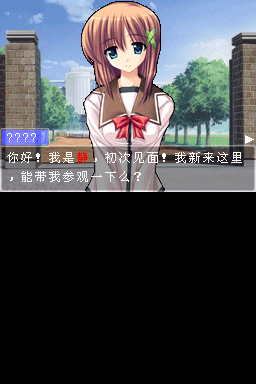
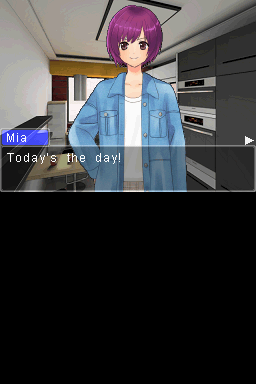
AVG MAKER DS (AMDS) is a visual novel game engine for the NDS developed by Hewenxie.
It allows you to create text-based adventure games that can be played on the NDS.
Features
- Character and avatar display.
- Basic character animation.
- Background rendering.
- Custom text box.
- GBK support.
- Background music.
- Sound effects.
- Customizable button.
- Support file saving.
- Support the use of packaged resources for assets.
- Basic scripting with conditions, branching, and jumps.
- Variable support.
- Gallery mode.
Installation
Folder structure
root
 |-AVGMAKER.nds (DS execution file)
 |-avgFiles\
 | |-data\
 | | |-main.spt (script file)
 | |-chara\
 | | |-img.res (sprite resource file)
 | |-bg\
 | | |-bg.res (background resource file)
 | |-sound\
 | | |-sound.res (se resource file)
 | |-bgm\
 | | |-bgm0.mp3 (background music)
 | | |-...
 | |-font\ (font files location)
 | | |-arial_12.asc
 | | |-simsun_12.hzk
 | |-component\ (custom text box location)
Supported formats
You must prepare the game files in compatible formats before converting them.
Image:
- Sprite - PNG format, 128x192 or 256x192 px, 16-bit. (e.g. chara1.png, chara2.png...)
- Avatar - PNG format, 32x32 px, 16-bit. (e.g. chara1.png, chara2.png...)
- BG - PNG format, 256x192 px, 256-color. (e.g. bg0.png, bg1.png...)
- Text box - PNG format. 256x256 px, 256-color. (textbox.png)
Audio:
- Voice - RAW format, 8-bit signed, 11025 Hz, Mono. (e.g. se1.raw, se2.raw...)
- BGM - MP3 format, 11025 Hz, 96 kbps or lower. Ideally under 1.6 MB. (e.g. bgm1.mp3, bgm2.mp3...)
Others:
- Script - TXT format.
- Font - arial_12.asc, simsun_12.hzk.
Conversion guide
Conversion tools:
- img_conv.exe - Image conversion tool.
- res_packer.exe - Resource packing tool.
- spt_gen.exe - Script conversion tool.
Convert the image files:
- Run image_conversion.exe, click on Open Files (打开文件) and select the image files.
- The first tab is for sprites, the second tab is for backgrounds and custom text box.
- Click Start the Conversion Process (开始转换) and the converted files will be saved in bin/.
- A background image named bg0.png will generate the following files: bg0_Info.bin, bg0_Map.bin, bg0_Pal.bin, and bg0_Tiles.bin.
- A character sprite named chara1.png will produce chara1_Pal.bin and chara1_Sprite.bin.
Create resource files (.*res) from the game files:
- Run res_packer.exe, click Open (打开) and choose the files you want to pack into a resource file:
- For img.res, select all the converted character sprites (e.g. charaxx.bin).
- For bg.res, select all the converted background files (e.g bgxx.bin).
- For sound.res, select all the .raw files.
- Click Generate (生成), enter the desired name for the output file (e.g., img.res, bg.res, sound.res), and click Save.
Convert your script file:
- Open spt_gen_win.exe, click Open (打开), select your .txt script file, and then click Convert (转换).
- The file will be saved as a .spt under spt/.
You can now place the converted files along with AVGMAKERDS1.6.nds on the SD card (refer to folder structure), or run it on an emulator.
Optionally, you can create a packed ROM with the tools provided.
Screenshots
Changelog
v1.6 2010/08/08
- Fixed numerous bugs related to @call.
- Added font outline effect.
- Added @txt_select(var, number, bcolor, fcolor, text1|text2|text3|text4) for text selection.
- Added @SetGameName(name) to set the save file name.
- Global variables now usable in scripts.
- Included packing tool.
v1.5 2010/03/13
- Fixed issues with bg gray-out effects.
- Resolved a crash bug in Gallery Mode.
- Redesigned the MENU system.
- Added volume control for SE and BGM.
- Added a return to title screen feature.
- Added MENU system skin loading commands: @setMenuBg, @setMenuBtn.
- Fixed flickering effects.
- Fixed an offset bug in boxText in non-word-by-word display mode.
- Added font color definition feature: @SetFontColor().
- Fixed issue where characters did not shake during jitter.
- Added font shadow effect.
- Added gray-out effect to bg entrance/exit animations.
v1.4 2009/12/22
- Fixed a screen corruption bug when quickly switching character images.
- Increased the speed of sprite transitions.
- Fixed offset bug in boxText.
- Fixed resource reading issues for 256×192 images.
- All chara series display commands now support 256×192 images, allowing 2 characters side-by-side display.
- Fixed various flickering issues with left/right character displays.
- Corrected text color issues, consolidating validity to a single command.
- Added image button selection:
- @LoadImageButton(id, resource, image, x, y);
- @ImageSelect(var, number);
- Expanded capacity for BGM section.
- Updated image conversion tool, version 1.4 required; not compatible with previous versions.
v1.31 2009/08/01
- Fixed bug where horizontal shaking caused text offset.
- Fixed bug in switching gallery mode.
v1.3 2009/06/03
- Fixed bug where bg(null,1) did not apply a fade effect when clearing the background.
- Fixed bug with immediate save/load not working correctly in the menu system.
- Added screen wave effect @wave(time).
- Added background negative (color inversion) effect @colorEffect().
- Added background grayscale effect @graybg().
- Fixed crash when a standalone '\' character appeared (in v1.2).
- Fixed crash when @delay exceeded 5 seconds.
- Added gallery system command @review(script).
- Included graphical script editor THE 音速起子 developed by 全局变量D.
v1.2 2009/12/15
- Added screen brightness fade effects:
- @fadeout(screen,type,time) / @fadein(screen,type,time).
- Added @cls(screen) to clear screen text (equivalent to @erase(screen)).
- Added spt_gen_win tool to replace the original script conversion program.
- Fixed bugs in @texton and @textoff.
- Optimized background loading, greatly reducing issues where large bg resources prevented BGM from loading.
- Fixed a potential crash during loading.
v1.1 2008/11/15
- Added inline pause marker \t for pauses within sentences.
- Fixed screen flicker when changing backgrounds.
- Added background transition effects, including fade to/from black and window-style fades.
- Fixed issue where previous dialogue briefly appeared when switching characters.
- Encapsulated BGM loading with command @res_playBGM.
- This update also includes a dedicated script editor by Zellshadow. See the "AVG MAKER DS Editor" folder in the archive.
v1.0 2008/10/18
- Screen shake effects (@quakex, @quakey).
- Added system variable save/load commands: @var_load, @var_save.
- Support for full-screen character display and left/right positioning (@lrchara, @res_lrchara).
- Menu system framework completed; quick save feature added (@menusys_on, @menusys_off).
- Added text box transparency toggle (@tbtrans_on, @tbtrans_off).
- Updated spt_gen to support indentation, line breaks, and end-of-line comments.
- Fixed comment line bug.
- Fixed BGM disappearing after loading.
- Changed BGM loading method (recommended MP3 size under 1.5MB).
- Fixed crashes and compatibility issues.
- Fixed BGM interruption issue.
v0.9 2008/09/13
- Recompiled using a new function library.
- Improved compatibility with M3/G6 Real.
- Fixed crash after executing gameover() (script-based branching still recommended instead).
- Recommended BGM format: MP3 at 11025 Hz, 8-bit, 96 kbps or lower.
- Further fixes to resource loading bugs.
- Added error prompts.
- Added character portrait display (@head, @res_head).
- Added ability to change button images dynamically (issues on real hardware).
- Fixed poor animation frame support.
- Fixed save bug.
- Fixed issue where text disappeared after textoff.
v0.8 2008/08/13
- Released.
External links
- Author's website - https://sites.google.com/site/hewenxie/
- GitHub (yayabo) - https://github.com/yayabo-handheldev
- Supported flashcards - http://www.yayabo.cn/thread-3057-1-1.html (archived)