
DSTwo iPlayer: Difference between revisions
From GameBrew
More actions
m Text replacement - "|download=https://dlhb.gamebrew.org/dshomebrew2/↵" to "|download=https://dlhb.gamebrew.org/dshomebrew2/" |
No edit summary |
||
| Line 8: | Line 8: | ||
|version=1.1 | |version=1.1 | ||
|license=Mixed | |license=Mixed | ||
|download=https://dlhb.gamebrew.org/dshomebrew2/ | |download=https://dlhb.gamebrew.org/dshomebrew2/dstwoiplayer_1.1.rar | ||
|website=http://eng.supercard.sc/manual/dstwo/plugin/dstwo-iplayer.htm | |website=http://eng.supercard.sc/manual/dstwo/plugin/dstwo-iplayer.htm | ||
}} | }} | ||
Latest revision as of 12:33, 20 August 2024
| DSTwo iPlayer | |
|---|---|
 | |
| General | |
| Author | supercard |
| Type | Media Players |
| Version | 1.1 |
| License | Mixed |
| Last Updated | 2010/11/17 |
| Links | |
| Download | |
| Website | |
DSTWO iPlayer is a media player for DSTWO. It full use the internal cpu of DSTWO, so user can play RMVB/AVI/FLV and etc video format files and MP3/APE/FLAC and etc audio files directly with DSTWO, without converting anymore.
Installation
Download and unzip.
Copy DSTWO iPlayer and _dstwoplug folders to the root of Micro SD card.
You can put media files anywhere in the card.
User guide
It supports the following formats:
| Video | RMVB, RM, FLV, WMV, ASF, AVI. |
|---|---|
| Audio | MP3, WMA, APE, FLAC. |
It supports a resolution of 640x480 and subtitles in SRT format.
Interface
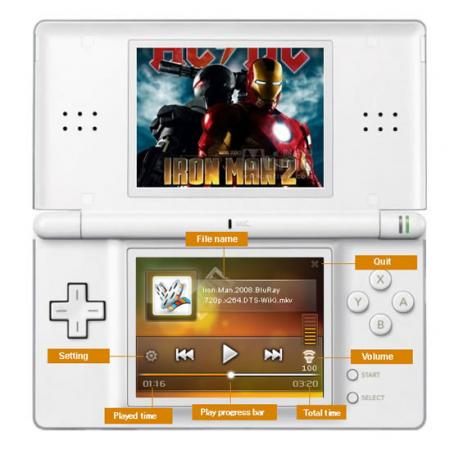
Controls
Up/Down - Previous/next file
Left/Right - Forward/back play
X - Volume increase
Y - Volume decrease
A - Play/pause
B - Stop
Start - System setting
Select - Turn on/off the backlight of bottom screen
Changelog
Version 1.1 2010/11/17
- Fixed the bug vertical bar appears when booting.
- Fixed the unzip bug on linux system caused white screen when booting.
External links
- Official website - http://eng.supercard.sc/manual/dstwo/plugin/dstwo-iplayer.htm