
Firestar Vita: Difference between revisions
From GameBrew
More actions
No edit summary |
No edit summary |
||
| (5 intermediate revisions by 3 users not shown) | |||
| Line 2: | Line 2: | ||
|title=Firestar | |title=Firestar | ||
|image=FirestarVita.png | |image=FirestarVita.png | ||
|description= | |description=Mod Manager for WipEout 2048 | ||
|author=bonkmaykr | |author=bonkmaykr | ||
|lastupdated=2024/07/04 | |lastupdated=2024/07/04 | ||
|contributor=Wirlaburla | |||
|type=Hack Utilities | |type=Hack Utilities | ||
|version=1. | |version=1.3.1 | ||
|license=Mixed | |license=Mixed | ||
|download=https:// | |language=English | ||
|website=https:// | |download=https://git.worlio.com/bonkmaykr/firestar/releases | ||
|website=https://screwgravity.net/firestar/ | |||
|source=https://git.worlio.com/bonkmaykr/firestar | |source=https://git.worlio.com/bonkmaykr/firestar | ||
}} | }} | ||
{{#seo: | {{#seo: | ||
| Line 19: | Line 20: | ||
|image_alt=Firestar | |image_alt=Firestar | ||
}} | }} | ||
Firestar is a cross-platform Java-based mod manager for WipEout 2048, which runs on a desktop/laptop computer and aims to allow | <!--https://dlhb.gamebrew.org/vitahomebrews/FirestarVita.7z--> | ||
Firestar is a cross-platform Java-based mod manager for WipEout 2048, which runs on a desktop/laptop computer and aims to allow easy installation of mods with very little hassle. It is compatible with both real PSVita hardware, as well as emulators. | |||
The program acts as a GUI frontend to Sony's psp2psarc tool, automatically dumping and then patching game assets so that players can install them with the Repatch kernel plugin. | |||
== Installation == | == Installation == | ||
The latest version of Firestar | The latest version of Firestar is available on [https://screwgravity.net/firestar/ screwgravity.net]. | ||
=== System requirements === | |||
* Windows 8 or newer, Mac OS X 10.14 or older, any modern version of Linux/BSD. | |||
==System | |||
* Windows 8 or newer, Mac OS X 10.14 or older, any modern version of Linux/BSD | |||
** If you have a Mac running 10.15 Catalina or newer, you should use Crossover to run the Windows version of Firestar instead. | ** If you have a Mac running 10.15 Catalina or newer, you should use Crossover to run the Windows version of Firestar instead. | ||
* Java 17 or above. | * Java 17 or above. | ||
* | * Non-Windows systems only: WINE | ||
* | * Version 1.3 and above only: [http://www.microsoft.com/en-au/download/confirmation.aspx?id=30679 Visual C++ 2012 libraries] | ||
* | * Must NOT be installed on a FAT or exFAT filesystem. | ||
==Screenshots== | ==Screenshots== | ||
| Line 69: | Line 40: | ||
==Changelog== | ==Changelog== | ||
'''v1.3.1''' | |||
*Added a new splash screen at startup | |||
*Changed the PSARC checklist icons from the setup screen to be more legible. | |||
*The PSARC checklist now appears in the asset downloader menu. | |||
*The asset downloader has a new option to save on redundant or wasteful redownloads. | |||
*Fixed a missing library in the compiled builds for Windows platforms and the standalone JAR release. This is a configuration change, not a source code change, so copies of version 1.3 compiled on your own system are unaffected. | |||
'''v1.3''' | |||
*Fixed a bad alphanumerical sorting algorithm which caused mod lists larger than 10 entries to rearrange themselves. | |||
*Fixed a bug where some settings would not actually take effect until restart. | |||
*Fixed some frankly repulsive margins on the buttons next to the mod list. | |||
*Added the auto-downloader | |||
*Added the custom soundtrack generator | |||
*Added FSCRIPT support to the modding toolkit for deploy-time modifications | |||
*Completely rewrote the initial setup screen to be more user-friendly | |||
*Firestar now automatically checks for updates on Worlio Git and alerts you of new stable releases. You can turn this off in the options. | |||
*Mod description is now scrollable. | |||
*Mod deploy path is now configured using JFileChooser to avoid user mistakes | |||
*PSARC dumps can now be deleted from the options. | |||
*Deploying order is now reversed as originally intended, so mods at the end of the list will be the lowest priority instead of the highest like in older versions. | |||
*Mod authors can use two new key value pairs, "requires" and "extracts" (both are String[]) in their mod metadata to pull assets from usually superfluous PSARC dumps when they need to be partially modified at deploy-time with FSCRIPT. | |||
*Thanks to the above change, deploying no longer uses every single PSARC dump the user has even when not necessary, repacks should be much smaller and faster now. (But you will need more storage space than before.) | |||
*Completely re-styled most of the interface to be more pleasing to look at. | |||
*New vector artwork for icons and shortcuts | |||
*Replaced build system with Gradle | |||
*Program resources are now embedded into the JAR file for more portable distribution. Firestar is effectively contained within a single file now, no ZIPs or Tarballs needed. | |||
*Linux packages are no longer built using Debreate. | |||
*Visual C++ 2012 libraries are now required for the backend functions. Most Windows installs should already have this, and WINE should handle it automatically. If you experience strange behavior with the Auto-Downloader, please double check you have these libraries on your system. | |||
'''v1.2''' | '''v1.2''' | ||
*Created Windows install wizard. | *Created Windows install wizard. | ||
| Line 91: | Line 89: | ||
== External links == | == External links == | ||
* Reddit - https://www.reddit.com/r/vitahacks/comments/1du6tcp/release_firestar_mod_manager_for_wipeout_2048/ | * Reddit Announcement - https://www.reddit.com/r/vitahacks/comments/1du6tcp/release_firestar_mod_manager_for_wipeout_2048/ | ||
* | * Git Repo - https://git.worlio.com/bonkmaykr/firestar | ||
Latest revision as of 18:59, 11 March 2025
| Firestar | |
|---|---|
 | |
| General | |
| Author | bonkmaykr |
| Contributor | Wirlaburla |
| Type | Hack Utilities |
| Version | 1.3.1 |
| License | Mixed |
| Language | English |
| Last Updated | 2024/07/04 |
| Links | |
| Download | |
| Website | |
| Source | |
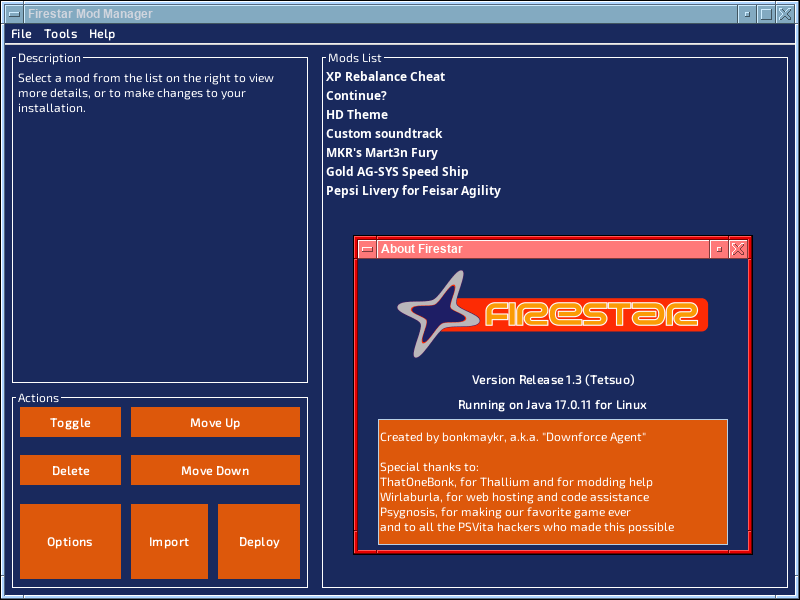
Firestar is a cross-platform Java-based mod manager for WipEout 2048, which runs on a desktop/laptop computer and aims to allow easy installation of mods with very little hassle. It is compatible with both real PSVita hardware, as well as emulators.
The program acts as a GUI frontend to Sony's psp2psarc tool, automatically dumping and then patching game assets so that players can install them with the Repatch kernel plugin.
Installation
The latest version of Firestar is available on screwgravity.net.
System requirements
- Windows 8 or newer, Mac OS X 10.14 or older, any modern version of Linux/BSD.
- If you have a Mac running 10.15 Catalina or newer, you should use Crossover to run the Windows version of Firestar instead.
- Java 17 or above.
- Non-Windows systems only: WINE
- Version 1.3 and above only: Visual C++ 2012 libraries
- Must NOT be installed on a FAT or exFAT filesystem.
Screenshots
Changelog
v1.3.1
- Added a new splash screen at startup
- Changed the PSARC checklist icons from the setup screen to be more legible.
- The PSARC checklist now appears in the asset downloader menu.
- The asset downloader has a new option to save on redundant or wasteful redownloads.
- Fixed a missing library in the compiled builds for Windows platforms and the standalone JAR release. This is a configuration change, not a source code change, so copies of version 1.3 compiled on your own system are unaffected.
v1.3
- Fixed a bad alphanumerical sorting algorithm which caused mod lists larger than 10 entries to rearrange themselves.
- Fixed a bug where some settings would not actually take effect until restart.
- Fixed some frankly repulsive margins on the buttons next to the mod list.
- Added the auto-downloader
- Added the custom soundtrack generator
- Added FSCRIPT support to the modding toolkit for deploy-time modifications
- Completely rewrote the initial setup screen to be more user-friendly
- Firestar now automatically checks for updates on Worlio Git and alerts you of new stable releases. You can turn this off in the options.
- Mod description is now scrollable.
- Mod deploy path is now configured using JFileChooser to avoid user mistakes
- PSARC dumps can now be deleted from the options.
- Deploying order is now reversed as originally intended, so mods at the end of the list will be the lowest priority instead of the highest like in older versions.
- Mod authors can use two new key value pairs, "requires" and "extracts" (both are String[]) in their mod metadata to pull assets from usually superfluous PSARC dumps when they need to be partially modified at deploy-time with FSCRIPT.
- Thanks to the above change, deploying no longer uses every single PSARC dump the user has even when not necessary, repacks should be much smaller and faster now. (But you will need more storage space than before.)
- Completely re-styled most of the interface to be more pleasing to look at.
- New vector artwork for icons and shortcuts
- Replaced build system with Gradle
- Program resources are now embedded into the JAR file for more portable distribution. Firestar is effectively contained within a single file now, no ZIPs or Tarballs needed.
- Linux packages are no longer built using Debreate.
- Visual C++ 2012 libraries are now required for the backend functions. Most Windows installs should already have this, and WINE should handle it automatically. If you experience strange behavior with the Auto-Downloader, please double check you have these libraries on your system.
v1.2
- Created Windows install wizard.
- Fixed mod entries turning invisible when importing a mod that has no name metadata.
- Prevent overreaction from Firestar when psp2psarc finds a leftover file from a past failed deploy.
- Fixed window icon not appearing on some menus.
- Fixed Metadata Editor getting cut off if the mod description was too large.
- Fixed two mods imported with the same filename getting deleted together under certain conditions.
v1.1
- Cosmetic UI changes.
- String changes on setup screen.
- Removed broken back button during Setup, no time to implement it properly right now since Kermit's code is a mess.
v1.0
- Various improvements to fault tolerance and nice features added. Enjoy :).
Beta 4
- Fixed bugs with Windows caused by not trimming filenames.
- Better handling of temporary and existing files overall.
Beta 2
- Almost everything working. probably ready for release.
Beta 1
- First Release.